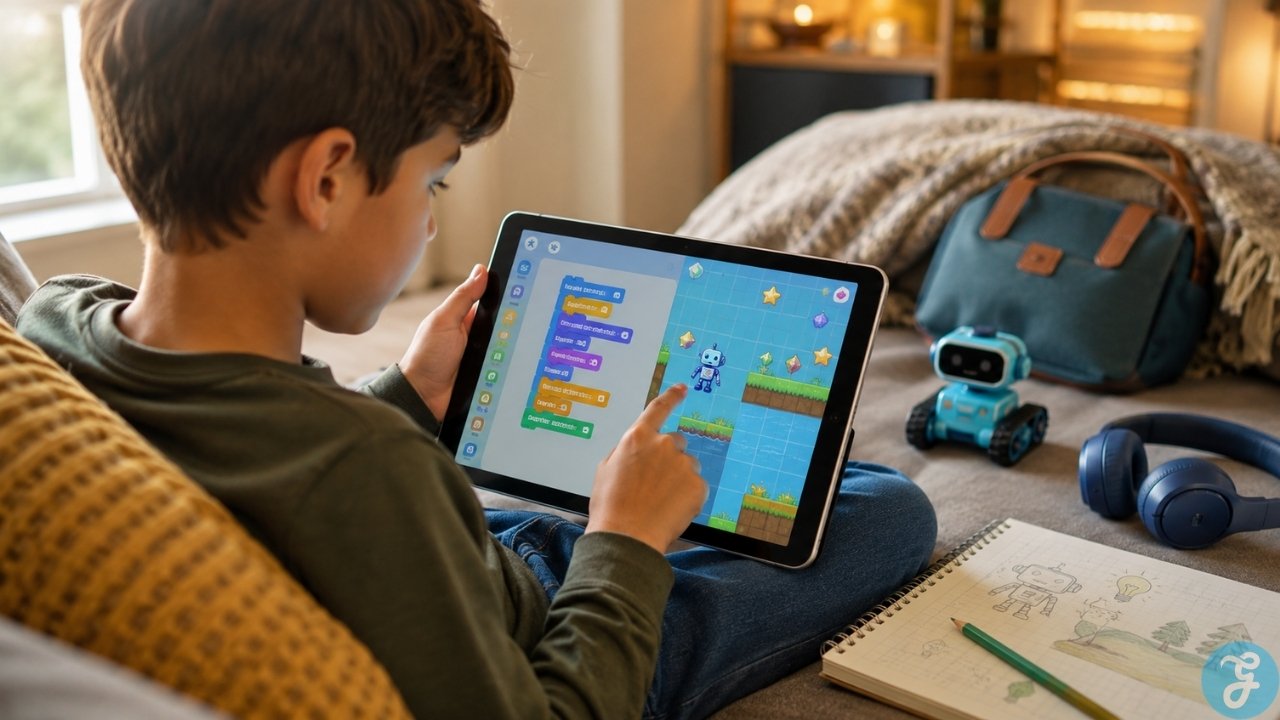
Finding screen time that is genuinely educational is hard enough. Finding it without dealing with recurring subscriptions, pop-up ads, or covert data tracking is even harder. If you are preparing a tablet for a long road trip, a flight, or a screen-time routine in an environment without stable Wi-Fi, you quickly learn that most educational software breaks down the moment you turn off your router.
Worse, many platforms marketed as free are little more than digital storefronts that lock the vast majority of their programming content behind a paywall after your child completes the first three introductory levels.
Locating genuine free offline coding apps for kids that do not secretly require a continuous network connection or gate everything behind an in-app purchase takes some digging. The applications curated below run natively without an active internet connection and teach foundational computer science logic without tracking your child’s data.
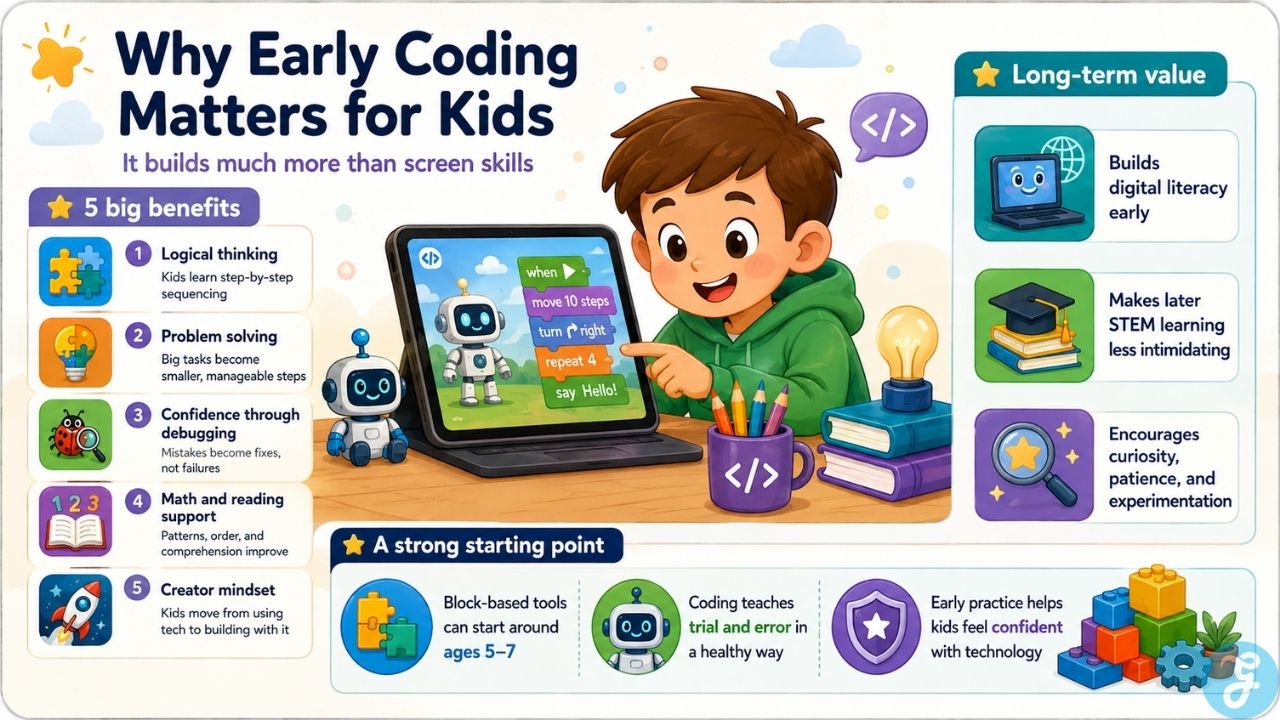
Why Early Coding Matters: Benefits and Future Outcomes
Introducing computer science concepts to children before they reach middle school has little to do with turning every child into a career software engineer. Instead, it targets a critical developmental window where the brain is highly adaptable at constructing mental models for logical classification and problem-solving.
The Cognitive Benefits of Early Programming
At its core, computer programming forces an individual to practice decomposition, which is the act of breaking down a large, intimidating challenge into small, orderly, manageable steps. When a child builds a simple sequence to move a digital character across a screen, they are testing cause-and-effect relationships in real time.
Unlike passive screen consumption where media is simply absorbed, programming requires active processing. It trains sequential thinking, which has a direct positive carryover into reading comprehension and mathematical reasoning.
Furthermore, programming introduces failure as a normal, functional part of the learning cycle. In computer science, an error is not a permanent failure; it is simply a bug that needs to be localized and diagnosed. This trial-and-error process builds deep psychological resilience and structural patience, showing children that problems are meant to be methodically disassembled rather than abandoned.
Long-Term Academic and Career Outcomes
As software systems continue to manage a greater share of our global infrastructure, digital literacy is transforming from an elective asset into a core foundational skill. Early exposure to algorithmic frameworks strips away the intimidation factor often associated with high school and college-level STEM tracks.
Children who master basic loop structures and conditional statements during their elementary years show greater confidence when transitioning to advanced mathematical concepts, algorithmic data handling, and syntax-heavy languages later in life.
Beyond tech-centric careers like software development, data science, or robotics engineering, early programming habits cultivate a maker mindset. It shifts a child’s relationship with technology from being a passive consumer of digital products to an active creator who understands how the digital landscape operates behind the screen.
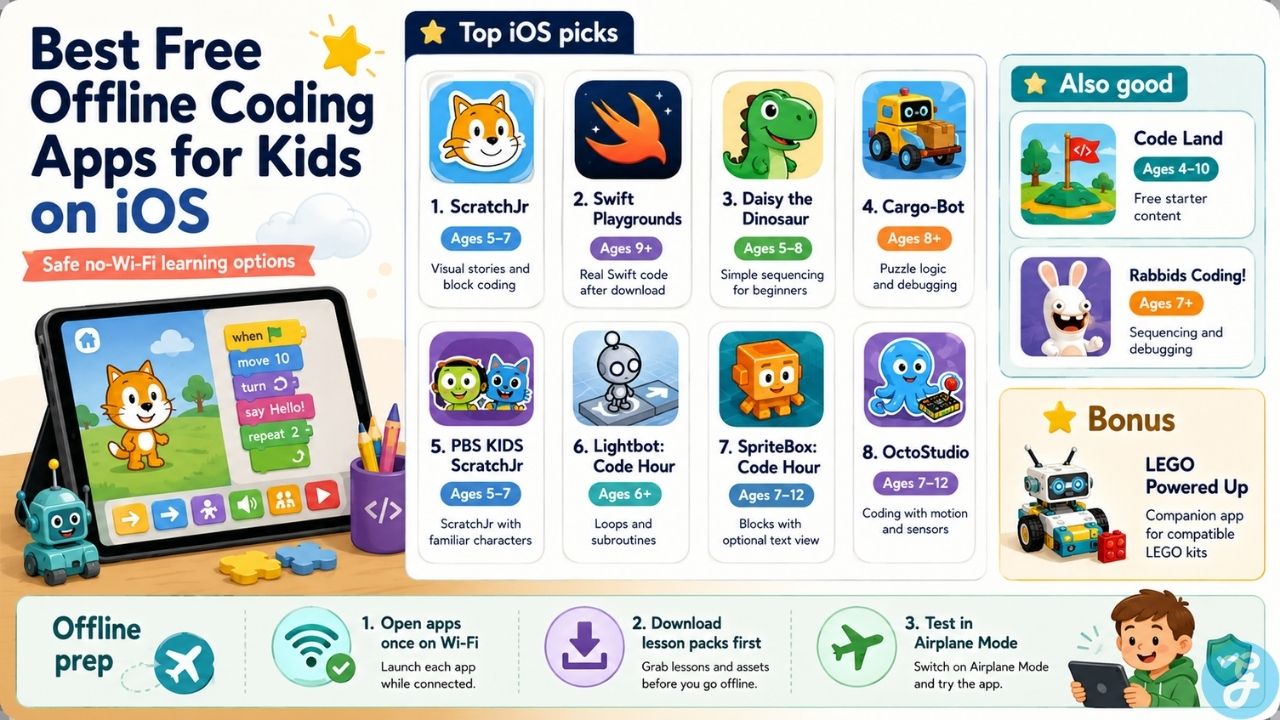
Top 10 iOS Choices: Free Offline Coding Apps for Kids
Apple’s tablet ecosystem holds some of the most polished educational software available, but storage requirements and device compatibility vary dramatically between basic block systems and real text environments.
1. ScratchJr
-
Best for ages: 5-7
ScratchJr uses a horizontal layout where symbol-based puzzle blocks snap together to control character animations. Created by the MIT Media Lab, this tool is widely considered the benchmark for early childhood computer science introduction. Because commands are driven completely by intuitive color-coded icons such as directional movement arrows and numeric step counters, it requires no prior reading skills. Children can safely construct interactive stories, design custom backdrops, and save their animations locally. A practical issue to keep in mind is that the canvas is explicitly optimized for a large tablet screen. Attempting to use the software on a standard iPhone screen can make dragging and dropping the small code pieces incredibly finicky for small hands.
2. Swift Playgrounds
-
Best for ages: 9 and up
Swift Playgrounds serves as Apple’s official first-party learning application. It bypasses cartoon visual matching blocks entirely to focus on real text-based typing using genuine Swift and SwiftUI syntax. Users guide an interactive 3D character through gridded levels by writing actual commands, conditional statements, variable paths, and loops. Performance-wise, this software is resource-heavy and requires a relatively modern iPad or Mac to operate smoothly. For offline travel prep, it is vital to open the app while connected to Wi-Fi first to explicitly download the core puzzle asset packages. If you lose network access before doing this, the app framework functions as an empty shell and will only present blank placeholders.
3. Daisy the Dinosaur
-
Best for ages: 5-8
Daisy the Dinosaur focuses on teaching basic object-oriented programming foundations. Developed by the same creative team behind Hopscotch, this minimalist option features a highly simplified, lightweight drag-and-drop mechanics kit. Children issue direct commands to make a green dinosaur walk, jump, spin, or grow dynamically on screen. The main limitation here is the overall depth of content. A focused child will easily complete every single logic challenge inside of an hour. It serves best as a zero-friction, introductory afternoon primer rather than a long-term software study tool.
4. Cargo-Bot
-
Best for ages: 8 and up
Cargo-Bot is a complex automation logic game designed entirely on an iPad platform. The core objective tasks children with writing direct input command arrays to make a mechanical crane sort and stack colored shipping crates inside a warehouse. It features no structural monetization walls or ad-network tracking scripts, forcing users to practice strict execution efficiency and code debugging. Parents should note that the difficulty rating spikes sharply around the tenth puzzle stage, and the app lacks an active hint system, meaning younger users may require external troubleshooting guidance when hitting a logical wall.
5. PBS KIDS ScratchJr
-
Best for ages: 5-7
This variant utilizes the exact same foundational visual block mechanics found in standard ScratchJr but replaces generic sprites with popular PBS educational media characters. Children can program and animate characters from shows like Wild Kratts, Arthur, and Nature Cat across diverse local backdrops. It features completely secure, self-contained offline access with zero integrated marketing pop-ups or external web redirections.
6. Lightbot: Code Hour
-
Best for ages: 6 and up
Lightbot: Code Hour represents a completely free, standalone teaser configuration of the broader commercial Lightbot product line. It carries no integrated advertisement intervals or paywall mechanics. Children arrange functional icon commands to steer a localized robot down gridded paths, illuminating specific target tiles. The primary learning value here is the early introduction of subroutines, forcing children to pack repeating instruction paths into secondary macro windows to keep their core execution loops clean.
7. SpriteBox: Code Hour
-
Best for ages: 7-12
SpriteBox: Code Hour acts as a unique bridge between pure block logic structures and text syntax configuration. The gameplay loop mimics a standard side-scrolling platform video game, but progressing past physical obstacles requires dropping down an inline puzzle ladder. Children solve the problem with visual block assets, but a specialized toggle button flips the blocks to show the actual text code running underneath, breaking down the mystique of textual computer science.
8. OctoStudio
-
Best for ages: 6-12
OctoStudio is another completely non-profit initiative launched by the MIT Media Lab. This platform differentiates itself by directly accessing the internal hardware sensors embedded within mobile phones and tablets. Children can construct interactive visual scripts that trigger reactions based on real-world movement, such as coding a game character to jump when the child physically shakes or tilts the tablet. The application collects no user metrics, runs flawlessly without data networks, and features zero app-store transaction prompts.
9. Code Land
-
Best for ages: 4-10
This app acts as a highly visual free-tier option offering a compilation of simple logic paths, maze mapping games, and visual manufacturing assembly mechanics into a highly colorful suite. It provides a generous selection of local, data-independent content that children can work through without an internet hookup. The primary limitation is that Code Land is not entirely free; it uses a free starter content model where foundational stages are open, but complete access to later puzzle packages requires a subscription payment.
10. Rabbids Coding!
-
Best for ages: 7 and up
Rabbids Coding! was launched by Ubisoft as an explicitly free educational project devoid of internal microtransactions or tracking software. The story places children inside a space station overrun by cartoon characters, requiring them to type out and arrange sequential movement strings to command vacuum devices to tidy up the facility. The app is highly valued for teaching structural testing and sequential debugging when an initial string fails to execute correctly.
Bonus Robotics Option: LEGO Powered Up
-
Best for ages: 7-12
While this software app is technically free and works fully offline on iOS devices, it functions strictly as a companion tool. It is not a standalone coding environment and depends entirely on compatible, physical LEGO hardware kits to serve any real learning purpose.
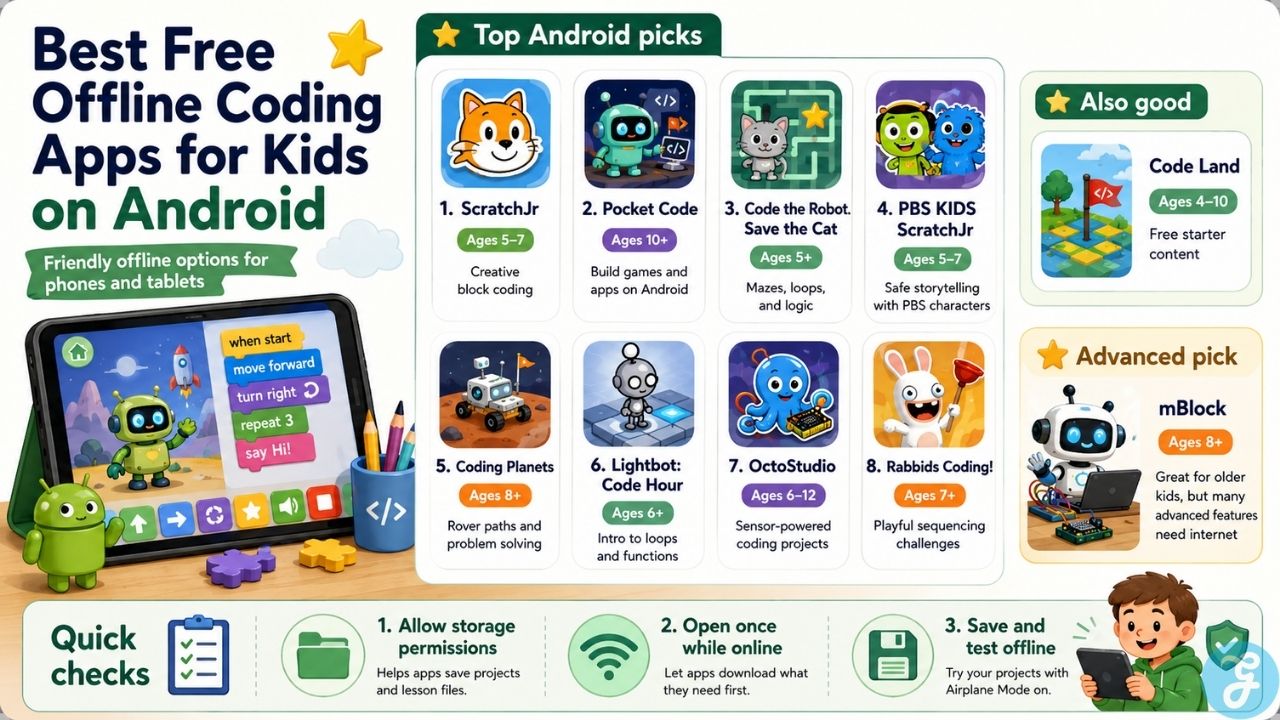
Top 10 Android Choices: Free Offline Coding Apps for Kids
The Android hardware ecosystem frequently features ad-heavy cloned software, making it critical to seek out verified, data-private platforms that run securely without local internet dependencies.
| App Name | Primary Focus | Best Age Range | Interface Style |
| ScratchJr | Creative Storytelling | 5-7 Years | Horizontal Icon Blocks |
| Pocket Code | Game Development | 10+ Years | Vertical Script Blocks |
| Code the Robot. Save the Cat | Sequential Puzzle Logic | 5+ Years | Grid Navigation Pathways |
| OctoStudio | Hardware Integration | 6-12 Years | Multi-sensor Logic |
1. ScratchJr
-
Best for ages: 5-7
The official Android edition of ScratchJr mirrors the complete horizontal block programming landscape of its iOS counterpart. It runs exceptionally well on low-cost, budget Android tablets. Because many affordable Android devices support expandable MicroSD card hardware, children can develop and preserve a massive local library of animated stories without placing an exhausting burden on the internal primary system memory.
2. Pocket Code
-
Best for ages: 10 and up
Pocket Code delivers a robust vertical script-block workflow based closely on the open-source Catrobat language framework. This application is an extreme rarity because it allows older children to program highly complex 2D video games, sound mapping dashboards, and custom software utilities natively on a mobile phone without internet connectivity. It provides full access to physical device sensors and can read localized system files. The practical friction involves a sharp learning curve; unlike simpler apps, Pocket Code will allow children to patch together broken logic sequences, forcing them to learn how to actively read error logs and debug live scripts.
3. Code the Robot. Save the Cat
-
Best for ages: 5 and up
Developed by Learny Land, this application functions as an exceptional logic and pathway puzzle game focused entirely on navigational pathways. Children organize clear action parameters to move a small robot across various island maps to safely reach a stranded pet. As levels advance, the game naturally brings in advanced execution matrices such as loops, conditional gates, and basic modular functions without triggering network verification checks or running any external advertisement networks.
4. PBS KIDS ScratchJr
-
Best for ages: 5-7
The full Android port of the PBS KIDS platform offers identical offline advantages to budget tablet installations. It packages all essential graphical components and character assets directly into the localized application download, ensuring children can continuously build and animate creative narratives in environments with zero cellular coverage.
5. Coding Planets
-
Best for ages: 8 and up
Coding Planets relies on a clean, isometric hexagonal grid space map setup. Players construct precise trajectory instructions to manage a planetary rover as it navigates structural terrain hazards across various worlds. The app uses a highly lightweight footprint that avoids heavy, battery-draining render models, making it an ideal choice for older or lower-specification Android devices.
6. Lightbot: Code Hour
-
Best for ages: 6 and up
This Android translation serves up the identical, zero-cost logic grid catalog found on Apple devices. It features great compatibility with historical Android operating system configurations, turning it into a fantastic, productive tool for repurposing an outdated family smartphone or legacy tablet into a dedicated, offline educational device.
7. OctoStudio
-
Best for ages: 6-12
The verified Android build of the MIT sensor-driven platform works smoothly across diverse phone manufacturers. It maps code blocks directly to internal Android component flags, letting young creators program automated routines that respond instantly to ambient light levels, physical steps counters, or device rotation states without ever pinging an external server.
8. Rabbids Coding!
-
Best for ages: 7 and up
Ubisoft’s Android release brings the entire space station sequencing campaign to portable devices. The application requires no remote server authentication or user profile setups, allowing children to work through dozens of structural instruction puzzles entirely within an offline sandbox environment.
9. mBlock
-
Best for ages: 8 and up (Advanced / Older Kids Pick)
Leveraging Scratch 3.0 block mapping alongside text-based Python code conversion matrices, mBlock is excellent for deep project engineering and hardware synchronization. However, parents should treat this as a specialized, caveated choice; while the basic programming interface runs locally, a high number of its deeper modules rely on active cloud computing pipelines, AI rendering engines, and IoT communication protocols that demand a live web connection.
10. Code Land
-
Best for ages: 4-10
Matching the framework of its iOS layout, this application holds a solid array of free starter content, logic mazes, and simple track-building stages. The introductory tiers deploy entirely out of the local system storage directory, though users must note that the long-term upper levels are explicitly blocked behind a paid subscription package.
What to Check Before Handing the Device to a Child
Setting up a mobile device for a non-network environment requires a brief five-minute configuration pass to eliminate sudden application crashes or loss of work when the internet drops out.
First, always perform the introductory app launch while remaining connected to your home Wi-Fi network. Applications like Swift Playgrounds and Rabbids Coding! install as skeletal core structures; they need that initial handshake to download the underlying 3D level textures, graphic files, and mapping data directly to the hardware’s permanent memory.
Second, verify the localized device storage permissions. Certain open-source or free-to-use platforms on the Android operating system can experience structural failures when trying to write save files if local storage permissions are toggled off. Take a moment to enter your device’s system settings menu, locate the application profile, and explicitly confirm that the software has full authorization to write data files locally, otherwise your child’s creative project progress will evaporate the instant the app is closed.
Third, execute a physical validation check by enabling Airplane Mode prior to departure. Handing over the device after manually severing network ties allows you to confirm that the apps initialize instantly, past project saves load correctly, and no background asset verification scripts cause the platform to freeze on an infinite loading wheel.
Final Thoughts
The long-term value of focusing on free offline coding apps for kids reaches far beyond reducing monthly data plan usage or escaping the drag of subscription frameworks. When an educational application functions in a completely disconnected environment, it completely strips away the broader ecosystem of mobile screen distraction. There are no background notification loops trying to redirect your child to video platforms, no commercial analytics tracking user click patterns, and no threat of unapproved microtransactions buried inside colorful gameplay layers.
By steering children toward non-profit, open-source development ecosystems like ScratchJr, OctoStudio, and Pocket Code, you create a private, secure digital space dedicated entirely to critical computational thinking, architectural logic design, and autonomous problem solving.
Frequently Asked Questions(FAQs) on Free Offline Coding Apps for Kids
Do these offline apps support external hardware like LEGO or micro:bit boards?
The majority of fully offline mobile tools do not interact with external robotic hardware components automatically because those peripheral pairings typically rely on active online web-extension repositories or live cloud firmware handshakes. However, applications like OctoStudio can process basic local Bluetooth connections to communicate with specific hardware inputs, provided the necessary device libraries are fully updated while your tablet is still connected to a home network.
Why do some free coding apps demand storage permissions on Android?
Online or premium applications usually maintain a child’s creative portfolio by uploading save files directly to a remote network server. Offline tools cannot access the cloud, meaning they must write your child’s game configurations, recorded audio tracks, and custom sprite artwork directly into the tablet’s internal folder system. Allowing file storage permissions is technically required for apps like Pocket Code to maintain and load project data locally.
Not during active offline sessions. While creative sandbox suites like ScratchJr and Pocket Code feature safe, moderated community hubs where young creators can showcase their video games and view external projects, these interactive zones are network-dependent. Your child can safely build, run, and refine their software locally while disconnected, then opt to upload their finalized files later once the device establishes a secure connection to home Wi-Fi.