


A growing website can become messy faster than most teams expect. One blog post targets a broad keyword. Another answers a related question. A third repeats half of the first two. Then a new campaign adds more pages, a product team publishes its own resources, and the content library starts to feel like a storage room instead of a system.
That is where the pillar and cluster content model becomes useful. It gives content teams a clean way to organize big topics, plan supporting articles, connect related pages, and make the site easier for readers and search engines to understand. It is not a magic ranking shortcut. It will not save weak content. But when the topic is right and the execution is careful, it can turn scattered publishing into a stronger content architecture.
For content strategists, SEO teams, founders, and marketing leads, this model is less about “writing more blogs” and more about building a useful topic library with a clear purpose.
What Is the Pillar and Cluster Content Model?

The pillar and cluster content model is a content architecture approach built around one broad topic and several related subtopics. The pillar page covers the main subject at a high level. It gives readers a strong overview and points them toward deeper resources. The cluster pages cover narrower questions, problems, comparisons, use cases, or workflows connected to that main topic.
Think of it as a topic hub.
The pillar is the central page. The clusters are the supporting pages. Internal links connect them in both directions so readers can move through the topic naturally.
A basic structure might look like this:
| Page Type | What It Covers | Example for a CRM Software Site |
| Pillar page | The broad topic | CRM Software Guide |
| Cluster page | A specific subtopic | CRM Implementation Checklist |
| Cluster page | A comparison or decision point | CRM vs Spreadsheet Tracking |
| Cluster page | A use case | CRM for Small Sales Teams |
| Cluster page | A technical concern | CRM Data Migration Steps |
The model is also called hub and spoke content, topic clusters SEO, or a content pillar strategy. The wording changes by team or tool, but the structure is similar: one central resource connected to supporting pages that explain the topic in more detail.
The best version of this model helps readers. Someone who lands on a cluster page can move to the pillar for context. Someone who lands on the pillar can choose the next page based on their question, skill level, or buying stage.
The weak version is just a bunch of articles linked together because someone put them in a spreadsheet.
That difference matters.
Why This Model Became So Popular in SEO
For years, many teams planned content around individual keywords. One page for one phrase. Another page for a slight variation. Another page for a near-duplicate question. That worked better when search behavior and ranking systems were simpler. It also created a lot of bloated websites.
Modern search is more topic-aware. Search engines look at meaning, relevance, usefulness, links, page quality, and the way information fits together. A single keyword still matters, but it is not enough to build a serious content program around isolated phrases.
A topic cluster gives your site a stronger structure. It shows that you are not covering a topic once and moving on. You are building a connected resource around the subject.
That helps in three practical ways.
- First, it gives readers a better path. They do not have to bounce back to Google every time they need the next answer.
- Second, it gives search engines clearer signals about how your pages relate to each other. Internal links and logical site organization help crawlers discover pages and understand relationships.
- Third, it gives your editorial team a planning system. Instead of asking, “What should we publish next week?” you can ask, “Which part of this topic is still missing, weak, outdated, or poorly connected?”
That is a better question.
Pillar Pages Are Not Just Long Blog Posts
A common mistake is treating a pillar page as a very long blog post. Length alone does not make a page a pillar. A strong pillar page has a job. It introduces a major topic, organizes the main branches of that topic, and directs readers to deeper pages where needed. It does not need to answer every possible question in full detail. If it tries to do that, it becomes hard to read and difficult to maintain.
For example, a pillar page about “content strategy” may explain:
- What content strategy means
- How it connects to business goals
- How audience research works
- How editorial planning fits in
- How SEO research supports it
- How publishing workflows are managed
- How performance is measured
But each of those areas can support its own cluster article.
A pillar page about content strategy should not bury a 2,000-word editorial calendar tutorial halfway down the page. That belongs on a dedicated cluster page. The pillar should introduce the concept, explain why it matters, and link to the deeper guide.
This is where many content teams get the balance wrong. They either make the pillar too thin or turn it into an overloaded document that nobody wants to finish.
A useful pillar page gives readers enough understanding to orient themselves, then helps them choose the right next step.
Cluster Pages Need Their Own Search Intent
Cluster pages are not filler. They should stand on their own. Each cluster page needs a clear search intent, a defined audience problem, and a reason to exist outside the pillar page.
A weak cluster topic looks like this:
- Content Strategy Tips
- More Content Strategy Tips
- Content Strategy Best Ideas
- Content Strategy for Marketing
These pages are too vague. They are likely to overlap, compete with each other, and confuse the site structure.
A stronger cluster map looks more like this:
- How to Build an Editorial Calendar
- Content Brief Template for SEO Teams
- Content Audit Process for Existing Websites
- How to Map Content to the Buyer Journey
- Editorial Workflow for Small Marketing Teams
- How to Refresh Old Blog Posts Without Creating Content Bloat
Each page has a separate job. Each one can answer a specific problem. Each one can link back to the pillar and to related cluster pages without feeling forced.
That is the standard worth aiming for.
A Simple Hub and Spoke Content Example
The hub and spoke content model works well when the main topic is broad enough to support many useful subtopics. Take a B2B SaaS company that sells employee onboarding software.
A loose blog strategy might publish scattered articles such as:
- Why onboarding matters
- Remote onboarding checklist
- HR software trends
- Employee retention tips
- Onboarding email templates
- How to onboard engineers
- Best onboarding tools
Some of these topics are useful. But without structure, they sit as separate posts. A pillar and cluster structure could organize them like this:
Pillar page: Employee Onboarding Guide
Cluster pages:
- New Hire Onboarding Checklist
- Remote Employee Onboarding Process
- Onboarding Software Features to Compare
- 30-60-90 Day Onboarding Plan
- Onboarding Metrics HR Teams Should Track
- Employee Onboarding Email Templates
- Common Onboarding Mistakes in Fast-Growing Teams
- How Onboarding Affects Employee Retention
Now the topic has shape. The pillar page explains the full onboarding process. The clusters answer practical questions. The software company can connect educational content to product pages where it makes sense, without turning every article into a sales pitch.
That is where this model becomes valuable for high-competition verticals. It helps the brand build topical depth without losing editorial control.
When a Pillar and Cluster Strategy Is Worth Building
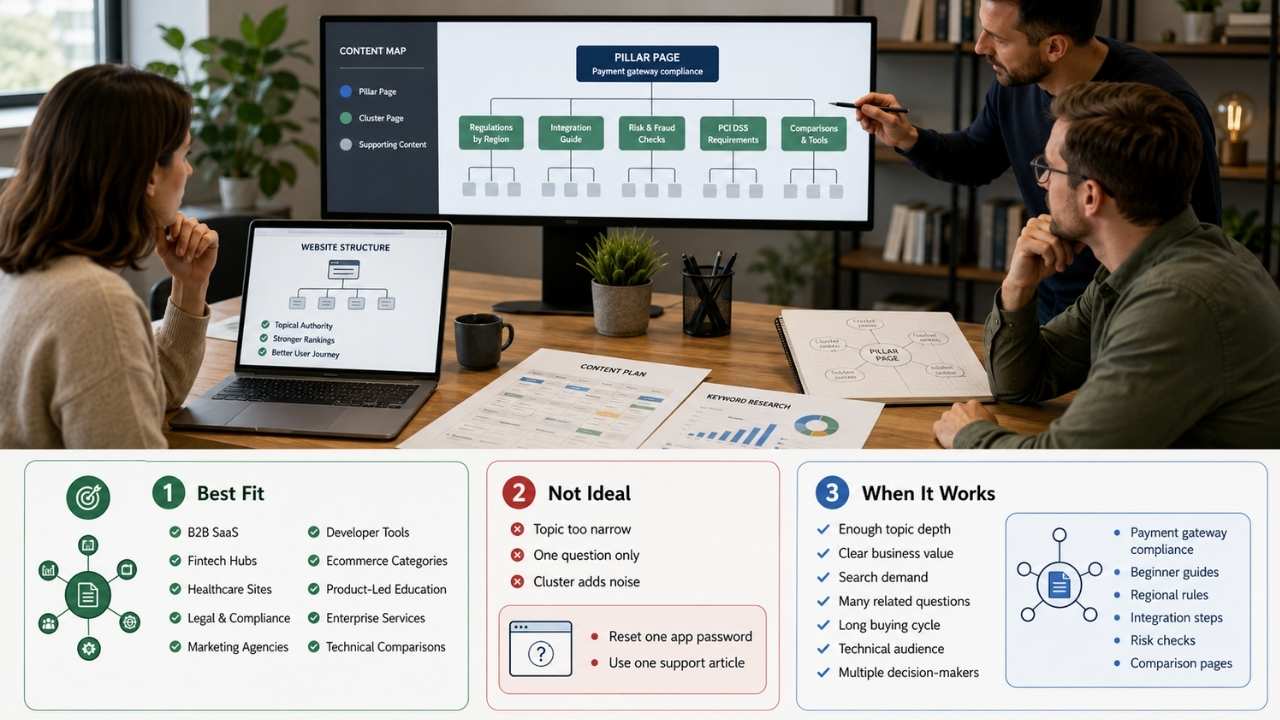
The pillar and cluster content model is useful when a topic has enough depth, business value, and search demand to support several connected pages.
It works especially well for:
- B2B SaaS categories
- Fintech education hubs
- Healthcare information sites
- Legal and compliance resources
- Digital marketing agencies
- Developer tools
- Complex ecommerce categories
- Product-led education libraries
- Enterprise service pages
- Technical comparison content
The model is less useful when the topic is too narrow.
For example, “how to reset a password in one app” probably does not need a pillar and ten cluster pages. It may need one clear support article. A cluster would only create noise.
A topic becomes cluster-worthy when readers have many related questions before they can make a decision or solve the problem. If the buying cycle is long, the topic is technical, or the audience includes multiple roles, clusters often make sense.
A founder researching “payment gateway compliance” may need beginner education, regional requirements, integration steps, risk checks, comparison pages, and implementation guides. One article cannot serve all of that well.
A cluster can.
Choosing the Right Pillar Topic
A pillar topic should sit at the overlap of three things: audience need, business relevance, and enough depth to support multiple pages. If one of those is missing, the cluster will struggle.
A topic with search demand but no business relevance may bring traffic that never matters. A topic with business relevance but no audience demand may become a sales document nobody reads. A topic with depth but no clear structure may produce a confusing content mess.
Good pillar topics usually have these qualities:
- The topic is broad but not vague.
- The audience already searches for related questions.
- The topic connects to a product, service, or business goal.
- The subject can support at least 8 to 12 useful cluster pages.
- The brand can add real expertise or useful perspective.
- The topic will stay relevant for more than a few months.
For a content marketing agency, “SEO” is too broad for one pillar unless the site has the authority and resources to support it. “Technical SEO for SaaS Websites” is more focused. “Internal Linking for SaaS SEO” may be too narrow for a major pillar but strong as a cluster page.
The right level depends on the site’s size, authority, audience, and publishing capacity. A smaller site should not try to build a giant topic hub around the biggest keyword in the industry. It is usually better to own a narrower topic first, then expand.
How to Map Cluster Pages Without Creating Overlap
Cluster mapping is where the real editorial work begins. Start by listing the questions, tasks, objections, comparisons, and use cases connected to the pillar topic. Then group them by intent.
For a pillar on “editorial planning,” the map might include:
Beginner intent
- What Is Editorial Planning?
- Editorial Calendar vs Content Calendar
- How to Plan Blog Content for a Quarter
Process intent
- How to Build an Editorial Workflow
- Content Briefing Process for SEO Teams
- How to Manage Review and Approval Steps
SEO intent
- How to Build Topic Clusters
- How to Prevent Keyword Cannibalization
- Internal Linking Strategy for Blog Content
Measurement intent
- Editorial KPIs That Actually Matter
- How to Audit Published Content
- When to Refresh, Merge, or Delete Old Content
This kind of grouping helps prevent overlap.
It also helps editors assign the right angle to each article. “How to Build Topic Clusters” and “Internal Linking Strategy for Blog Content” are related, but they are not the same article. One covers the planning model. The other covers the linking system that supports it.
Before assigning a cluster page, ask one simple question:
Can this page answer a distinct reader problem better than the pillar page can?
If the answer is no, the page may not need to exist.
Internal Linking Makes or Breaks the Model
Internal links are the wiring of a topic cluster. Without them, the cluster is just a list of articles. With them, the site becomes easier to navigate and easier to understand.
At minimum, the pillar page should link to all core cluster pages. Each cluster page should link back to the pillar. Related cluster pages should link to each other when the connection helps the reader.
The key phrase is “helps the reader.”
Internal linking becomes weak when teams force links into every paragraph or use the same exact anchor text again and again. That can make the content feel unnatural. It also gives readers a poor experience.
A better approach is to link where the next step is obvious.
For example:
- A section on content briefs can link to a detailed content brief template.
- A section on pruning can link to a content audit guide.
- A section on buyer journey mapping can link to an article about TOFU, MOFU, and BOFU content.
- A cluster page about keyword cannibalization can link back to the main topic cluster strategy page.
Anchor text should describe the destination clearly. “Read this” tells the reader very little. “content audit process” or “editorial calendar planning” gives more context.
For larger sites, internal linking also needs maintenance. Pages get removed. URLs change. Old posts become outdated. New cluster pages launch without being added to the pillar. A quarterly link review can prevent the cluster from slowly falling apart.
URL Structure: Helpful, But Do Not Overcomplicate It
Some teams spend too much time trying to design the perfect URL structure before they have strong content.
Clean URLs are useful. Logical directories can help users and search engines understand sections of a website. But URL structure alone will not make a weak cluster strong.
A clean structure might look like this:
- /content-strategy/
- /content-strategy/editorial-calendar/
- /content-strategy/content-brief/
- /content-strategy/content-audit/
- /content-strategy/topic-clusters/
This is tidy and easy to understand.
But many websites already have existing URL patterns. Moving everything into a new folder can create redirect work, reporting issues, and migration risk. If the existing URLs are short, stable, indexed, and performing, changing them just to make the cluster look neat may not be worth it.
The practical rule is simple: use a clean structure when building from scratch. Be more careful when reorganizing existing content.
A cluster can still work with mixed URLs if the internal linking, navigation, breadcrumbs, and page relationships are clear.
Do Not Build Clusters Only From Keyword Tools
Keyword tools are useful. They help teams find search demand, related phrases, questions, and competitor coverage. But they should not run the whole strategy.
A content cluster built only from keyword exports often becomes repetitive. It may include five pages that target slightly different versions of the same question. It may ignore important topics that customers ask about but keyword tools underreport.
Use keyword research as one input. Add other signals:
- Sales calls
- Customer support tickets
- Product demo questions
- On-site search data
- Community discussions
- Competitor gaps
- Internal subject-matter expert input
- Search Console queries
- Content performance data
This matters in technical verticals. A fintech company may find that some of its most valuable content topics have modest search volume but strong business value. A B2B SaaS company may need pages that support sales enablement even if they are not huge traffic drivers.
The best clusters serve both search behavior and real customer decision-making.
How Many Cluster Pages Do You Need?
There is no fixed number. A small cluster may have five strong supporting pages. A large topic hub may include 30 or more over time. The right number depends on the topic, competition, business goal, and publishing resources.
For many teams, a practical starting point is one pillar page and 8 to 12 cluster pages. That is enough to cover the main angles without creating a huge production burden.
Start with the pages that matter most:
- The broad pillar page
- The highest-intent cluster pages
- The most common beginner questions
- The strongest comparison or decision pages
- The workflow pages that help readers take action
Do not launch 40 thin pages because a tool suggested 40 keywords. A smaller cluster with strong content, clear links, and regular updates is usually better than a large cluster full of shallow pages.
Publishing discipline matters more than volume.
What Makes a Strong Pillar Page?
A strong pillar page does not need to be fancy, but it does need to be useful.
It should help readers understand the topic, choose where to go next, and trust that the site knows the subject.
Useful pillar pages often include:
- A clear explanation of the main topic
- A table of contents or jump links for long pages
- Short summaries of key subtopics
- Links to deeper cluster pages
- Practical examples
- Definitions for important terms
- Visual structure where helpful
- A clear connection to the business or product, if relevant
- A date or update note when the topic changes often
The pillar should not be a dumping ground. It should not include every paragraph from every cluster page. It should not read like a keyword-stuffed glossary.
For a content pillar strategy to work, the pillar page has to feel like a starting point worth bookmarking.
That means the editorial quality matters. The writing should be clear. The structure should be easy to scan. The examples should match the audience. The links should feel useful, not promotional.
What Makes a Strong Cluster Page?
A strong cluster page goes deeper than the pillar.
It answers one specific intent well. It may explain a process, compare options, solve a technical problem, or help the reader make a decision.
A good cluster page should:
- Stay focused on one main topic
- Link back to the pillar naturally
- Link to related clusters only where useful
- Avoid repeating large sections from the pillar
- Add detail, examples, templates, or steps the pillar cannot cover
- Match the reader’s stage of awareness
- Include original insight, expert review, or practical judgment when possible
For example, a cluster page about “content audit process” should not spend 1,000 words defining content strategy. That is pillar territory. It should explain how to run an audit, what to check, what data to collect, how to decide whether to update or merge pages, and what mistakes to avoid.
A strong cluster page earns its place in the hub.
The Editorial Workflow Behind a Good Cluster
The model looks simple from the outside. The work behind it is not.
A solid workflow usually includes these steps:
Pick the pillar topic
Choose a topic with business value, audience demand, and enough depth.
Audit existing content
Find pages that already support the topic. Some may become cluster pages. Some may need updates. Some may need to be merged or removed.
Map search intent
Separate beginner questions, comparison intent, problem-solving pages, technical guides, and buying-stage content.
Build the cluster plan
Decide which pages are required now and which can wait.
Assign page roles
Every page should have one job. If two pages have the same job, merge them or change the angle.
Create internal linking rules
Define how the pillar and clusters link to each other.
Publish in a sensible order
You do not always need to publish the pillar first. Sometimes updating strong existing cluster pages before launching the pillar makes more sense.
Measure and refresh
Track performance, improve weak pages, add missing links, and update outdated sections.
This workflow keeps the cluster from becoming another content calendar exercise. It connects editorial planning to site architecture.
Common Mistakes That Weaken Topic Clusters
The model is simple enough to explain in a meeting. It is also easy to execute badly.
Here are the mistakes that cause the most trouble.
Creating a Pillar Page That Is Too Generic
A broad topic is not always a strong topic.
“Marketing” is too broad for most sites. “Content marketing strategy for B2B SaaS” is more manageable. “Editorial workflow for SaaS content teams” is even more focused.
The pillar needs room for depth, but it also needs boundaries.
Publishing Cluster Pages That Compete With Each Other
Keyword cannibalization often happens when teams publish multiple pages with nearly the same intent.
For example:
- How to Create a Content Calendar
- How to Build a Content Calendar
- Content Calendar Creation Guide
- Content Calendar Strategy
These may not need four separate pages. One strong page may be better.
Linking Only From the Pillar to the Clusters
Many teams remember to link from the pillar page to cluster pages. They forget the return links. Cluster pages should usually link back to the pillar. That helps readers find the main resource and reinforces the relationship between pages.
Treating the Pillar as a Sales Page
A pillar page can support conversions, but it should not read like a product brochure. Readers arrive with questions. Answer them first. Add product or service paths where they make sense.
Never Updating the Cluster
Clusters age. Examples become stale. Tools change. Screenshots expire. Search intent shifts. New competitors publish better pages. A cluster that performed well last year may need a refresh this year. For competitive topics, maintenance is part of the strategy.
How to Measure Whether a Cluster Is Working
Traffic matters, but it is not the only signal.
A cluster can be successful in several ways. It may increase organic sessions. It may improve rankings for related terms. It may help users move from educational pages to product pages. It may reduce sales friction by answering common questions before a demo.
Useful metrics include:
- Organic traffic to the whole cluster
- Rankings across the pillar and cluster pages
- Impressions and clicks in Google Search Console
- Internal link clicks from pillar to cluster pages
- Assisted conversions
- Demo requests or leads from cluster pages
- Engagement on key pages
- Indexation and crawl issues
- Pages with high impressions but low click-through rate
- Pages that lose traffic over time
Look at the cluster as a group, not only as individual articles.
One page may not bring many conversions by itself, but it may support a journey that later converts through another page. This is common in B2B and technical buying cycles.
Still, do not use that as an excuse to keep weak pages forever. If a page has no traffic, no links, no conversions, no internal value, and no clear reader purpose, it may need to be improved, merged, or removed.
Where Topic Clusters Fit in a Larger Content Strategy
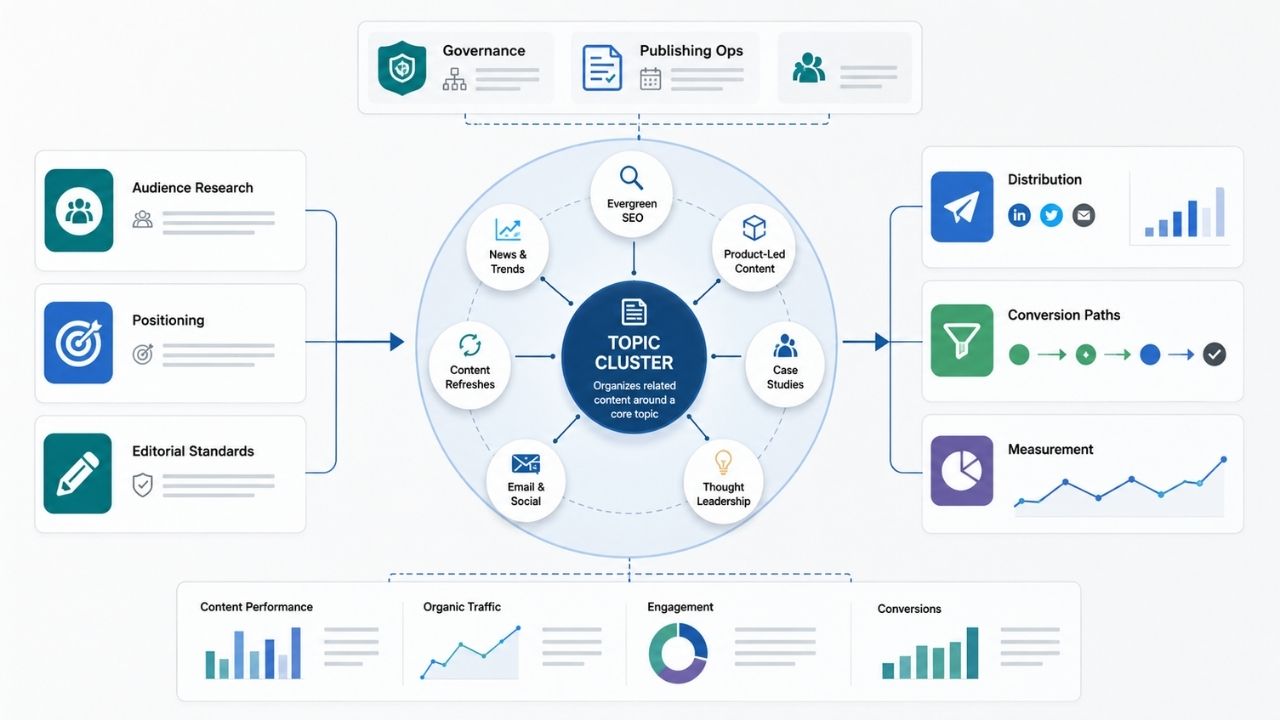
Topic clusters are not the whole content strategy. They are one part of it. A complete content strategy also includes audience research, positioning, editorial standards, distribution, conversion paths, governance, measurement, and publishing operations.
The cluster model answers one major question: how should related content be organized?
It does not answer every question.
It will not tell you which audience matters most. It will not fix poor messaging. It will not replace subject-matter expertise. It will not solve technical SEO issues such as poor indexation, slow pages, broken templates, or duplicate URLs.
That is why the model works best when it sits inside a broader editorial planning system.
For example, a strong publishing strategy may include:
- Pillar and cluster planning for evergreen SEO
- News or trend coverage for timely visibility
- Product-led content for conversion
- Case studies for proof
- Thought leadership for brand authority
- Email and social distribution for repeat engagement
- Content refreshes for performance maintenance
The pillar and cluster content model gives structure to the evergreen side of that system.
A Practical Build Plan for Teams Starting From Scratch
For a new cluster, start smaller than you want to.
A practical first version may include:
- One pillar page
- Six to eight cluster pages
- A simple internal linking map
- A shared brief template
- One measurement dashboard
- A refresh date for each page
Do not begin with a 70-row content plan unless the team can actually produce, edit, publish, and maintain it. Large plans create a false sense of progress. Published, useful, connected pages create real progress.
Here is a cleaner path:
Month 1: Research and mapping
Choose the pillar topic. Audit existing content. Map search intent. Pick the first cluster pages.
Month 2: Production
Write or update the pillar page and the highest-priority cluster pages. Build internal links as each page goes live.
Month 3: Expansion and repair
Add missing cluster pages. Improve weak sections. Check Search Console data. Fix internal links. Update the pillar page to include newly published resources.
This slow build often works better than a rushed launch.
Content clusters compound when the structure stays clean.
A Practical Build Plan for Existing Websites
Existing sites are harder because they already have history.
Before creating new content, audit what you have.
Look for:
- Pages that already rank for cluster-related terms
- Thin pages that overlap with stronger pages
- Old posts that can become cluster pages after updates
- Strong pages that lack internal links
- Orphaned pages
- Pages with declining traffic
- URLs that should be merged
- Product or service pages that need educational support
Many teams do not need to create as much new content as they think. They need to reorganize and improve what already exists.
For example, a digital marketing agency may already have 25 SEO articles. The issue may be that they are not connected. Some may target the same intent. Some may be outdated. Some may have no clear path to service pages.
In that case, the first cluster project should be cleanup.
Create the pillar page. Merge overlapping posts. Update the strongest pages. Add internal links. Remove or redirect pages that no longer serve a purpose.
Then publish new cluster pages only where real gaps remain.
The Role of Editorial Judgment
A pillar and cluster plan can look neat in a spreadsheet and still fail on the website.
Editorial judgment is what keeps the model useful.
Someone has to decide when two topics are too similar. Someone has to cut weak ideas. Someone has to say that a high-volume keyword is not worth chasing because it brings the wrong audience. Someone has to notice when a cluster page reads like a thin rewrite of the pillar.
Tools can suggest. Editors decide.
This is especially important in high-stakes or technical verticals. A fintech cluster about compliance needs accuracy and careful wording. A health cluster needs expert review. A cybersecurity cluster needs technical precision. A SaaS cluster needs product knowledge and realistic use cases.
A topic cluster is not just an SEO asset. It is a public expression of what the brand understands.
That is why quality control matters.
What to Include in a Cluster Brief
A good cluster brief prevents overlap and keeps writers focused.
It should include:
- Target reader
- Search intent
- Primary keyword
- Secondary terms
- Page role in the cluster
- Link back to the pillar
- Related cluster links to include
- Topics to cover
- Topics to avoid because another page owns them
- Examples or use cases
- Required expert input
- Conversion path, if relevant
- Source requirements
- Update schedule
The “topics to avoid” line is underrated. It protects the cluster from repetition.
For example, a cluster page about “editorial calendar templates” should not explain the entire content strategy process. That belongs somewhere else. The brief should make that boundary clear.
Without boundaries, every article slowly becomes the same article.
How AI Search Changes the Value of Topic Structure
Search is changing. AI-generated answers, summaries, and discovery tools are affecting how people find information. That does not make content clusters obsolete. If anything, it makes clear topic structure more valuable.
Machines need to understand what your site covers. Readers need fast paths to trustworthy information. Brands need stronger proof that their content is not a thin collection of search-targeted pages.
A clear hub and spoke content structure helps with that. It connects concepts, shows depth, and makes the site easier to interpret.
But do not take this too far. A cluster is not a guarantee that AI systems will cite your site. No content architecture can promise that. The safer view is this: clear structure, useful content, accurate information, and strong internal links give your site a better foundation for both traditional search and newer discovery surfaces.
That foundation is worth building.
When the Pillar and Cluster Model Is Not Worth It
This model is not always the right answer.
Skip it when:
- The topic is too narrow.
- The business has no reason to own the topic.
- The team cannot maintain the content.
- Existing pages already answer the topic well.
- The cluster would create duplicate pages.
- The audience needs one simple answer, not a full hub.
- The site has serious technical issues that prevent indexing or crawling.
A cluster should reduce confusion. If it adds complexity without improving the reader journey, it is not helping. Sometimes one excellent page is better than a forced cluster.
Final Thoughts
The pillar and cluster content model is useful because it brings order to content that would otherwise drift into scattered publishing. It gives teams a way to plan around topics, not just keywords. It helps readers move through a subject with less friction. It also gives search engines clearer relationships between pages.
The model works best when it is treated as editorial architecture, not an SEO trick.
Choose a pillar topic with real business value. Build cluster pages around distinct reader problems. Link pages in ways that help people. Refresh the cluster before it becomes stale. Cut pages that do not deserve to exist.
A strong topic cluster does not come from publishing more. It comes from organizing better, writing with purpose, and maintaining the system after launch.
FAQs About Pillar and Cluster Content Model
Is a pillar page the same as a landing page?
Not always. A pillar page is mainly built to organize and explain a broad topic. A landing page is usually built for conversion. Some pillar pages include conversion sections, but they should still work as useful topic resources. If a pillar page reads only like a sales pitch, it will not serve the cluster well.
How many internal links should a cluster page include?
There is no fixed number. Add links where they help the reader move to a relevant next step. A short cluster page may need only a few links. A detailed technical guide may need more. The bigger issue is relevance. Forced links create noise.
Should every blog post belong to a content cluster?
No. Some posts may support campaigns, news, announcements, thought leadership, or social distribution. Not every page needs to fit inside a pillar model. That said, evergreen SEO content usually performs better when it has a clear place in the site structure.
Can one cluster page support more than one pillar?
Sometimes, but be careful. If a page naturally connects two related pillars, linking to both may make sense. If it creates confusion about the page’s main role, choose one primary pillar and use secondary links only where helpful.






















