

We all remember when synthetic audio felt like a narrow, clunky tool meant only for turning text into robotic narration. Thankfully, that version of the technology is long gone.
Today, we have systems that can generate incredibly realistic voices, clone approved speakers, compose full tracks, and even build immersive sound effects. You can clean up messy recordings, dub videos into entirely different languages, and securely add hidden provenance signals to synthetic files. For creators, developers, podcasters, and media teams, the upside is clear: you can produce audio faster, scale your workflows, and reach global audiences more easily than ever before.
But let’s be honest, the risks are just as real. Bad synthetic audio still sounds incredibly cheap. Misusing AI voice cloning can irreparably damage your audience’s trust, and poor text to speech AI can make your most serious content feel lazy and careless. Furthermore, if you assume every output from AI music generation is automatically safe to use, you might stumble into a massive licensing headache. As synthetic voices and clips spread rapidly across the web without context, issues like detection, watermarking, and provenance are impossible to ignore.
That is exactly why this AI audio voice generation guide takes a strict, workflow-first approach.
At its core, this technology isn’t just a single feature; it’s a complex web of creative, technical, and ethical systems. While some of these tools are fantastic for speed, accessibility, or localization, they also introduce new challenges surrounding consent, ownership, and identity. The smartest production teams out there aren’t just asking, “Can a computer make this sound?” Instead, they’re asking, “Should it make this sound, how are we reviewing it, and how will our listeners know what they’re actually hearing?”
Let’s break down the main components of this ecosystem to see how they fit together, where they shine, where they fall flat, and how you can build a workflow that actually protects your brand.
What Is AI Audio and Voice Generation?
Before we dive into the specific workflows, it helps to establish exactly what we’re talking about when we discuss this technology. Fundamentally, this refers to using artificial intelligence models to create, transform, enhance, or verify audio files.
It generally encompasses:
-
AI-generated narration and text to speech AI
-
AI voice cloning
-
Automated podcast production
-
AI music generation
-
Synthetic sound effects
-
Automated dubbing and voice translation
-
Multilingual voice generation
-
Voice cleanup and enhancement tools
-
Audio watermarking and provenance tracking
-
Synthetic speech detection
-
Audio repurposing for videos, podcasts, and e-learning
At the most basic level, these tools simply convert instructions into sound. Your instruction could be a text script, a short voice sample, a melody, a prompt, or even a video clip.
However, it’s important to remember that not all of these tools do the same job. A text-to-speech platform turns a script into spoken narration, while a music model creates instrumental or vocal tracks. A sound generation system might give you foley-style textures, whereas a cloning system focuses on preserving a specific person’s vocal identity. A watermarking system adds a signal that can help verify where audio came from.
Because this category is so incredibly broad, your specific workflow is everything. A solo creator throwing together a podcast doesn’t need the exact same rigorous process as a global brand localizing corporate training videos. A game developer does not need the same controls as a newsroom verifying a suspicious voice clip.
Good audio production always starts by looking closely at your specific use case.
Why AI Audio Matters Now
Think about it: audio has always been a uniquely powerful medium because it feels deeply personal. A real human voice can build trust much faster than a wall of text. The right music completely shifts the emotional weight of a video scene, and crisp sound effects make digital interfaces feel tactile and alive. A localized narration track can make global content feel less distant.
The historical problem, of course, is that producing high-quality audio takes a massive amount of time and skill. Recording, editing, cleaning up background noise, scoring, mixing, translating, dubbing, and publishing are all specialized tasks. Because of this, smaller teams have often compromised on audio quality simply because doing it right felt too expensive or painfully slow.
This new technology completely changes that equation.
Instead of getting bogged down in the mechanics, a solo creator can now draft narration in minutes. A podcast team can feed one recording into a system and instantly get back clips, show notes, and transcripts. A product team can test interface sounds before hiring a sound designer. Course creators can quickly generate multilingual narration to test early versions of their curriculum. A brand can prototype voiceovers, music beds, and sonic directions before committing to final production.
This certainly doesn’t mean we are replacing audio professionals. Instead, it shifts where human judgment brings the most value. As generating the actual sound gets easier, the human tasks like selection, editing, securing consent, managing licenses, and quality control can become the most important parts of the job.
AI can help make sound. Humans still decide whether the sound belongs.
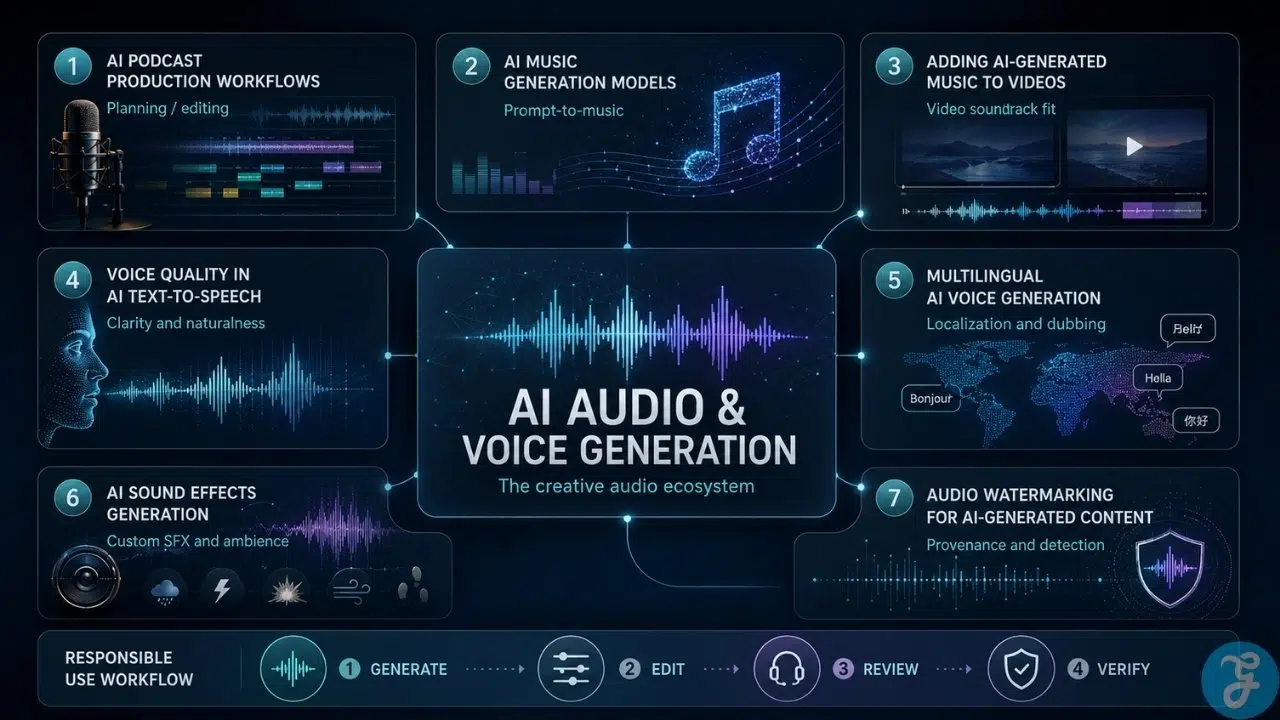
AI Audio Voice Generation Guide: The Core Production Map
A genuinely useful AI audio voice generation guide shouldn’t just treat every new app as a magic shortcut. The better, safer approach is to map out your entire workflow. Most successful AI audio projects move through these five distinct stages:
1. Intent
Start by deciding exactly what the audio needs to achieve before you touch a single tool. Is it supposed to teach, entertain, guide, reassure, sell, localize, signal action, or create atmosphere? A customer support voice needs to exude clarity and trust. A game sound effect requires precise feedback timing. A podcast workflow needs editing efficiency. Without intent, AI just produces random options. With intent, you can actually judge them.
2. Generation
This is where the tool creates the very first draft of your audio asset. The input might be a script, a prompt, a melody, or a video. The output might be speech, music stems, clips, or a finished track. The key is to remember that generation is not the end of the line—it is only a starting point.
3. Editing
AI-generated audio almost always needs shaping to sound genuinely listenable. This is where rushed workflows typically fail. Be prepared to step in and handle the trimming, pacing adjustments, EQ, volume balancing, layering, or pronunciation fixes. Never publish the raw generated file as if it were finished.
4. Review
You need a human checkpoint to verify quality, accuracy, emotional fit, audience expectations, and legal rights. If you are cloning a voice, you must verify explicit consent. If you are doing multilingual work, native speakers need to review the pacing and tone. For music and effects, you have to verify licensing.
5. Provenance
The final question you have to answer is: how will people know where this audio came from? People are going to ask, and you need a transparent paper trail ready. Ensure you have documentation, watermarks, metadata, content credentials, or internal approval notes neatly filed away. Provenance isn’t glamorous, but it is critical when audio represents a real person or brand.
AI Podcast Production Workflows
Automating podcast production works best when you use it to eliminate the tedious, repetitive tasks that surround a human-led show.
Let’s be clear: a podcast still desperately needs a strong topic, a compelling reason to exist, a host with actual taste, and an audience that cares. Algorithms cannot invent those foundational elements for you. What they can do is dramatically reduce your production drag.
You can use these tools to assist with:
-
Deep topic research and guest briefs
-
Structuring episode outlines
-
Fast transcription and rough timeline editing
-
Spotting and removing filler words
-
Cleaning up muddy remote recordings
-
Drafting show notes, timestamps, clip suggestions, social posts, and newsletters
The absolute strongest use case here is transforming a single raw recording into a highly efficient content engine. A good transcript seamlessly supports your editing process, generates your captions, and helps you chop out short-form social clips.
But remember, podcasting isn’t just about processing files. Editing is an art form that requires human taste. A long pause might look like an error to an algorithm, but to a human listener, it might be the emotional weight that makes a guest’s answer feel profound. A technically “clean” cut might actually accidentally remove the best, most authentic part of the conversation. A catchy AI-generated title might misrepresent what the guest actually said.
AI podcast production should be used to protect the creator’s time, not erase the creator’s voice. If you manage a brand or media team, use AI to support the production line, but never let it become your editor-in-chief. Keep humans firmly in charge of topic selection, editorial framing, and final approvals.
AI Music Generation Models Explained
AI music generation has quickly become one of the flashiest and most visible parts of the generative landscape. The basic pitch sounds simple: you type in a prompt or hum a melody, and the model hands you back a finished piece of musical material.
In reality, the ecosystem is a lot more nuanced. These models are typically used to generate:
-
Short, loopable beats
-
Instrumental background beds
-
Full song drafts or isolated stems
-
Ambient textures and sound design elements
-
Custom tracks for videos, ads, games, or social content
Some of these systems work with symbolic data like MIDI, while others generate the raw audio waves directly. You’ll find text-to-music models that rely entirely on language prompts, and melody-guided systems that use your hummed tune as a musical anchor. Advanced systems might even juggle text, lyrics, video, and reference audio simultaneously.
The true superpower of AI music generation is rapid exploration. A video editor can toss in placeholder music to see how a rough cut feels. A songwriter can quickly test out chord progressions or arrangement ideas before committing to a studio session. A marketer can compare totally different tones for a campaign in minutes.
Its biggest weakness? Taste and judgment.
A generated track might sound incredible on its own, but completely ruin the project once you drop it into the timeline. It might overpower the dialogue, feel too emotionally generic, or raise serious licensing red flags. It might resemble an existing copyrighted style a little too closely.
Treat these models as creative assistants—use them to explore directions, but never use them as an excuse to stop listening critically. Always double-check your licensing terms before putting a generated track into commercial work, ads, client projects, or monetized videos. Music is not just decoration; it is a rights-sensitive asset.
Adding AI-Generated Music to Videos
Slapping an AI-generated track onto a video can save you hours, but if you do it carelessly, it can completely destroy your edit.
Music must always serve the visual story. That means your generated track has to perfectly match the pace, emotional scale, voiceover, scene structure, and publishing context of the scene. A soaring, dramatic orchestra might sound amazing in your headphones, but it’s going to feel ridiculous underneath a simple software tutorial.
Always evaluate your video before you start generating music. Ask yourself:
-
Is there dialogue or voiceover that the music needs to stay under?
-
Should the music stay strictly in the background?
-
What specific mood does this scene demand?
-
Are the visual cuts moving quickly or slowly?
-
Does the track need to loop cleanly for social media?
-
Does the ending need a clean finish?
-
Where is this being published? (YouTube, an ad, a client website, TikTok?)
Generators are great for churning out background beds, intro stings, and rough soundtrack ideas. But the human editor still has to make it work. You’ll likely need to trim the file, duck the volume under the speech, and fade the ending naturally. In explainer videos, tutorials, and product demos, vocal clarity should always win out over a cool background beat.
Licensing matters here, too. AI-generated music is not automatically royalty-free or safe for every platform. Check whether the tool allows commercial use or distribution. The best workflow is simple: generate a few solid options, pick the one that elevates the story, edit it carefully into your timeline, test the final mix on regular phone speakers, and save your licensing records before you hit publish.
Voice Quality Factors in AI Text-to-Speech
While text to speech AI has evolved at breakneck speed, there is still a massive gap between a flashy 10-second vendor demo and a voice that actually holds up in a real production environment.
A voice model might sound incredibly human for the first paragraph, only to become grating and exhausting to listen to after five minutes. It might nail standard conversational English, but totally butcher your brand names, industry acronyms, numbers, or technical vocabulary. It might even pause in bizarre places or put the emotional emphasis on the completely wrong word.
When evaluating these models, you need to look at a combination of factors:
-
Overall clarity and naturalness
-
Pronunciation accuracy on difficult words
-
Prosody (the natural rhythm of speech)
-
Pacing and tone fit
-
Audio cleanliness (no digital artifacts)
-
Accent and localization quality
-
Long-term listener comfort
Here is the hard truth: the most important factor isn’t always achieving theatrical realism. It’s usefulness. If your listeners have to strain to understand the message, the voice has failed its primary job, even if it sounds perfectly human.
If you are building e-learning courses, healthcare tutorials, or customer support trees, clear pronunciation matters far more than dramatic flair. A bubbly, energetic voice reading a serious legal warning feels incredibly off-putting, just like a monotone voice reading a children’s story feels lifeless.
To really test a text to speech AI platform, don’t just listen to their curated samples. Feed the system your own difficult scripts. Complete with acronyms, numbers, long complex sentences, and warnings—and listen to the output on normal earbuds and laptop speakers. Good AI should make the message easier to hear, not just more impressive on first listen.
Multilingual AI Voice Generation
Using AI to push your content across language barriers is an incredible capability, but we have to remember that “multilingual” is not the same thing as “localized.”
A tool might boast that it can generate speech in dozens of languages, but that doesn’t mean it will sound culturally accurate to local listeners. Spanish localized for Mexico sounds very different from Spanish meant for Spain. Arabic varies widely by region. An AI model might technically pronounce the words correctly, but completely miss the cultural rhythm, the required formality, or the regional tone.
Common workflows in this space include:
-
Translated narration and automated dubbing
-
Voice translation
-
Localized text-to-speech
-
Multilingual customer support trees
-
Global product tutorials and e-learning
-
Accessibility narration
-
Brand voiceovers customized for local markets
The most dangerous mistake you can make here is treating localization like a simple file conversion. You cannot run an English script through a translator, feed it to a voice generator, and expect it to feel natural. Sentence lengths change drastically. Cultural references need to be adapted. The entire timing of a video might need to be re-edited to match the new language track.
This gets even trickier if you are using AI voice cloning. If you clone a real person’s voice to speak a language they don’t actually speak, you are navigating sensitive territory. Consent and disclosure become critical. They need to know exactly what languages their synthetic voice will be speaking, what it will say, and if it can be reused later.
For any serious multilingual project, having a native speaker review the output is not optional. They will catch the awkward phrasing, wrong stress, and cultural mismatches that your software simply cannot see. AI helps scale global audio, but human review protects the trust.
AI Sound Effects Generation Explained
Sound design relies heavily on microscopic details, making it a perfect candidate for AI assistance.
Think about the subtle click of a digital button, the heavy thud of a closing door, or the soft ambient hum of a coffee shop. When those sounds are even slightly off, your viewer immediately feels that the production is cheap, even if they can’t articulate exactly why.
AI sound generation allows creators to bypass massive stock libraries and simply prompt the exact effect they need, whether it’s UI sounds, game feedback, podcast transitions, or foley-style textures. This is a game-changer for smaller teams who don’t have the budget to hire dedicated sound designers.
The secret here lies entirely in how you prompt the tool. Asking for a “magic sound” is far too vague. Instead, you need to write something like: “Short sparkling magic reveal, soft bell-like shimmer, clean fantasy feel, no voice, no music, under three seconds.”
However, just like the rest of this technology, raw generated sound effects are rarely ready for prime time. In professional sound design, a good effect is usually built from several different audio layers. A heavy door slam might require a low-end thump, the metallic click of the latch, and the natural reverb of the room. AI might give you one fantastic layer, but you still need to trim, fade, EQ, and mix it into the final product.
Generative effects are fantastic raw material. Generate them quickly, test them in context, edit carefully, and choose the one that serves the moment.
Audio Watermarking for AI-Generated Content
As synthetic audio becomes indistinguishable from reality, watermarking and tracking are shifting from optional features to absolute necessities.
Once a piece of audio leaves your computer, it loses its context. A voice clip can be chopped up and remixed to say things the original speaker never authorized. A cloned voice can spread misinformation. A generated music bed can be used in a way that violates its original licensing terms.
Audio watermarking technology embeds a hidden signal into the file itself. While usually imperceptible to human ears, detecting tools can read this signal to verify the audio’s origin.
This helps support:
-
AI audio detection
-
Audio provenance
-
Voice watermark workflows
-
Synthetic speech labeling
-
Brand asset tracking and rights management
-
Voice clone accountability
-
Platform reviews and internal production controls
However, a watermark is not a flawless truth machine. It can prove a synthetic signal is present, but it doesn’t prove that the message itself is accurate, nor does it prove that consent was legally obtained. Furthermore, heavy compression, speed changes, or aggressive re-editing can sometimes break the watermark entirely.
That is why establishing true provenance matters. You need a paper trail: records of where the file originated, how it was created, who approved it, and what consent agreements apply. For brands and creators, the safest route is a layered approach: watermark what you can, save your origin records, document consent clearly, and always lean on human review.
AI Voice Cloning: Useful, Powerful, and Easy to Misuse
Of all the tools in the audio stack, AI voice cloning requires the most caution, simply because you are directly dealing with human identity.
When utilized with proper consent, the technology is brilliant. It allows authors to narrate their own audiobooks in multiple languages, helps busy creators scale their content, allows brands to maintain consistent narration, and provides incredible accessibility tools for individuals who are losing their natural speaking ability.
But without explicit, documented consent, cloning is just digital impersonation.
The boundaries here must be absolute. You should never clone, extend, translate, or monetize a real person’s voice without clear, written permission. That agreement needs to meticulously define exactly how the voice can be used, where it can appear, how long the permission lasts, and how the original speaker can revoke access in the future.
Even with consent, you still need human review. A highly convincing clone might inadvertently express a specific emotional tone that misrepresents the real person’s actual feelings. If you are doing public-facing work where a listener could easily mistake the synthetic voice for a real recording, clear disclosure is highly recommended.
Always treat a cloned voice as a piece of someone’s identity, not just a neat audio trick.
How to Choose AI Audio and Voice Tools
The “best” tool on the market is rarely the one with the flashiest marketing demo; it’s the one that seamlessly fits your actual daily workflow and gives you the exact controls you need.
Before you hand over your credit card for a new subscription, ask yourself:
-
What exact type of audio are we generating?
-
Are we generating this audio for internal testing, or public release?
-
Do the tool’s terms of service strictly allow for commercial use?
-
How granular is the editing? Can we tweak the pacing, tone, and pronunciation?
-
Does it support the specific languages or file formats we need?
-
If we are cloning voices, are their consent protocols robust and secure?
-
Does the platform offer clear watermarking and provenance support?
-
Can our team review the outputs easily before publishing?
If a piece of software saves you three hours of editing time but creates a massive legal or ethical headache downstream, it isn’t actually saving you anything. For serious teams, it is always better to build a small, tightly approved stack of tools rather than letting every employee use whatever random generator they find online. Centralized workflows make quality control infinitely easier.
A Practical AI Audio Workflow for Creators and Teams
Building a responsible workflow doesn’t mean building a complicated one. It just means being clear and intentional at every step.
Try adapting this simple process for your next project:
-
Define the exact purpose of the audio.
-
Choose the correct generation type (music, voiceover, sound effect, dubbing, or cleanup).
-
Write a highly specific, detailed prompt or clean up your text script.
-
Generate multiple options to explore different directions.
-
Edit and shape the best output in your digital audio workstation.
-
Test the audio in its final context (e.g., under dialogue or on phone speakers).
-
Do a final check on pronunciation, timing, and listener comfort.
-
Confirm your licensing rights and usage rights.
-
Document explicit consent for any voice cloning.
-
Add public disclosure if the synthetic nature of the audio could mislead people.
-
Save all source files, licenses, prompts, and final versions into a central repository.
-
Publish only after a human has listened to the final mix.
By keeping the AI in the role of an assistant and the human in the role of the director, you protect both quality and trust. The more realistic the audio becomes, the more your review matters.
Common Mistakes in AI Audio and Voice Generation
Even with a good workflow, it’s easy to fall into a few traps. Keep an eye out for these frequent missteps:
-
Treating Output as Finished: Assuming the downloaded file is ready to publish. Generated audio is usually just a draft; it needs editing, mixing, or pacing adjustments.
-
Choosing the Most Impressive Voice Instead of the Right Voice: Picking a dramatic, cinematic voice for content that simply requires calm, clear instruction (like a training manual).
-
Ignoring Consent in AI Voice Cloning: Playing fast and loose with identity. Permission must be secured before you hit generate, not after a problem arises.
-
Forgetting Licensing Requirements: Assuming that because AI made the music or effects, it’s instantly royalty-free. Always check the tool’s specific terms before commercial use.
-
Skipping Native Review for Multilingual Audio: Trusting a localized audio track without having someone who actually speaks the language listen for cultural nuances and rhythm issues.
-
Using Too Much Audio: Thinking that more sound equals better production. Cramming in too many generated effects, loud music beds, and overprocessed voices usually just creates noise and weakens the experience.
-
Assuming Detection Solves Trust: Watermarking and detection tools help, but they cannot replace proper context, good record-keeping, verified consent, and human judgment.
Best Practices for AI Audio Voice Generation
The most successful teams start every project by thinking about the listener first. What do they need to hear, understand, and feel to trust the content?
Use this technology aggressively to remove the repetitive grunt work from your day, but never use it to abdicate your editorial responsibility. Take the time to clean up your scripts before feeding them into a text to speech AI, even the most advanced models perform significantly better with clean sentences, intentional punctuation, and phonetic spelling notes.
Always test your audio in its natural habitat. If you are designing an app, test the sound effects on a physical phone, not just your expensive studio monitors. If you are generating a synthetic speaker for news-like content or public figures, be transparent and disclose its origins so you don’t mislead your audience. Finally, be rigorous about your record-keeping. Save your prompts, source files, and consent agreements.
The best workflows aren’t always the fastest ones on day one; they are the ones that remain legally sound and highly useful months down the line.
What Comes Next for AI Audio and Voice Generation
Looking ahead, we are moving rapidly toward highly integrated environments. Soon, you won’t need five different apps; your voice generation, music drafting, dubbing, sound effects, cleanup, and watermarking will all sit natively inside a single production pipeline.
As creators get more comfortable, they are going to demand deeper control. We will see better tools for adjusting emotional delivery, cleaner stem exports for music, and much more precise timing controls for multilingual dubbing and localized narration.
Simultaneously, the public pressure for transparency, consent, and labeling is only going to intensify. As the line between real and synthetic audio completely blurs, audiences are going to demand to know exactly where a piece of media came from and whether they should trust it.
The creators and brands who ultimately win in this space won’t be the ones who simply generate the highest volume of content. They will be the ones who use AI to generate highly useful, carefully reviewed audio that deeply respects their audience.
Final Thoughts: The Future of AI Audio Still Needs Human Ears
If there is one practical takeaway from this entire AI audio voice generation guide, it’s this: artificial intelligence has made it incredibly easy to produce audio, but it hasn’t made it any easier to judge it.
You now have a staggering amount of power at your fingertips. You can automate your podcast workflows, spin up custom music beds, clone voices, generate sound effects, and translate your narration for the entire globe. Those are incredibly powerful tools.
But the algorithms still desperately need your human decisions.
Does that synthetic voice actually fit the emotional weight of your script? Does the generated music serve the visual scene? Does the sound effect match the on-screen action? Did you secure the necessary legal consent for that voice clone? Are you allowed to use that track commercially? Can the audience clearly tell when they are listening to synthetic audio?
These questions are only going to become more critical as the underlying technology improves.
Use AI to move faster and explore wider. But rely entirely on your own human judgment to decide what actually deserves to be heard.
Frequently Asked Questions (FAQs) About AI Audio and Voice Generation
What is AI audio and voice generation?
It is the use of artificial intelligence models to create, alter, or verify audio assets. This broad category covers everything from text-to-speech engines and voice cloning to AI music generation, automated dubbing, sound effects, localization, and audio watermarking.
What is the difference between AI voice generation and AI voice cloning?
Standard voice generation uses pre-built, synthetic voices to read text. AI voice cloning, on the other hand, specifically attempts to replicate or preserve the unique vocal identity of a real speaker based on audio samples, making legal consent and usage rights an absolute requirement.
Is text to speech AI actually good enough for professional use?
Yes, it absolutely can be—especially for tutorials, corporate training, apps, and accessibility features—provided you test it thoroughly. Its success relies heavily on your willingness to tweak the pacing, clarify the pronunciation of difficult words, and ensure the tone fits the specific use case.
Can AI music generation be used safely in commercial projects?
That depends entirely on the specific tool you use, your subscription plan, and the license type. Before using AI-generated music in ads, videos, client work, games, or monetized podcasts, you must carefully review the platform’s terms of service and save your usage records.
Are AI sound effects going to replace traditional stock libraries?
Not always. While generators are fantastic for quickly mocking up UI sounds, ambient noise, or customized transition effects, high-end traditional stock libraries or recorded foley are often still superior when you need highly specific, photorealistic audio.
Why does audio watermarking matter for AI-generated content?
Because digital audio travels fast and loses context. Watermarking embeds a hidden, detectable signal into the synthetic file, which helps platforms and creators track its origin, verify authenticity, support AI audio detection, and protect against malicious misuse or impersonation.






















