Search “testing stonecap3.0.34 software” and you’ll get ten confident articles. Not one of them links to where the software actually lives. No vendor website. No GitHub repository. No changelog. No download page. The fifth result is a celebrity gossip blog. Sixth is a UK travel site. A prayer blog claiming “2026 Ka Secrets Exposed Now” rounds out the top ten.
That’s a strange SERP for an enterprise software testing query — and it’s not a coincidence.
This article does what none of those results did: investigate the keyword before commenting on it. What follows is what the evidence shows, why this SERP looks the way it does, and — because you may have arrived genuinely needing software testing guidance — a complete QA methodology built around tools that provably exist.
Quick answer: StoneCap 3.0.34 does not appear to be a verifiable software product. No official vendor website, GitHub repository, changelog, or download page can be found under this name. Every article currently ranking for “testing stonecap3.0.34 software” was published on unrelated sites — a celebrity gossip blog, a UK travel site, a prayer blog — none of which link to any primary source confirming the software exists. The keyword was most likely manufactured by a content farm SEO network. If you need a real enterprise software testing platform, tools like Selenium, Apache JMeter, Cypress, Playwright, and k6 do what those articles claimed StoneCap does.
What Is StoneCap 3.0.34 and Why Is There No Official Website?
StoneCap 3.0.34 cannot be verified as a real software product. As of June 2026, no vendor website, official documentation, GitHub repository, or changelog exists under the name StoneCap or StoneCap 3.0.34. That absence matters, because every legitimate versioned software release, regardless of how niche, leaves a traceable public footprint.
Consider what that footprint normally looks like. A real enterprise QA platform ships with an official domain, release notes tied to a changelog, a repository, and some form of support or documentation portal. You can look up Selenium at selenium.dev, Apache JMeter at jmeter.apache.org, Playwright at playwright.dev. Each has a version history, a contributing team, and a clear owner. StoneCap 3.0.34 has none of that.
| Signal | Verified software product | StoneCap 3.0.34 |
|---|---|---|
| Official website | ✓ | ✗ Not found |
| GitHub / source repository | ✓ | ✗ Not found |
| Changelog or release notes | ✓ | ✗ Not found |
| Vendor support or docs portal | ✓ | ✗ Not found |
| Consistent product description | ✓ | ✗ 7 contradictions across 10 articles |
| Primary source cited anywhere | ✓ | ✗ Zero citations in entire SERP |
That last row is the tell. The ten articles currently ranking describe the product as seven completely different things: an enterprise backend platform, a CI/CD QA tool, a business analytics hub, a patch management system, and an automation monitor. No two agree on what “Testing StoneCap3.0.34 Software” actually does.
One caveat worth acknowledging: some organizations run proprietary internal tools under custom names that never make it into public documentation. If StoneCap 3.0.34 is a white-label or internal enterprise build at your organization, the testing methodology later in this article applies exactly the same way. But a legitimate internal tool still has internal documentation — and a dozen unrelated blogs wouldn’t be the right place to find it.
The version number itself (3.0.34) follows semantic versioning (SemVer) convention: MAJOR.MINOR.PATCH. The “3” indicates a major release, no new features in this cycle, and the 34th patch since the last minor release. A product with 34 patches has been actively maintained for some time and should have a long and findable trail. This one has none.
How Phantom Software Keywords Are Built (The Content Farm Behind This SERP)
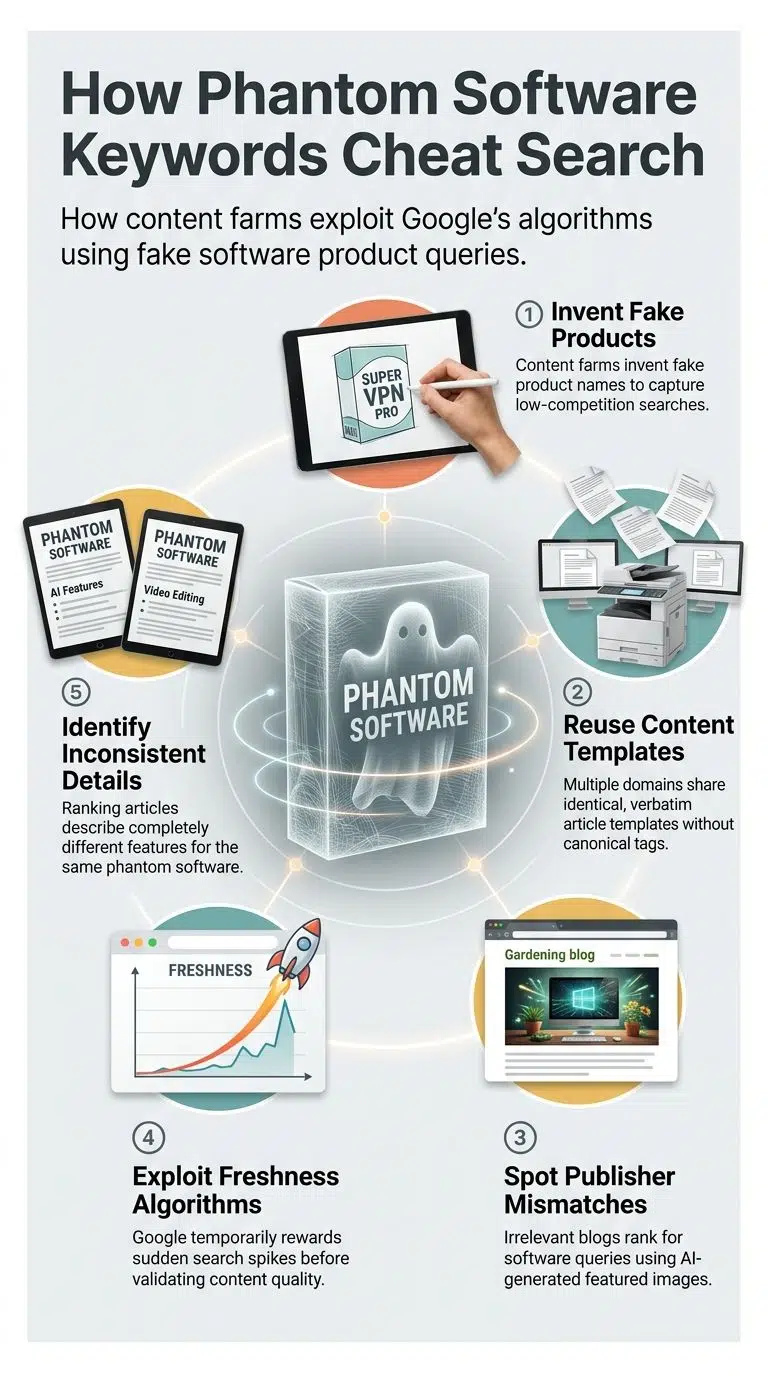
“Phantom software keywords” are fabricated search terms, typically a fake product name paired with a specific version number, created by content farm networks to capture low-competition queries where no authoritative publisher has staked a position.
The mechanics are simple. A content network invents a plausible-sounding product, distributes articles about it across 10–15 unrelated domains, and each article uses the keyword naturally while referencing the others. The result is an artificial authority signal that Google’s freshness and topical relevance systems can temporarily reward.
The StoneCap 3.0.34 evidence trail is unusually clear:
- Identical fabricated case study: The claim that “an e-commerce company reduced page load time by 40%” appears verbatim in at least two competing articles published on different sites, celebrora.com and nameswords.com. That’s not editorial coincidence; it’s a shared content template. It’s also precisely the kind of duplicate content that canonical tags are meant to surface to search engines, but content farm sites deliberately avoid proper canonicalization because they want every copy to rank independently.
- Same farm domain, different keyword: appears in both the StoneCap 3.0.34 SERP and the “Droven IO cybersecurity updates” SERP. Same domain, same playbook, two different phantom products.
- Publisher mismatch: The current top-10 publishers include a celebrity gossip blog, a UK travel site, and a prayer blog. None has any prior history covering enterprise software or QA. Some use an AI-generated featured image with no human authorship, signaling a useful reminder that AI infrastructure capable of extraordinary things in the right hands is also being deployed at scale to generate content with no editorial intent behind it.
- No consistent product identity: When a real product exists, articles about it describe the same product. Here, each article describes something different. The inconsistency isn’t editorial variation; it’s the absence of a real referent to describe.
Why does Google rank these temporarily? Topical freshness signals fire when a new keyword suddenly accumulates multiple pages. Google’s algorithm is designed to reward timely, apparently on-topic content before quality signals fully propagate. As our analysis of the Helpful Content Update shows, the relationship between what Google’s systems reward and what actually helps readers is more complicated than the original policy framing suggested and phantom product keywords are one of the cleaner examples of that gap in action. The absence of an AI overview on this query is itself a low-confidence signal: Google triggers AI Overviews on queries it trusts. It didn’t here.
What Were You Actually Searching For?
Most searchers landing on “testing stonecap3.0.34 software” fall into one of three groups and each has a clear path forward.
| Who you are | What you actually need | Where to go |
|---|---|---|
| You need a real software testing platform | A verified, downloadable QA tool | Jump to the comparison section below |
| You need to test a versioned software update | A structured QA methodology | Jump to the 8-step section below |
| You read an article about StoneCap and are trying to verify it | An honest answer | You just got the product, and it doesn’t appear to exist |
There’s a fourth scenario worth naming: you’re a developer or QA engineer whose organization uses something called StoneCap internally. If so, this article can’t tell you anything specific about your proprietary tool — but the testing methodology below applies to any versioned software release, regardless of the platform name.
Real Software Testing Tools That Actually Exist: Verified 2026 Alternatives
The following six tools do what the “Testing StoneCap3.0.34 Software” articles claimed to describe. All are actively maintained, have official documentation you can access right now, and leave the kind of public footprint a legitimate software product should.
| Tool | Type | Best for | License |
|---|---|---|---|
| Selenium WebDriver | UI / browser automation | Cross-browser web testing, legacy systems | Open source |
| Apache JMeter | Load / performance | Stress testing, API load simulation | Open source |
| Cypress | Frontend E2E | JavaScript and TypeScript web apps | Free tier + Pro |
| Playwright | Cross-browser E2E | Multi-browser, mobile viewport testing | Open source |
| k6 (Grafana Labs) | Load / performance | API load testing, cloud integration | Free / Pro |
| Postman | API testing | REST and GraphQL API validation | Free tier + Pro |
A bit more on each, since the table doesn’t capture where they actually excel or fall short.
Selenium WebDriver is the oldest and most widely supported option — it’s a W3C standard, which means it’s not going anywhere. The tradeoff is setup friction: Selenium requires more configuration than newer tools, and test scripts need maintenance as UIs change. Best for teams with existing Selenium infrastructure or those needing broad language support across Java, Python, C#, Ruby, and JavaScript.
Apache JMeter is the standard for simulating concurrent users and measuring how a system holds up under load. It’s not a UI testing tool — it’s built for backend and API stress testing, and it’s genuinely excellent at that. The GUI feels dated, but the underlying engine is robust and the documentation is thorough.
Cypress trades breadth for developer experience. If your stack is JavaScript or TypeScript and you’re testing web applications, setup is fast and the debugging experience with real-time test replay is noticeably better than Selenium. It doesn’t support multi-browser testing as broadly, and it’s not built for native mobile apps.
Playwright, maintained by Microsoft and released in 2020, has become the pragmatic first choice for teams starting fresh in 2026. It supports Chromium, Firefox, and WebKit, handles mobile viewports natively, and integrates cleanly into CI/CD pipelines. For most new projects, Playwright covers UI testing breadth better than any other free option.
k6 (acquired by Grafana Labs in 2021) handles load and performance testing with a scripting interface most developers find approachable. The free tier is practical for small to medium load scenarios; the cloud tier adds distributed testing across regions. It pairs naturally with Playwright UI testing for functionality and k6 for performance.
Postman covers API testing and is the most accessible entry point for teams that aren’t deeply test-focused. It doesn’t replace the other tools for performance or E2E work, but its request building, environment management, and automated test collections are hard to beat for REST and GraphQL validation specifically.
If managing these tools in-house isn’t practical for your team’s size or timeline, our roundup of top QA outsourcing companies for software testing covers firms that handle the full testing cycle for you — including what to look for in a partner and how these engagements are typically structured.
How to Actually Test a Versioned Software Update
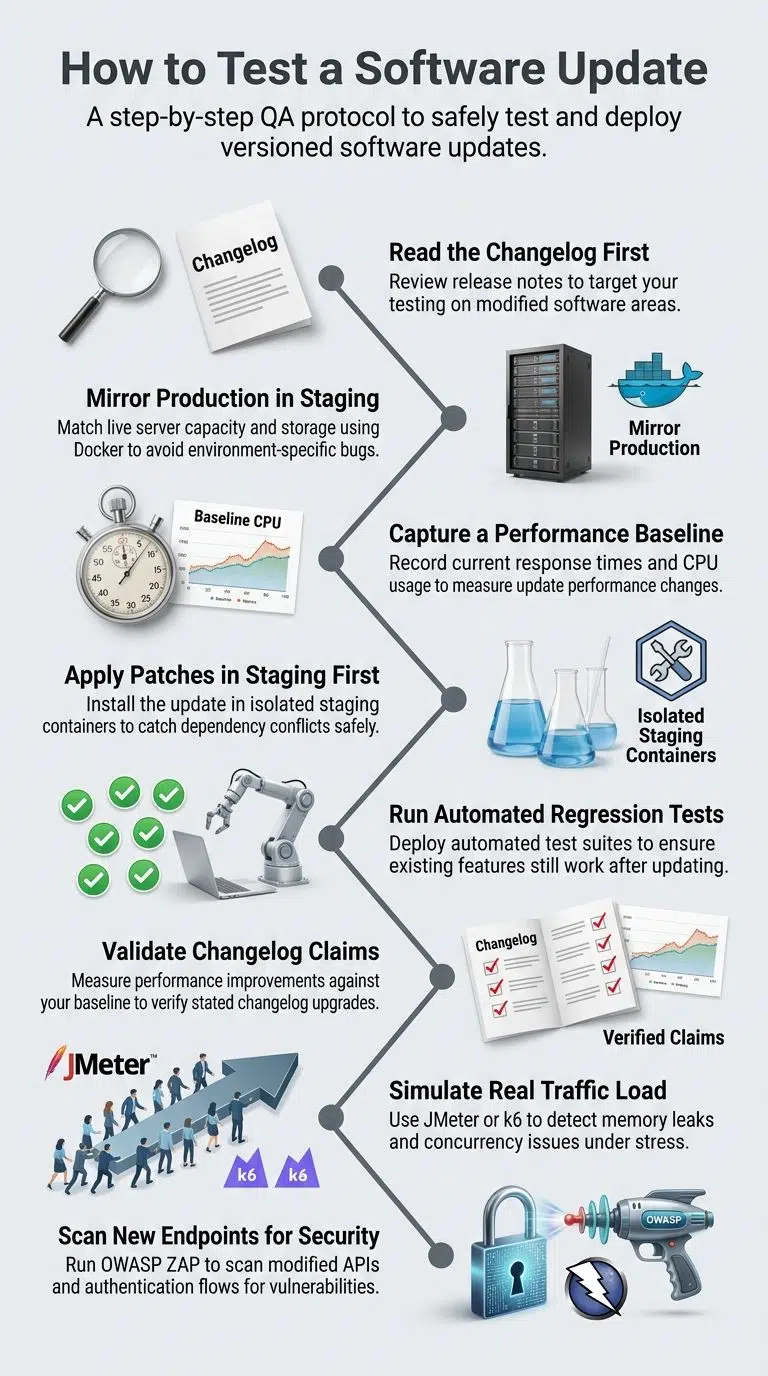
Testing a versioned software release follows a structured QA protocol regardless of which platform you use. Here’s the sequence that actually protects production environments, the methodology the StoneCap 3.0.34 articles gestured at without ever explaining.
Step 1: Read the changelog before writing a single test
The release notes tell you exactly what changed. According to the ISTQB, regression testing means “re-testing previously tested software after modification to ensure defects have not been introduced in unchanged areas. ” You can only verify what’s documented. If the changelog says “refactored database queries for faster retrieval,” your test suite needs to prove response times actually improved, not just that the application boots.
Step 2: Mirror your production environment in staging
A staging environment that doesn’t closely match production gives you results that don’t transfer. Match server capacity, network configuration, storage systems, and any third-party integrations. Even small differences, a missing environment variable, or a lower memory allocation can mask or manufacture issues that won’t reproduce in the real environment. Containerization via Docker makes this practical without duplicate hardware costs.
Step 3: Capture a performance baseline before applying the patch
Run your standard benchmarks on the current version before touching anything. Record response times, memory consumption, CPU usage, error rates, and throughput. These numbers are your reference point. Without them, you can’t say whether the new version performed better — only that it performed.
Step 4: Apply the patch inside the staging container
Never apply a patch directly to a live server. Even updates described as minor can introduce dependency conflicts. Apply the update in your isolated staging environment, verify the application boots cleanly, and check logs for any immediate errors before running tests.
Step 5: Run your regression test suite
The most important step after any update. Every feature that worked before the patch should still work after it. Automated regression suites — built in Selenium, Playwright, or Cypress — catch breakage faster than any manual process. If you don’t have a regression suite, the patch cycle is the right time to start building one. Research from DORA consistently shows that teams with automated testing deploy more frequently and recover from incidents faster than those testing manually.
Step 6: Validate the specific changes listed in the changelog
Don’t stop at regression. Confirm that the stated improvements actually work. If the changelog claimed improved API response times, measure them against your step 3 baseline. If it claimed enhanced memory management, watch memory allocation under the same workload. Changelog claims are testable — test them.
Step 7: Load-test under simulated real traffic
Use Apache JMeter or k6 to simulate the concurrency your system sees in production: concurrent users, API calls per second, and sustained load over time. Compare results against your step 3 baseline. A patch that fixes a bug but introduces a memory leak under load has caused a net regression even if all functional tests pass.
Step 8: Run a security scan on any new endpoints or authentication changes
Any new API surface is a new potential attack vector. OWASP ZAP is a free, actively maintained tool for scanning web applications for common vulnerabilities, injection attacks, broken authentication, and misconfigured headers. If your patch added or modified authentication flows, ZAP should run before the build gets promoted.
Once all eight steps pass, user acceptance testing (UAT) is the final gate for major releases. For patch-level updates, in UAT it is typically lighter, but functional sign-off from a non-technical stakeholder who uses the system daily catches things automated tests miss.
The entire sequence from step 2 through step 8 can be automated inside a continuous integration pipeline so every future patch runs through the same process without anyone needing to remember to trigger it manually. Our guide to the best CI/CD tools for software development teams compares GitHub Actions, Jenkins, CircleCI, and other options worth evaluating depending on your stack and budget.
Frequently Asked Questions
Is StoneCap 3.0.34 a real software product?
Based on available evidence, no. No official website, GitHub repository, vendor page, or changelog exists under the name StoneCap or StoneCap 3.0.34 as of June 2026. Every article currently ranking for this term was published on unrelated sites, a celebrity gossip blog, a UK travel platform, and a religious blog: none of which link to any primary source confirming the product exists. If “Testing StoneCap3.0.34 Software” is an internal or white-label tool at your organization, the testing methodology in this article still applies — but it is not a publicly available software product.
Why do so many articles about StoneCap 3.0.34 exist if the product isn’t real?
Content farm networks manufacture low-competition keywords by pairing plausible-sounding product names with version numbers, then distributing articles across unrelated domains. The goal is ad revenue from search traffic, not reader utility. The same network behind “Droven IO cybersecurity updates” and similar phantom product keywords appears responsible for StoneCap 3.0.34. Google’s quality systems are designed to catch this pattern eventually but newly manufactured keywords often rank while those signals catch up, which is why you found these results.
What is the best free software testing tool in 2026?
For browser and UI testing, Playwright (open source, maintained by Microsoft) is the strongest free option for most development teams in 2026 — it covers Chromium, Firefox, and WebKit with minimal setup. For load and performance testing, k6 by Grafana Labs offers a generous free tier with cloud integration. Apache JMeter remains the standard for stress testing at no licensing cost. The right pick depends on your stack: Cypress for JavaScript web apps, Postman for API validation, and Selenium for maximum language and browser compatibility across a larger engineering org.
How do I test a software update without breaking production?
Never apply a patch directly to a production server. Mirror your production environment in an isolated staging setup, apply the update there, run regression and performance tests, and only promote to production after sign-off. Docker containers or virtual machines make this practical without duplicate hardware costs. Automating the pipeline inside a CI/CD system means every future patch goes through the same sequence consistently, without relying on anyone remembering to run the tests manually.
What does version 3.0.34 mean in software?
Under semantic versioning (SemVer), a version number in the format carries specific meaning. In 3.0.34, the “3” indicates a major release, potentially with breaking changes from version 2.x. This “0” means no new features were added in this minor cycle. This ’34’ is the 34th patch, a small bug fix or security update since the last minor release. A product with 34 patches to its name should have a long and findable public changelog. SemVer is the dominant versioning convention in open-source software, documented at semver.org.
Can AI tools automate software testing in 2026?
Yes, with realistic expectations. AI-assisted testing platforms, including Testim, Mabl, and Applitools, use machine learning to generate and maintain test scripts, detect visual regressions, and flag anomalous system behavior without manual scripting. GitHub Copilot can write unit test boilerplate directly in your IDE. These tools work alongside established frameworks like Playwright and Selenium rather than replacing them.
Running AI-assisted testing at scale does carry a meaningful compute cost; the kind of work happening at US sustainable AI labs focused on energy-efficient machine learning will eventually make AI-driven test generation more viable for smaller teams. For now, treat it as a productivity layer over a well-configured conventional test suite, not a replacement for one.
Final Words
Testing StoneCap3.0.34 Software case is one of the cleaner recent examples of how phantom product keywords work at scale. The same network has produced Droven IO, The Meshgamecom, and a growing cluster of similar keywords. The pattern is worth understanding if you’re making keyword selection decisions for a content operation.
One honest observation to close on: the fact that a celebrity gossip blog and a prayer site are jointly ranking in the top ten for an enterprise software query tells you something important, not about “Testing StoneCap3.0.34 Software”, but about how much room honest editorial content still has on keywords the content farms have claimed as their own. Verifiable claims, real sources, and the willingness to say “this product doesn’t appear to exist” remain genuinely rare. That gap is still worth occupying.