
Symmetric and asymmetric encryption show up in nearly every security system worth auditing: HTTPS, VPNs, encrypted databases, cloud backups, digital certificates, and password managers. They work differently, and most real systems need both. One handles bulk data efficiently. The other solves the trust problem before the data moves at all.
What Encryption Actually Protects
Encryption protects readability, not access. That distinction matters more than most teams realise.
One company I reviewed had a fully encrypted database, AES-256, properly configured, and passed every compliance checkbox. They were breached anyway. The attacker compromised an application account with valid decrypt permissions. The database was locked; the app had the key and handed out data freely.
Encryption turns readable data (plaintext) into unreadable data (ciphertext) using an algorithm and a key. The right key reverses it. The key is the sensitive part, a strong algorithm with careless key handling is still a weak control.
What Encryption Doesn’t Fix?
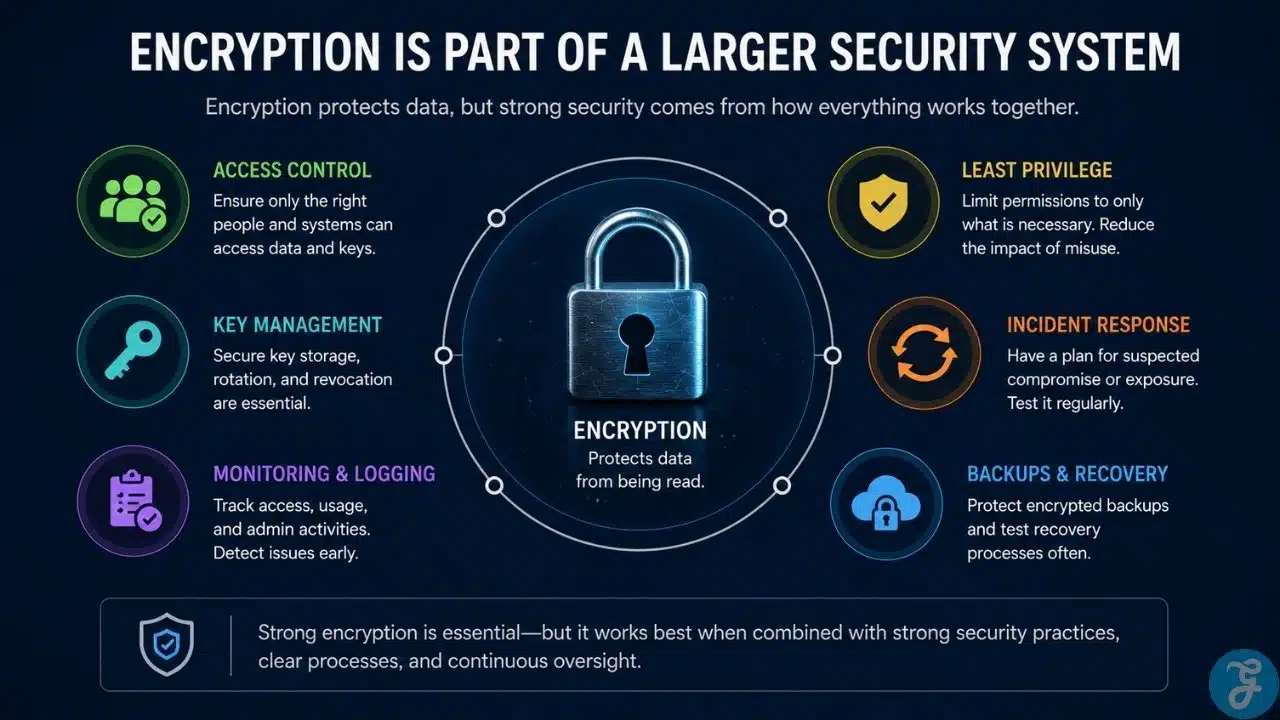
Broken access control, weak passwords, exposed admin accounts, poor logging, careless vendor permissions. An attacker who steals encrypted backups may be blocked. An attacker who walks in through a compromised account with decrypt access won’t be. Encryption works best inside a larger system that includes access control, monitoring, least privilege, and incident response.
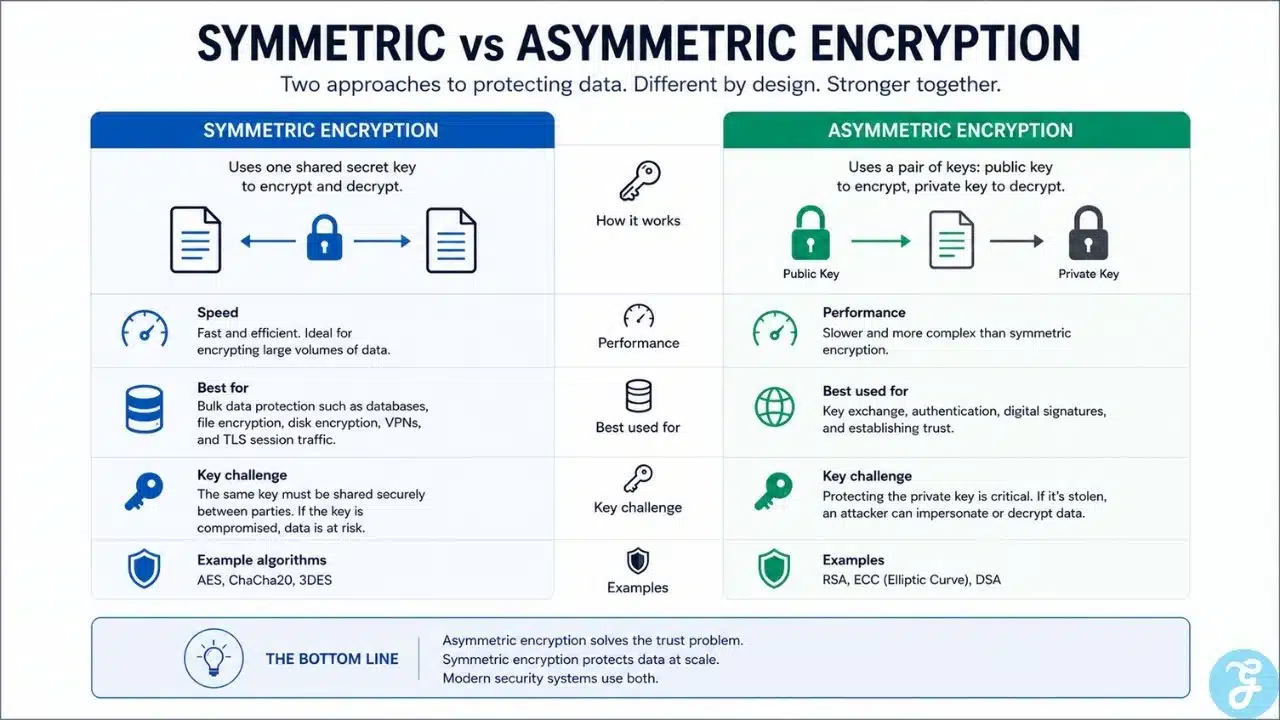
Symmetric encryption uses the same key to encrypt and decrypt. Anyone with that key can lock the data and unlock it.
Picture a filing cabinet key photocopied across a floor of 30 desks. After a few years, management has no idea how many copies exist or who still has one. The algorithm may be strong, but the protection depends entirely on who has the key and how carefully those copies are controlled.
Why it’s fast: Symmetric encryption is efficient enough to protect large volumes of data without slowing systems down — databases, file encryption, disk encryption, backup archives, cloud storage, VPN and TLS session traffic after the initial handshake. AES is the standard most people encounter. Saying “we use AES” isn’t enough during a serious review — key length, mode of operation, key storage, access policy, and rotation all matter too.
Where it fits: Symmetric encryption is the workhorse behind bulk data protection. Once two systems have safely agreed on session keys, symmetric encryption protects everything moving between them, which keeps communication fast after the trust problem is solved up front.
The Real Risk? Key Handling
The symmetric key has to be available to the systems that need it, which creates an obvious problem: how do you share a secret without exposing it?
Teams under pressure take shortcuts. The key goes into an environment file, a deployment script, a private message, a spreadsheet, or a source code repository. It works at first. Six months later, nobody remembers where it was copied, who still has access, or whether the same key is used in production and staging.
That’s how encryption becomes a paper control.
Common mistakes that show up in real audits far more than sophisticated attacks:
- One key reused across too many systems
- Production and development share the same key
- Keys left active long after they should be retired
- Too many admins with decrypt access
- Keys stored in code repositories
- Logs that inadvertently capture secrets
- Backups containing old, unretired keys
- No tested rotation process
A compliance review shouldn’t stop at “data is encrypted.” The better questions: Where is the key stored? Who can use it? Is access logged? Can the key rotate without breaking the application? What happens if it’s suspected of being exposed?
Asymmetric Encryption: A Key Pair
Asymmetric encryption uses two mathematically related keys: a public key and a private key. The public key can be shared freely. The private key must stay protected.
In a basic encryption exchange, someone encrypts data with a public key. Only the matching private key decrypts it. This removes the need to share a secret before communication begins. Two parties can establish trust even if they’ve never exchanged anything privately before.
Why The Private Key Matters So Much
If the private key is stolen, an attacker may be able to impersonate a server, decrypt protected data, or create signatures that appear legitimate. The exact damage depends on context — a stolen TLS private key, SSH private key, and code-signing private key create very different problems. None of them is small.
Private keys shouldn’t sit on shared drives, personal laptops, old deployment folders, support tickets, or unprotected config files. They need strong access controls and a clear replacement process.
Public Doesn’t Mean BlindTrust
A public key can be visible, but it still has to be verified. If an attacker tricks a system into accepting the wrong public key, they can impersonate the legitimate party — a man-in-the-middle attack.
When a browser connects over HTTPS, it doesn’t simply accept whatever public key the server presents. It checks the certificate, the domain, the validity period, and the trust chain. Those checks are what prevent an attacker from quietly swapping the key.
Signatures Are Not the Same As Encryption
Asymmetric cryptography also supports digital signatures, and this is where explanations frequently get sloppy.
Encryption hides content. A digital signature does something different: it proves that something came from the holder of a private key and hasn’t been changed since signing. Software updates, certificates, and code-signing systems rely on signatures. The goal isn’t always to hide the content — it’s to prove origin and detect tampering.
“Encrypted,” “signed,” “hashed,” and “authenticated” don’t mean the same thing. When a vendor says “your password is encrypted,” check whether they mean hashed. Those are very different problems when a database leaks.
Symmetric and Asymmetric Encryption: The Practical Comparison
| Area | Symmetric | Asymmetric |
| Key model | One shared secret | Public and private key pair |
| Main strength | Fast bulk data protection | Trust, identity, key exchange |
| Speed | Faster | Slower |
| Common use | Files, databases, backups, session traffic | TLS certificates, signatures, secure key exchange |
| Main risk | Shared key exposure | Private key theft or key substitution |
If you’re protecting data at rest or in transit after a handshake, then it’s symmetric. If you’re proving identity or exchanging a secret with someone you’ve never spoken to before, then it’s asymmetric.
Why do Modern Systems Use Both?
A web connection needs to establish trust between a browser and a server that has no shared secret. Asymmetric cryptography handles that setup. After the session is established, symmetric encryption protects the actual traffic, because public-key operations are too slow to carry every packet.
TLS as a Working Example
TLS is the protocol behind HTTPS. During a modern TLS handshake, certificates and asymmetric cryptography handle authentication and session key negotiation. Symmetric encryption then protects everything moving through the connection. That’s why HTTPS works without users manually exchanging keys with every website they visit.
Transit encryption protects the path between systems. It doesn’t protect the systems themselves. A site can use HTTPS and still have broken access control. The padlock icon means the connection is protected, not that the application is sound.
Encryption at Rest Needs Its Own Review
Stored data lives in more places than most teams track. The original database isn’t usually the only risk.
One organisation I reviewed had strong encryption on their primary database. Their weekly CSV exports sat unprotected in a shared folder accessible to a dozen people. The gap in the shared folder mattered more than the database configuration.
Data at rest turns up in databases, file servers, laptops, cloud storage buckets, backups, log systems, analytics exports, test datasets, and third-party platforms. When reviewing, follow the data: Where is it created? Where does it move? Where is it stored? Where is it backed up? Which systems can decrypt it? Who can approve key access?
Encryption at rest reduces damage if storage is copied or exposed. It doesn’t remove the need for access control. If any logged-in support user can trigger a decrypt, permission design still matters.
Key Management is the Real Test
Encryption depends on keys. Key management decides whether encryption is a working control or a compliance label.
A real key management process covers the full lifecycle — secure key generation, controlled storage, least-privilege access, environment separation, rotation and replacement, revocation after suspected exposure, logging of key use, and safe retirement. The organisations that manage this well aren’t necessarily the ones with the most sophisticated cryptography. They’re the ones who know what keys they’re running, where they’re stored, and who can use them.
Environment Separation
Production, staging, and development should never share the same keys. Test environments are less restricted — more people touch them, temporary debugging is routine, logs are noisier. If a lower environment uses production keys, that environment becomes a side entrance to production data
This is one of the first things a serious review should check. It’s also one of the easiest mistakes to make during a fast deployment.
Mistakes that create false confidence
Mistaking Hashing for Encryption
Hashing is not encryption. Encryption is reversible with the right key. Hashing is designed to be one-way. Passwords should be protected with proper password hashing, not reversible encryption. If a system can decrypt every user’s password, that’s a design problem
Treating Encryption as Access Control
Encryption protects data from being read without the right key. It doesn’t decide who deserves access. Identity, authorisation, permission design, monitoring, and administrative controls do that job. Encryption supports them; it can’t replace them.
Ignoring Weak Configurations
A system can claim encryption is enabled while running outdated protocols, weak cipher settings, expired certificates, or private keys stored in unsafe locations. “Encrypted” isn’t specific enough. Security teams need to know how it’s encrypted and whether the configuration still holds up.
What Security Teams Should Check First?
External connections: public-facing websites, APIs, VPN gateways, SSO portals, admin dashboards, vendor integrations. Check certificate validity, TLS configuration, weak protocol support, and whether internal service connections are also protected.
Stored sensitive data: databases, storage buckets, file shares, laptops, backups, snapshots, exports, logs. Pay special attention to places where data leaves its original system. Reports, spreadsheets, and temporary files frequently escape the protection model that covers the main database.
Keys, secrets, and certificates: often the least glamorous and most important review. Ask:
› Where are encryption keys stored?
› Who can access or use them?
› Are key actions logged?
› Are production secrets separated from test secrets?
› Are certificates tracked before expiry?
› Can keys be rotated without major downtime?
› Are old keys retired?
› What’s the response plan for suspected exposure?
Strong answers here show that encryption is being operated, not merely claimed.
Post-quantum Readiness: What To Do Now?
The concern is specific: quantum computing threatens many current public-key systems, including commonly used RSA and elliptic-curve methods. The risk is especially significant for data that must remain confidential for years; an attacker may collect encrypted traffic today and decrypt it later if future capabilities allow it.
This doesn’t mean replacing all cryptography immediately. It means knowing where cryptography lives. Start with an inventory: TLS certificates, VPNs, SSH keys, code signing, encrypted email, identity systems, hardware devices, vendor-managed cryptography.
Migration planning is far easier when you already have cryptographic visibility. The organisations that handled past protocol transitions fastest, POODLE, BEAST, Heartbleed, weren’t the ones with the best crypto. They were the ones who knew what they were running.
The Practical Way to Think About Both
Symmetric encryption is the faster worker. It protects large amounts of data efficiently, but the shared key must be carefully controlled. That’s where it usually breaks down in practice.
Asymmetric encryption solves the trust problem. It lets systems establish secure communication, verify identity, and support digital signatures with strangers, but the private key needs the same discipline as any other high-value credential.
Don’t start by memorising algorithm names. Start with the key model. One shared secret: symmetric. A public and private key pair: asymmetric. Fast bulk protection: symmetric. Trust, identity, certificates, key exchange: asymmetric.
The real question isn’t whether encryption exists. It’s whether the organisation can explain and prove how it works: what’s encrypted, where, with which key, who can use it, how it gets rotated, and what happens when it leaks. That’s what separates encryption as a working control from encryption as a policy claim.