A remote job portfolio can do what a resume often can’t. It shows the work. A resume tells a recruiter where you worked, what title you had, and which tools you know. That’s useful. But it’s not enough anymore, especially for high-paying international remote jobs. Remote employers want proof. They want to see how you solve problems, how you write, how you explain your decisions, and what kind of results you can create without someone watching over your shoulder.
That’s where a strong portfolio helps.
The job market is also changing fast. The World Economic Forum’s Future of Jobs Report 2025 says employers expect 39% of workers’ core skills to change by 2030. So companies are paying closer attention to practical skills, not just degrees or job titles.
A good portfolio answers a simple question:
“Can this person actually do the work?”
If your portfolio answers that clearly, you’re already ahead of many applicants.
Why a Remote Job Portfolio Matters Now
Remote work isn’t going away. It has settled into the way modern companies hire and manage teams.
Stanford SIEPR’s 2025 working-from-home research shows that remote work dropped from its pandemic peak but then stabilized. Across surveyed countries, average work-from-home levels moved from 1.6 days per week in 2022 to 1.33 days in 2023 and 1.27 days in 2024/2025.
That tells us one thing clearly: remote and hybrid work are now part of the normal work system.
But here’s the catch. Remote jobs attract candidates from everywhere. A single role can pull applicants from India, the Philippines, Europe, Latin America, Africa, and the US. That makes competition intense.
| Remote hiring reality | What your portfolio should prove |
|---|---|
| More people apply from different countries | You have a clear niche |
| Resumes are easier to polish with AI | Your work is real and verifiable |
| Remote teams need trust | You can manage work independently |
| Hiring is becoming more skills-based | You can show practical proof |
| Recruiters scan fast | Your best results are easy to find |
Employers Don’t Want Big Claims
Anyone can write “hardworking” or “results-driven” on a resume. Those words don’t mean much anymore.
A portfolio gives weight to your claims.
Weak version:
“I improved SEO performance.”
Better version:
“I updated 34 outdated blog posts, fixed internal links, matched pages with current search intent, and helped increase organic clicks by 42% in four months.”
That second line works because it gives details. It shows what you did and what changed.
A Portfolio Makes Hiring You Feel Less Risky
Remote hiring comes with doubts.
Will this person communicate well?
Will they meet deadlines?
Can they work across time zones?
Will they ask smart questions?
Can they handle feedback?
A strong portfolio answers many of these doubts before the interview.
It shows your thinking. It shows your process. It shows your results.
That’s powerful.
What International Remote Employers Actually Want
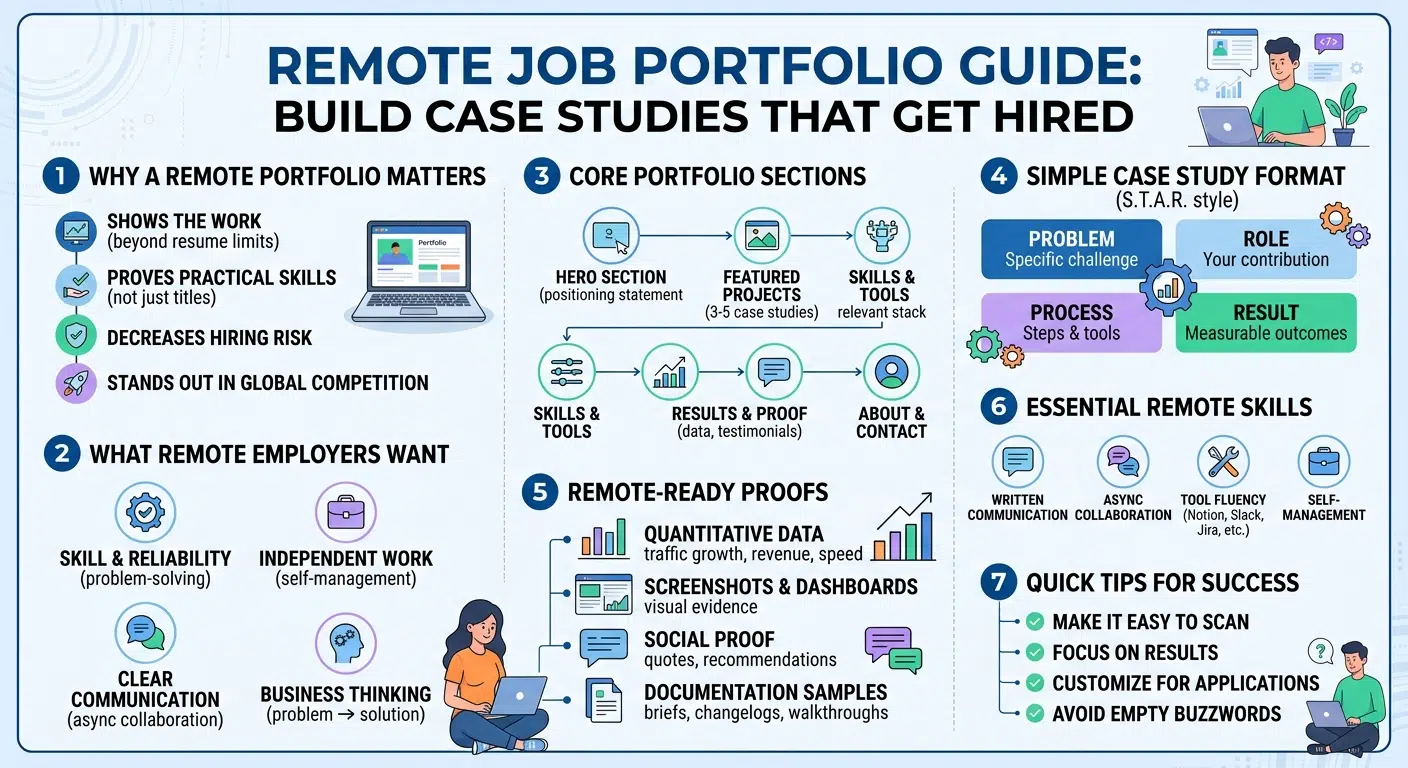
High-paying remote employers usually look for three things: skill, reliability, and communication.
They don’t want someone who needs daily chasing. They want someone who can understand the task, ask the right questions, document progress, and deliver clean work.
Remote teams also depend heavily on async communication. That means people write things down clearly so work can move forward even when teammates are in different time zones.
GitLab’s remote work handbook is one of the best-known examples of this style. It shows how serious remote teams treat documentation, written updates, and clear ownership.
| Employer expectation | Portfolio evidence |
|---|---|
| Independent work | Before-and-after case studies |
| Clear communication | Short, structured project write-ups |
| Business thinking | Problem, process, and result sections |
| Async collaboration | Briefs, docs, changelogs, walkthroughs |
| Reliability | Timelines, milestones, and ownership notes |
Match the Employer’s Problem
Your portfolio shouldn’t feel like a random folder of old work.
It should feel focused.
If you want a remote SEO job, show SEO audits, content refreshes, keyword maps, internal linking projects, traffic growth, and ranking improvements.
If you want a remote design job, show research, wireframes, prototypes, design choices, and usability improvements.
If you want a remote developer job, show live projects, GitHub repos, clean documentation, architecture notes, and deployment links.
Make it easy for the employer to think:
“Yes, this person has solved problems like ours.”
Show How You Think
Good employers don’t only hire output. They hire judgment.
So don’t just show the final article, app, dashboard, design, or campaign.
Explain why you made certain choices.
Why did you choose one tool over another?
Why did you remove a feature?
Why did you rewrite a landing page?
Why did you change the content structure?
Why did you prioritize one task first?
Those details make your work feel real.
Remote Job Portfolio: Core Sections You Need
A remote job portfolio should be simple, fast, and easy to scan.
Recruiters don’t have time to explore a confusing website. They want to understand who you are, what you do, and whether your work fits the role.
You can build your portfolio on Notion, WordPress, Webflow, Framer, Wix, GitHub Pages, Behance, Dribbble, Medium, or a custom site. The platform doesn’t matter as much as the clarity.
| Portfolio section | What to include |
|---|---|
| Hero section | Your role, niche, and value statement |
| Featured case studies | 3–5 strong projects with proof |
| Skills section | Tools, methods, and domain knowledge |
| Proof section | Results, screenshots, testimonials |
| About section | Short professional story |
| Contact section | Email, LinkedIn, resume, calendar link |
Start With a Clear Positioning Line
Your opening line should say what you do and who you help.
Weak version:
“I’m a passionate digital marketer looking for remote opportunities.”
Stronger version:
“I help B2B SaaS teams grow qualified organic traffic through SEO-led content systems.”
That line is clear. It tells the recruiter exactly where to place you.
More strong examples:
- “I design onboarding flows that reduce drop-offs for fintech apps.”
- “I build clean React dashboards for early-stage SaaS teams.”
- “I help founders turn rough ideas into publish-ready thought leadership.”
- “I manage remote operations with simple systems, weekly reporting, and clear documentation.”
Put Your Best Work Near the Top
Don’t hide your strongest case study.
Your homepage should show your best projects quickly. Each project card should include:
- Project title
- Problem solved
- Your role
- Main result
- Tools used
- Link to full case study
Example:
SEO Content Refresh for SaaS Blog
Updated 34 old articles, rebuilt internal links, and improved organic clicks by 42% in four months.
Tools: Google Search Console, Ahrefs, WordPress, GA4
That gives the reader value in seconds.
How to Choose the Right Case Studies
The best case study isn’t always your biggest project. It’s the one that explains your value best.
Choose projects that match the jobs you want next. If you’re targeting international remote roles, pick work that shows ownership, communication, independence, and measurable results.
Don’t upload everything you’ve ever done. That makes the portfolio messy.
Be selective.
| Case study type | Best for |
|---|---|
| Growth case study | SEO, marketing, sales, product growth |
| Process improvement case study | Operations, HR, admin, project management |
| Product build case study | Developers, product managers, designers |
| Research case study | UX, data, consulting, strategy |
| Client success case study | Customer success, account management |
| Automation case study | Operations, analytics, technical support |
Use a Simple Case Study Format
Use this structure:
- Problem: What was broken, slow, missing, or underperforming?
- Role: What exactly did you handle?
- Process: What steps did you take?
- Tools: Which tools or systems did you use?
- Result: What changed?
- Reflection: What did you learn?
This format works because it feels natural. It also helps the reader follow your thinking.
Make the Problem Specific
Don’t start with something vague like:
“The client needed better marketing.”
Say this instead:
“The client had 120 blog posts, but only 18 brought steady organic traffic. Most pages had outdated search intent, weak internal links, and no clear conversion path.”
Now the reader understands the challenge.
Specific problems make your solution more believable.
Be Honest About Your Role
If you worked with a team, say so.
You don’t need to pretend you did everything.
Example:
“I worked with one designer and one developer. My role was SEO research, content mapping, brief creation, and performance tracking.”
That sounds honest. It also shows you know how to collaborate.
Add Metrics, Screenshots, and Social Proof
Numbers make your portfolio stronger. But they must be real.
Good metrics include traffic growth, revenue growth, conversion improvement, time saved, cost reduced, fewer support tickets, faster delivery, or better user engagement.
This matters because hiring is becoming more skills-focused. TestGorilla’s 2025 report says 85% of employers use skills-based hiring, up from 81% in 2024 and 73% in 2023.
| Proof type | Example |
|---|---|
| Quantitative result | “Reduced reporting time from 6 hours to 90 minutes” |
| Visual proof | Screenshots, dashboards, before-after images |
| Social proof | Client quote, manager feedback, LinkedIn recommendation |
| Technical proof | GitHub repo, live demo, changelog |
| Writing proof | Strategy memo, brief, research summary |
Small Metrics Still Count
Not every project has revenue data. That’s okay.
You can still show useful numbers:
- Time saved
- Pages published
- Bugs fixed
- Tasks automated
- Rankings improved
- Leads generated
- Tickets resolved
- Meetings reduced
- Delivery time improved
A small clear result is better than a big claim with no proof.
Show Before and After
Before-and-after examples are easy to understand.
Example:
- Before: Blog posts had no internal linking structure.
- After: Built topic clusters and added 180 contextual internal links.
Another example:
- Before: Weekly reports took six hours to prepare.
- After: Created a dashboard template that reduced reporting time to 90 minutes.
That kind of proof works because it’s simple.
Protect Private Data
Never share confidential company data without permission.
Blur names. Hide customer details. Remove private financial numbers. Use percentages when exact figures are sensitive.
For example:
“Improved demo bookings by 28%”
is safer than showing a private CRM dashboard.
This shows maturity. It tells employers they can trust you.
Show Remote-Ready Skills Inside the Portfolio
A remote job portfolio should prove that you understand remote work.
Remote teams depend on clear writing, ownership, documentation, and trust. Gallup’s workplace data shows that six in 10 remote-capable employees prefer hybrid work, around one-third prefer fully remote work, and fewer than 10% prefer fully on-site work.
So yes, workers want flexibility. But employers still need people who can handle that flexibility well.
| Remote-ready skill | How to show it |
|---|---|
| Written communication | Clear case studies and project summaries |
| Async collaboration | Docs, briefs, update samples |
| Self-management | Timelines, milestones, ownership notes |
| Tool fluency | Slack, Notion, Jira, Trello, Asana, GitHub, Figma |
| Cross-cultural work | Global clients, time-zone handoffs, multilingual projects |
Add a “How I Work” Section
This small section can make your portfolio feel more personal.
Example:
“I work best with clear goals, weekly priorities, and async updates. I usually share progress through Notion docs, Loom walkthroughs, or short Slack summaries.”
You can also mention:
- Your communication style
- Your update rhythm
- Your time-zone overlap
- Your project management tools
- How you handle feedback
- How you document work
This helps employers picture you on their team.
Show Your Tool Stack
Don’t list every tool you’ve opened once.
List tools you actually know how to use.
For a content strategist:
- Google Search Console
- GA4
- Ahrefs
- Semrush
- WordPress
- Notion
- Google Docs
For a developer:
- GitHub
- React
- Node.js
- PostgreSQL
- Docker
- Vercel
- Jira
For a designer:
- Figma
- FigJam
- Adobe Creative Suite
- Maze
- Hotjar
- Webflow
Tool fluency helps recruiters match you with the role faster.
Build Case Studies by Role
Different remote roles need different proof.
A writer shouldn’t build the same portfolio as a developer. A project manager shouldn’t copy a designer’s layout.
Your portfolio should speak the language of your target role.
| Role | What your portfolio should show |
|---|---|
| Content writer | Published samples, briefs, SEO results, editing range |
| SEO specialist | Audits, keyword maps, content refreshes, traffic growth |
| Developer | Live projects, GitHub repos, documentation, architecture notes |
| Designer | UX research, wireframes, prototypes, final screens |
| Project manager | Timelines, stakeholder updates, delivery improvements |
| Data analyst | Dashboards, insights, SQL/Python work, business decisions |
For Writers and Content Marketers
Don’t only show writing samples.
Show the thinking behind the content.
Add:
- Keyword research
- Search intent notes
- Content briefs
- Editorial calendars
- Content refresh results
- Internal linking plans
- Performance screenshots
This proves you understand content as a business asset, not just a writing task.
For Designers
Don’t only show polished screens.
Show the journey.
Add:
- User pain points
- Research notes
- Wireframes
- Rejected ideas
- Design decisions
- Prototype links
- Usability improvements
Employers want to know why you made your choices.
For Developers
A developer portfolio should be easy to inspect.
Add:
- Live demo
- GitHub repo
- Tech stack
- Setup instructions
- Key features
- Architecture notes
- Known limitations
- Future improvements
Clean documentation is a remote-work signal. It shows that teammates can understand your work without asking ten follow-up questions.
For Project Managers and Operations Professionals
Your work may not look visual. That’s fine.
Show systems.
Add:
- SOPs
- Dashboards
- Timelines
- Workflow maps
- Meeting notes
- Reporting systems
- Stakeholder updates
Example:
“Reduced weekly reporting delays by creating one shared dashboard, assigning clear owners, and moving updates from meetings to async check-ins.”
That’s the kind of proof remote employers value.
Build for Skills-Based and AI-Aware Hiring
Recruiters now see more polished applications than ever. Many are written with AI tools. That makes generic resumes and cover letters easier to ignore.
TestGorilla’s 2025 report says 65% of employers use AI in hiring, and 73% say AI-generated resumes are easy to spot.
LinkedIn’s 2025 recruiting report also found that companies using more skills-based searches are 12% more likely to make a quality hire.
So your portfolio has to feel real.
| Hiring shift | What your portfolio should do |
|---|---|
| AI-written resumes are common | Show real project stories |
| Skills-based screening is growing | Add work samples and outcomes |
| Degree requirements are changing | Prove ability through evidence |
| Recruiters scan faster | Put results near the top |
| Global competition is intense | Position yourself clearly |
Show Human Judgment
AI can help draft text. It can’t replace your actual project decisions.
Add decision points to your case studies:
- Why did you choose this solution?
- Why did you remove that feature?
- Why did you rewrite the page?
- Why did you prioritize one issue first?
- Why did you use one tool instead of another?
These details make your work feel human.
Show Responsible AI Use
Coursera’s 2025 Global Skills Report says GenAI enrollments rose 195% year over year and passed 8 million total enrollments.
So yes, AI skills matter. But don’t just write “AI expert.”
Say how you use AI.
Weak version:
“AI expert.”
Better version:
“Used AI to draft content cluster ideas, then manually checked search intent, reviewed SERP gaps, edited the structure, and verified every claim before publishing.”
That sounds practical. It also sounds trustworthy.
Make the Portfolio Easy to Scan
Your portfolio must work for busy people.
Recruiters may open it during a packed workday. Hiring managers may check it between calls. If your portfolio is slow, crowded, or confusing, they may leave before seeing your best work.
Don’t overcomplicate it.
| Design element | Best practice |
|---|---|
| Navigation | Keep it simple: Work, About, Contact |
| Homepage | Show your niche and best projects quickly |
| Case studies | Use headings, bullets, and visual proof |
| Mobile view | Test every page on phone |
| Contact | Make email and LinkedIn easy to find |
| Load speed | Compress images and avoid heavy effects |
Write for Skimmers
Use short paragraphs.
Use direct headings.
Use bullets where they help.
Each case study should answer:
- What was the problem?
- What did you do?
- What changed?
- Why does it matter?
Don’t make the reader hunt for the main point.
Add Clear Calls to Action
Every page should guide the reader to the next step.
Good CTAs include:
- “View my resume”
- “Email me”
- “Book a 15-minute call”
- “See more case studies”
- “Connect on LinkedIn”
A portfolio should not just impress people. It should help them contact you.
Promote Your Portfolio the Right Way
A strong portfolio won’t help if nobody sees it.
Add the link to your resume, LinkedIn profile, email signature, GitHub bio, job board profiles, and freelance profiles.
FlexJobs reported that remote job postings increased by 20% in Q1 2026, covering January 1 through March 31, 2026. That points to fresh activity in the remote job market. It also means stronger competition.
| Channel | How to use your portfolio |
|---|---|
| Resume | Add the link below your name |
| Add it to the Featured section | |
| Job application | Mention one relevant case study |
| Cold email | Link to one project, not the whole site |
| Freelance profile | Add proof-heavy samples |
| GitHub or Behance | Link back to your main portfolio |
Customize Before Applying
You don’t need to rebuild your portfolio for every job.
Make small changes:
- Reorder featured projects
- Update your headline
- Add a role-specific note
- Highlight relevant tools
- Mention the company’s industry
- Link to the most relevant case study first
These small changes make your application feel personal.
Use One Case Study in Outreach
Don’t send a generic “please see my portfolio” message.
Mention one relevant project.
Example:
“I saw you’re hiring for a remote SEO role. This case study may be relevant: I refreshed 34 underperforming articles and improved organic clicks by 42% in four months.”
That’s short, specific, and useful.
Common Portfolio Mistakes to Avoid
Most weak portfolios fail for simple reasons.
They’re too vague. Too crowded. Too slow. Too hard to trust.
The biggest mistake? Showing finished work without explaining the thinking behind it.
A screenshot alone doesn’t tell an employer whether you solved the right problem.
| Mistake | Better approach |
|---|---|
| Listing too many projects | Show 3–5 strong case studies |
| No metrics | Add numbers, timelines, or proof |
| No project context | Explain the problem and your role |
| Generic homepage | Write a clear niche statement |
| Broken links | Test every link before applying |
| No contact details | Add email, LinkedIn, and resume |
| Too much design | Keep the work easy to read |
Don’t Hide Your Role
Be honest about what you did.
If it was a team project, explain your part clearly.
Example:
“The design team created the final UI. My role was user research, competitor analysis, and testing the onboarding flow with five users.”
That sounds credible. It also shows teamwork.
Don’t Use Empty Buzzwords
Avoid lines like:
- “I’m a dynamic professional.”
- “I’m passionate about innovation.”
- “I create impactful solutions.”
- “I work in a fast-paced environment.”
Replace them with proof:
“I built a weekly reporting system that reduced client update meetings from four to one.”
That’s much stronger.
Portfolio Checklist Before You Apply
Before sending your portfolio to remote employers, do one final check.
Pretend you’re a busy hiring manager with only three minutes.
Can you understand what you do?
Can you see your best work?
Can you find proof?
Can you contact you easily?
If not, simplify.
| Checklist item | Status |
|---|---|
| Clear headline explaining your role and niche | Yes / No |
| 3–5 relevant case studies | Yes / No |
| Results or proof included | Yes / No |
| Contact details visible | Yes / No |
| Resume linked | Yes / No |
| Mobile view checked | Yes / No |
| Broken links fixed | Yes / No |
| Confidential data removed | Yes / No |
| Case studies matched to target roles | Yes / No |
Review the Homepage First
Your homepage should answer one question fast:
“Why should this person be considered for this remote role?”
If the answer isn’t clear in the first few seconds, rewrite the headline and project cards.
Review Every Case Study
Each case study should include:
- Project background
- Problem
- Your role
- Process
- Tools
- Result
- Reflection
- Visual proof, where possible
One polished case study is better than five weak ones.
Final Thoughts
A remote job portfolio should make hiring easier for the employer.
It should show your best work, explain your thinking, prove your results, and make your communication style clear.
It should also sound like you. Not inflated. Not generic. Not packed with empty buzzwords.
The best portfolio says:
“Here’s the problem I solved. Here’s how I worked. Here’s what changed. Here’s how I can help your team.”
That’s what high-paying international remote employers want to see.
A resume may get your name into the system. But a strong portfolio can make someone remember you.
FAQs About Building a Remote Job Portfolio
A useful portfolio isn’t about looking perfect. It’s about showing how you solve problems.
Remote employers care about proof, clarity, and fit. If your portfolio explains those three things well, it can help you stand out even without a famous company name.
| Question | Quick answer |
|---|---|
| How many projects should I show? | 3–5 strong projects are usually enough |
| Can beginners build one? | Yes, through self-initiated or volunteer projects |
| Should I include confidential work? | Only after removing sensitive details |
| Does it replace a resume? | No, use both together |
| Which platform is best? | The one you can keep clean and updated |
Can I build a remote job portfolio without paid experience?
Yes.
Create realistic self-initiated projects.
A content writer can audit a public website and write a sample content strategy. A designer can redesign a public app flow and explain UX decisions. A developer can build a useful tool and document the code.
The project should feel practical, not imaginary.
Is Notion good enough for a remote job portfolio?
Yes.
A clean Notion portfolio is better than a slow, confusing custom website.
Just make sure the page is public, mobile-friendly, and easy to navigate.
Should I add salary expectations?
Usually, no.
Keep salary expectations for the application form, recruiter call, or interview stage.
Your portfolio should focus on value, skills, and proof.
Should I include failed projects?
You can, if the learning is strong.
Explain what happened, what you learned, and what you’d do differently next time.
Good employers respect honest reflection.
How often should I update my portfolio?
Update it every quarter or after every major project.
Remove weak samples. Add stronger results. Refresh your headline when your target role changes.
A stale portfolio can make you look inactive.