


WordPress powers over 40% of all websites on the internet, making it a prime target for cyber threats, including malware, brute-force attacks, and data breaches. If your WordPress site lacks robust security measures, it’s only a matter of time before hackers attempt to exploit vulnerabilities.
Fortunately, using the best WordPress security plugins can safeguard your site, protect sensitive data, and enhance overall security.
In this article, we’ll explore the 7 best WordPress security plugins to keep your website safe. We’ll analyze their features, pros, and cons, and help you choose the right plugin for your needs with detailed comparisons and expert insights.
Why You Need a WordPress Security Plugin?
WordPress security is not something to take lightly, as websites are frequent targets for cybercriminals. Without the right security measures, your website could fall victim to malware, data breaches, and hacking attempts. The best WordPress security plugins provide essential layers of protection to defend against evolving threats and keep your site safe.
Understanding WordPress Security Risks
WordPress websites face various security risks, including:
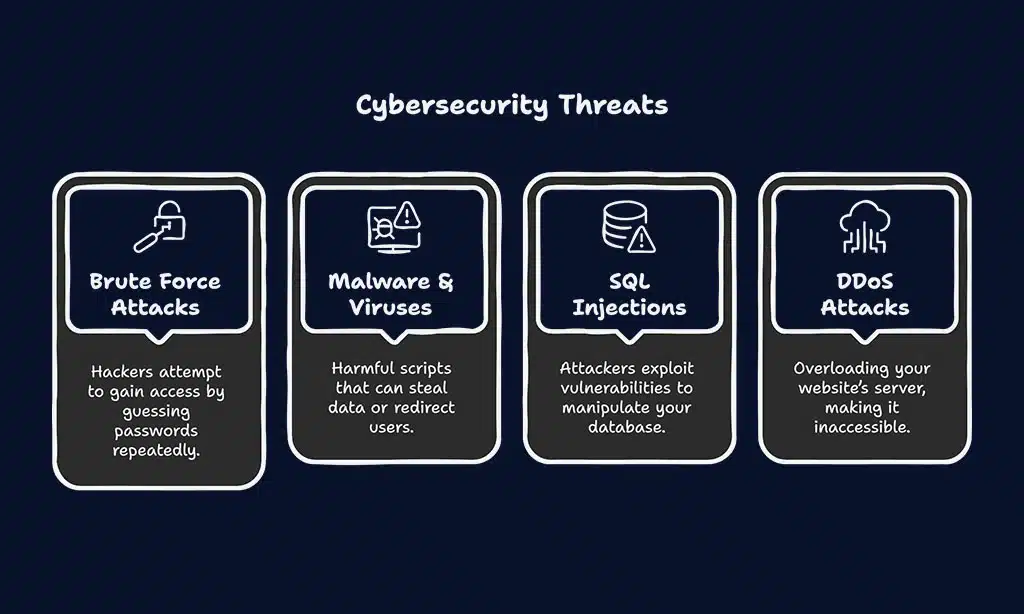
- Brute Force Attacks: Hackers attempt to gain access by guessing passwords repeatedly.
- Malware & Viruses: Harmful scripts that can steal data or redirect users.
- SQL Injections: Attackers exploit vulnerabilities to manipulate your database.
- DDoS Attacks: Overloading your website’s server, making it inaccessible.
- Outdated Plugins & Themes: Security loopholes in outdated software invite hackers.
Key Features to Look for in a Security Plugin
Selecting the right security plugin is crucial for maintaining your website’s safety. The best WordPress security plugins offer a variety of features that help prevent unauthorized access, detect malware, and keep your site running smoothly. Understanding these key security aspects will allow you to make an informed choice.
When choosing among the best WordPress security plugins, consider the following features:
- Firewall Protection: Blocks malicious traffic before it reaches your site.
- Malware Scanning: Detects and removes harmful code.
- Login Security (2FA, CAPTCHA): Prevents unauthorized access.
- Real-Time Monitoring: Alerts for suspicious activity.
- Backup & Recovery: Ensures you can restore your site in case of an attack.
Now, let’s dive into the 7 best WordPress security plugins that offer these essential features.
7 Best WordPress Security Plugins
Choosing the right security plugin for your WordPress site can be overwhelming, given the numerous options available. To help you make an informed decision, we have compiled a list of the best WordPress security plugins that offer robust protection against various cyber threats.
Each of these plugins is designed to enhance your website’s security, prevent unauthorized access, and protect your data from malicious attacks.
1. Wordfence Security
Wordfence is one of the most popular security plugins, offering a comprehensive approach to WordPress protection. It comes with a powerful firewall that actively blocks known malicious traffic, and its malware scanner ensures that your site remains clean.
The live traffic monitoring feature helps you see hack attempts in real time, giving you better visibility into potential security threats.
Additionally, Wordfence includes advanced blocking features that allow you to restrict access based on IP addresses, countries, or specific user agents. It also provides login security enhancements, including two-factor authentication (2FA) and CAPTCHA verification, to prevent brute-force attacks.
The plugin’s threat defense feed continuously updates to detect and prevent the latest emerging threats, ensuring your website remains protected at all times.
| Feature | Details |
| Firewall Protection | Blocks malicious traffic and known threats |
| Malware Scanning | Detects and removes malware automatically |
| Real-Time Monitoring | Monitors live traffic for security threats |
| Login Security | Prevents brute-force attacks with 2FA |
Pros & Cons:
- Regular malware signature updates
- Strong firewall protection
- Can slow down websites with heavy traffic
2. Sucuri Security
Sucuri is a cloud-based security solution that offers firewall protection, malware removal, and DDoS attack prevention. Many businesses trust Sucuri due to its reliability in preventing large-scale attacks and mitigating security threats before they impact website performance.
Its Web Application Firewall (WAF) effectively blocks malicious traffic, while its malware scanner actively detects and eliminates potential threats.
Beyond security, Sucuri also enhances website performance. It includes a CDN (Content Delivery Network) that not only helps in improving website speed but also optimizes bandwidth usage and reduces server load.
This ensures that websites remain fast and accessible even during high-traffic periods. Additionally, Sucuri provides website monitoring tools and instant security alerts, allowing administrators to react swiftly to potential security breaches.
| Feature | Details |
| Firewall Protection | Prevents DDoS, XSS, and brute-force attacks |
| Malware Scanning | Detects and removes harmful scripts |
| Performance Optimization | CDN integration boosts site speed |
| Security Auditing | Logs security issues for analysis |
Pros & Cons:
- Excellent malware protection
- Includes a performance-boosting CDN
- Premium version required for full features
3. iThemes Security

iThemes Security is a user-friendly and robust plugin that focuses on securing WordPress logins, database protection, and overall site integrity. It offers two-factor authentication (2FA), file integrity monitoring, brute-force prevention, and strong password enforcement to keep your site safe from cyber threats.
Additionally, iThemes Security provides scheduled malware scans, IP blocking, and real-time monitoring to detect and mitigate threats proactively.
A standout feature of iThemes Security is its away mode, which allows administrators to lock down the WordPress dashboard during specified hours, reducing exposure to unauthorized login attempts. It also offers database backups, helping site owners restore their data quickly in case of a breach. With over 30+ security measures, this plugin is a great choice for users looking to enhance their WordPress security effortlessly.
| Feature | Details |
| Login Security | 2FA and brute-force prevention |
| Database Protection | Secures critical WordPress files |
| File Change Detection | Monitors unauthorized modifications |
| Security Logs | Keeps track of login attempts and threats |
Pros & Cons:
- User-friendly interface
- Strong password enforcement
- Free version lacks malware scanning
4. All In One WP Security & Firewall
This plugin is ideal for beginners and offers a simple yet powerful firewall and security features. It provides login lockdown functionality, file system security, and a grading system to help users understand their security status.
The plugin’s user-friendly interface makes it accessible to those without technical knowledge, allowing them to implement security measures with ease.
In addition to these features, All In One WP Security & Firewall provides protection against brute-force attacks by limiting failed login attempts and automatically blocking suspicious IP addresses. It also includes database security tools that enable users to back up and restore their data, reducing the risk of losing valuable content.
The grading system helps users assess their site’s security strength and provides recommendations for improvement, making it a great choice for those new to WordPress security.
| Feature | Details |
| Firewall Protection | Blocks common security threats |
| Login Security | Protects against brute-force attacks |
| Database Security | Prevents unauthorized changes |
| Security Scoring | Rates security levels for improvement |
Pros & Cons:
- Beginner-friendly
- Free with essential features
- Lacks real-time scanning
5. MalCare Security
MalCare is a lightweight security solution designed to detect malware before it affects your site. Unlike traditional security plugins that scan within your server, MalCare scans your site in the cloud, ensuring minimal impact on performance.
This cloud-based approach allows it to conduct deep scans without slowing down your website, making it an ideal choice for high-traffic sites.
MalCare’s one-click malware removal feature sets it apart from many other security plugins. Instead of waiting for manual intervention, MalCare instantly removes any detected threats, ensuring your site remains clean and secure.
Additionally, it includes firewall protection, login security, and website hardening features to provide a well-rounded defense against cyber threats. With automated security updates and proactive monitoring, MalCare offers a hassle-free security solution for WordPress users.
| Feature | Details |
| Cloud-Based Scanning | Detects threats without slowing down your site |
| Instant Malware Removal | Removes infections with one click |
| Firewall Protection | Blocks harmful traffic and threats |
| Website Hardening | Implements security measures automatically |
Pros & Cons:
- Doesn’t impact site performance
- Instant malware removal
- Limited free version
6. WP Cerber Security
WP Cerber Security is a powerful security plugin designed to offer advanced anti-spam protection, malware scanning, and login security features. This plugin is ideal for site owners looking for robust protection against bots, brute-force attacks, and unauthorized access attempts.
WP Cerber’s intelligent traffic monitoring ensures that suspicious activities are detected and blocked before they can cause damage. It also includes customizable security rules that allow administrators to set specific access permissions, helping to strengthen security. With a combination of IP blocking, country restrictions, and real-time alerts, this plugin ensures that your website remains secure at all times.
| Feature | Details |
| Anti-Spam Protection | Blocks bots and automated spam attacks |
| Malware Scanning | Detects and removes malicious code |
| Login Security | Protects against brute-force attacks |
| IP & Country Blocking | Restricts access from suspicious regions |
Pros & Cons:
- Excellent anti-spam protection
- Strong login security features
- Some advanced features require a premium version
7. Shield Security
Shield Security is a lightweight yet feature-rich security plugin that provides automated malware scanning, firewall protection, and two-factor authentication (2FA). This plugin is known for its hands-off approach, meaning that once configured, it runs in the background without requiring constant manual intervention.
One of Shield Security’s standout features is its learning mode, which allows it to adapt to your site’s behavior and reduce false alarms while still keeping security tight. It also includes activity logging, bot detection, and traffic filtering, making it a comprehensive security solution for WordPress users looking for an easy-to-use plugin.
| Feature | Details |
| Automatic Malware Scanning | Detects and removes threats automatically |
| Firewall Protection | Blocks malicious traffic and bot attacks |
| Two-Factor Authentication | Enhances login security |
| Learning Mode | Reduces false positives for better accuracy |
Pros & Cons:
- Lightweight and efficient
- Minimal manual configuration required
- Some features require a premium version
Takeaways
Securing your WordPress website is essential to ensure its longevity and reliability. Cyber threats are continuously evolving, and relying on a high-quality security plugin can significantly reduce your vulnerability.
Whether you’re looking for a free beginner-friendly option or a premium enterprise-level solution, the security plugins listed above provide powerful protection features to keep your site safe.
Before choosing a security plugin, consider your specific needs, budget, and level of expertise. A well-protected website not only prevents cyberattacks but also ensures a smooth and trustworthy experience for your visitors.
Take action today by selecting the best WordPress security plugin suited to your requirements and safeguarding your online presence from potential threats.
























