

For gamers juggling a busy schedule, finding time to enjoy their favorite pastime can feel like an impossible challenge.
Balancing work, family, and personal commitments often leaves little room for gaming, but it doesn’t have to be this way.
In this article, we’ll explore 10 time-saving tips for gamers that will help you make the most of your limited time without sacrificing the enjoyment of your gaming sessions.
These time-saving tips for gamers will show you how to streamline your gaming routine while maintaining your passion for the hobby.
Understanding the Challenges of Time-Restricted Gaming
Why Time Management is Crucial for Gamers
The modern gamer faces a unique set of challenges. A packed schedule can lead to frustration, incomplete games, or even abandoning the hobby altogether.
Time management isn’t just about gaming; it’s about maintaining balance. Poor time management can result in missed opportunities to relax and de-stress, while effective time-saving tips for gamers allow them to maximize their enjoyment without guilt or burnout.
Key struggles include:
- Limited gaming time due to professional and personal commitments.
- Frustration with lengthy setup or loading times.
- Difficulty finding games that fit into short time slots.
Actionable Time-Saving Tips
1. Prioritize Gaming Goals
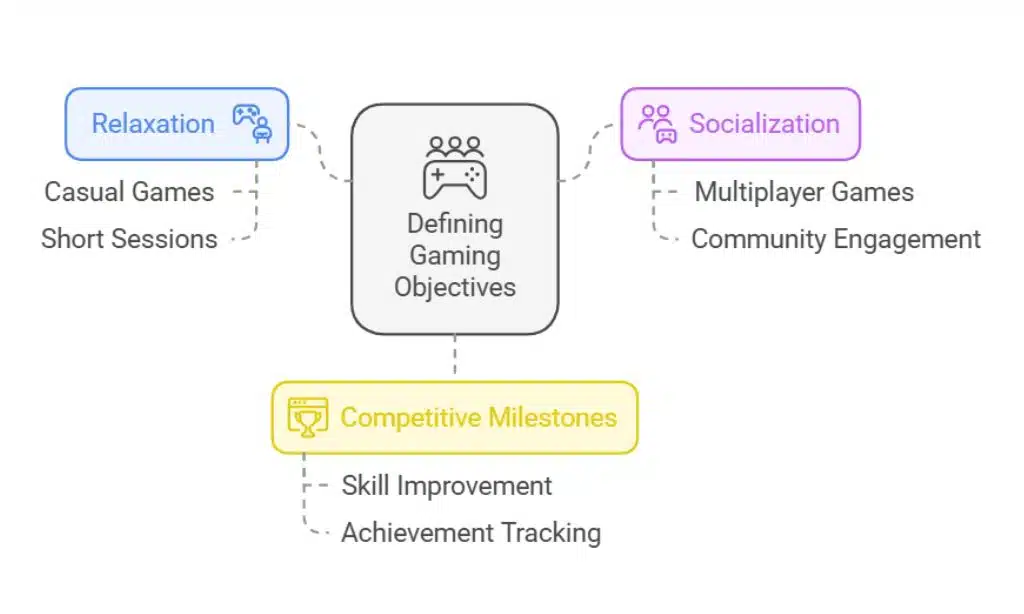
Defining your objectives as a gamer is essential. Are you playing to relax, socialize, or achieve competitive milestones? Setting clear goals will help you decide which games deserve your limited time.
By focusing on titles that align with your preferences and available time, you’ll enjoy a more fulfilling gaming experience.
Tips for Prioritizing Goals:
- Create a gaming bucket list with specific milestones.
- Focus on completing one game at a time to avoid splitting attention.
- Avoid games with excessive grinding unless they align with your goals.
Real-Life Insight:
A busy professional shared how completing one story-driven game per month brought immense satisfaction while fitting into their tight schedule.
This real-world example highlights the impact of time-saving tips for gamers.
2. Schedule Dedicated Gaming Time
Incorporate gaming into your daily routine by allocating specific time blocks. Treating gaming as a planned activity ensures it fits into your schedule without disrupting other responsibilities.
Sample Time-Blocking Schedule:
| Time Slot | Activity |
| 6:30 AM – 7:00 AM | Morning Game Break |
| 8:00 PM – 9:00 PM | Gaming Session |
| 9:00 PM – 9:30 PM | Wind Down/Relaxation |
Pro Tip:
Set reminders on your phone or calendar to establish consistency and prevent skipping gaming sessions. These time-saving tips for gamers can help you stick to a routine.
3. Leverage Cloud Gaming Services
Cloud gaming platforms like NVIDIA GeForce Now, Xbox Cloud Gaming, and Google Stadia offer instant access to games without the need for lengthy downloads or installations.
These services can significantly reduce setup and loading times, making them a game-changer for busy gamers.
Comparison of Cloud Gaming Platforms:
| Platform | Key Features | Cost (Monthly) |
| NVIDIA GeForce Now | High-quality graphics, free tier | $0 – $19.99 |
| Xbox Cloud Gaming | Extensive game library, Game Pass | $14.99 |
| Google Stadia | Easy integration with YouTube | $9.99 |
4. Optimize Game Settings for Efficiency
Simple adjustments to your game settings can save precious minutes. Utilize pre-configured options to skip lengthy customization processes and take advantage of features like auto-save to ensure your progress is never lost.
Efficiency Tips:
- Enable quick-start modes to bypass intros or tutorials.
- Adjust graphics settings for smoother gameplay on lower-end devices.
- Use auto-save and cloud save features to pick up where you left off without hassle. These simple yet effective time-saving tips for gamers are often overlooked.
5. Utilize Shorter Gaming Sessions

Not all games require hours of investment to enjoy. Explore titles designed for short playtimes, such as mobile games or indie hits. These games are perfect for quick sessions during breaks.
Top Games for Quick Sessions:
| Game | Average Playtime |
| Among Us | 10-15 minutes per round |
| Stardew Valley | Flexible, short days |
| Hades | 20-30 minutes per run |
| Slay the Spire | 15-20 minutes per run |
| Rocket League | 5-7 minutes per match |
6. Focus on Multiplayer Games with Friends
Combine your gaming time with social interaction by playing multiplayer games. Co-op and team-based titles allow you to connect with friends while enjoying your favorite hobby.
Advantages of Multiplayer Games:
- Social interaction with friends enhances enjoyment.
- Quick-access multiplayer modes eliminate downtime.
- Shared gaming achievements foster camaraderie.
Examples:
- Play “Overcooked! 2” for quick, cooperative fun.
- Join a “Call of Duty” match for fast-paced, competitive action.
7. Streamline Gaming Setup
An organized gaming environment reduces the time spent searching for gear or troubleshooting equipment. Invest in accessories that simplify your setup and save time.
Recommended Accessories:
| Accessory | Benefit |
| Cable management kits | Keeps wires organized |
| Quick-connect controllers | Reduces setup time |
| Headset stand | Keeps gaming gear accessible |
Real-Life Example:
One gamer reported cutting down their prep time by 15 minutes daily after reorganizing their gaming station with labeled storage bins. This practical application of time-saving tips for gamers underscores their value.
8. Use Productivity Apps for Gaming
Productivity tools aren’t just for work—they can also enhance your gaming experience. Apps like Trello or Notion can help manage your gaming schedule and track progress.
Popular Gaming Productivity Tools:
- Trello: Organize gaming goals and achievements.
- GG App: Track completed games and wishlist items.
- Discord: Schedule gaming sessions with friends and stay connected.
9. Take Advantage of Gaming Guides
Save time by consulting expert walkthroughs and tutorials. These resources reduce the learning curve, allowing you to progress faster and avoid unnecessary frustration.
Best Platforms for Gaming Guides:
| Platform | Type of Content |
| YouTube | Video tutorials and playthroughs |
| Community tips and discussions | |
| Official Wikis | Comprehensive game information |
10. Stay Healthy to Maximize Efficiency
Your physical and mental well-being directly impact your gaming performance and enjoyment. Incorporate wellness routines into your day to stay focused and energized.
Quick Wellness Hacks:
- Take 5-minute stretch breaks during gaming sessions.
- Stay hydrated with a water bottle nearby.
- Practice mindfulness or short breathing exercises to reduce stress. Staying healthy is one of the most overlooked time-saving tips for gamers.
Interactive Elements
Enhancing Engagement with Readers
To make this guide more actionable, we’ve included interactive elements like tables and lists:
- Table: “Top 5 Cloud Gaming Platforms with Features”
- List: “Quick Games Under 15 Minutes”
- Pointers: Wellness hacks for sustained focus.
Takeaways
Finding time for gaming doesn’t have to be a struggle. By applying these time-saving tips for gamers, you can balance your passion for gaming with a busy schedule.
From leveraging cloud gaming services to staying organized and healthy, these strategies will help you enjoy a fulfilling gaming experience.
These actionable tips ensure that gaming remains a source of joy rather than a stress point. What are your favorite tips for saving time while gaming?
Share them in the comments below!
























