

Why Is It Important To Review Your Bank Statement Each Month?
You might miss a sneaky fee on your paper statement. You could also miss a shady withdrawal in your mobile banking. A bank statement gives an account summary. It shows every deposit and withdrawal in a specific period.
We will share steps to compare each transaction. You will learn to track spending habits and spot fraudulent activity. This guide will help you dodge overdraft fees. It will guard your cash flow and boost your financial health.
Read on.
Key Takeaways
- Checking your statement each month helps you catch fraud early (the FTC gets over 100,000 fraud reports yearly) and spot phantom charges like a $4.50 coffee purchase you never made.
- You can fix banking errors fast by spotting wrong ATM fees, duplicated payments, or a check cleared for the wrong amount and reporting them right away.
- Tracking subscriptions and small fees (for example, a $12 streaming charge adds up to $144 a year) helps you trim waste and meet goals like saving for a home or building an emergency fund.
- A 15–30 minute monthly review of your balance and transactions keeps you from overdraft fees; set alerts and check pending items so you never spend more than you have.
- Regular reviews boost your financial awareness, sharpen your budgeting, and guard your cash flow by matching bank entries to receipts and your own records.
Why Is It Important to Review Your Bank Statement Each Month

Skim your statement each month to spot sneaky ATM fees, odd debit card charges, or surprise withdrawals. This quick visit to your online banking keeps your checking or savings balance on track.
Detect Fraudulent Transactions
Check your account statements each month to spot sneaky charges on your debit card, credit card, or ATM withdrawals. Regularly reviewing your bank statements might catch a $4.50 coffee charge you never made or a phantom deposit in your savings account.
More than 100,000 bank fraud reports land with the FTC each year, and millions face identity theft cases yearly. Report odd entries to your bank right away through online banking or a teller so you cut risk.
Identify Banking Errors
Scan each line on your bank statement every month to spot wrong charges. Wrong ATM usage fees or duplicated payments can slip by. Spot a recurring subscription fee you forgot to cancel and cut that expense fast.
Catching a check that cleared for the wrong amount keeps your deposit account records accurate. Reporting discrepancies to your financial institution fast can lower your liability for fraudulent transactions.
Prompt action will stop small mistakes from ballooning into big fees.
Compare each transaction to your budget or to your receipts. Flag any missing deposit or debit entry mistakes. You might spot a loan payment that never posted or a payment gone astray.
Call customer service right away to fix the issue. Regularly checking your bank statements each month helps keep your account holder status in good standing.
Monitor Spending Habits
A quick look at your bank statement can spot unnecessary subscriptions in your checking account. Review your statements regularly to track every Netflix or gym fee. Tracking account activity in banking apps or at an ATM builds a clear view.
Spotting small fees adds up to real savings toward a house or an emergency fund.
Smart budget moves come when spending links to goals like debt reduction or saving for a trip. Watching your bank makes it easy to curb overspending and meet savings goals. A clear account balance gives you the power to plan ahead.
Tips for Efficient Bank Statement Reviews
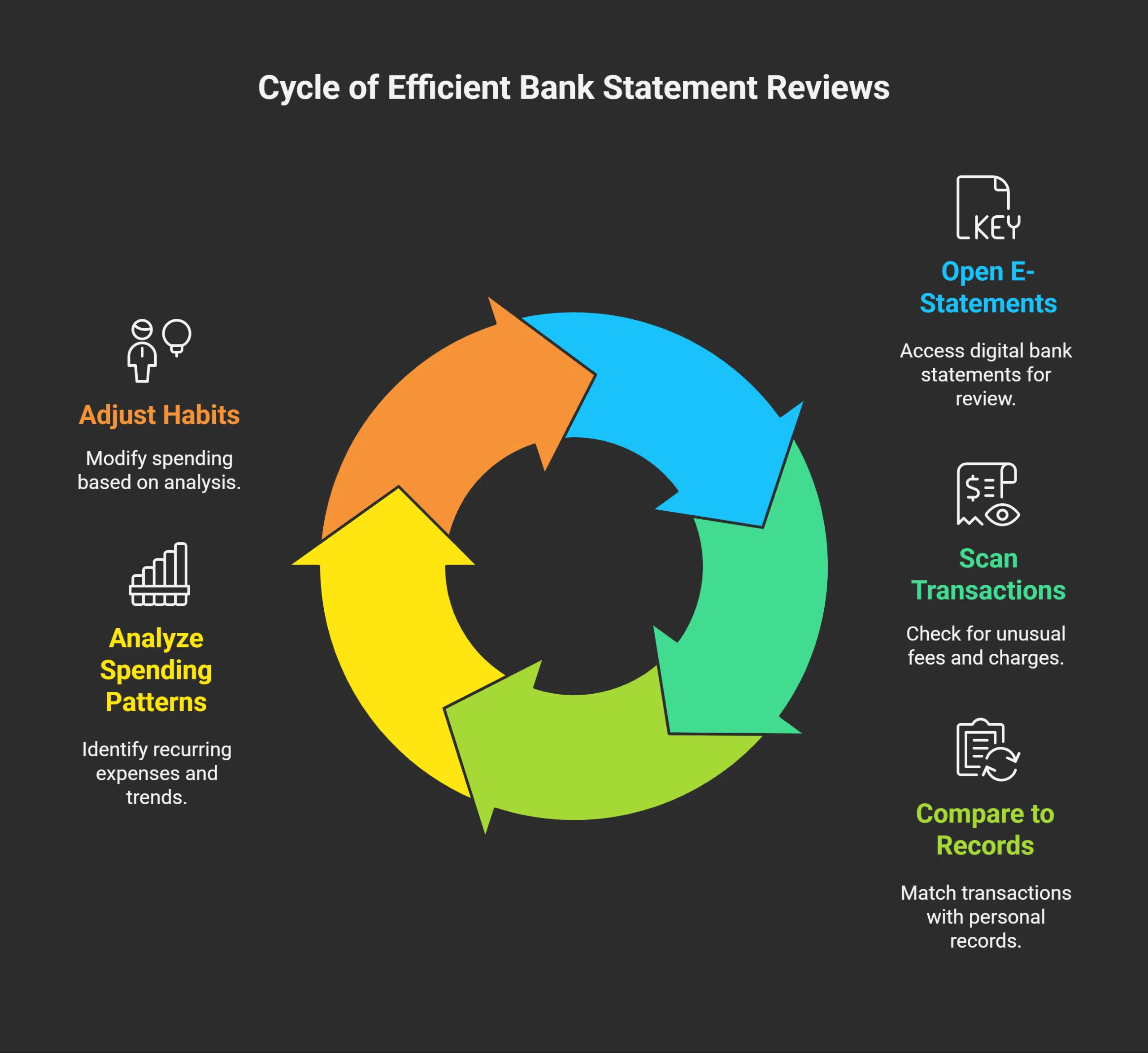
Open your e-statements in the bank app, and scan each financial transaction like a hawk for odd fees. Pull your ATM history into a simple budget tool, tag bills by color, and spot strange spending fast.
Compare Transactions to Your Records
Plan 15 to 30 minutes each month to check your bank statement against your own records. Scan each entry and match it to a sales slip, ledger, or mobile app log. Mark each automated teller machine withdrawal and payroll deposit.
Spot any unexpected bank fees or charges.
Highlight mismatches and report them to your bank immediately with the date, amount, and description. Keep copies of receipts or pay stubs as proof. Get a bank statement online or a paper copy each statement period.
This habit sharpens your financial awareness.
Analyze Patterns in Spending
Check your checking or savings account online each month and mark repeated entries to review your account details, like a $12 streaming fee. Spotting small drains helps you find waste.
That $12 fee adds up to $144 over a year. Use money management software or a simple table to track totals by category. You keep your bank and savings on track by reviewing bank statements regularly this way.
Compare sums from one period to the next. See if groceries or utilities climb. Match those figures to goals, like saving for a home down payment, building an emergency fund, or cutting debt by 20 percent in six months.
That review lets you adjust habits. Monitoring your bank and spending helps your budget stay healthy.
Benefits of Regular Bank Statement Checks
Regularly scanning your bank account on an online banking platform helps you catch odd fees and spot dips in your paycheck fast. A glance at your statement in a mobile application or spreadsheet grows your money sense and shields your funds.
Avoid Overdraft Fees
Low funds can trigger a fee if you pay more than your balance. A look at your balance log each month, at least once a month, helps you spot a pending overdraft. Use smartphone alerts and access your bank accounts online to track your total.
Check your bank statements regularly to find in a bank statement any hidden costs like a forgotten subscription.
Contact your bank as soon as possible if you spot a fee. Gather your account information, like the date, amount, and statement page, then send it to your bank. Keep paper copies or online statements for six months as proof.
You might see a refund once they check your proof.
Strengthen Financial Awareness
Monthly reviews boost your money smarts. A quick look at a bank statement regularly helps you spot odd fees, income entries, and mortgage charges. Statements provide a comprehensive overview of tax credits, apartment rent, and interest errors.
They track spending habits and savings goals, so you can cut waste and build your nest egg.
Brief checks shield you from fraud risks and unauthorized charges. You can use ledger balancing or a spending tracker or update data grids with payment warnings. These tools help you build confidence, improve budgeting, and avoid overdraft fees.
You gain insights into your cash flow, empowering you to take control of your financial health.
Takeaways
Tracking your balance report each month feels like a health check for your money. It helps you spot scam alerts fast. You can use a web portal or Acrobat Reader to scan each entry quickly.
An Excel file lays out your transactions with clear labels. Regular reviews shape a smarter spending plan and guard against surprise fees. This habit flexes your money muscles.
FAQs
1. How often should you check your bank statement?
You should check your bank statement at least once a month, right at the end of the statement period. Regular reviews of your transaction account give you an overview of the account, and bank statements on a regular basis help you spot errors fast.
2. What does a bank statement look like, and how do I read a bank statement?
A bank statement provides a list of all entries applied to your account. It shows dates, account numbers, deposits, withdrawals, and balances. To read a bank statement, scan each line, check the totals, and make sure everything makes sense. Statements help you identify odd entries.
3. Why is it important to review your credit card statement with your bank statement?
Your credit card statement often shows charges that may not appear on a transaction account right away. Comparing both can help you detect duplicate payments, catch a sneaky fee, or clear up any mystery charges in finance or accounts payable. This side-by-side check may help you avoid late fees and keep your cash flow healthy.
4. How do statements allow you to spot suspicious activity?
By regularly looking at your statements, you keep an eye out for bad apples, like unauthorized withdrawals or odd transfers within an account. A careful review can help you catch suspicious activity in its tracks. The statement can help you identify who made the charge and when it hit your account.
5. Where can I access my bank statements?
You can access your bank statements online, through your bank’s website or app, or opt for receiving paper statements in the mail. Both electronic statements and paper statements let you view every transaction over a specific period. Just log in to your profile or open your mailbox to keep up.
6. What benefits do I get from reviewing my bank statement each month?
A monthly review may help you avoid overdraft fees and spot hidden costs. Bank statements help you plan budgets, track savings, and see how much was applied to your account. That habit keeps you in the loop, and a penny saved really is a penny earned.























