


WhatsApp Launches New Search Function in The Settings Section

WhatsApp Launch New Search Function

Listen to the Podcast:

We are aware that WhatsApp is the most popular messaging application, so it is constantly introducing new features to enhance the user experience. Today, we have an innovation that will save time and make life simpler for many people. What is the latest? As it turns out, WhatsApp has just released a feature that enables you to filter options using a search tool in the settings, which is currently available to beta testers.

According to WABetaInfo, both the WhatsApp beta update for iOS 23.4.0.73 and the most recent WhatsApp beta update for Android 2.23.8.20 available on the Google Play Store include a new feature made available to some beta testers: “the ability to filter the application settings using the search bar.” This feature will make it much simpler to locate a particular option.

As shown on the screenshot, a search field will appear, into which you will simply input the desired option’s name to be taken directly to it.
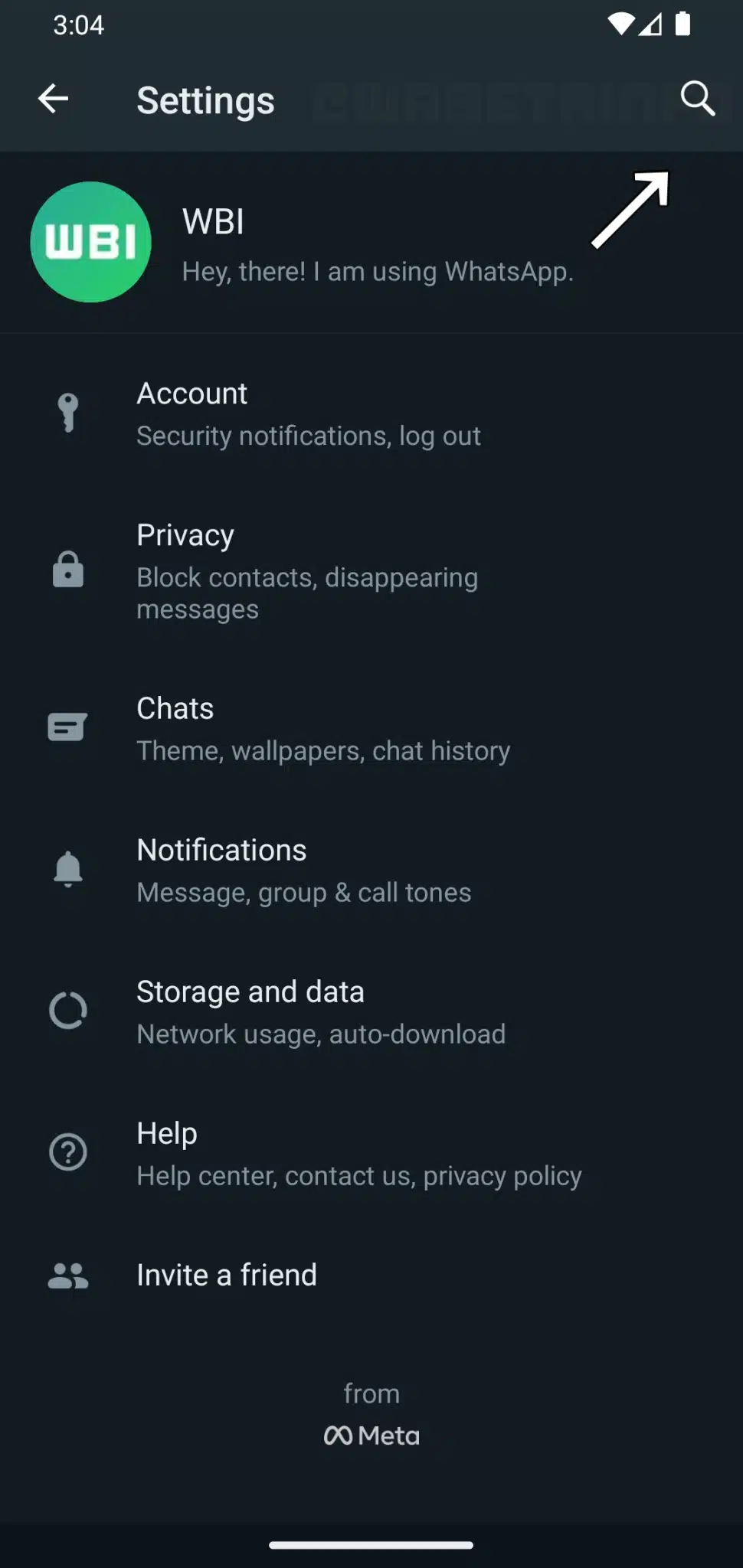
WhatsApp new search function

WhatsApp is also working on a search filter for messages 

According to WABetaInfo, the WhatsApp beta update for iOS 22.19.0.73 has been released. WhatsApp was developing a new feature: the ability to browse for messages by date. This is a feature that has been anticipated by many, as it will make it simpler for users to navigate to a specific date within a conversation.

This feature was in development in 2020, but the social media company recently redeveloped it. Due to the latest WhatsApp iOS 22.24.0.77 beta update for the TestFlight app, some beta testers can now utilize this feature in their conversations and groups after a lengthy wait.

As seen in the screenshot below from WABetaInfo, in order to use the search function in a conversation, a calendar icon must be present. When this icon appears when you select the search button, it indicates that the function has been enabled for your WhatsApp account. If the calendar indicator does not appear, don’t panic; it will be made available to more users in the future, and at the end of this article, we’ll explain how to obtain it early.
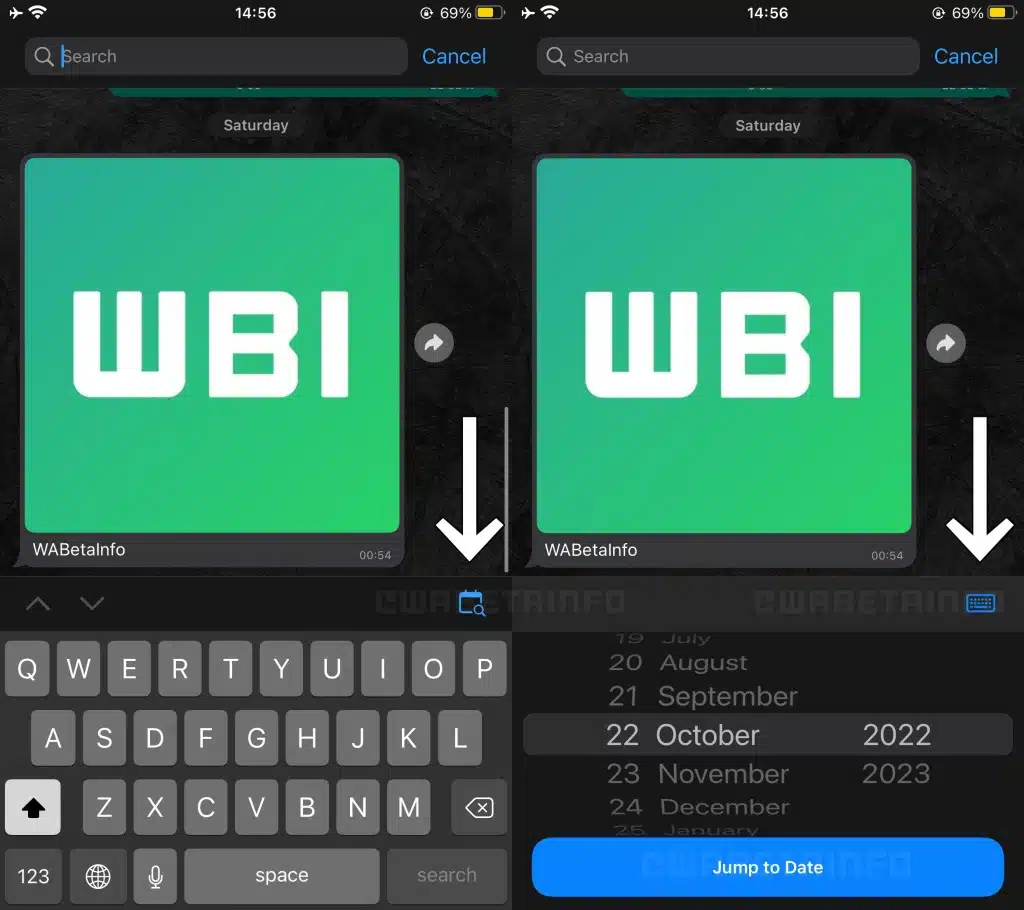
WhatsApp search function

This feature will enable you to quickly navigate to a specific date to view the messages shared within a particular conversation. Not only that, but you can also skip to the first message, so you won’t have to browse endlessly to locate the desired message.

Finally, it is important to note that this new function, which allows users to search for communications by date, has been made available to beta testers who installed the most recent beta update of the TestFlight application and will be rolled out to more users in the coming weeks. Eventually, it will be available to everyone, but for the time being, you can either wait or transition to WhatsApp’s beta version.



Subscribe to Our Newsletter

Related Articles

Top Trending

On This Day July 30
On This Day July 30: History, Famous Birthdays, Deaths & Global Events
Productivity App Overload
Productivity App Overload: Why More Tools Mean Less Work
Machine Learning vs Deep Learning comparison showing decision-tree models beside a multilayer neural network processing images, audio, and text data.
Machine Learning vs Deep Learning: What's the Difference?
Ways to Reduce Game Development Costs
12 Ways Studios Cut Game Development Costs
AI Search Visibility Metrics KPIs
AI Search Visibility Metrics KPIs: How to Measure It [Step-By-Step Guide]

Technology & AI

Productivity App Overload
Productivity App Overload: Why More Tools Mean Less Work
Machine Learning vs Deep Learning comparison showing decision-tree models beside a multilayer neural network processing images, audio, and text data.
Machine Learning vs Deep Learning: What's the Difference?
SaaS vs MaaS
SaaS vs MaaS: What Model as a Service Means for Software Buyers
Google Home control multiple devices at once
Can Google Home Turn On Two Smart Devices at Once?
ai tools for personal productivity
12 Best AI Tools for Personal Productivity in 2026

GAMING

Ways to Reduce Game Development Costs
12 Ways Studios Cut Game Development Costs
NFT game development cost
How Much Does NFT Game Development Cost? A Realistic Budget Breakdown
Reasons Why You No Longer Need the Best Roblox AI Scripter
Forget Best Roblox AI Scripter: 10 Reasons Why You No Longer Need It
Blockchain Platforms for Game Development
The 9 Best Blockchain Platforms for Game Development
Free Game Engines for Beginners
Top 10 Best Free Game Engines for Beginners

Business & Marketing

How To Start A Digital Marketing Consultancy From Scratch
Ecommerce Data Analysis with Claude
The Complete Guide to Ecommerce Data Analysis with Claude
SaaS valuation decline
Why $50B SaaS Valuations Won't Survive: 10 Top Reasons Explained
Enterprise AI Agent Strategy
The Age of AI Agents: How to Build an Enterprise AI Agent Strategy
Side Hustle Projects
Top 10 Side Hustle Projects That Will Generate MRR In 2027

EdTech & E-Learning

Learning Management System
What Is A Learning Management System And How To Choose One
How Student Data Privacy Works in EdTech
How Student Data Privacy Works in EdTech: FERPA, COPPA, and GDPR
Should Schools Ban AI
Should Schools Ban AI? What The Evidence Actually Suggests
How Schools Detect AI-Written Homework
How Schools Detect AI-Written Homework: The Shocking Truth!
How Teachers Use AI To Cut Planning Time In Half

Software & Apps

Productivity App Overload
Productivity App Overload: Why More Tools Mean Less Work
SaaS vs MaaS
SaaS vs MaaS: What Model as a Service Means for Software Buyers
ai tools for personal productivity
12 Best AI Tools for Personal Productivity in 2026
SaaS Development Process
How to Design a SaaS Development Process in 8 Steps
Are productivity apps like Notion useful
Are Productivity Apps Like Notion Useful or a Time Sink?





















