


Have you ever clicked a button on a web app and felt that frustrating half-second delay? You are definitely not the only one dealing with sluggish load times and stuttering animations. Many developers run into a performance wall when relying entirely on JavaScript for heavy tasks. You want your games, video editors, and complex tools to run at lightning speed. That is exactly how WebAssembly is changing front-end development.
By early 2026, WebAssembly handles around 5.5% of all Google Chrome page loads, powering some of the biggest applications on the web. This technology lets you write code in languages like Rust or C++ and run it directly in browsers at near-native speeds.
It is a massive leap forward for the whole industry. I will walk you through exactly how it works and when you should use it. Grab a cup of coffee, and let’s go through it together so you can start building faster web applications.
What Is WebAssembly?
WebAssembly is a binary instruction format that runs inside your web browser. It delivers code that executes at incredibly fast speeds.
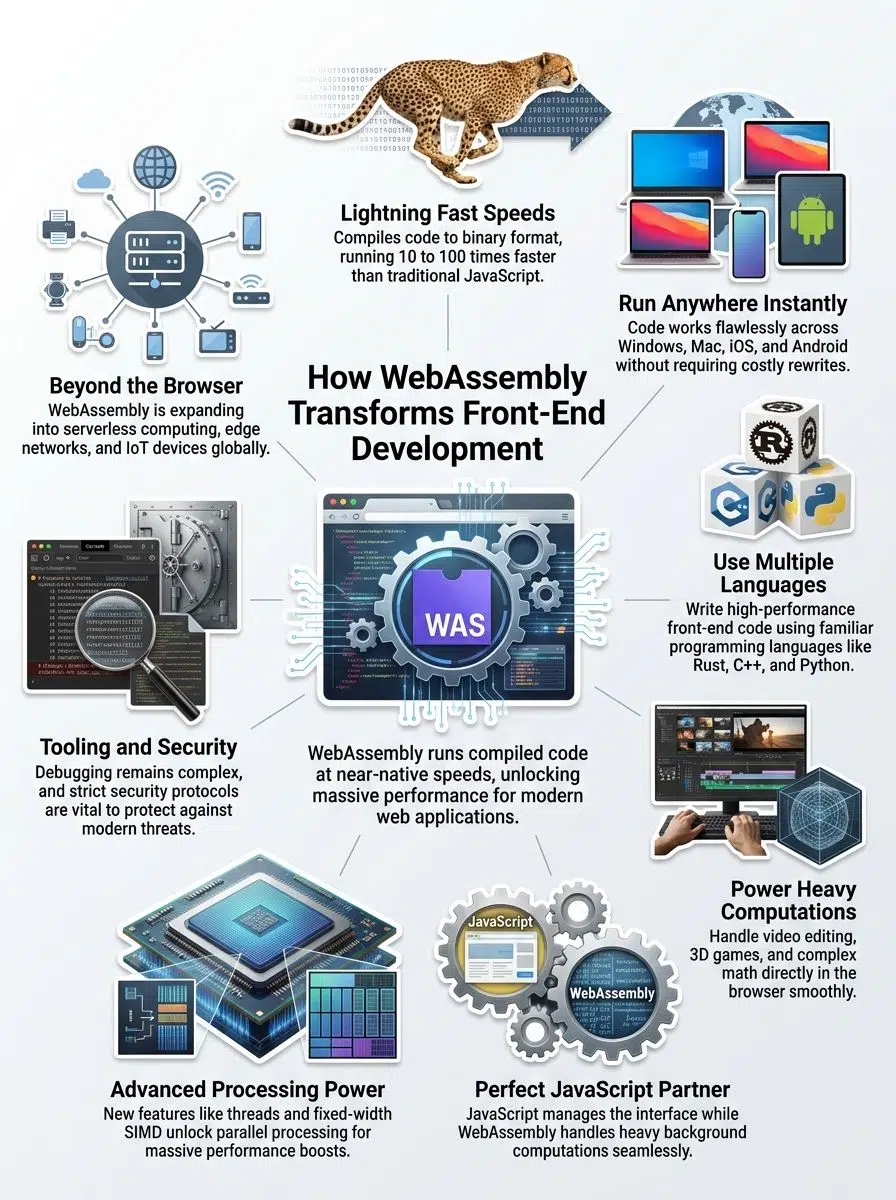
With the release of the WebAssembly 3.0 specification in late 2025, the technology became an official W3C standard with powerful new features. It acts as a direct bridge between traditional programming languages and the web.
Key features of WebAssembly
WebAssembly runs at near-native speeds inside your browser. For example, recent runtime engines like Wasmer 6.0 achieve roughly 95% of native hardware speed on compute benchmarks.
This technology opens doors to possibilities that JavaScript simply cannot reach on its own. Here are the core features you should know about:
- Fast execution speeds: Your code compiles to a compact binary format before running. The browser skips translation delays, making applications perform like compiled desktop programs.
- Language flexibility: You can write front-end code in Rust, C++, or Python instead of relying solely on JavaScript. Developers can bring their favorite tools directly to the web.
- Compact file sizes: Binary format compresses much better than text-based JavaScript. This drastically reduces bandwidth costs and improves load times for users.
- Sandbox security: The browser isolates code execution within strict boundaries. It prevents malicious scripts by controlling exactly what the application can access on a machine.
- Interoperability with JavaScript: These two technologies work together perfectly. You can easily call JavaScript functions from your compiled code and pass data back seamlessly.
How it integrates with front-end development
Front-end developers integrate WebAssembly by writing code in languages like Rust or C++. They then use modern tools like Emscripten or wasm-pack to compile that code into the WebAssembly format.
The compiled modules load directly into web browsers alongside your standard JavaScript files. This creates a hybrid approach that leverages the best parts of both languages.
This integration means you can keep your existing JavaScript infrastructure completely intact. You only add high-performance WebAssembly components exactly where you need them most.
The browser handles the execution natively. Users see immediate performance gains without downloading special software or third-party plugins.
Advantages of WebAssembly in Front-End Development
WebAssembly speeds up your web applications by running code significantly faster than interpreted scripts. Your users get snappier interfaces and quicker load times across every single device.

Improved performance and speed
Speed is absolutely critical in web development. Code written in languages like Rust compiles down to a highly optimized binary format.
This completely eliminates the bottleneck of interpreting text-based code line by line. Complex calculations that once took seconds now finish in a few milliseconds.
Real-world results are very impressive. For instance, the popular design tool Figma uses a C++ rendering engine compiled to WebAssembly. This approach achieved load times that were three times faster than previous methods.
WebAssembly opens the door to performance levels we never thought possible in a standard web browser.
Graphics render more smoothly, and heavy data processing happens in real time. Front-end development teams can build modern applications that rival the absolute speed of native desktop software.
Cross-platform compatibility
WebAssembly breaks down the walls between different operating systems. Code written in Python or C++ compiles once and runs anywhere.
It works flawlessly on Windows, Mac, Linux, iOS, and Android without requiring any modifications. Apple recently improved execution speeds in Safari 18.4, bringing mobile execution up to par with Chrome and Firefox.
This cross-platform approach saves massive amounts of time and cuts development costs. Your web application performs consistently on a smartphone and a laptop.
Support for multiple programming languages
Developers love working with familiar tools. You can write code in your favorite language and compile it directly to WebAssembly.
In fact, almost all of the top 25 programming languages now support this platform. The most popular options include:
- Rust: Known for memory safety and tiny file sizes.
- C++: Perfect for porting existing heavy-duty desktop apps.
- Python: Incredible for bringing data science to the browser.
- Kotlin and Java: Now fully supported thanks to the new garbage collection updates.
This flexibility opens amazing doors for programmers who prefer different languages over JavaScript. A developer skilled in Rust can build high-performance front-end features immediately.
Key Use Cases of WebAssembly in Front-End Development
WebAssembly truly shines when developers need to run heavy computations right in the browser. It gives a serious speed boost to applications that would normally cause your computer fans to spin up.
Running heavy computations in the browser
Heavy math problems notoriously slow down web apps. Your browser can now handle these intensive tasks directly without crashing.
In 2026, client-side AI inference became the fastest-growing use case for WebAssembly. Developers are now running complex models locally. This localized approach provides huge benefits:
- Data stays perfectly secure on the user’s personal device.
- The application functions beautifully even without an internet connection.
- Server costs drop drastically since the user’s machine does the heavy lifting.
It cuts down on network traffic and makes your app respond instantly to user actions.
Enabling high-performance 3D rendering and games
WebAssembly completely transforms how developers build 3D graphics for the web. Traditional JavaScript struggles with the heavy computational tasks required by modern visual software.
Major engineering software relies on this tech today. The web version of AutoCAD uses WebAssembly to render massive architectural plans smoothly inside a standard browser tab.
Game developers also leverage WebAssembly to port massive engines like Unity and Unreal Engine 5 directly to the web. Players can enjoy console-quality experiences without downloading massive installation files.
Supporting complex applications like video editing tools
Video editing tools push web browsers to their absolute limits. These applications demand serious computing power for fast rendering and smooth playback. Front-end development teams turn to WebAssembly to handle the intense workload. For example, Adobe Photoshop on the web handles highly complex image rendering entirely through WebAssembly.
Users notice immediate improvements across the board:
- Massively faster file exports.
- Quicker live previews of visual effects.
- Incredibly smooth navigation along the video timeline.
The front-end handles user interactions through JavaScript, while WebAssembly tackles the heavy color grading and audio processing in the background.
WebAssembly vs. JavaScript
WebAssembly and JavaScript each solve very different problems. Smart developers do not pick a favorite; they just pick the right tool for the specific job.
Differences in execution and use cases
JavaScript and WebAssembly operate in fundamentally different ways. They both excel in specific scenarios where their unique strengths matter most.
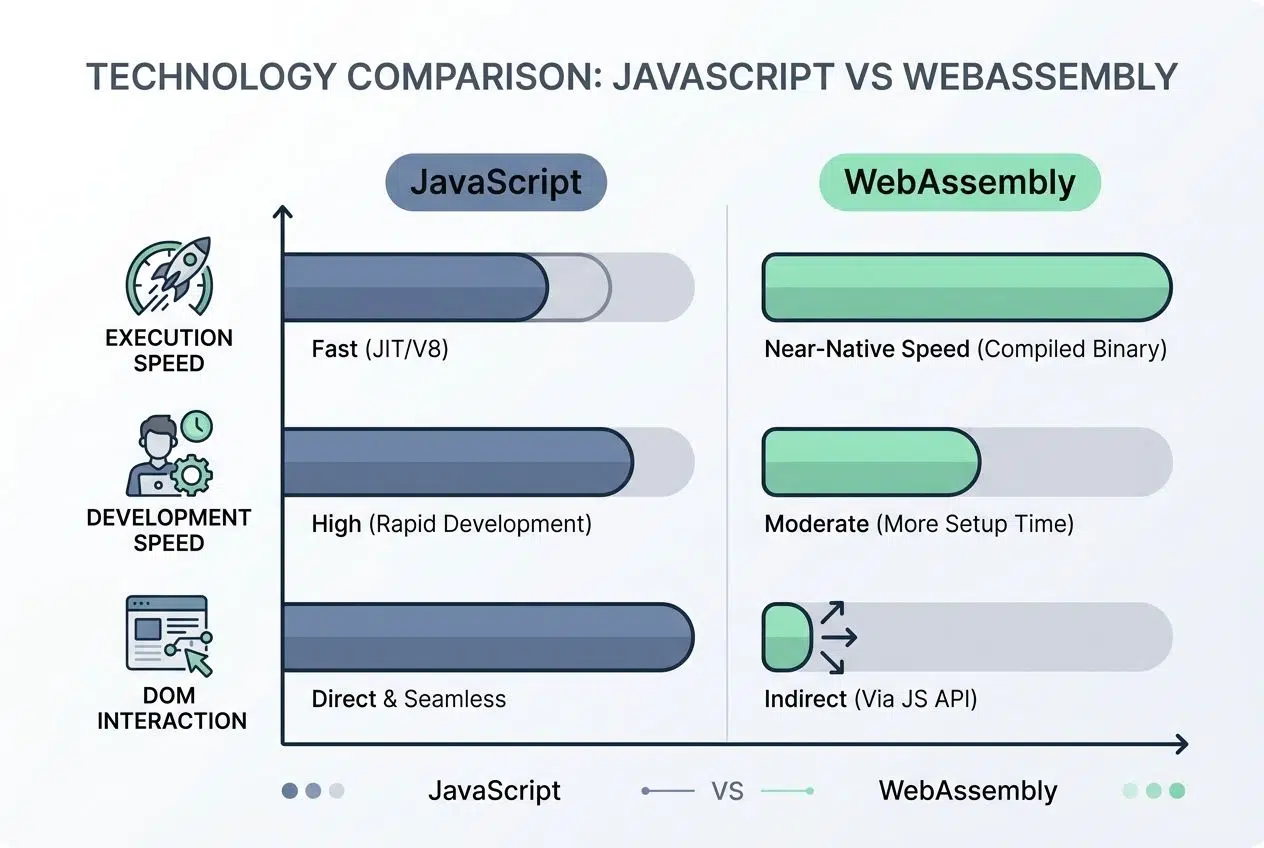
| Aspect | JavaScript | WebAssembly |
|---|---|---|
| Execution Speed | Interpreted and JIT-compiled. Slower for compute-heavy tasks. | Pre-compiled binary format. Runs at near-native hardware speeds. |
| Development Speed | Quick to write and deploy. Minimal setup required. | Requires a compilation step. The initial development cycle is longer. |
| DOM Interaction | Direct access to the DOM. Manipulates page elements easily. | Cannot directly access the DOM. Needs a JavaScript bridge. |
| File Size | Text-based code. It can be verbose and larger when unminified. | Binary format. Typically smaller, compresses well, and loads faster. |
| Debugging | Browser dev tools provide excellent debugging capabilities. | Debugging support is improving, but historically has been limited. |
| Best Use Case | UI interactions, API calls, event handling, and real-time updates. | Heavy computations, AI inference, and physics simulations. |
| Learning Curve | Easier for beginners. Very forgiving syntax and error handling. | Steeper curve. Requires knowledge of lower-level systems languages. |
| Browser Compatibility | Supported universally across all modern browsers. | Widely supported in modern browsers. Older versions lag behind. |
JavaScript handles user interactions brilliantly. It talks directly to the DOM, making interface updates feel natural and immediate.
Meanwhile, WebAssembly works tirelessly behind the scenes to crunch numbers and process large datasets. It cannot touch the DOM directly, so it relies on JavaScript to relay messages back and forth.
When to use WebAssembly alongside JavaScript
JavaScript is your conductor, and WebAssembly is your orchestra. They always perform best together. Use WebAssembly for the heavy lifting. Your JavaScript code can call WebAssembly functions, get results back, and update the page instantly.
This integration is getting even smoother. In 2026, JavaScript Promise Integration reached Phase 4, allowing WebAssembly code to easily interact with asynchronous web APIs without blocking the main browser thread.
Your team maintains cleaner code by separating concerns. JavaScript handles the beautiful presentation, while WebAssembly manages the intense calculation.
Emerging Features and Innovations in WebAssembly
WebAssembly keeps getting better with new updates that make it significantly faster and easier to use. The platform is constantly evolving to handle bigger workloads.
Threads and atomics
Threads and atomics bring serious muscle to your performance toolkit. They allow multiple tasks to run simultaneously inside your browser.
Parallel processing in the browser is no longer a dream, it is a standard expectation for modern web applications.
Web developers use SharedArrayBuffer to split heavy computations across several processors. Your web application stays highly responsive while number-crunching happens entirely in the background.
Atomics ensure that shared data stays perfectly safe when multiple threads access it together. This prevents frustrating crashes and data corruption.
Garbage collection
Garbage collection automatically removes unused code from your browser’s memory. Developers no longer need to manually free up space themselves.
This is a massive breakthrough. WasmGC became fully stable in Chrome 119+ and Safari 18.2+. It allows managed languages like Kotlin, Dart, and Java to run efficiently without shipping their own heavy garbage collectors.
For developers using those languages, WasmGC slashes application bundle sizes by 60% to 80%. Your web applications run faster because the system cleans itself without your constant attention.
Fixed-width SIMD
Fixed-width SIMD stands for Single Instruction Multiple Data. It is a brilliant technology that lets computers process several pieces of data at the exact same time.
It supports 128-bit fixed-width SIMD, which dramatically speeds up specific workloads. This is especially useful for:
- Real-time video and audio encoding.
- Complex cryptographic calculations.
- Live image filtering and manipulation.
Front-end developers run these lightning-fast operations directly in browsers. You get professional-grade tools directly in your browser without forcing anyone to download heavy external plugins.
Popular Programming Languages for WebAssembly
You can write WebAssembly code using the languages you already know. You just pick the best language for your specific project and compile it down for blazing-fast browser performance.
Rust
Rust stands out as the clear ecosystem leader for WebAssembly development today. It offers incredible memory safety without sacrificing an ounce of performance.
Many developers choose Rust because its strict compiler catches hidden errors before your code ever runs. Tools like wasm-bindgen make it incredibly easy to connect Rust functions directly to your front-end JavaScript elements.
You write your performance-critical code in Rust, compile it to it, and call it instantly from your interface. It is highly reliable and produces incredibly small file sizes.
C++
C++ serves as a classic, incredibly powerful tool for WebAssembly development. It truly shines when you need raw speed for complex calculations or deep graphics rendering.
For porting massive legacy desktop applications to the web, C++ combined with WebAssembly is the ultimate cheat code.
Game developers and performance-focused teams pick C++ to turn browser-based projects into lightning-fast experiences. Figma relied entirely on C++ compiled to WebAssembly to build its super-fast rendering engine.
Libraries written in C++ compile directly to WebAssembly using the Emscripten compiler. This saves huge amounts of time and drastically reduces bugs.
Python
Python brings serious data science power to modern web development. Developers write standard Python code and compile it instantly for the browser.
Amazing tools like Pyodide and PyScript make this transformation possible. They bring a full CPython interpreter directly into a sandboxed, browser-native runtime.
Scientists and data experts can now build interactive web dashboards using familiar libraries like NumPy and Pandas. They do not have to learn JavaScript from scratch, which makes everything far more accessible.
Challenges in Adopting WebAssembly
Moving WebAssembly into production environments still brings a few real obstacles. Developers face specific tooling gaps and security questions that demand careful attention.
Debugging and tooling limitations
Debugging WebAssembly code presents daily challenges. Traditional browser developer tools work beautifully for JavaScript, but they often struggle with a compiled binary format.
You cannot easily read WebAssembly code the way you read plain text. Stack traces become cryptic, and setting basic breakpoints requires extra steps that slow down your workflow.
Thankfully, the tooling is actively improving. Chrome DevTools recently added support for the DWARF debugging format. This update finally allows developers to step directly through their original C++ or Rust source code right in the browser.
Security considerations
WebAssembly code runs directly on a user’s machine, making security an absolute priority. Malicious actors could potentially exploit vulnerabilities to access sensitive data.
Fortunately, WebAssembly executes within a very strict sandboxed memory model. To keep your application completely safe, you should follow standard best practices:
- Always verify third-party modules to avoid supply chain attacks.
- Implement strong, modern authentication protocols.
- Never trust client-side calculations for sensitive backend logic.
A compiled module cannot access memory outside its own designated allocation without asking for explicit permission. Still, your front-end development team must remain vigilant.
The Future of WebAssembly in Front-End Development
WebAssembly is rapidly expanding far beyond web browsers. It is powering new serverless computing platforms and desktop applications with massive efficiency.
Expanding non-browser environments
Servers, edge computing platforms, and smart devices now run WebAssembly code outside traditional environments. This massive shift transforms how developers build applications across the board.
The WebAssembly System Interface, also known as WASI, makes this possible. With the release of the WASI 0.3 standard in early 2026, developers gained native asynchronous I/O support for much faster networking.

WebAssembly is stepping out of the browser and becoming a universal runtime for the entire cloud computing ecosystem.
Companies deploy WebAssembly modules to edge networks like Cloudflare Workers. This allows backend logic to execute in mere microseconds, vastly reducing latency for end users.
Potential for enhanced developer tools
Developer tools will continue to transform how programmers work every day. Better debuggers, improved profilers, and smarter compilers are hitting the market right now.
The biggest breakthrough on the horizon is the WebAssembly Component Model. This new framework allows modules written in totally different languages, like Rust and Python, to communicate and work together seamlessly in the same application.
This level of integration means developers will spend far less time hunting for bugs. Teams will reuse existing code much faster, boosting productivity across the entire development cycle.
The Bottom Line
WebAssembly completely transforms the industry, proving exactly how WebAssembly is changing front-end development by offering a powerful alternative to JavaScript for performance-critical tasks. You can write your core logic in Rust, C++, or Python, and then compile it to run instantly in any browser. The result is incredibly clear.
You get faster applications, better user experiences, aneffortless code reuse across totally different platforms. Web applications now handle heavy machine learning computations and 3D rendering that would have choked a traditional JavaScript setup.
Adopting WebAssembly does not mean you have to replace JavaScript entirely. You are simply using the right tool for a specific job, and both technologies combine beautifully. Modern frameworks fully support this hybrid approach, making it easier than ever to add new WebAssembly modules to your daily workflow.
As browser support continues to improve, more teams will discover how this technology solves complex problems. The transition is already underway. Your very next project could easily benefit from the speed and cross-platform compatibility that WebAssembly provides.
Frequently Asked Questions (FAQs) on WebAssembly and Front-end Development
1. What is WebAssembly, and how does it change front-end development?
WebAssembly (often called Wasm) lets browsers run code written in languages like C++, Rust, or Go, not just JavaScript. It can execute computational tasks up to 50% faster than equivalent JavaScript for processor-intensive operations. This means web apps can handle complex things like 3D graphics, video editing, and real-time data processing right in your browser.
2. Can WebAssembly work with existing JavaScript projects?
Yes, you can use WebAssembly alongside JavaScript. Developers often use Emscripten to compile C++ code into Wasm modules while keeping their existing JavaScript libraries.
3. Does using WebAssembly make websites load quicker?
Often, yes. Figma’s web-based design tool uses WebAssembly to deliver near-desktop performance, making operations with large files feel snappy for users.
4. Is learning WebAssembly hard for someone who only knows HTML and CSS?
It might seem tricky at first since you’ll need to learn a language like Rust or C++. You can start with AssemblyScript, which looks similar to TypeScript and is much easier for web developers to pick up.





















