In the fast-paced world of 2026, entrepreneurs are managing more data and teams than ever before. To keep up with global competition, you need a digital toolkit that streamlines your daily operations and automates repetitive tasks. Choosing the Best Productivity Apps for Entrepreneurs allows you to reclaim your time and focus on high-level strategy instead of administrative clutter.
Success in the modern business landscape is often determined by the tools you use to organize your vision. The following guide provides a comprehensive look at the applications currently helping founders scale their businesses with minimal friction.
How We Picked Our Picks for 15 Best Productivity Apps for Entrepreneurs
Our selection process for this list involved testing over forty different software solutions across various business sectors. We prioritized apps that offer cross-platform synchronization and robust mobile interfaces to support founders who work on the go.
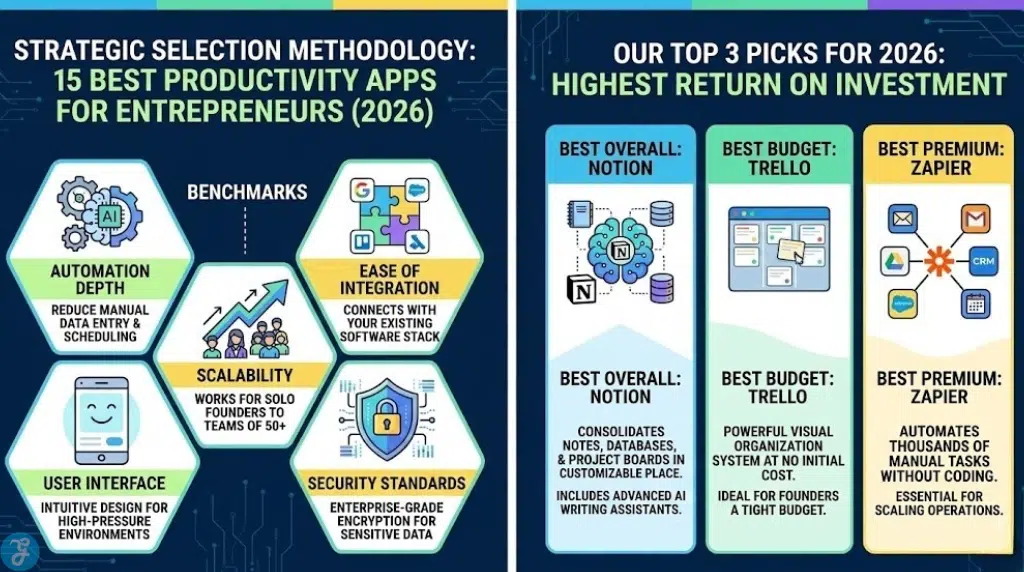
The following benchmarks were used to finalize the top fifteen selections:
Automation Depth: We favored apps that use AI to reduce manual data entry and repetitive scheduling tasks.
Ease of Integration: A productivity tool is only useful if it connects with the rest of your existing software stack.
Scalability: We selected tools that work just as well for a solo founder as they do for a team of fifty employees.
User Interface: High-pressure environments require clean and intuitive designs that do not add to your mental load.
Security Standards: Given the sensitive nature of business data, we only included apps with enterprise-grade encryption.
Complete Guide to the 15 Best Productivity Apps for Entrepreneurs
Each of these applications has been chosen for its unique ability to solve a specific bottleneck in an entrepreneurial workflow.
1. Notion
The Review: Notion acts as a digital brain for your entire company by combining documents and project management in one place. The 2026 version includes advanced AI writing assistants that can draft entire business plans based on simple prompts.
Best For: Entrepreneurs who need a centralized knowledge base.
Standout Features:
- Fully customizable database views.
- Integrated AI content generation.
Things To Consider:
- The sheer amount of options can be overwhelming for new users.
2. Slack
The Review: Slack remains the gold standard for reducing email clutter within a growing team. It organizes conversations into channels so that every team member stays aligned on specific projects or departments.
Best For: Fast-moving teams that need instant communication.
Standout Features:
- Thousands of third-party app integrations.
- Powerful search functionality for finding old files.
Things To Consider:
- Constant notifications can become a distraction if not managed.
3. Zapier
The Review: Zapier is the “glue” that holds your business together by connecting different apps without requiring any coding knowledge. It can automatically move data between your CRM and your email marketing platform.
Best For: Founders who want to automate manual data entry.
Standout Features:
- Supports over six thousand different applications.
- Multi-step automation paths.
Things To Consider:
- The cost can increase significantly as your task volume grows.
4. Monday.com
The Review: Monday.com offers a highly visual way to track project progress and team workloads. It is particularly effective for marketing agencies and product development teams that need to see clear timelines.
Best For: Managing complex team projects and deadlines.
Standout Features:
- Colorful and easy to read dashboard views.
- Built-in time tracking for every task.
Things To Consider:
- Some of the most useful features are locked behind higher paywalls.
5. ClickUp
The Review: ClickUp positions itself as the one app to replace them all by offering tasks, docs, and goals in one interface. It is extremely feature-rich and allows for high levels of task hierarchy.
Best For: Small business owners who want to avoid paying for multiple subscriptions.
Standout Features:
- Real-time whiteboards for team brainstorming.
- Customizable task statuses for every project.
Things To Consider:
- The mobile app can occasionally feel cluttered compared to the desktop version.
6. Todoist
The Review: If you just need a reliable way to manage your daily to-do list, Todoist is the most effective tool available. It uses natural language processing to let you set deadlines by simply typing “every Friday at 2pm.”
Best For: Individual task management and personal organization.
Standout Features:
- Gamified productivity tracking with “Karma” points.
- Seamless sync across all wearable devices.
Things To Consider:
- Lacks the deep project management features of Notion or ClickUp.
7. Calendly
The Review: Calendly eliminates the “back and forth” emails usually required to book a meeting. You simply share your link and let the other person choose a time that works within your set availability.
Best For: Founders who have high volumes of external sales or networking calls.
Standout Features:
- Automatic time zone detection for international clients.
- Integration with Zoom and Google Meet.
Things To Consider:
- The free version is limited to only one type of meeting.
8. Canva
The Review: Entrepreneurs often need to act as their own marketing department. Canva allows anyone to create professional-grade graphics and presentations without needing a background in graphic design.
Best For: Creating social media content and pitch decks.
Standout Features:
- Massive library of stock photos and templates.
- Collaborative design tools for teams.
Things To Consider:
- Professional designers may find the tools a bit restrictive.
9. Otter.ai
The Review: Otter.ai uses advanced voice recognition to transcribe meetings in real-time. It can identify different speakers and even generate a summary of the action items discussed during the call.
Best For: Founders who spend hours in meetings and hate taking notes.
Standout Features:
- High-accuracy live transcription.
- Automated meeting summaries sent via email.
Things To Consider:
- Background noise can occasionally interfere with transcription quality.
10. HubSpot CRM
The Review: Managing relationships is the core of any business. HubSpot provides a free version of its CRM that is powerful enough for most early-stage startups to track leads and sales pipelines.
Best For: Sales-focused entrepreneurs and small teams.
Standout Features:
- Detailed contact timelines and activity logs.
- Integrated email tracking and templates.
Things To Consider:
- Transitioning to the paid tiers can be very expensive.
11. Loom
The Review: Sometimes an asynchronous video is better than a meeting. Loom allows you to record your screen and camera simultaneously to explain a concept or give feedback to your team.
Best For: Reducing the number of live meetings.
Standout Features:
- Instant video sharing via a single link.
- Viewers can leave time-stamped comments.
Things To Consider:
- The recording limit on the free version is quite short.
12. Airtable
The Review: Airtable is a hybrid between a spreadsheet and a database. It is incredibly powerful for managing large amounts of structured data like inventory lists or content calendars.
Best For: Data-heavy operations and content management.
Standout Features:
- Advanced linking between different data tables.
- Beautiful gallery and kanban views.
Things To Consider:
- Requires a bit of time to learn the database logic.
13. Forest
The Review: Staying focused is a major challenge for entrepreneurs. Forest uses a unique gamification method where you “plant a tree” that grows while you work and dies if you leave the app to check social media.
Best For: Founders struggling with smartphone distractions.
Standout Features:
- Partnership with a real-tree-planting organization.
- Simple and peaceful user interface.
Things To Consider:
Only useful for managing focus on a mobile device.
14. 1Password
The Review: Security is a vital part of productivity. 1Password ensures that you and your team can safely share login credentials without resorting to insecure spreadsheets or chat messages.
Best For: Managing business security and team access.
Standout Features:
- Secure vaults for different team departments.
- Alerts for compromised or weak passwords.
Things To Consider:
- There is no longer a permanent free version for individuals.
15. Grammarly
The Review: Clear communication builds professional authority. Grammarly goes beyond simple spell checking to suggest tone adjustments and clarity improvements for your emails and blog posts.
Best For: Ensuring all outward-facing communication is professional.
Standout Features:
- AI-powered tone detection.
- Plagiarism checker for content creation.
Things To Consider:
- The suggestions can sometimes strip away personal writing style.
Our Top 3 Picks for 2026
if you are looking for the most impactful upgrades to your workflow, these three applications offer the highest return on investment.
Best Overall: Notion – This tool consolidates your notes, databases, and project boards into a single customizable environment.
Best Budget: Trello – For founders on a tight budget, Trello provides an incredibly powerful visual organization system at no initial cost.
Best Premium: Zapier – While it carries a higher price tag, the ability to automate thousands of manual tasks makes it essential for scaling operations.
While the top picks cover the basics, most entrepreneurs require a more specialized stack to handle specific business needs. The following detailed list breaks down the features and considerations for the top fifteen tools available today.
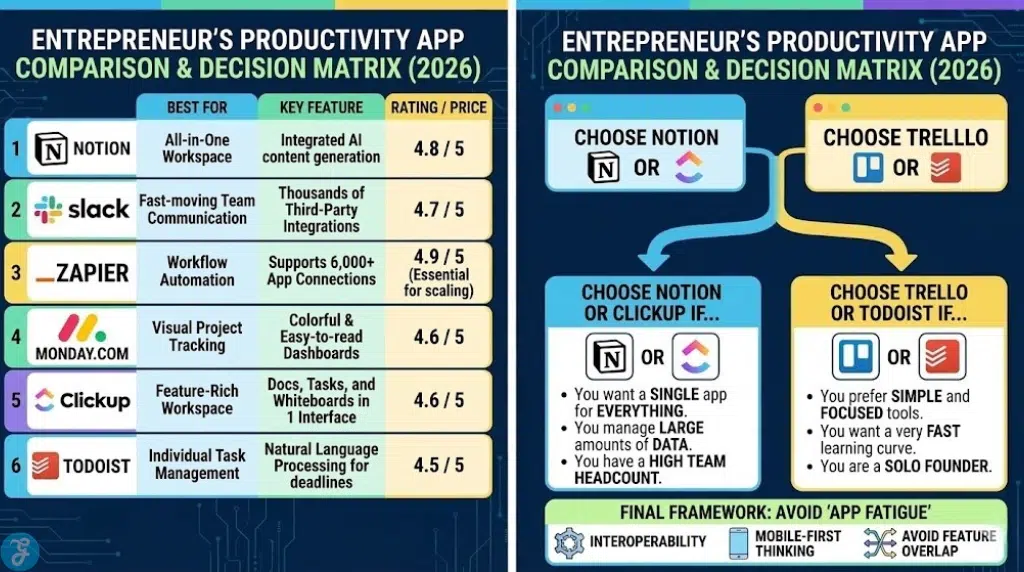
Quick Comparison Table
| Product/Item Name | Key Feature | Best For | Price/Rating |
| Notion | All-in-One Workspace | Project Tracking | 4.8 / 5 |
| Slack | Instant Team Messaging | Real-time Collaboration | 4.7 / 5 |
| Zapier | Workflow Automation | App Integration | 4.9 / 5 |
| Monday.com | Visual Project Management | Team Scaling | 4.6 / 5 |
Buyer’s Guide: How to Choose the Right Best Productivity Apps for Entrepreneurs
With thousands of options available, the risk of “app fatigue” is high. Use the following framework to build a lean and effective digital toolkit.
Focus on Interoperability: Ensure every new app you add can talk to at least one other app in your current stack.
Mobile-First Thinking: As an entrepreneur, you will often need to check a project status or reply to a lead while away from your desk.
Avoid Feature Overlap: Do not pay for two different tools that both handle project management or both handle note-taking.
Decision Matrix
| Choose Notion or ClickUp if… | Choose Trello or Todoist if… |
| You want a single app for everything. | You prefer simple and focused tools. |
| You manage large amounts of data. | You want a very fast learning curve. |
| You have a high team headcount. | You are a solo founder. |
The Final Checklist
-
Does the app offer a free trial that is long enough to test it on a real project?
-
Is the pricing based on the number of users or the number of features?
-
Are there active community forums or templates available to help you get started?
-
How often does the developer release security updates and new features?
-
Can you easily export your data if you decide to switch platforms later?
Final Thoughts & Recommendations
Productivity is about more than just checking boxes. It is about creating a system that works for you. Start by identifying your biggest bottleneck—whether it is communication, task tracking, or scheduling—and select one primary tool to solve that problem. Once that is stable, you can begin to integrate other apps to create a unified business engine.