The shift toward asynchronous learning has exposed the limitations of traditional, text-heavy digital assignments. For schools, universities, and corporate training departments looking to increase comprehension and student engagement, finding the right Video Lesson Creation Tools is absolutely essential. By bypassing legacy enterprise software and partnering with independent American developers, educators gain access to highly specialized platforms. These SMEs build tools that simplify the complex video production process, offering intuitive screen recording, transcript-based editing, and interactive overlays that transform passive viewing into active learning.
Establishing a reliable digital foundation requires a strict evaluation process to ensure these creative platforms also deliver rigorous academic accessibility and security.
How We Selected Our 15 Best Video Lesson Creation Platforms
Identifying the most effective video authoring architecture required strict filtering to separate genuine pedagogical tools from generic social media video editors. We focused entirely on independent American studios that balance high-quality media production with strict educational standards.
-
Geographic Baseline. Operated and headquartered strictly within the United States as independent entities.
-
Independence. Verified as independent SMEs to guarantee agile customer support, educational focus, and transparent data policies.
-
Pedagogical Rigor. Proven inclusion of specialized teaching aids like embedded quizzes, closed-captioning automation, and viewer analytics.
-
Data Security. Complete adherence to FERPA and COPPA regulations, ensuring student viewing data and recorded materials remain strictly private.
Understanding these core requirements helps identify exactly which organizations are equipped to handle the rigorous daily demands of modern educators and instructional designers.
Evaluating the Top 15 SMEs for Video Lesson Creation Tools
The following independent studios and specialized organizations are actively reshaping how academic institutions produce instructional media. Here is our curated breakdown of the standout developers driving video lesson creation today.
Starting with platforms that integrate flawlessly into the web browser allows teachers to start recording without complex software installations.
1. Screencastify
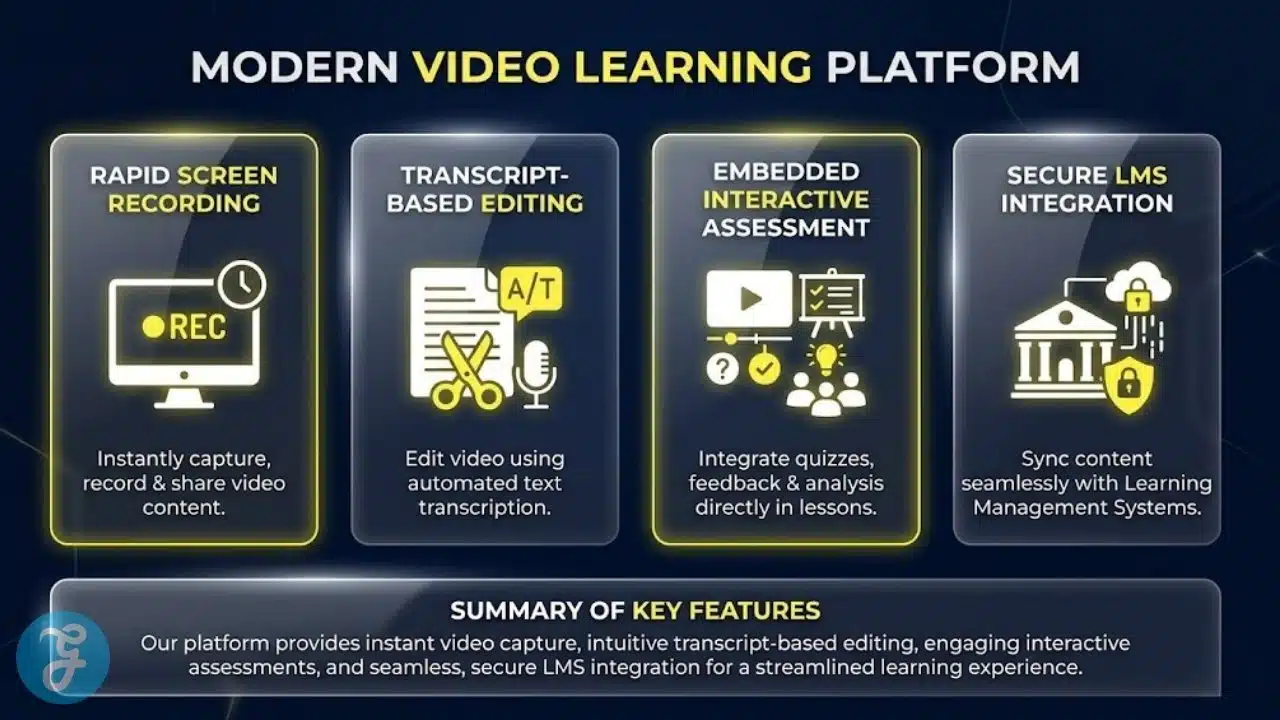
Operating out of Chicago, Illinois, Screencastify is a pioneer in lightweight, browser-based video creation. Originally famous as a simple Chrome extension, the platform has evolved into a comprehensive instructional suite. Teachers can record their screen, webcam, or both simultaneously, and then use the built-in editor to trim the fat, add interactive quizzes directly into the video timeline, and share securely via Google Drive.
Best for:
-
K-12 educators embedded in the Google Workspace ecosystem who need a fast, frictionless way to record daily lessons.
Why We Chose It:
-
It completely eliminates the learning curve of traditional video editing, allowing a teacher to record and publish a lesson in under five minutes.
-
The integrated “Submit” feature allows teachers to safely request video assignments from students without requiring the students to create their own accounts.
Things to consider:
-
Because it operates as a browser extension, it lacks the heavy, multi-track timeline editing capabilities of standalone desktop software.
The 2026 Edge:
-
Advanced AI auto-summarization that instantly generates a bulleted text outline and study guide from the recorded video lesson.
When instruction requires highly polished, multi-layered video editing, robust desktop applications remain the industry standard.
2. TechSmith (Camtasia)
Headquartered in East Lansing, Michigan, TechSmith is the developer behind Camtasia, one of the most powerful and widely used video lesson creation tools in higher education. The platform provides a full-featured, multi-track editor that allows instructional designers to layer multiple video feeds, add professional green-screen effects, and highlight specific on-screen cursor movements during complex software tutorials.
Best for:
-
University instructional designers and higher-education faculty producing permanent, highly polished asynchronous course libraries.
Why We Chose It:
-
It perfectly balances professional-grade editing power with an interface that is significantly more intuitive than commercial cinema software like Adobe Premiere.
-
The platform includes a massive library of royalty-free educational assets, including lower-thirds, animated icons, and background music.
Things to consider:
-
It requires a localized desktop installation and a relatively modern computer processor to render long video files efficiently.
The 2026 Edge:
-
Integrated audio-cleaning algorithms that instantly remove background room echo, HVAC noise, and microphone static without degrading the instructor’s vocal quality.
Centralizing video creation, hosting, and interactive assessment requires unified enterprise solutions.
3. YuJa
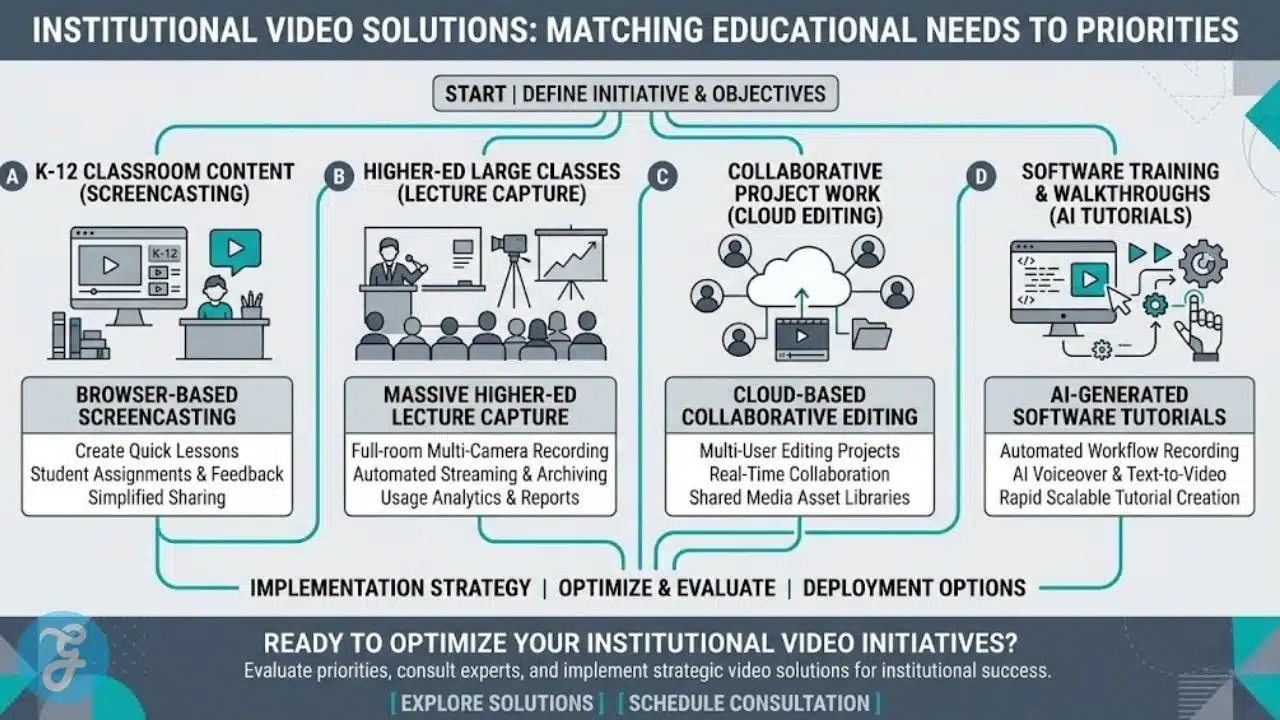
Located in San Jose, California, YuJa provides an enterprise-wide video platform designed explicitly for the educational sector. While it offers deep lecture capture capabilities, its primary strength is the unified creation suite. Instructors can record multi-source video, embed interactive video quizzes, and ensure the content is instantly distributed to the correct Learning Management System (LMS) course shell securely.
Best for:
-
Large college campuses and university systems needing to centralize all video creation, storage, and LMS integration under one secure umbrella.
Why We Chose It:
-
It solves the massive administrative headache of managing thousands of large video files across different university departments.
-
The platform automatically indexes every spoken word in a video lesson, allowing students to search a massive video library for a specific term and jump directly to that timestamp.
Things to consider:
-
It is an enterprise-scale architecture; implementing it requires a coordinated effort from the campus IT department.
The 2026 Edge:
-
Automated WCAG 2.2 accessibility remediation that dynamically adjusts color contrast and visual pacing for visually impaired students.
Editing video is notoriously tedious, but new paradigms are making it as simple as editing a text document.
4. Descript
Based in San Francisco, California, Descript completely flipped the video editing process on its head. When a teacher records a video lesson, the software instantly generates a highly accurate text transcript. To edit the video, the teacher simply deletes words or sentences from the text document, and the software automatically cuts the corresponding video footage, saving hours of manual timeline slicing.
Best for:
-
Educators who struggle with traditional video timeline editing and want to refine their recorded lectures quickly.
Why We Chose It:
-
The “Overdub” feature allows teachers to type a corrected word into the transcript, and the AI will actually synthesize their voice to fix verbal mistakes without re-recording.
-
It automatically detects and removes filler words like “um” and “uh” with a single click, making every teacher sound incredibly polished.
Things to consider:
-
The workflow is highly optimized for “talking head” lectures and narration, making it slightly less intuitive for editing highly complex, multi-camera action sequences.
The 2026 Edge:
-
Enhanced visual “B-Roll” matching that automatically reads the teacher’s transcript and seamlessly overlays relevant stock footage or images when they mention a specific historical event.
Collaborative video creation allows students and teachers to build lessons together.
5. WeVideo
Operating out of Mountain View, California, WeVideo provides a powerful, entirely cloud-based video editing platform. Because the rendering happens on their servers rather than the local machine, it allows schools to run complex video editing software on standard-issue Chromebooks. It also features deep integration with interactive video assessment tools, allowing for quizzes to be built directly into the final timeline.
Best for:
-
1:1 Chromebook districts and media arts classes looking for collaborative, cloud-based video editing.
Why We Chose It:
-
Multiple students and teachers can log into the same video project simultaneously from different locations, perfectly mirroring the collaborative nature of Google Docs.
-
It completely bypasses the hardware limitations of underpowered school laptops.
Things to consider:
-
Because all media must be uploaded to the cloud before editing, a robust and stable school internet connection is strictly required.
The 2026 Edge:
-
Integrated generative AI storyboarding that helps students outline their video projects visually before they begin recording footage.
Explaining abstract concepts often requires moving beyond live-action recording.
6. Vyond
Headquartered in San Mateo, California, Vyond is a cloud-based animation studio designed for non-animators. The platform allows educators to create highly engaging, 2D animated video lessons. By dragging and dropping characters, props, and dynamic charts into the timeline, teachers can explain complex historical narratives or abstract scientific processes that would be impossible to capture with a standard webcam.
Best for:
-
Instructional designers and corporate trainers needing to explain highly abstract, conceptual, or sensitive topics where live-action video is impractical.
Why We Chose It:
-
The automated lip-syncing feature instantly matches the animated character’s mouth movements to the uploaded voiceover track.
-
Animated lessons often bypass the “digital fatigue” associated with staring at an instructor’s face for hours on end, dramatically increasing viewer retention.
Things to consider:
-
Creating a high-quality animation, even with drag-and-drop tools, generally takes longer than simply recording a live webcam lecture.
The 2026 Edge:
-
Custom character generation from photographs, allowing teachers to instantly create a perfectly stylized, 2D animated avatar of themselves for the lesson.
Flipped classrooms require tools that blend screen capture, webcam, and immediate assessment seamlessly.
7. ScreenPal
Located in Seattle, Washington (formerly known as Screencast-O-Matic), ScreenPal is a veteran in the educational video space. They offer an incredibly robust, affordable suite that handles screen recording, full timeline editing, and video hosting. Their latest iterations heavily emphasize “Interactive Video,” allowing educators to layer multiple-choice questions, polls, and open-ended text boxes directly over the recorded lesson.
Best for:
-
Flipped classroom educators looking for an all-in-one, affordable solution for capturing lectures and tracking student comprehension.
Why We Chose It:
-
It strikes a perfect balance between the simplicity of browser extensions and the heavy lifting of desktop software.
-
The platform provides granular viewing analytics, letting teachers know exactly when a student paused, skipped, or re-watched a specific segment of the lesson.
Things to consider:
-
The interface, while highly functional, leans heavily toward utilitarian design rather than sleek modern aesthetics.
The 2026 Edge:
-
Automated “Chaptering” algorithms that analyze the visual slides within a video and instantly generate clickable navigation menus for the student.
Generating step-by-step software tutorials often doesn’t require a traditional video camera at all.
8. Scribe
Based in San Francisco, California, Scribe is a unique instructional tool that straddles the line between video and interactive documentation. When a teacher turns on Scribe and performs a digital task (like navigating a new research database), the software silently captures every mouse click and keystroke. It then instantly generates a hybrid, video-like visual guide with perfectly cropped screenshots and auto-generated text instructions.
Best for:
-
Technology integration specialists and IT departments needing to rapidly create “how-to” tutorials for faculty and students.
Why We Chose It:
-
It cuts the time required to make a software tutorial by nearly 90%, completely eliminating the need to record, edit, and export a traditional video file.
-
The output is highly accessible; students can read the steps, watch the micro-clips, or do both simultaneously at their own pace.
Things to consider:
-
It is strictly for capturing digital processes and cannot be used to record live-action lectures or physical classroom demonstrations.
The 2026 Edge:
-
Integrated AI translation that instantly converts the auto-generated text instructions of the tutorial into over 50 different languages.
Managing high volumes of short-form educational content requires platforms built for speed and remixing.
9. Kapwing
Operating out of San Francisco, California, Kapwing is a modern, collaborative online video editor that feels incredibly native to Gen-Z students and modern educators. It is built entirely in the browser and excels at rapid trimming, subtitling, and formatting videos for different aspect ratios. It is highly effective for teachers creating “micro-lessons” or short instructional clips for social learning platforms.
Best for:
-
Modern classrooms utilizing micro-learning, where lessons are delivered in quick, highly visual two-minute segments.
Why We Chose It:
-
The automated subtitling engine is exceptionally fast and accurate, which is critical for maintaining ADA compliance in public education.
-
The “Smart Cut” feature automatically removes silences and dead air from a lecture with a single click, dramatically improving the pacing of the lesson.
Things to consider:
-
The platform is heavily optimized for short-form content and may struggle with managing massive, two-hour lecture files.
The 2026 Edge:
-
Integrated “Brand Kit” features that ensure every video a teacher produces automatically matches the school’s official colors, fonts, and logo placements.
B2B and corporate learning require platforms that wrap the video lesson in a highly professional viewing experience.
10. Wistia (Soapbox)
Headquartered in Cambridge, Massachusetts, Wistia provides a professional video hosting and creation platform, primarily utilizing their Soapbox recording tool. Soapbox allows educators to record their webcam and screen simultaneously. After recording, the teacher can decide when the viewer sees the screen, the face, or a split-screen layout, without ever touching a traditional editing timeline.
Best for:
-
Corporate trainers, higher-education marketing departments, and professional development coordinators seeking a premium viewing experience.
Why We Chose It:
-
The final product looks incredibly polished; the seamless transitions between the presenter and the slides mimic a professional studio broadcast.
-
Wistia’s hosting environment is completely ad-free and highly secure, ensuring learners are never distracted by external algorithms or recommended videos.
Things to consider:
-
The platform is priced and structured more toward corporate B2B environments and private higher education than standard K-12 public schools.
The 2026 Edge:
-
Advanced predictive engagement heatmaps that show instructional designers exactly where viewers are likely to lose interest based on aggregate historical data.
Evaluating physical teaching skills requires specialized video capture and reflection tools.
11. Vosaic
Located in Lincoln, Nebraska, Vosaic provides a highly specialized video platform for observation and coaching. While it can be used to create lessons, its true power lies in allowing educators to upload videos of themselves teaching. Administrators or peers can then watch the video and leave time-stamped, categorized feedback markers directly on the video timeline to evaluate specific pedagogical skills.
Best for:
-
University student-teacher practicums, nursing programs, and district professional development departments focusing on observational coaching.
Why We Chose It:
-
It shifts video from a broadcast medium into a deep, analytical reflection tool.
-
The customizable digital rubrics allow coaches to tag a video with specific, data-driven markers (e.g., “Positive Reinforcement” or “Wait Time”).
Things to consider:
-
It is an analytical observation platform rather than a creative suite with flashy transitions or animated graphics.
The 2026 Edge:
-
Automated AI transcription analysis that identifies the exact “talk-time ratio” between the teacher and the students during the recorded lesson.
Transforming static slide decks into engaging video presentations requires dedicated presenter-focused software.
12. Prezi (Prezi Video)
Based in San Francisco, California, Prezi Video completely solves the “floating head in the corner” problem of traditional screen recordings. The software removes the presenter’s background and places the lesson graphics, text, and charts directly alongside them on the screen, mimicking the visual style of a live news broadcast.
Best for:
-
Instructors who rely heavily on visual aids but want to maintain strong eye contact and non-verbal communication with their students.
Why We Chose It:
-
It keeps the human element front and center, preventing the instructor from becoming a tiny, disconnected thumbnail during the lesson.
-
It integrates seamlessly with live conferencing tools like Zoom or Google Meet, allowing teachers to use their interactive video layouts during live synchronous classes as well.
Things to consider:
-
Creating a high-quality Prezi Video requires a clean, well-lit physical background to ensure the digital green-screen effect works smoothly.
The 2026 Edge:
-
Integrated 3D depth-mapping that allows the presenter’s hands to physically interact with and “push” the digital graphics around the screen during the recording.
Assembling high-quality lessons from a mix of photos, video clips, and text requires intuitive, template-driven tools.
13. Animoto
Operating out of New York City, Animoto is a drag-and-drop video maker that simplifies the creation process into a storyboard format. Teachers or students simply drop their photos, short video clips, and text into pre-built educational templates. The platform automatically handles the transitions, pacing, and music synchronization to output a professional-looking video lesson.
Best for:
-
Elementary educators and language arts teachers looking for a highly intuitive way to create vocabulary lessons, historical summaries, or digital storytelling projects.
Why We Chose It:
-
It requires absolutely zero technical editing skills; if a teacher can build a PowerPoint, they can build an Animoto video.
-
The platform provides a massive library of commercially licensed music, ensuring student projects do not get muted or flagged for copyright infringement when shared.
Things to consider:
-
The template-driven nature means users have less granular control over the exact timing of individual frames or complex audio mixing.
The 2026 Edge:
-
Dynamic text-to-speech integration that allows the platform to automatically narrate the text blocks placed within the video storyboard.
Massive institutional knowledge sharing requires platforms capable of handling thousands of hours of lecture capture.
14. Panopto
Headquartered in Seattle, Washington, Panopto is the undisputed heavyweight of higher-education lecture capture. It provides automated video creation solutions; cameras in physical university lecture halls are programmed to automatically start recording and uploading the professor’s lesson when class begins. It also provides a robust desktop recorder for faculty creating flipped-classroom content from their offices.
Best for:
-
Massive university systems that need an automated, highly secure infrastructure for capturing and hosting every single lecture on campus.
Why We Chose It:
-
The reliability at scale is unmatched; it effortlessly manages petabytes of video data while ensuring deep security integrations with university single sign-on (SSO) protocols.
-
The multi-camera capture allows students to view the professor, the whiteboard, and the digital slides simultaneously in a customizable viewing window.
Things to consider:
-
It is an incredibly powerful, enterprise-grade architecture that is overkill and cost-prohibitive for a single K-12 classroom.
The 2026 Edge:
-
Automated semantic grouping that organizes an entire semester’s worth of hour-long lectures into perfectly categorized, bite-sized study playlists.
Generating professional “how-to” videos using generative AI is fundamentally changing instructional design.
15. Guidde
Located in Sunnyvale, California, Guidde utilizes generative AI to create software documentation and video lessons. The user simply captures their screen workflow, and the AI automatically stitches the clips together, generates professional voiceover narration, and adds smooth transitions and visual highlights to the final video.
Best for:
-
Corporate training departments and EdTech administrators needing to mass-produce software onboarding videos and technical tutorials.
Why We Chose It:
-
It standardizes the instructional output. Even if five different subject matter experts record their workflows, Guidde ensures all the final videos share the same professional voice and visual branding.
-
Updating a video is incredibly simple; if a software interface changes, the creator only needs to re-record that specific clip, and the AI updates the voiceover and stitches the new video perfectly.
Things to consider:
-
It is heavily focused on software tutorials and procedural documentation, rather than human-centered lecturing or creative arts.
The 2026 Edge:
-
Interactive branching logic within the generated video, allowing the viewer to choose which technical pathway they want the AI instructor to explain next.
Reviewing these varied digital environments side-by-side helps administrators clarify their institutional priorities.
An Overview Of Video Lesson Creation Tools
Examining these distinct providers collectively provides a clear perspective on the digital infrastructure available to modern educators. The following data points highlight the primary functional differences between these independent providers.
Overview Comparison Table
Comparing these specific metrics highlights the structural differences between browser-based screen recorders and enterprise video platforms.
Evaluating these diverse administrative tools naturally leads to our primary recommendations for specific institutional use cases.
Our Top 3 Picks and Why
Narrowing down the field highlights three developers making exceptional contributions to instructional media. Screencastify remains the absolute gold standard for K-12 friction removal, allowing any teacher, regardless of technical skill, to record and distribute a lesson in minutes. Descript fundamentally revolutionizes the editing process by treating video like a word document, instantly removing the technical barriers of timeline slicing for educators. Finally, WeVideo provides unmatched collaborative power, fully democratizing high-end video production by moving the rendering process entirely to the cloud, solving the hardware crisis for 1:1 Chromebook districts.
Selecting the right digital infrastructure requires balancing the technical capabilities of the software with the actual needs of the teaching staff.
How to Choose the Right Video Lesson Creation Tools by Yourself
Implementing a new asynchronous video environment successfully means finding a platform that aligns with your specific pedagogical philosophy and hardware constraints.
-
Assess the Hardware Limitations. Determine if your faculty uses high-end laptops capable of running local desktop editors (TechSmith), or if you rely heavily on cloud-dependent Chromebooks (WeVideo, Screencastify).
-
Evaluate the Pedagogical Goal. Decide if you need to record live human lectures (ScreenPal), explain abstract concepts using animation (Vyond), or generate fast software tutorials (Scribe).
-
Check Accessibility Compliance. Ensure the platform automatically generates highly accurate, editable closed captions to comply with strict ADA and WCAG regulations.
-
Analyze Storage and Hosting. Require the developer to clarify whether the video files are hosted on their secure servers, integrated directly into your LMS, or forced onto public platforms like YouTube.
Applying this framework directly to your specific campus needs allows you to match the right developer to your media department.
The Final Checklist
Running through this quick verification process guarantees you are adopting a secure, scalable platform.
-
Verify the developer complies entirely with federal regulations regarding student privacy, ensuring recorded lessons cannot be scraped by public search engines.
-
Ensure the platform allows teachers to export standard MP4 files, preventing your institution from being locked into a proprietary video format.
-
Test the platform’s mobile responsiveness to guarantee that the final interactive videos play correctly on student smartphones.
-
Confirm the developer provides robust, responsive customer support specifically tailored to the unique deployment schedules of the academic year.
-
Check that the software allows for easy embedding directly into your specific learning management system without requiring students to click external links.
Implementing these systems successfully requires a deep understanding of what makes instructional media actually effective.
Beyond the Lens: The Future of Instructional Video
The rapid normalization of digital learning has created a false belief that simply turning on a webcam and talking for forty minutes constitutes a high-quality asynchronous lesson. The uncomfortable truth is that utilizing advanced Video Lesson Creation Tools to record a boring, static lecture only results in a boring, static digital file. As universities and school districts scale their video libraries, they must avoid the trap of treating video as a one-way broadcasting tool.
The future of asynchronous education does not rely on recording longer lectures or utilizing flashier visual transitions. It relies on educators utilizing these specialized digital platforms to break content into digestible micro-lessons, embedding interactive assessments directly into the timeline, and forcing the student to actively engage with the material. True digital learning happens when institutions stop viewing video as a passive replacement for the classroom and start recognizing it as a dynamic, interactive medium that allows students to pause, reflect, and master content at their own unique pace.
To further clarify the implementation of these digital systems, addressing common technical concerns is essential.
Frequently Asked Questions (FAQs) About Video Lesson Creation Tools
How do interactive videos prevent students from just skipping to the end?
High-quality instructional video platforms feature mandatory gating. When a teacher embeds a quiz or a reflection question into the video timeline, the platform locks the playback controls. The student cannot fast-forward or continue watching until they have actively answered the question.
Do these platforms auto-generate closed captions?
Yes. Modern independent developers utilize advanced speech-to-text algorithms to instantly generate closed captions upon publishing. Furthermore, most platforms provide an easy-to-use transcript editor, allowing the instructor to quickly fix any technical jargon or names the AI may have misunderstood.
Can students use these tools to create their own video projects?
Absolutely. Many platforms (like WeVideo and Kapwing) offer dedicated student-license tiers. This shifts the pedagogy from passive consumption to active creation, allowing students to demonstrate their knowledge by recording, editing, and publishing their own collaborative video projects safely.
Are videos recorded on these platforms public like YouTube?
No. Educational SMEs operate on private, secure cloud architectures. Teachers can restrict video access strictly to authenticated users within their specific LMS or Google Workspace domain, ensuring that lectures and student data are never exposed to public internet searches or external advertisers.
Will these tools slow down a standard school laptop?
Desktop-based editing software requires significant processing power and RAM. However, the majority of K-12 focused tools on this list are entirely cloud-based or operate as lightweight browser extensions. Because the heavy lifting (rendering) is done on the company’s external servers, they run smoothly on standard, low-cost Chromebooks.