
Running a business is no easy feat, especially when it comes to managing your finances. Whether you’re a new entrepreneur or managing a well-established company, mastering financial management is key to sustaining and growing your business.
The ability to track your income, expenses, taxes, and profits is crucial to make informed decisions and avoid financial pitfalls. Fortunately, digital tools make financial management easier than ever.
Today, we’re diving into the top 10 online platforms to master financial management for entrepreneurs. These platforms are specifically designed to help you stay on top of your business finances with tools that allow you to track expenses, create invoices, generate reports, and even file taxes.
This article will help you explore and compare the best options available for entrepreneurs who want to take control of their business finances, save time, and reduce errors. Whether you’re handling a small startup or a growing enterprise, you’ll find a platform that meets your needs.
Criteria for Choosing the Best Financial Management Platforms
Before we dive into the top 10 online platforms to master financial management for entrepreneurs, it’s important to know what features make these tools valuable. Here are the key elements to consider:
Key Features to Look for in Financial Management Tools
When selecting an online financial management platform, consider these essential features:
- Expense Tracking – This is the backbone of any financial platform. You need tools that track business spending accurately.
- Invoicing – A good platform should allow you to create professional invoices, track payments, and manage receivables.
- Cash Flow Management – A proper cash flow management system is vital for understanding the ins and outs of your finances.
- Tax Reporting – The platform should generate tax-ready reports that simplify tax filing.
- Automated Reconciliation – Connecting your bank accounts to the platform for automated reconciliation can save you countless hours.
- Security – Protecting your sensitive business and financial data should always be a top priority, so encryption and secure storage are must-have features.
User-Friendly Interfaces and Integration with Other Business Tools
Look for platforms that offer an intuitive interface, meaning it’s easy to navigate and doesn’t require a steep learning curve. Also, make sure the platform integrates with other business tools such as payroll systems, eCommerce platforms, or customer relationship management (CRM) software.
Security Measures and Data Protection
Financial data is highly sensitive, so look for platforms that comply with industry-standard security measures like encryption, multi-factor authentication, and secure data backups.
Top 10 Online Platforms to Master Financial Management
Now that we’ve outlined the essential features, let’s dive into the top 10 online platforms to master financial management for entrepreneurs. Each of these platforms has been selected based on their features, ease of use, and ability to scale with your business. We’ll break down the platform’s overview, key features, and some pros and cons for each.
1. QuickBooks Online
QuickBooks Online is arguably one of the most well-known accounting tools for small and medium-sized businesses. QuickBooks has been a trusted name in accounting software for years, and the online version provides flexibility and scalability for growing businesses. It allows entrepreneurs to track expenses, create invoices, manage payroll, and generate reports with ease.
- Expense Tracking – Categorize and track business expenses in real-time.
- Invoicing & Payments – Customizable invoice templates, payment tracking, and overdue reminders.
- Tax Calculations – Automatically calculates and tracks taxes based on your region.
- Integrations – Seamlessly integrates with over 650 third-party apps, including PayPal, Square, and Shopify.
Pros and Cons
| Pros | Cons |
| Comprehensive feature set | Can be expensive for smaller businesses |
| Excellent customer support | Limited customization options |
| Scalable for growing businesses | Reports can be a bit complex for beginners |
Case Study:
A small marketing agency used QuickBooks Online to streamline its invoicing process, saving the company around 10 hours per month on administrative tasks. The integration with PayPal allowed clients to pay invoices directly from the platform, improving cash flow.
2. Xero
Xero is a powerful cloud-based accounting software designed for small businesses, particularly those with international operations. It offers strong multi-currency support, an intuitive interface, and excellent collaboration features, allowing multiple users to access the platform simultaneously.
- Multi-Currency Support – Ideal for entrepreneurs with international clients or operations.
- Bank Reconciliation – Automatically imports bank transactions and reconciles them with your accounts.
- Project Tracking – Track project-based expenses and revenue.
- Reports – Generate comprehensive financial reports, including balance sheets, profit and loss, and tax reports.
Pros and Cons
| Pros | Cons |
| Excellent for international businesses | Limited customer support on lower-tier plans |
| Strong multi-currency features | Pricing can be expensive |
| Clean, easy-to-use interface | Lacks some payroll features |
Example:
A small UK-based business with clients in Europe and North America uses Xero to manage finances in three currencies, which saves hours each week that would otherwise be spent manually converting currencies and tracking exchange rates.
3. FreshBooks
FreshBooks is designed with small business owners in mind. It’s particularly well-suited for entrepreneurs who need robust invoicing and time-tracking tools. FreshBooks makes it easy to track billable hours, automate billing, and create professional invoices with minimal effort.
- Invoicing & Payments – Customize invoices, accept payments online, and send automated reminders.
- Time Tracking – Track time spent on projects or tasks, ensuring accurate billing.
- Expense Management – Snap photos of receipts and upload them for easy tracking.
- Reports & Analytics – Create detailed financial reports to analyze profit, expenses, and tax liabilities.
Pros and Cons
| Pros | Cons |
| Easy-to-use and intuitive interface | Lacks some advanced accounting features |
| Strong focus on billing and invoicing | No inventory management |
| Great customer support | Limited features for larger businesses |
Case Study:
A freelance web designer used FreshBooks to track time for each client project. With FreshBooks’ automated invoicing system, they saved an hour each week by eliminating manual invoice creation and payment follow-ups, allowing them to focus more on creative work.
4. Wave
Wave is a completely free accounting software tool that offers many features entrepreneurs need, including invoicing, accounting, and financial reporting. For entrepreneurs just starting out or running small businesses with limited budgets, Wave is a great option.
- Free Accounting Software – Completely free to use for invoicing, accounting, and reporting.
- Receipt Scanning – Upload and categorize receipts by simply taking a photo.
- Bank Reconciliation – Connect your business bank accounts for automated reconciliation.
- Reports – Generate financial statements and reports like profit and loss, balance sheet, and tax reports.
Pros and Cons
| Pros | Cons |
| Completely free for basic features | Limited integrations and features for larger businesses |
| Easy to use | Customer support is only available via email |
| Great for small businesses and startups | Lacks advanced payroll features |
Example:
A solo entrepreneur who runs a consulting business used Wave to manage their accounting and invoicing needs. They found that the receipt scanning feature saved them a lot of time, as they no longer had to manually input expenses.
5. Zoho Books
Zoho Books is an accounting software that excels in automation. From recurring invoices to automated tax reports, Zoho Books reduces the manual effort of handling finances, making it a strong choice for entrepreneurs looking for a robust yet affordable solution.
- Automated Workflows – Automate recurring invoices, payment reminders, and reports.
- Project-Based Accounting – Track income and expenses on a per-project basis.
- Tax Compliance – Generates tax reports in accordance with local tax laws.
- Inventory Management – Keep track of inventory, manage orders, and create purchase orders.
Pros and Cons
| Pros | Cons |
| Affordable pricing | The user interface can be overwhelming for beginners |
| Excellent project-based accounting | Limited reporting options for large businesses |
| Great automation features | No payroll support |
Case Study:
A digital marketing agency used Zoho Books to automate invoicing and payment reminders. This saved them around 8 hours each week on administrative tasks and helped them improve their cash flow by ensuring timely payments.
6. Sage Business Cloud Accounting
Sage Business Cloud Accounting is a comprehensive accounting software tool aimed at small and medium-sized businesses. Known for its ease of use, Sage offers a wide range of financial management features. The platform supports invoicing, tax calculations, expense tracking, and more. What sets Sage apart is its ability to scale with your business as it grows, offering more advanced features like inventory management and project tracking.
- Cash Flow Management – Keep track of your cash flow to ensure you have the funds necessary for business growth.
- Expense Tracking – Automatically categorize expenses, and generate reports to see where your money is going.
- Customizable Invoicing – Customize invoices, add payment terms, and send reminders to clients.
- Integrations – Connect to other business tools like payroll and CRM platforms for a seamless experience.
Pros and Cons
| Pros | Cons |
| Excellent for growing businesses | May be more complex for beginners |
| Scalable with advanced features | Limited customer support on lower plans |
| Offers customizable reports and analytics | Can be expensive for startups |
Case Study:
A UK-based construction company used Sage Business Cloud Accounting to streamline their project management and financial workflows. The customizable invoicing allowed them to easily track payments for each project, and the expense tracking helped identify areas to cut costs, leading to a 15% reduction in overheads over 12 months.
7. Bench
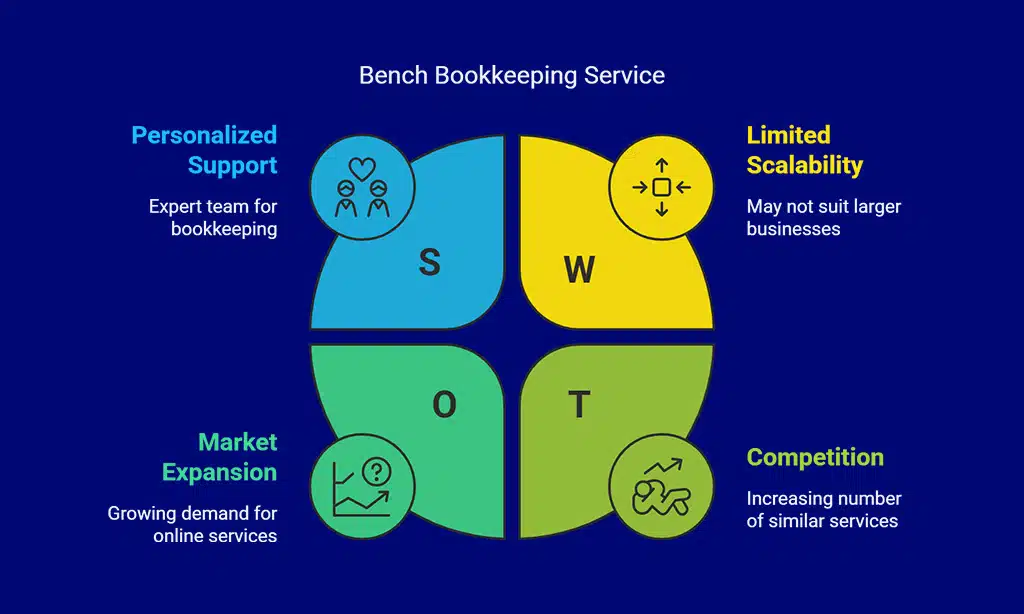
Bench is an online bookkeeping service that focuses on simplifying accounting for small businesses by offering personalized bookkeeping support. Unlike traditional software, Bench provides an actual team of accountants to handle your business’s books. This can be especially helpful for entrepreneurs who don’t have the time or expertise to manage their own finances but still need to stay on top of their financials.
- Personalized Bookkeeping – Bench assigns a dedicated bookkeeping team to handle all your business’s financial transactions.
- Financial Reports – Generate profit and loss statements, balance sheets, and tax reports.
- Expense Categorization – Automatically categorize expenses to help you understand where your money is going.
- Tax Prep – Prepare your business for tax season with easy-to-understand reports.
Pros and Cons
| Pros | Cons |
| Personal accounting team for support | Higher price point for small businesses |
| Great for business owners who need hands-off help | Limited automation features compared to other platforms |
| Easy-to-read financial reports | Lacks advanced features like payroll or multi-currency support |
Example:
A small eCommerce entrepreneur who struggled with managing finances outsourced their bookkeeping to Bench. With their professional team handling the books, the entrepreneur saved around 8 hours per week and could focus on growing the business.
8. Wave Financial
Wave Financial is another great free financial management tool that’s especially beneficial for small businesses and freelancers. It’s simple to use and comes with an array of financial management features, including invoicing, accounting, and receipt scanning. While Wave is free for its core services, it also offers paid services for payroll and credit card processing, making it a versatile option for businesses on a budget.
- Free Accounting – Access a range of financial tools at no cost, including invoicing, accounting, and financial reporting.
- Receipt Scanning – Snap pictures of your receipts and upload them for easy expense tracking.
- Invoicing – Customize invoices and accept payments online via PayPal, credit cards, or bank transfers.
- Financial Reports – Generate key financial reports such as profit and loss statements, balance sheets, and tax summaries.
Pros and Cons
| Pros | Cons |
| Free core services | Limited customer support |
| Simple to use and beginner-friendly | Lacks payroll features |
| Excellent for freelancers and small businesses | Limited integrations with third-party apps |
Example:
A freelance photographer used Wave to manage her business’s finances. She appreciated the free tools available, especially the receipt scanning feature, which made tracking expenses seamless and efficient.
9. AccountEdge Pro
AccountEdge Pro is a robust financial management software designed for small businesses that need advanced features. The desktop version of AccountEdge Pro allows for detailed financial reporting, payroll processing, and time billing, while the cloud version offers the flexibility to access your data anywhere. It’s ideal for businesses that need a comprehensive, standalone accounting solution with the power to scale.
- Comprehensive Reporting – Detailed reports on everything from profit and loss to balance sheets and tax summaries.
- Payroll Management – Process payroll, manage taxes, and print paychecks from the same platform.
- Multi-User Capability – Multiple users can work simultaneously, which is great for teams.
- Mobile Access – Access your financial data on-the-go with the cloud-based version.
Pros and Cons
| Pros | Cons |
| Excellent for businesses with complex financial needs | Only available as a desktop software in its basic version |
| Advanced features like payroll and job tracking | Higher learning curve compared to simpler platforms |
| Strong customization options | Price may be prohibitive for startups |
Case Study:
A law firm used AccountEdge Pro to manage client billing, payroll, and taxes. The software’s detailed reports helped the firm better understand profitability per case, leading to a 20% increase in overall revenue after streamlining operations.
10. PayPal Business
PayPal is widely recognized for its ability to process online payments, but its PayPal Business service also provides powerful financial tools for entrepreneurs. It’s particularly useful for businesses that primarily operate online, as PayPal allows you to manage both your payment processing and finances from a single platform.
- Online Payment Processing – Accept credit cards, debit cards, and PayPal payments.
- Invoicing – Create and send invoices directly from the PayPal dashboard.
- Financial Tracking – Track income and expenses, and integrate with accounting software for seamless reporting.
- Multi-Currency Support – If you have international clients, PayPal supports transactions in multiple currencies.
Pros and Cons
| Pros | Cons |
| Great for online businesses | Transaction fees can add up quickly |
| Quick and easy to use | Limited financial reporting features |
| Integrates with other financial tools | Can be expensive for higher transaction volumes |
Example:
An online retail store used PayPal Business to process payments from their international customers. The easy invoicing tool and the multi-currency support helped them streamline their payment processing and manage financial records efficiently.
How to Choose the Right Platform for Your Business
Selecting the best online platform to master financial management for entrepreneurs depends on your business’s specific needs. Here are some important factors to consider:
Factors to Consider Based on Your Business Size
- Small businesses and startups should consider affordable options like Wave and FreshBooks that offer basic features without the hefty price tag.
- Medium-sized businesses will likely need more advanced features like multi-currency support and project-based accounting, making Xero and QuickBooks Online ideal choices.
Matching Features with Your Financial Goals
- If you need tax reporting and expense management, platforms like Zoho Books and QuickBooks are highly recommended.
- For businesses that focus on invoicing and time tracking, FreshBooks is a top pick.
Budget and Cost-Effectiveness
For entrepreneurs on a tight budget, platforms like Wave offer free tools that are more than sufficient for basic accounting. However, if your business requires more advanced functionality, platforms like QuickBooks or Xero provide excellent value, especially when you consider the long-term benefits.
Takeaways: Mastering Financial Management with the Right Tools
As an entrepreneur, mastering financial management is crucial for the growth and success of your business. Choosing the right online platform to master financial management for entrepreneurs can provide you with the tools and insights necessary to make informed decisions, track your financial health, and streamline your accounting processes.
From free tools like Wave and PayPal Business to more advanced solutions such as QuickBooks and Sage Business Cloud Accounting, there is a platform available for every type of business. Each of these tools offers unique features, integrations, and scalability to meet the diverse needs of entrepreneurs at different stages of their business journey.
By adopting the right financial management platform, you’ll not only improve your financial workflows but also free up time to focus on growing your business. Explore the options available and choose the one that best fits your business’s current needs and future goals.