


For firms assessing legal technology trends in 2026, the hard part is not finding another tool. It is deciding which parts of legal work should change, what information a system can use, and who remains accountable for the result.
AI draws most of the attention, but the shifts also involve cloud systems, cybersecurity, document workflows, e-discovery, and client service. ILTA’s 2025 technology survey gathered responses from 580 law firms worldwide. Thomson Reuters’ 2026 legal report surveyed more than 736 law firm professionals across 46 countries. Those figures show the breadth of the research, not that every firm is adopting the same tools or moving at the same speed.
1. Generative AI Enters Daily Work
Generative AI can help summarize documents, extract information, prepare routine correspondence, and organize research. The practical question for legal technology trends 2026 is which tasks a firm can support without compromising accuracy or client duties.
A polished answer can still be wrong. It may miss a qualification, misstate a fact, or cite an authority that does not support its point. The American Bar Association’s Formal Opinion 512 says lawyers using generative AI must consider duties that include competence, confidentiality, communication, supervision, candor, and reasonable fees. It interprets the ABA Model Rules; lawyers must also check the rules that apply where they practice.
A firm could begin with a contained task, such as a first-pass summary of documents, and require a lawyer to check it against the source files. That is a more defensible starting point than allowing staff to use public tools with client material and no shared rules.
2. AI Agents Face Controlled Trials
A chatbot responds to a prompt. An AI agent may be built to carry out several steps, such as finding approved documents, drafting a response, and sending it for review. Among legal technology trends in 2026, this one deserves cautious testing because more autonomy can mean more places for an error to spread.
Before giving an agent access to live matters, decide what it may read or change, where it must stop for approval, and how its actions will be logged. Keep early trials narrow and low risk. No agent should make a consequential legal decision or send unreviewed advice to a client.
3. Firm Knowledge Systems Gain Importance
AI is only useful when it can find the right material. A well-managed knowledge system can help lawyers search approved templates, internal guidance, and prior work product that might otherwise sit in separate folders.
But poor organization creates poor answers. Outdated templates may appear alongside current ones, while weak access controls can expose information across matters. One of the legal technology trends 2026 firms should address is the less glamorous work behind AI search: clean, current content and reliable permissions.
Firms should know what their systems index, how often content is reviewed, and whether access restrictions remain in place when AI tools retrieve information. Answers should also point back to their source material so lawyers can check relevance and currency.
4. Research Platforms add AI-generated Answers
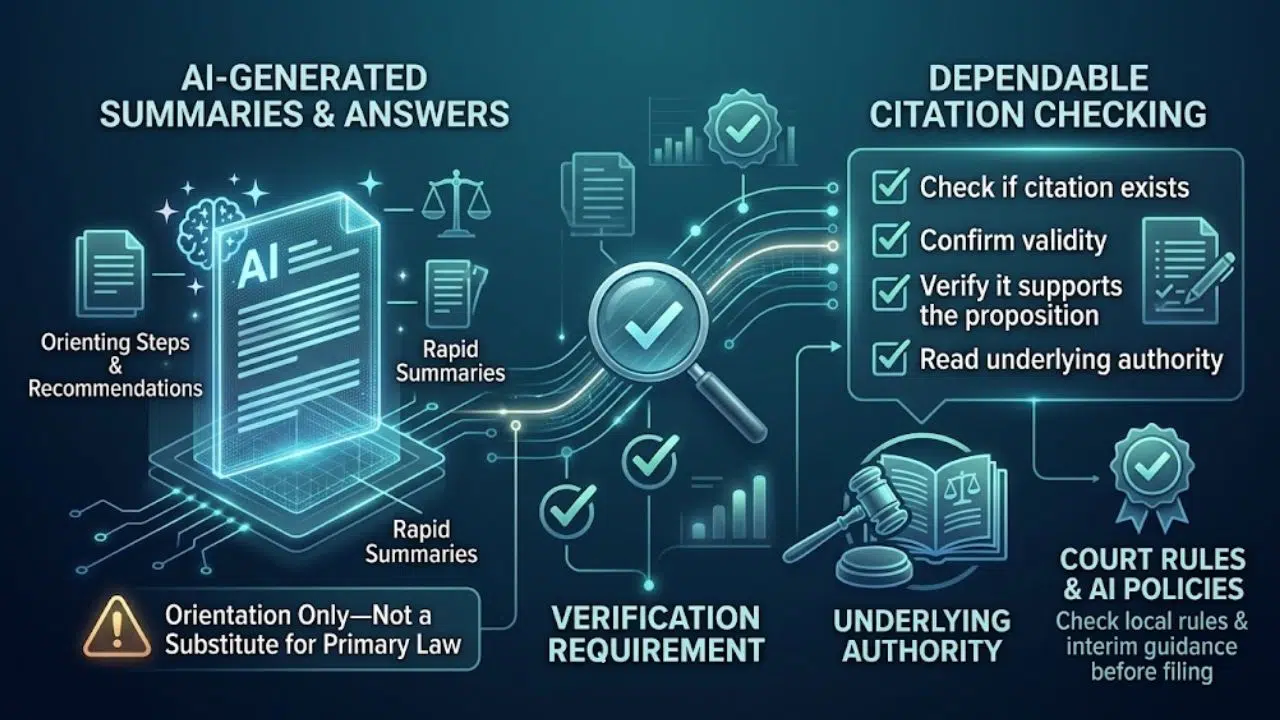
Legal research tools increasingly offer summaries, suggested authorities, or answers drawn from legal databases. These features can help a lawyer get oriented, but they do not remove the need to read the underlying authority.
Check that each citation exists, remains valid where relevant, and supports the proposition. The federal judiciary is still considering policy questions raised by AI and has issued interim guidance to courts. Requirements can vary by court, so lawyers should check local rules and orders before filing.
For legal technology trends 2026, a dependable citation-checking process matters more than a confident-sounding research summary.
5. Contract Review Becomes More Structured
Contract tools can compare versions, extract key terms, flag clauses, and check language against a client’s playbook. AI may also help prepare an initial draft or suggest edits for a lawyer to assess.
The quality of the playbook sets the ceiling. If a client’s preferred terms are scattered across old documents or have changed over time, software may apply them inconsistently. Before buying or expanding a system, choose the clauses it should flag and test it on both routine and unusual agreements. A firm with unreliable templates may get more value from fixing version control first. That makes contract automation one of the legal technology trends in 2026 where process quality matters as much as the software.
6. E-discovery Handles Wider Evidence Collections
E-discovery systems help legal teams preserve, process, review, and produce electronically stored information. Analytics and AI-assisted review can help prioritize documents or surface patterns across large collections. Evidence may now sit in email, messaging services, collaboration platforms, and mobile devices, so teams need to plan for more than a mailbox search.
Automation does not decide the review method. Teams still need to define custodians, dates, search terms, and quality checks. Test searches against known relevant documents, document the process, and check whether a court order or discovery protocol calls for agreement or disclosure. These practical details make legal technology trends 2026 especially consequential in litigation.
7. Workflow Automation Links Administrative Steps
Opening a matter, collecting documents, assigning work, updating a client, and preparing a bill can involve repeated handoffs. Workflow software can route information through approved steps and reduce duplicate entry.
Map the process before automating it. If no one knows who owns an approval or how exceptions are handled, software may simply move the confusion faster. Start with one repetitive administrative task, name the person responsible for it, and give staff a way to pause or correct a workflow. This operational side of legal technology trends 2026 may be less exciting than AI, but it can produce clearer gains.
8. AI governance Becomes Day-to-Day Work
A useful AI policy answers questions staff actually face: Which tools are approved? What client information can be entered? Who checks the result? What happens when a tool changes?
The ABA opinion gives a professional-duty lens for lawyers, while NIST’s Generative AI Profile provides a voluntary, cross-sector framework for identifying and managing AI risks. Neither replaces local professional rules, but both can help firms structure their own review.
Keep the policy short enough to follow. Name approved tools, set limits on confidential data, require review of AI-assisted work, and explain how to report a problem. Training should use examples drawn from the firm’s actual practice. Governance may be the least visible of legal technology trends in 2026, yet it is what makes wider use manageable.
9. Cloud Security Remains a Core Investment
Cloud services support remote work and collaboration, but firms still need to know where data is stored, who can access it, and what protections a provider offers. The ABA’s 2024 survey found that about 75% of attorneys used cloud computing for work-related tasks. That is a dated survey result, not a 2026 adoption rate.
Review multi-factor authentication, user permissions, device security, backups, vendor access, and incident response. A firm should know how it would restore files after an outage and who would act if an account were compromised. Small practices may lack an in-house security team, but they can still document basic controls and get qualified help with gaps.
10. Client Service and Pricing: Use Better Data
Secure portals, online intake, electronic signatures, and matter updates can reduce friction for clients. Matter-management and billing data may also help firms see where work is delayed, or costs are rising.
Clients may ask how AI affects the work and the bill. Thomson Reuters’ 2026 legal report examines AI’s effects on client relationships and law firm business models. ABA guidance also connects AI use with client communication and reasonable fees. Firms should be ready to explain the role technology played when it materially affects a matter.
A portal is useful only if it makes communication clearer. Ask clients what updates they want, keep sensitive documents behind secure access, and avoid making clients manage a maze of disconnected systems.
Final Thoughts
The most useful legal technology trends in 2026 will depend on the firm’s clients, practice areas, size, and existing systems. A firm with scattered files may need to fix document management before adding AI search. A firm already using AI may need better training and review procedures.
Start with one recurring problem. Identify the people affected, the information involved, the cost of an error, and how you will judge whether a new system helped. Test it on a limited basis, then ask the staff doing the work what changed. Choose technology the firm can govern and explain to its clients.
Frequently Asked Questions (FAQs) About Legal Technology Trends
What is the biggest legal technology trend in 2026?
AI is the most visible, especially in drafting, research, document review, and workflow support. Its value depends on reliable information, human review, training, and safeguards for client data.
Should small law firms use AI?
They can consider it for defined tasks, after checking privacy terms, access controls, and suitability for legal work. Set clear rules about what staff may enter and who reviews the output.
Can AI replace a lawyer’s legal judgment?
AI can assist with parts of a task, but lawyers remain responsible for their professional work. Rules and court requirements vary, so lawyers should verify AI-assisted work and follow the requirements in their jurisdiction.























