
You got hurt, the bills are piling up, and an insurance adjuster wants to talk numbers. You want to know what your claim is worth before that call. Injury settlement calculator tools can give you a starting number in a few minutes. But that number is a guess, not a promise.
This guide covers seven tools worth knowing. It also explains where each one tends to go wrong, so you can use the number without being fooled by it.
How Accurate Are Injury Settlement Calculator Tools?
The short answer: they are good for a rough range and poor at predicting your exact payout.
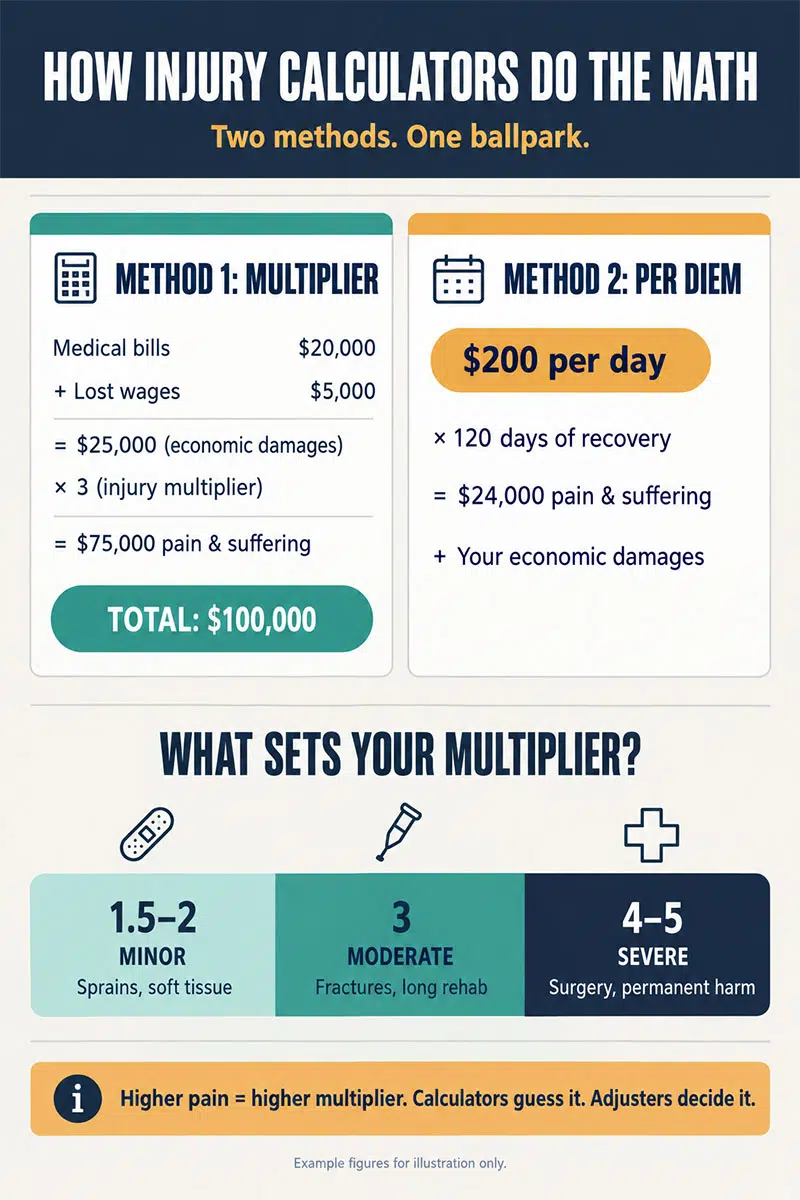
Most injury settlement calculator tools use the same basic formula. They add up your bills and lost pay. Then they multiply your medical costs by a number, usually between 1.5 and 5, to estimate pain and suffering. A higher number means a worse injury.
The problem is that you pick the multiplier. Adjusters often push for 2 or 3. Only a few claims justify more than 5. If you choose too high, your estimate will look great on screen and fall apart in talks.
Calculators also can’t see your evidence. They don’t know if your medical records are thorough, if a witness backs your story, or how much insurance the other driver carries. Those things often matter more than the formula.
The 7 Best Injury Settlement Calculator Tools
These injury settlement calculator tools are not equal. The first one is the best place for most people to start. The last one is a tool you can’t use at all, but you need to understand it.
1. AllLaw (Nolo) Personal Injury Settlement Calculator
This is the most trusted free option. Nolo is a well-known legal publisher, and the calculator page was updated in March 2025 by an attorney with a law degree.
You enter six things: medical bills, property damage, lost earnings, future lost income, future medical costs, and a multiplier. It then shows your economic losses and your pain and suffering amount. It also adds a $1,000 “nuisance value,” which is the small sum insurers sometimes pay just to close a claim.
What makes it better than most injury settlement calculator tools is the help around it. Below the calculator, it lists which states cut your award by your share of fault and which states block you from collecting if you were even 1% at fault. Those states are Alabama, Maryland, North Carolina, Virginia, and Washington, DC.
One weak spot: it does not adjust for fault by itself. You have to do that math on your own. The page also has a form that asks for your contact details to match you with lawyers. You can skip it.
2. SettlementCalcUSA
This is the newest tool on the list. It launched in June 2026 and offers eight free calculators in one place.
It covers car accidents, slip and fall cases, workers’ comp, medical malpractice, lost wages, wrongful death, and pain and suffering. The pain and suffering tool runs your numbers two ways: the multiplier method and the “per diem” method, which pays a set amount for each day you hurt. You can see which method gives the higher figure.
It also gives low, middle, and high results instead of one number. The site says it does not collect your contact details.
The big question with these injury settlement calculator tools is trust. SettlementCalcUSA has no long track record yet, and it is unclear who checks its formulas. Use it to compare methods, not as your final answer.
3. Lempu Personal Injury Settlement Calculator
Lempu works on its website and as a Chrome browser extension. It is one of the few injury settlement calculator tools that covers both the United States and the United Kingdom.
You choose your country, state, accident type, and injury type. You can also set a liability percentage to see how shared fault shrinks your payout. The result shows a middle estimate plus the lowest and highest amounts.
For UK whiplash claims in England and Wales, it uses the official tariff amounts set by law. That makes it more precise there than a plain multiplier.
The extension has very few users so far. Treat it as a second opinion, not your main tool.
4. Law Firm Calculators (Such as KaplunMarx)
Many personal injury firms now have free calculators on their websites. KaplunMarx is a good example. Its tool asks about current and future medical care, vehicle damage, and how serious your injury is. Fleming Attorneys offers a similar three-step version.
These injury settlement calculator tools are often easy to use and look polished. But remember why they exist. The firm wants you to call. After your estimate, you’ll see an offer for a free case review.
That is not a bad thing. A free review can help. Just know that the calculator is also a sales tool, and its formula is rarely explained in detail.
5. Settlement Calculator App for iPhone
Most injury settlement calculator tools stop at the gross number. This free iPhone app answers a different question: how much money do you actually keep?
It was built for attorneys, but anyone can use it. You enter the settlement offer, medical bills, and case costs. Then you choose whether the lawyer’s fee comes off the total or off what’s left after expenses. That one choice can change your take-home amount by thousands of dollars.
It works offline and the developer says it collects no data. It will not tell you what your claim is worth. It tells you what an offer means for your wallet.
6. Enjuris Damages Worksheet
This one isn’t a calculator. It’s a free printable worksheet. And for many people, it fixes the biggest reason calculators get it wrong: missing costs.
The worksheet helps you track medical treatment, prescriptions, property damage, and lost wages as they happen. Enjuris also offers a medical mileage log, since trips to doctors can add up.
Fill this out first. Then plug the totals into any of the injury settlement calculator tools above. Your estimate will be much closer to real.
7. Colossus (The Insurer’s Tool)
You can’t use Colossus. Insurance companies can. But if you file a car accident claim, there’s a good chance it will judge your case.
Colossus is software that many large auto insurers license. An adjuster enters details from your medical records. Each injury gets a code and “severity points.” The software compares your claim to past claims and gives the adjuster a value range. It is mainly built for minor to moderate injury claims.
Critics, mostly injury lawyers, say it tends to produce low offers and gives adjusters little room to go higher. Knowing this helps you see why public injury settlement calculator tools and insurer offers often don’t match. Clear records showing your diagnosis, treatment, and how the injury affects daily life give the software more to work with.
Side by Side Comparison
The table below shows how these injury settlement calculator tools differ. Notice that only a few handle fault, and only one shows what you keep after fees.
| Tool | Cost | Handles Fault? | Best Use |
|---|---|---|---|
| AllLaw (Nolo) | Free | Explains it, no auto math | First estimate |
| SettlementCalcUSA | Free | Yes | Comparing methods |
| Lempu | Free | Yes | US and UK claims |
| Law firm calculators | Free | Varies | Quick check before a consult |
| Settlement Calculator app | Free | No | Net amount after fees |
| Enjuris worksheet | Free | No | Tracking real costs |
| Colossus | Insurers only | Yes | Understanding offers |
If you only use one, start with AllLaw. If you have an offer in hand, add the iPhone app to see your real take-home.
Why Calculator Numbers and Real Offers Don’t Match
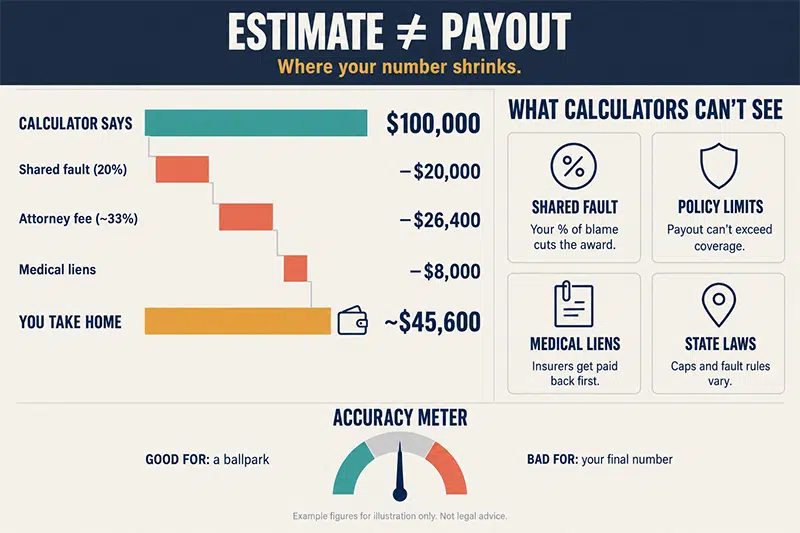
Even the best injury settlement calculator tools miss things that move real money:
- Insurance limits. If the other driver has a small policy, your claim may be capped no matter what the calculator says.
- State law. Some states limit pain and suffering in certain cases, such as medical malpractice.
- Your share of fault. In some states, a small share of blame can wipe out your claim.
- Gaps in treatment. Waiting weeks to see a doctor gives insurers a reason to pay less.
- Old data. Many sites quote an average settlement of $52,900. That figure comes from a Nolo reader survey from 2017, so it is not a current benchmark.
That same survey found something useful, though. People who hired a lawyer averaged $77,600, while people who handled claims alone averaged $17,600.
What to Do After You Get a Number
Use your estimate as a floor for your own thinking, not as a demand letter. Injury settlement calculator tools work best as a reality check before you speak with someone who knows your state’s rules.
If your injury is serious, or the insurer’s offer is far below your estimate, a lawyer can look at the facts a calculator can’t. This guide on how a personal injury attorney evaluates your case explains what they review in a first meeting. You can also learn how personal injury attorneys advocate for injured victims’ rights and how personal injury law firms fight for compensation when an insurer won’t budge.
Before you accept any offer, check one thing. Most settlements include a release. Once you sign, you usually can’t ask for more, even if new problems show up later.
Final Thoughts
Injury settlement calculator tools are worth using. They help you understand how claims are valued and keep you from taking a very low first offer. Start with the AllLaw calculator, track your real costs with the Enjuris worksheet, and check what you would actually keep with the iPhone app.
Just don’t treat any result as the truth. Your evidence, your state’s laws, and the other side’s insurance will decide the final number. If the gap between your estimate and the offer is large, talk to a personal injury lawyer before you sign anything.