

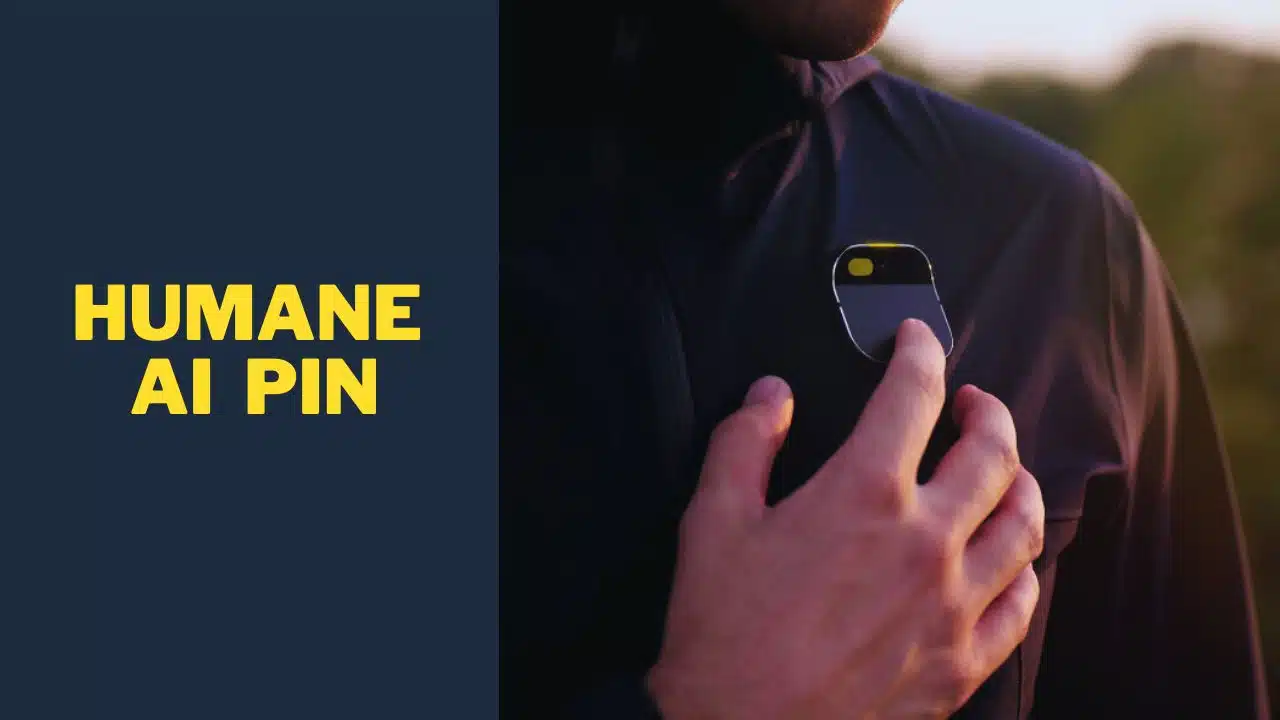
The Silicon Valley startup Humane has unveiled a new voice-controlled device called the AI Pin that it claims will “replace your smartphone.” But with no app ecosystem, required monthly fees, and a constantly filming chest camera, the product raises many concerns.
A Pager-Like Box Without a Screen
Shaped like an oversized pager from the 1990s, the Humane AI Pin is a rectangular aluminum box measuring approximately 3 inches long, 1 inch wide, and 0.5 inches thick. It has a smooth, rounded design with no external buttons other than a single circular front button for activating the voice assistant.
The device contains no traditional display screen. Instead, it uses a 720p laser projector to display a minimalist user interface on your palm or other surface when held nearby. The monochrome light blue graphics resemble a stripped-down smartwatch interface, providing basic information like the time, weather, notifications, and media controls.
Without a touchscreen, all interaction happens via voice commands detected by four microphones and hand gestures tracked by the built-in 13MP camera. A double tap of your thumb and index finger serves as a virtual tap to select on-screen options. The lack of a display means you’ll rely on two blinking LED lights and voice prompts from the speaker to provide status updates.
This unconventional approach aims to reduce distractions by removing the compulsion to constantly check a bright, scrolling screen. However, it remains unclear if the limited projected interface and gesture controls will provide an intuitive experience compared to simply tapping on a touchscreen.
Advanced Voice Capabilities, But No Apps
The Humane AI Pin leverages natural language processing technology from AI research companies Anthropic and OpenAI to enable robust voice interactions. You can give complex commands to look up information online, dictate messages, ask for summaries of unread emails and notifications, and more.
However, its biggest limitation is the lack of support for third-party apps. You’re restricted only to the services and platforms that Humane has explicitly built into the device. For example, music can only be played from Tidal, which has just a 2% market share compared to leaders like Spotify and Apple Music.
Without access to popular apps like WhatsApp, Facebook, YouTube, and countless others, the AI Pin’s capabilities will be incredibly limited compared to general-purpose mobile devices. This closed ecosystem approach has failed many times in consumer tech history. With no app store or SDK for developers, the AI Pin will likely struggle to attract users who are accustomed to iOS and Android’s open ecosystems.
Humane’s website shows logos for Slack, Microsoft, and Google, suggesting integrations may be possible in the future. But at launch, the inability to run third-party apps could be a dealbreaker for many potential buyers.
You’re always filming with the chest camera.
Like Google Glass before it, one of the most controversial aspects of the Humane AI Pin is its front-facing 13MP camera. The device is designed to be worn on your shirt or lapel via a magnetic clip, positioning the camera at chest level. This means you’ll be constantly filming strangers in public going about their day, raising major privacy concerns.
A small LED “trust light” is meant to indicate when the camera is actively recording video. But that does little to reassure bystanders who haven’t consented to being filmed by a device pointed at them. Services like Google Maps blur faces for Street View; the AI Pin makes no attempt at privacy preservation.
Humane claims the camera is necessary for functions like reading QR codes, identifying objects held in your hand, and tracking gestures. But the always-on filming, regardless of context, remains a core issue that could repel many potential buyers.
Monthly Fee for Cellular Connectivity
The Humane AI Pin requires an “AI Plan” subscription costing $24 per month to enable many key features. This provides LTE data connectivity through T-Mobile’s network. Without this paid subscription, the device’s functionality will be extremely limited, even when connected to Wi-Fi.
This ongoing cost seems difficult to justify for what is positioned as just a voice assistant gadget, akin to an Amazon Echo or Google Nest device. However, those products rely on being continuously plugged into power. The cellular subscription is likely needed to offset the fees Humane pays to partners for cloud processing of voice commands and AI functions.
But consumers will question paying yet another monthly bill for such limited hardware. And the AI Pin won’t work at all without the subscription, whereas smartphones can still perform many offline functions without cellular data.
Hard to Justify the $700 Price Tag
With its mid-range Qualcomm processor, paltry 4GB of RAM, lack of a proper screen, and narrow use cases, it’s unclear how Humane is justifying the AI Pin’s steep $700 retail price.
For comparison, affordable smartwatches from Apple, Samsung, and others already surpass its capabilities in many ways while costing hundreds less. Even premium wearables generally max out at $500 while packing advanced health sensors, 5G, and full-fledged app platforms.
The AI Pin’s laser projection technology is certainly innovative. But is a monochrome palm display worth the always-on camera, required subscription, lack of apps, and extremely high price? For most mainstream consumers, the AI Pin seems unlikely to replace their smartphone in any meaningful way or even complement it as effectively as a smartwatch or earbuds.
Too Many Compromises to Replace a Smartphone
While Humane positions the AI Pin as a revolutionary device that can replace your smartphone, in reality, it forces far too many compromises compared to iOS and Android devices. No matter how good its voice assistant may be, the lack of a screen, apps, camera controls, and an open ecosystem make it an ineffective smartphone replacement for many situations.
Sure, it enables hands-free access to information via voice. But so do affordable wireless earbuds with voice assistants built in. And those devices don’t constantly film your surroundings, lack basic apps, or require an ongoing subscription.
For specific use cases, like quickly getting spoken summaries of messages, the AI Pin shows promise. As a holistic smartphone alternative, however, its limitations suggest it will join the pile of failed “iPhone killers” that never caught on with mainstream consumers.
Unless Humane rapidly evolves the product before launch, the AI Pin seems destined to occupy a niche gadget market rather than the revolutionary role it aspires to. For all its intriguing technology, the device in its current form asks users to compromise far too much compared to existing alternatives.






















