


Filing taxes can be stressful, especially if you’re running out of time. Maybe life got hectic, or you still need to gather all your tax return paperwork. Missing the tax filing deadline could lead to penalties and interest on unpaid taxes.
The good news is you can request an automatic extension until October 15 by filing IRS Form 4868. This gives you more time to submit your federal income tax return without late-filing penalties.
However, it’s important to estimate and pay any taxes owed before April 15 to avoid extra charges.
This guide will walk you through three simple steps for requesting a tax extension. You’ll learn how to calculate what you owe, file forms correctly, and handle state rules if needed.
Make sure to keep reading!
Step 1: Determine If You Owe Money or Are Owed a Refund
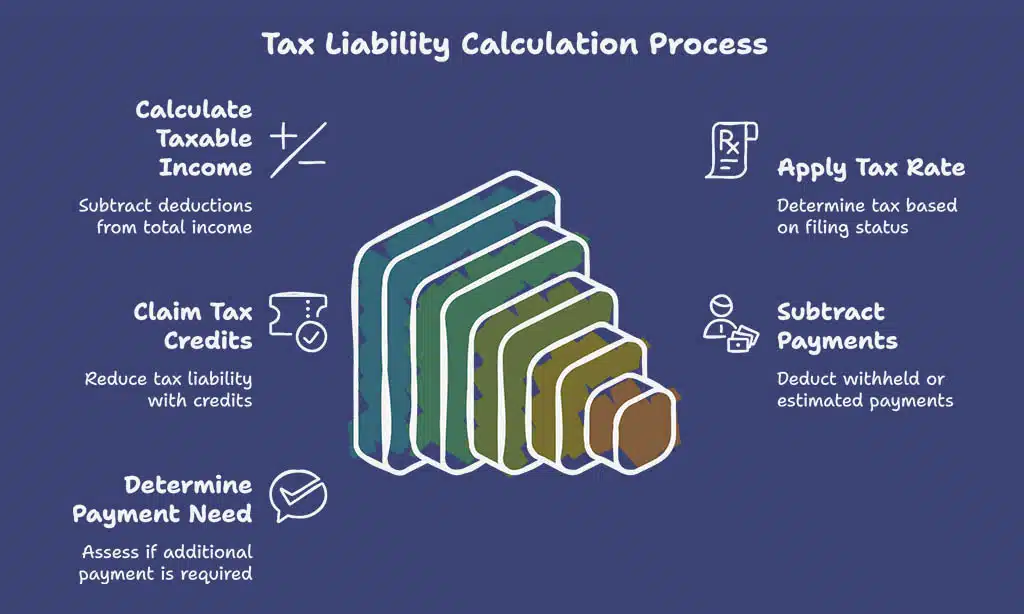
Start by checking if you’ve paid enough taxes throughout the year. This helps you see if you might owe or be due a refund.
Calculate your estimated tax liability
Add up your total income, including wages, self-employment earnings, and any extra sources like rental or investment income. Subtract eligible tax deductions such as student loan interest or mortgage interest to get your taxable income.
Apply the correct tax rate based on your filing status.
Check if you qualify for credits like the earned income tax credit or child tax credit (CTC). These will lower what you owe. If taxes were withheld from paychecks or paid through estimated payments earlier, subtract that amount too.
File IRS Form 4868 if more time is needed to finalize your federal income tax return by the April 15 deadline.
Identify if you need to make a payment with your extension
Estimate how much tax you owe for the year. Use IRS Form 1040 or other tax forms to calculate this. If you owe money, pay at least 90% of the total amount by April 15. This helps avoid late-payment penalties and reduces interest on unpaid taxes.
If your estimated payments fall short, interest will build up until the balance is settled. The IRS accepts various payment methods like electronic payments, credit cards, or debit cards.
Paying now can save fees later during tax season.
Step 2: File a Federal Tax Extension
Complete IRS Form 4868 to request extra time for your federal taxes. Submit it online or mail it in to avoid late filing penalties.
Use Form 4868 to request an extension
Use IRS Form 4868 to request an automatic extension for filing your individual income tax return. This form gives you six extra months, moving the tax filing deadline from April 15 to October 15.
Make sure to submit it by Tax Day to avoid late penalties.
Taxpayers can file Form 4868 online through IRS Free File or approved tax software like TurboTax and Quicken. You can also mail a paper form if needed. Estimate any taxes owed and pay at least 90% of the total amount due by April’s deadline to reduce interest charges or failure-to-pay penalties.
File online through approved e-file services or by mail
Submit IRS Form 4868 electronically using tax software like TurboTax or QuickBooks. The IRS Free File program also offers a fast, easy way to request an automatic extension. Filing online ensures your form is processed quickly and reduces errors.
For mail submissions, download Form 4868 from the IRS website. Fill out the form accurately with your estimated federal income tax details. Send it to the address listed for your state on the instructions page by April 15, ensuring timely delivery.
Step 3: File a State Tax Extension (If Required)

Some states need separate tax extension forms. Check your state’s rules to keep things on track.
Check state-specific rules for extensions
States have their own rules for tax extensions. Some accept IRS Form 4868, while others require a separate form. Check your state’s tax agency website to find specific instructions and deadlines.
Not all states honor an automatic extension from the IRS. For example, California grants residents more time without needing a request, but Texas may need extra forms or payments. Submit any required state payment by the April filing deadline to avoid penalties or interest on unpaid taxes.
Submit the necessary forms for your state
Check your state’s tax rules. Some states accept the federal extension, while others require a separate form. For example, California grants an automatic extension if you file and pay taxes by October 15.
Visit your state’s tax agency website to download the right forms. Submit these before the April 15 deadline or earlier if needed. Use online filing systems or mail options as allowed by your state.
Key FAQs About Tax Extensions
Tax extensions can feel tricky, but they don’t have to be. Here are answers to common questions that could save you time and money.
Does a tax extension give me more time to pay taxes?
A tax extension only gives you extra time to file your federal income tax return. It does not extend the deadline to pay taxes owed. Payments are still due by April 15, or penalties and interest will apply.
To avoid a failure-to-pay penalty, pay at least 90% of what you owe by this date.
You can use IRS Form 4868 to request an automatic extension for filing paperwork until October 15. If you do not estimate and pay your taxes properly by the original deadline, unpaid taxes may accrue penalties or interest.
Using tools like TurboTax or other tax software can help calculate payments before filing extensions.
How will I know if my extension is approved?
The IRS does not send confirmation letters for tax extensions filed by mail. If you use IRS Free File or approved e-file services, you’ll get a quick confirmation online when your extension is accepted.
Always double-check the details before submitting to avoid errors.
Keep in mind, an approved extension only grants extra time to file your federal income tax return—not to pay taxes owed. Ensure you’ve submitted IRS Form 4868 and paid at least 90% of any due taxes by April 15 to avoid penalties on unpaid taxes.
Takeaways
Filing a tax extension is simple if you follow the steps. Estimate your taxes and submit Form 4868 before April’s deadline. Check state rules and file for an extension there, too, if needed.
These steps protect you from penalties while giving extra time to prepare your return. Using tools like TurboTax or IRS Free File makes it even easier. Take action now to avoid stress later!
FAQs
1. What is a tax extension, and how does it work?
A tax extension gives you more time to file your federal income tax return. By filing IRS Form 4868, you can get an automatic extension of up to six months, moving the deadline from April 15 to October 15.
2. Will I face penalties if I file for a tax extension?
Filing for a tax extension avoids the failure-to-file penalty as long as you submit IRS Form 4868 by Tax Day. However, interest on unpaid taxes and failure-to-pay penalties may apply if you owe money and don’t pay by the original deadline.
3. How do I file a tax extension online?
You can use IRS Free File or trusted tax software like Intuit TurboTax or H&R Block to electronically submit Form 4868 before the April filing deadline.
4. Do I still need to pay my taxes by April 15 if I request an extension?
Yes, even with an automatic extension, any unpaid taxes are due by April 15 (or Tax Day). You can estimate your payment using payroll withholdings or other records and choose available payment options through the Internal Revenue Service.
5. Can businesses also file for a tax extension?
Yes, business owners such as sole proprietors who report income on Schedule C can request an automatic six-month delay for their returns using IRS forms specific to business taxes.
6. Does requesting an extension impact my refunds or trigger audits?
No, requesting an extension doesn’t affect your refunds or increase audit risks. It simply allows extra time to complete accurate paperwork while avoiding late-filing penalties during busy times like natural disasters or complex deductions like state and local taxes.
























