

The first time a client asked me to pull their “reference domains,” I typed that phrase into Semrush’s search bar and got nothing useful. The report exists. Semrush just calls it Referring Domains. Same data, different label, and that one-word gap wastes a lot of people’s first ten minutes.
So if you came here searching for how to check reference domain in Semrush, you’re in the right place. I’ll walk through exactly where the report lives, which filters I actually use on client work, and how I read it when a site loses traffic and nobody knows why. I’ve been on the Guru plan for about two years, mostly running audits for client sites rather than my own.
Reference Domain vs Backlink: The Difference That Matters
A backlink is one link. A referring domain is one website, no matter how many links it sends you.
If a single blog links to you 40 times, that’s 40 backlinks and one referring domain. This distinction isn’t trivia. Google weighs the number of unique referring domains as a trust signal, which means fifty links from fifty different sites can be worth more than five hundred links from five sites.
That’s why I check referring domains before I check backlink count. A profile that looks huge often shrinks fast once you group it by domain. If you want the fuller picture of link types and their value, I’ve broken that down in what are backlinks in SEO.
What You Need Before You Start
You don’t need a paid plan to look. Semrush’s free Backlink Checker will show you referring domains, authority score, and anchor text for any domain, though the free account caps you at roughly 10 searches a day with 10 results each.
That’s fine for a quick sanity check. It’s not enough for client work.
On Guru, which runs $249.95 a month, each report returns up to 30,000 results and you can run 5,000 reports per day. Guru also unlocks historical data going back to January 2012, which matters more than it sounds when you’re trying to prove a link was there in March and gone by June.
You also don’t need to own the site. The report works on any domain, so competitor analysis needs no permission and no verification.
How to Check Reference Domains in Semrush, Step by Step
1. Open the Referring Domains Report
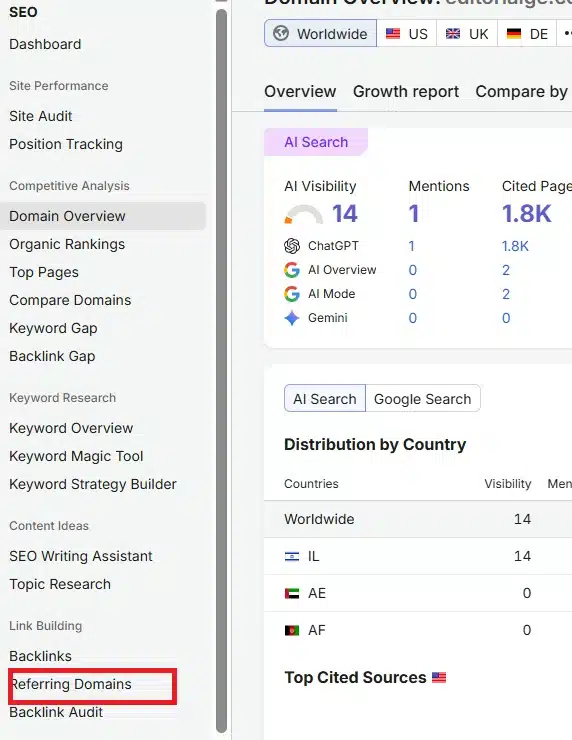
In the left sidebar, go to SEO, then look under the link-building group for Referring Domains. It sits right below Backlinks. Semrush split these into separate menu items, so if you’re used to hunting inside one big “Backlink Analytics” screen, look again.
2. Enter the Domain and Pick Your Scope
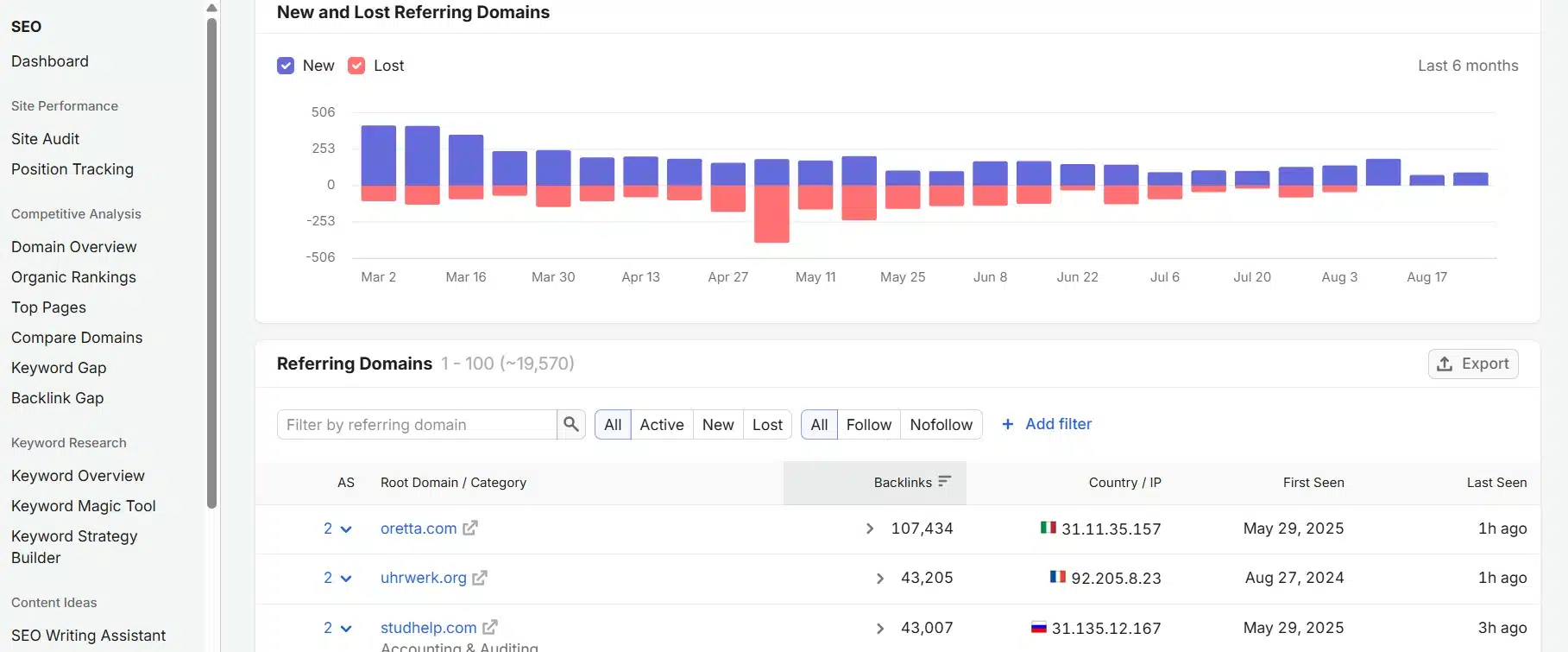
Type the domain and hit search. Before you read anything, check the scope selector. The root domain pulls every subdomain. A subdomain or exact URL narrows it.
I default to the root domain for client audits. For a single blog post that lost rankings, I switch to exact URLs. Mixing these up is the fastest way to misread a report.
3. Read the Graph Before the Table
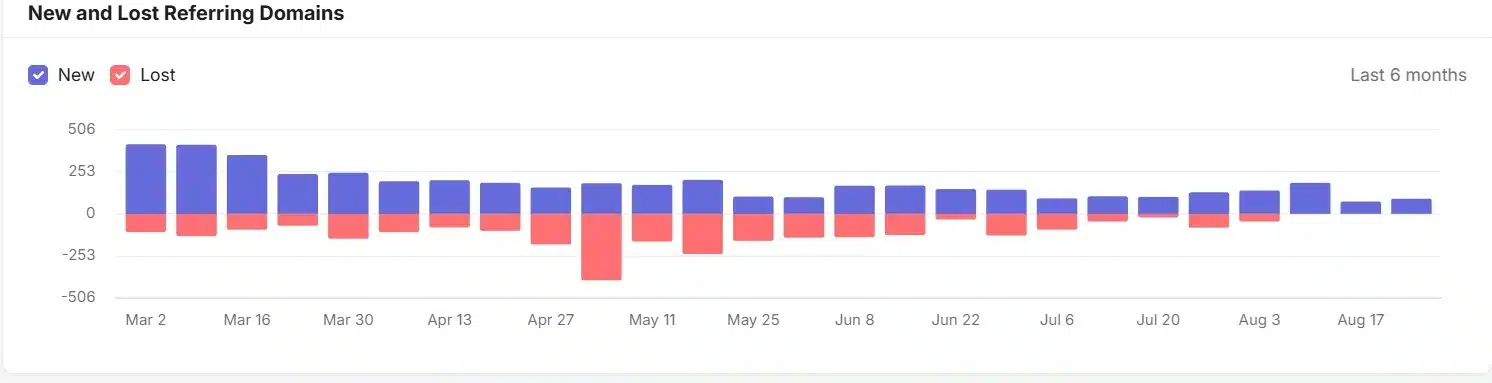
At the top you’ll see a New and Lost Referring Domains chart. Most people scroll past it. Don’t.
The table tells you what a profile looks like today. The graph tells you what happened to it. A steady green line with small red dips is a healthy site. A red spike in one month is your investigation.
4. Use the Quick Filters
Above the table sit two filter rows that do most of the work:
- All / Active / New / Lost. New shows link to those that appeared in the past 30 days. Lost shows links dropped within the past six months.
- All / Follow / Nofollow. A follow domain sends at least one follow link. A nofollow domain sends none.
I click “Lost” first on every drop diagnosis. It reorders the whole conversation with a client.
5. Sort by Authority Score, Not by Backlink Count
The table loads sorted by how many links each domain sends you. That order flatters spam. A scraper site sending 300 sitewide footer links sits at the top.
Click the Authority Score column instead. Now you’re looking at the domains that actually carry weight. You can also sort by First Seen and Last Seen to find the oldest partnerships or the most recent additions.
6. Add Filters to Cut the Noise
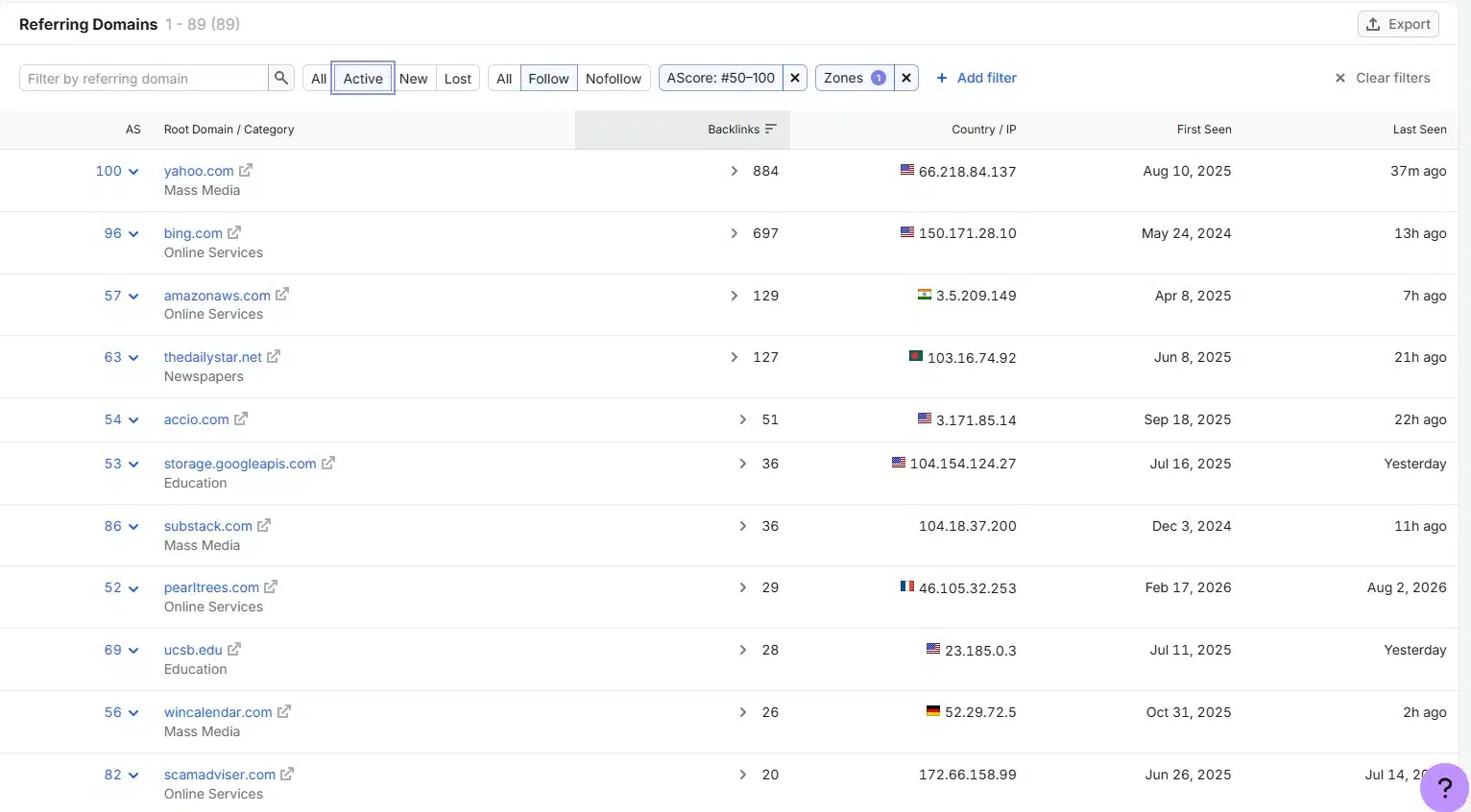
Click Add filter for the deeper cuts. You get authority score ranges, categories, IP addresses, zones (which are really TLD filters), and countries.
Two I use constantly:
Authority Score above 30. Strips out the long tail so I can see the profile a human would judge.
Zone. One client had 60% of their referring domains on a single unrelated country TLD. Nobody had noticed. Note that a zone filter for .au finds sites using that TLD anywhere, while a country filter for Australia finds sites located there on any TLD. They answer different questions.
7. Export Before You Filter Again
Filter first, then export to CSV. The export respects your filters, so a filtered export is a clean deliverable and an unfiltered one is 20,000 rows nobody will read.
I keep two exports per client audit: full profile and lost domains only.
How I Read a Referring Domain Drop
This is the workflow I run when a client site loses traffic and the site audit comes back clean. Filter to Lost. Sort by authority score, highest first. Then I ask three questions about the top 20 rows.
Did we lose links from one site or many? One domain dropping 50 links is usually a site redesign or a page deletion. Fifty domains dropping one link each in the same week is a network going down, and that’s a different problem.
Were they follow or nofollow? Losing nofollow links rarely explains a ranking change. I’ve watched clients panic over exactly this.
What was the Last Seen date? Compare it to when traffic actually fell. If links disappeared in April and traffic fell in February, the links aren’t your story. Go look at a core update instead.
On my last drop investigation, the answer turned out to be [119 lost referring domains from a single expired guest post network]. All follow. All within nine days. The site had bought them two years earlier under a different agency, and I only found the pattern because the IP column showed the same host repeating.
That experience is a big part of why I wrote what are backlinks in SEO. Links you rent can be unrented.
Finding Competitor Link Gaps
Referring Domains is the diagnostic. Backlink Gap is the opportunity finder.
Backlink Gap locates referring domains that link to several sites you compete with, and it compares up to five domains at a time. I load the client plus four competitors, then filter to domains linking to three or more competitors but not to my client. That list is the outreach shortlist. Nothing else comes close for hit rate.
If you need wider coverage, Bulk Analysis handles up to 200 URLs at once and shows backlink and referring domain counts for each. I use it to compare content formats across a niche before commissioning a piece.
One more report worth ten minutes: Network Graph. It maps a site’s referring domains up to three tiers deep and color-codes them by niche relevance. Seeing the tier structure laid out visually is the clearest explanation of second tier link building I’ve found inside any tool.
Three Things I Got Wrong Early
I treated the count as the goal. Referring domain totals are a scoreboard, not a strategy. A client with 400 relevant referring domains beat one with 2,000 scraped ones. Every time.
I assumed Semrush sees everything. It doesn’t. No crawler has Google’s index. If a link is missing from the report, check it manually before telling a client it was removed.
I reached for “disavow” too fast. Google’s guidance stays cautious about aggressive disavow use, since removing links Google was already ignoring can do more harm than good. Run a backlink audit, read the toxic flags, then sit on them. A messy profile isn’t automatically a penalized one.
Frequently Asked Questions (FAQs)
1. Is a reference domain the same as a referring domain?
Yes. “Reference domain” is a common way people phrase it, but Semrush and every other major tool call it a referring domain. Searching the correct term inside the tool gets you there faster.
2. Can I check referring domains for a site I don’t own?
Yes. Semrush pulls from its own crawl index, so no site verification is needed. This is why competitor link analysis works at all.
3. Why do Semrush and Ahrefs show different referring domain counts?
Different crawlers, different indexes, different refresh cycles. Neither is wrong. Pick one tool and track the trend inside it rather than comparing absolute numbers across tools.
4. How often should I check?
Monthly for maintenance on client sites. Immediately when rankings move. The lost filter covers a six-month window, so a quarterly check still catches most damage, but you’ll be diagnosing it late.
Final Thoughts
If you’ve never opened this report, run it on your own site, filter to Lost, and sort by Authority Score. Fifteen minutes. You’ll either find nothing, which is genuinely good news, or you’ll find the link that quietly disappeared six weeks before your rankings did.
Then run the same thing on your closest competitor. That second report is usually where the content plan comes from. I covered how that fed into my year in SEO strategy 2026: what worked.























