The need to track WhatsApp has increased significantly in 2025. From parents looking to protect their kids from online threats to spouses trying to secretly monitor their partner’s activities, WhatsApp tracking has become pivotal in providing clarity and ensuring peace of mind. For parents asking, “Can WhatsApp messages be tracked?” We’ll show you how to do so in 3 minutes.
Msafely – A Reliable WhatsApp Tracking App
WhatsApp tracking apps provide an easy way to monitor someone’s activities on the messaging app. One app that stands out for its effectiveness and ease of use is Msafely. The app is renowned for its outstanding features and solutions that actually work. It provides comprehensive monitoring of the target’s WhatsApp, allowing you to see who they are talking to anytime, anywhere. You can view sent and received messages as well as call logs.
How Msafely Tracks WhatsApp
Msafely has an innovative range of features designed to collect data from the target device and transmit it to a user-friendly dashboard. Here is how Msafely helps you monitor someone’s WhatsApp.
- Read WhatsApp messages
Msafely lets you read WhatsApp messages on your target phone. It also allows you to see secret chats and media to help you understand your child’s or partner’s internet behavior.
- View deleted and hidden chats
Use the WhatsApp tracking feature to see all deleted and hidden WhatsApp messages on their phone. You don’t have to worry about deleted messages – Msafely will save them for you.
- Set keyword alerts
The tracking app lets you set alerts for keywords that are often associated with suspicious conversations. These words include meet, delete, love, etc.
- Track GPS location
Msafely allows you to view the target phone’s real-time location on a detailed map. The geofencing feature alerts you when the phone enters areas you consider unsafe, such as hotels, parks, or people’s houses.
- Monitor browser history
If your child always receives links on WhatsApp, check their browser history to better understand the situation. Msafely lets you view websites they visit late at night or when you are away.
- Check installed apps
Discover all apps installed on the target phone, including hidden apps like Telegram and dating apps. You can also access the vault to reveal apps they don’t want you to see.
- See social media messages
Nowadays, kids use different social media platforms to chat, especially when sending secretive messages. Msafely lets you track more than 13 apps, including Facebook, Instagram, Snapchat, Twitter, and others.
- Monitor calls and text messages
The tracking app also lets you monitor call logs and text messages. Sometimes, your child may opt to call a stranger they met online rather than texting them on WhatsApp. This often happens when they want to meet. Msafely lets you see the caller’s names and read sent, received, and deleted text messages.
- Real-time tracking
Msafely tracks the target phone in real time, keeping you up to date with who your child is talking to and what they are planning. This way, you can respond to situations before they get worse.
How to Set Up Msafely
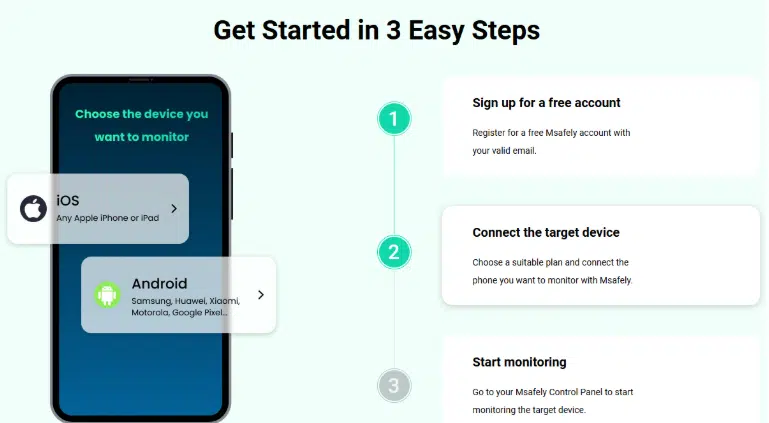
Msafely is the easiest app to use. Unlike most apps, no app installation is required. In fact, you don’t even need to touch the target device. Follow these steps to set up Msafely:
- Visit msafely.com on your browser and click Sign Up Free
- Click Continue with Google or enter a working email address to register
- Choose the device you want to monitor (Android or iOS)
- Select a subscription plan and make a payment to proceed
- Enter your target’s Apple/Google ID and password. For Android devices, you can use the APK solution, which involves manually installing the app on the target device.
- Once the connection has been verified, you can start monitoring the target device in real time.
Msafely’s Pros and Cons
Pros
- It’s quick and easy to set up. Setting up Msafely takes less than three minutes, and you don’t need to be tech-savvy.
- Provides detailed monitoring of the target’s WhatsApp, revealing everything, including deleted messages and media.
- No app install required. You don’t need to access the target device to pair it with your Msafely account
- Let’s you monitor the target device anonymously. They won’t know you’re tracking your WhatsApp.
- Outstanding range of features. The tracking app lets you track your child’s social media, web browser, location, and other activities.
- Offers multiple connection options. Besides Apple/Google ID, you can also use APK to pair Msafely to the target phone
- User-friendly interface and dashboard. Msafely’s interface is intuitive, making it easier to sign up and access information from the dashboard.
Cons
- Does not offer free trial
Msafely Pricing
Msafely is a fairly priced WhatsApp tracker. It has three pricing plans. The one-month plan costs $49.98. The 3-month plan is priced at $28.32 per month. The best value is offered on the 12-month plan, which goes for $11.66 per month.
| Monthly Plan | Quarterly Plan | Annual Plan |
| $49.98/mon | $28.32/mon | $11.66/mon |

The monthly plan is ideal for users who only want to track one time or for a limited period of time. The Quarterly plan is most preferred because it gives you sufficient time to monitor your target. The annual plan is suited for long-term monitoring. It can help you gather enough evidence to make a conclusive decision on a matter.
Why Choose Msafely?
Msafely stands out for its ability to track a phone without direct physical access. While free methods often require consent or alert the user, Msafely’s cloud-based approach for iPhones (and Google Cloud for Androids) bypasses the need for physical installation. This ensures complete discretion.
Combined with its extensive features that go beyond just WhatsApp tracking to include messages, different social media platforms, location tracking, and more, Msafely shows itself as the top phone tracker app, offering a truly comprehensive and reliable solution for remote monitoring. It’s the ideal choice when discretion and detailed information are paramount.
Conclusion
While WhatsApp is the best instant messaging app, it puts your child at risk of online threats. Additionally, its high level of privacy makes it a desirable choice for partners engaging in illicit affairs. WhatsApp tracking provides clarity in such situations and helps you handle the situation better.
Msafely provides comprehensive monitoring of the target’s WhatsApp, keeping you up to date with what they are planning. Without installing any app, you can monitor your child’s or spouse’s WhatsApp anonymously. Msafely delivers the clarity and peace of mind you seek.