
Free AI travel tools for trip planning are software programs that use AI to help you build itineraries, find flights, create maps, and set budgets. They have grown fast since 2024, but not everyone trusts them yet. Among travelers who tried generative AI for travel, 84% said it improved their experience. Yet only 30% of US travelers felt comfortable using AI tools in 2025.
I looked at 20 free AI travel planning tools to find which ones work without paywalls. This guide covers 10 tools that deliver real help with itineraries, flights, maps, and budgets. Each tool is listed by number, and each one solves a different part of trip planning.
1. ChatGPT: General-Purpose Travel Ideation and Research
Yes, you can use ChatGPT to plan a trip. ChatGPT helps with brainstorming destinations and researching ideas. It fits travel apps that focus on early planning stages.
Core Capabilities
ChatGPT answers questions about destinations, suggests activities based on your interests, and writes sample itineraries. You can ask it to compare cities, explain visa rules, or list budget options. It handles follow-up questions and refines answers as you narrow your plans.
Limitations
ChatGPT, without a web search, cannot confirm whether a restaurant closed last month or if a landmark still exists. It pulls from training data, not live sources. You need to verify dates, prices, and opening hours yourself.
2. Mindtrip: Visual Itinerary Creation and Sharing
Mindtrip turns plans into visual maps you can share with other travelers. The tool builds day-by-day routes and shows each stop on an interactive map. You can invite friends to view or edit the same itinerary.
Core Capabilities
Mindtrip plots activities on a map with timing and distance between stops. It suggests nearby attractions when you add a location. You can export the map to your phone and share a link with travel companions.
Limitations
The free version limits how many trips you can save. Some map layers and route optimization features require a paid account. Offline access is not included.
3. iMean AI: Multi-City Flight Coordination and Complex Route Planning
When you fly from different cities but want to meet in one place, iMean AI handles the coordination. One test asked it to sync arrivals for four people. They flew from New York, Toronto, Sydney, and Tokyo into Kraków between July 5 and 7. The prompt was complex. It was not a simple hotel request.
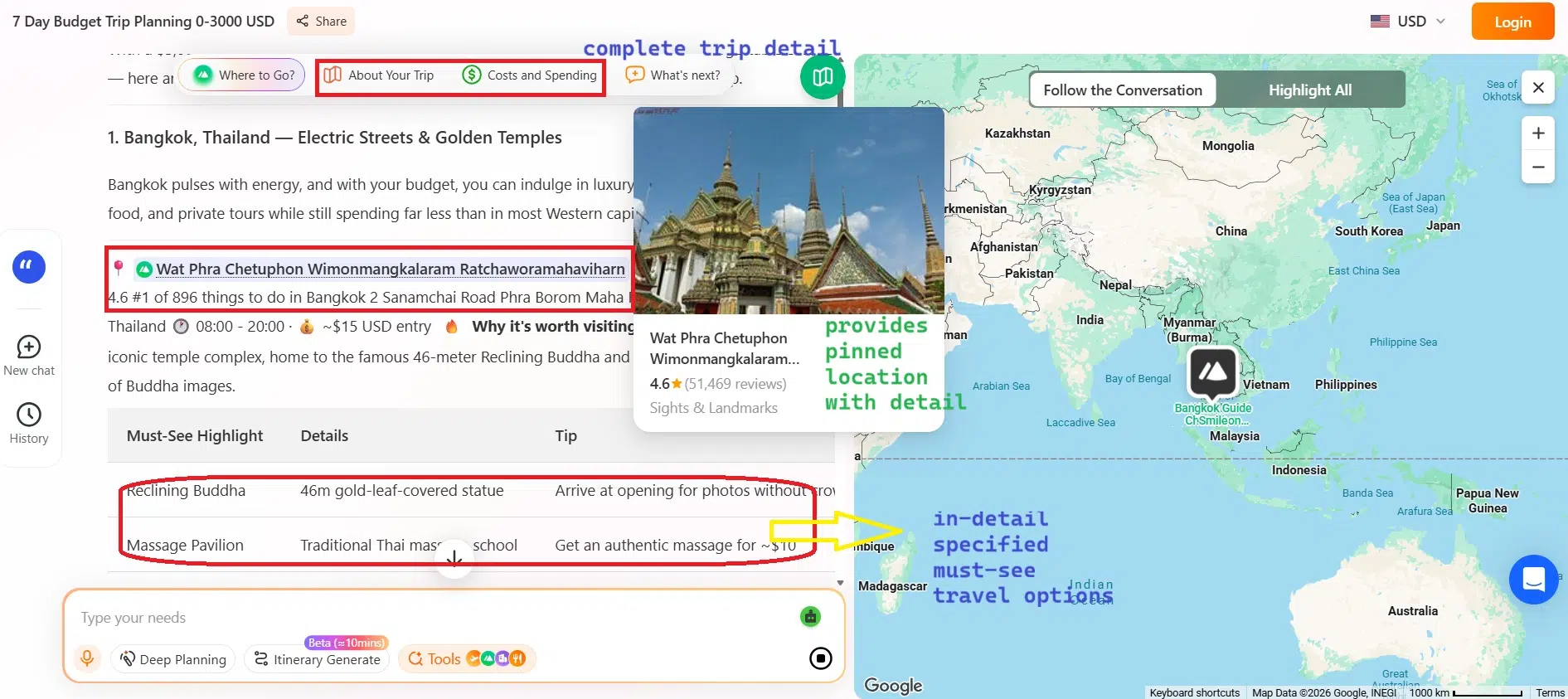
- Compares flight options for multiple departure cities
- Finds overlapping arrival windows
- Checks layovers
- Suggests dates that work for everyone
Core Capabilities
iMean AI compares flight options for multiple departure cities and finds overlapping arrival windows. It checks layovers and suggests which dates work for everyone. The tool also plans low-impact routes by prioritizing direct flights or fewer connections.
Limitations
The free tier includes unlimited trip planning, but advanced features cost $6.99 per month as of October 2026. Results depend on the flight data it can access at the time you search. You still book tickets through airline sites.
4. Roam Around: Rapid Day-by-Day Itinerary Generation
MonkeyTravel is 100% free and builds itineraries for groups of up to 8 friends per trip. It creates day-by-day plans with real places, opening hours, and budget estimates. You drop in a destination and get results in about 30 seconds.
Core Capabilities
Roam Around generates full schedules with activities for each day. It includes timing suggestions and estimates how long each stop takes. The tool pulls in popular attractions and meal options based on your travel dates.
Limitations
The itineraries feel generic if you do not add specific interests. Opening hours and prices may be outdated. You cannot edit the output directly; you have to start over with a new prompt.
5. Tripnotes AI: Mobile-First Itinerary Builder
Some tools lock the export button behind a paywall after showing you the itinerary. Tripnotes AI avoids that but still limits some features in the free version. It works best on phones, with swipe navigation and quick edits.
Core Capabilities
Tripnotes AI lets you drag stops to reorder days. It saves itineraries to your account and syncs across devices. You can add notes, photos, and bookings to each activity.
Limitations
Free accounts limit the number of trips you can store. Offline access and detailed budget tracking require a subscription. The app needs constant internet to load maps.
6. Kayak AI Assistant: Budget Flight Search Optimization
When you need cheap flights, Kayak’s AI assistant filters options by price and convenience. It compares hundreds of routes and flags deals. The tool answers questions like “What’s the cheapest week to fly to Barcelona?”
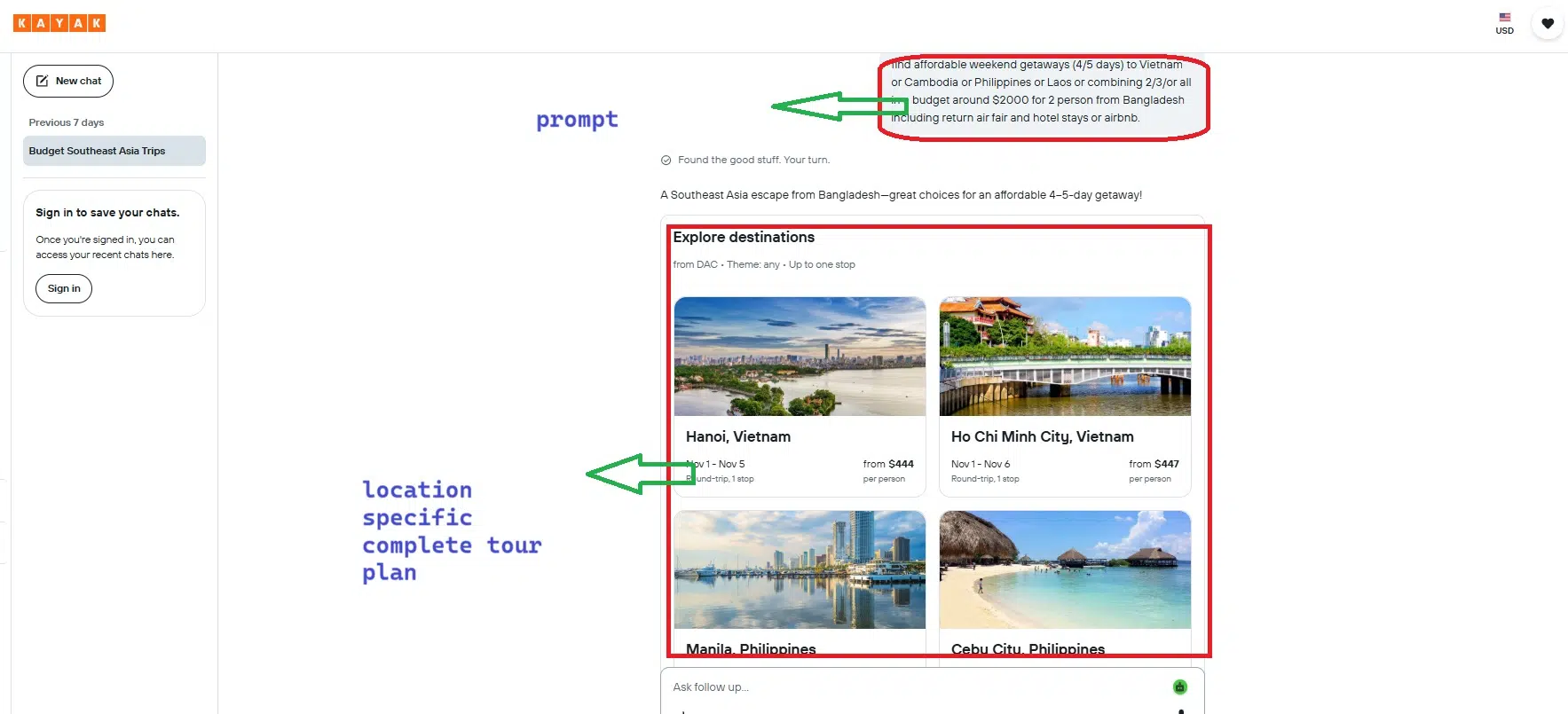
Core Capabilities
Kayak’s assistant tracks fare changes and suggests when to book. It shows flexible date grids so you can shift travel by a day or two for savings. You can filter by airline, layovers, or baggage fees.
Limitations
Search results favor partner airlines and booking sites. Budget carriers sometimes do not appear. The AI assistant cannot book tickets; it redirects you to third-party sites.
7. Sygic Travel and Other Free AI Travel Tools for Trip Planning
After you plan online, Sygic Travel downloads maps for offline use during the trip. It combines itinerary building with turn-by-turn navigation that works without data. You mark attractions and the app routes you through them.
Core Capabilities
Sygic Travel saves full city maps to your device. It tracks your location offline and shows nearby stops from your plan. You can add custom points of interest and notes.
Limitations
Downloading large maps requires storage space on your phone. Real-time updates like traffic or closures do not work offline. Free users see ads and have a cap on saved trips.
8. Roadtrippers: Scenic Route Mapping for Road Trips
Road trips with multiple drivers benefit from shared expense tracking and route planning. Roadtrippers maps scenic stops along highways and calculates driving time. It highlights quirky landmarks and local diners between major destinations.
Core Capabilities
Roadtrippers plots waypoints on a driving route and estimates fuel costs. It suggests detours to national parks, roadside attractions, and scenic overlooks. You can share the route with passengers and edit it together.
Limitations
The free version limits how many stops you can add to a single route. Premium features include campground listings and offline maps. International coverage is weaker than US routes.
9. TripIt: Email-Based Itinerary Aggregation
TripIt automatically organizes confirmations sent to your inbox. Forward a hotel booking or flight receipt, and it builds a master itinerary. Wanderlog’s free tier works for basic planning, but the AI assistant and offline maps require a Pro subscription at about $39.99 per year.
Core Capabilities
TripIt parses emails for dates, addresses, and confirmation numbers. It creates a timeline of every reservation and sends reminders before check-in. You can share the full itinerary with family or colleagues.
Limitations
TripIt relies on email forwarding, so manually booked items need manual entry. The free version does not include real-time flight alerts or seat tracking. It aggregates plans but does not suggest new activities.
10. Rome2Rio: Multi-Modal Transportation Route Planning
Rome2Rio has no AI assistant, just a search tool. It finds bus, train, ferry, and flight combinations between two points. Results show duration and approximate cost for each option.
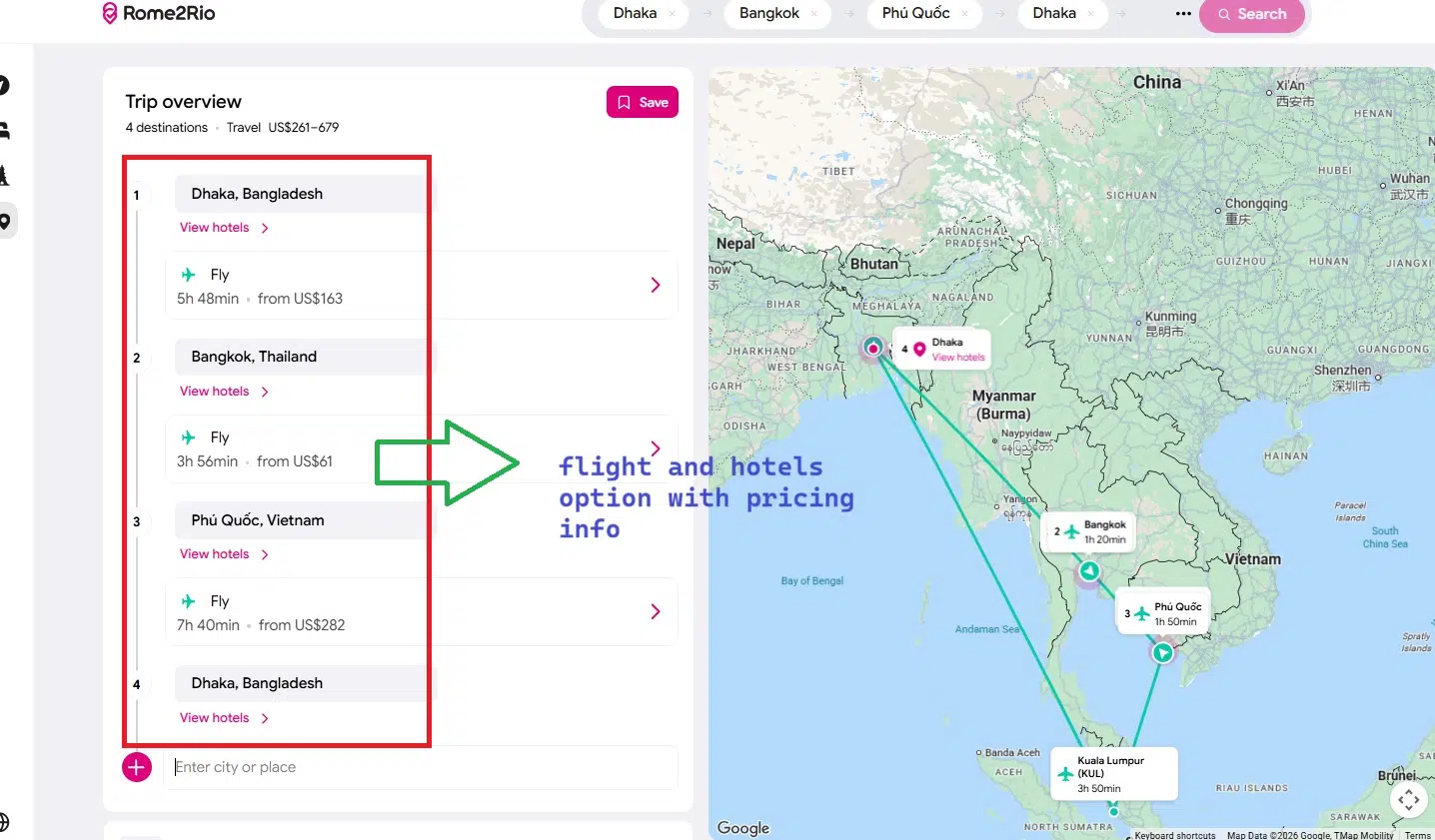
Core Capabilities
Rome2Rio compares public transit, rideshares, and flights on one screen. It links to booking sites for trains and buses.
You see layovers. You see transfer points. The tool shows complex routes.
- Compare buses, trains, ferries, and flights
- See duration for each option
- See cost estimates
- Find transfer points
- Check layovers
Limitations
Prices are estimates, not live fares. Schedules may be out of date for smaller regional operators. The tool does not book tickets; it only lists options.
Common Questions About AI Travel Planning Tools
You can do more with AI travel assistants by combining tools: use one for flights, another for itineraries, and a third for maps. Free AI itinerary makers like MonkeyTravel, Roam Around, and Mindtrip all work without a subscription. The best free app for travel planning depends on your trip type.
Can I use ChatGPT to plan a trip?
Yes, ChatGPT handles brainstorming and research. It answers questions about destinations and suggests activities. But it cannot confirm live details like restaurant closures or current prices.
Which AI is best for travel?
No single AI tool wins every category. ChatGPT works for open-ended research. Mindtrip and iMean AI handle multi-city coordination. Kayak and Rome2Rio focus on flights and transport.
How do AI travel planners actually work?
AI travel planners use prompts to generate itineraries based on your input. Some pull data from live sources; others rely on training data. The tool matches your preferences to places, times, and routes.
Are these tools genuinely free or limited free trials?
Some tools are free until you need to use the output. Others stay free but cap the number of saved trips. MonkeyTravel and group collaboration features remain free, even for up to 8 friends per trip.
How to Choose the Right Tool for Your Trip
Pick a tool based on what you need first: flights, maps, or itineraries. Try one that fits your trip type and check whether the free tier covers exports and sharing. Combine tools when a single app misses a key feature.