You priced the comedy night at $25. Then checkout tacked on another $3.52, and half the group chat closed the tab. That’s the real fight for anyone running shows, workshops, or meetups without a venue box office behind them. The best event ticketing platforms for independent organizers keep fees low enough that buyers don’t flinch. They also pay you before the venue deposit is due, and they let you keep your own attendee list, which most roundups never mention.
This guide ranks 10 options by three things: what each one actually costs on a $25 ticket, how fast the money reaches your bank, and who should walk away from it. Prices were checked in October 2026.
Quick Picks If You’re in a Hurry
- Best overall: Ticket Tailor
- Best if nobody knows you yet: Eventbrite
- Best for registered nonprofits: Zeffy
- Best for community meetups: Luma
- Best for conferences and paid workshops: Tito
- Best for cause-led events: Humanitix
- Best flat fee with live phone support: TicketSpice
- Best for organizers who can run their own server: Hi. Events
What a $25 Ticket Really Costs on Each Platform
Headline fees leave things out. This table adds the platform fee and standard card processing for a single $25 ticket, so you’re comparing real dollars instead of marketing copy.
| Platform | Platform charge | Estimated total fee on $25 |
|---|---|---|
| Eventbrite | 3.7% + $1.79 + processing | $3.52 |
| Humanitix | 5% + $1.29, processing included | $2.54 |
| Loopyah | $1.15 + 4.75%, processing included | $2.34 |
| SimpleTix | $0.79 + 2% + processing | $2.32 |
| Luma (Free) | 5% + Stripe | $2.28 |
| TicketSpice | $0.99 + processing | $2.02 |
| Hi.Events Cloud | 1.25% + $0.60 + Stripe | $1.94 |
| Ticket Tailor | Approximately $0.75 + Stripe | $1.78 |
| Tito | 3% + Stripe | $1.78 |
| Zeffy | No mandatory fee for eligible nonprofits | $0.00 |
The math assumes an order of one ticket, with Stripe at 2.9% + 30¢ where it applies. Bigger orders spread that 30¢ across more tickets, so your real number will run a little lower.
The spread is bigger than it looks. On 200 tickets, Eventbrite takes about $704 in fees, and Ticket Tailor takes about $356. That’s $348 back in your pocket on one show.
What Independent Organizers Should Check Before Signing Up
| Platform | Best suited to | Payments/payout consideration | Distinctive feature |
|---|---|---|---|
| Loopyah | Independent promoters | Weekly bank payout schedule; verify holds | CRM + promoter tools |
| SimpleTix | Venues and recurring events | Direct merchant payments; processor timing varies | Box office + season passes |
| Ticket Tailor | Independent ticket sellers | Connected payment account | Flat platform fee |
| Eventbrite | Audience discovery | Payout schedule and reserve terms | Event marketplace |
| Hi.Events | Technical organizers | Stripe integration | Self-hosting option |
Fees get all the attention, but they’re not the only thing that can hurt you.
Payout timing: By default, Eventbrite sends your money three business days after the event ends, and first-time sellers can’t get paid any sooner. If you’re fronting a $1,500 venue deposit, that wait stings. Platforms that plug into your own Stripe, PayPal, or Square account pay you as tickets sell.
Who owns the buyer list: A marketplace keeps marketing other events to your fans. With a direct checkout tool, the emails stay yours.
All-in pricing: Since May 12, 2025, the FTC’s junk fee rule has required anyone selling live event tickets in the US to show the total price up front, mandatory fees included. Passing fees to buyers no longer hides them, because buyers see the bigger number on the first screen. That makes low fees matter even more when you compare event ticketing platforms for independent organizers.
Discovery: Only one tool on this list brings you strangers. Every other one expects you to bring the crowd.
The 10 Best Event Ticketing Platforms for Independent Organizers, Ranked
1. Ticket Tailor
Ask a room of independent promoters what they moved to after Eventbrite, and Ticket Tailor usually comes up first. There’s a reason for that.
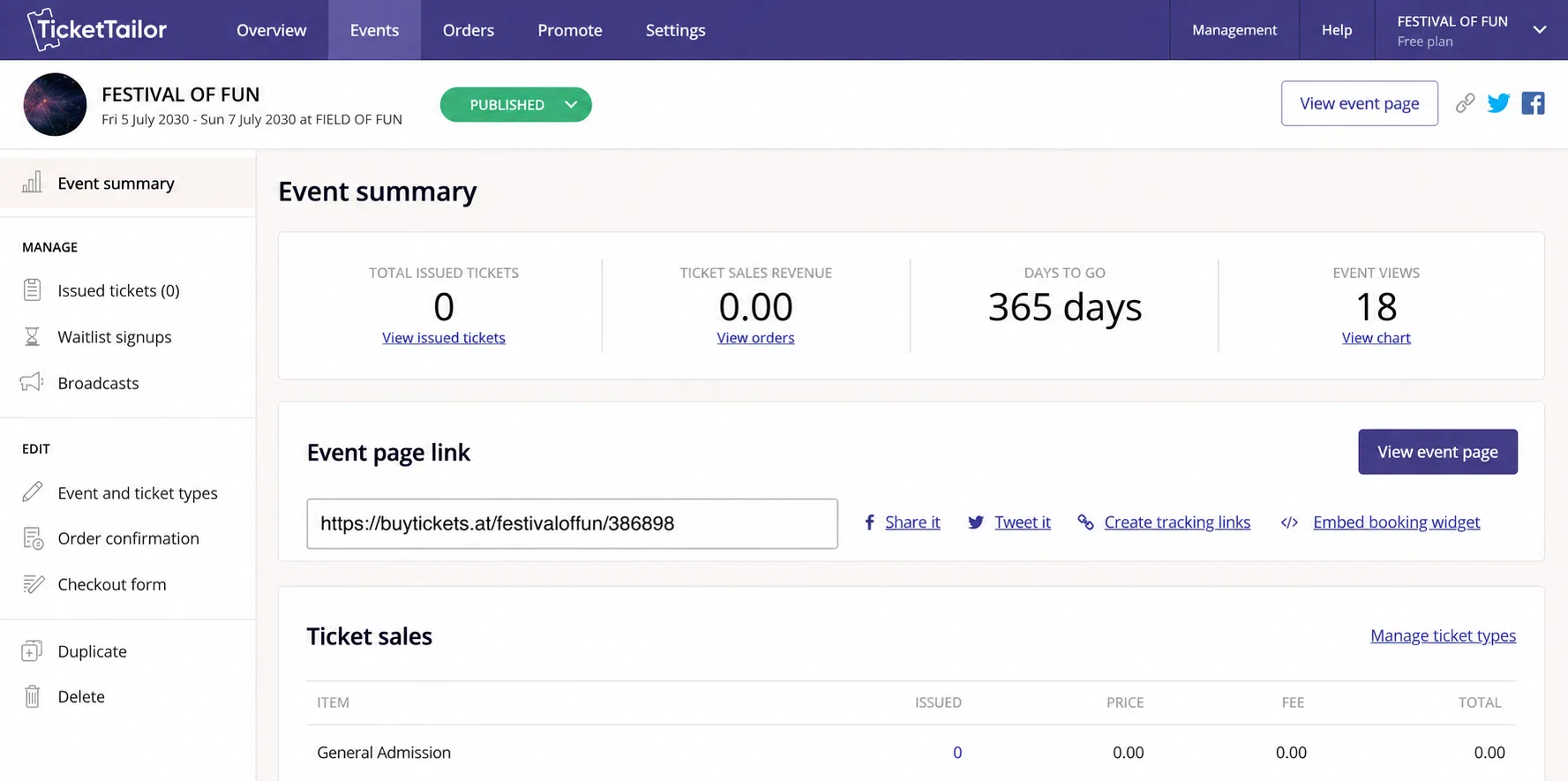
You pay a flat fee per ticket, never a percentage of the price. In the US, pay-as-you-go runs about $0.75 per paid ticket. If you buy credits in advance (minimum 100), the rate drops further, and the credits never expire. Your first five paid tickets are free, and free events cost nothing up to 5,000 tickets a year.
The real advantage is cash flow. Ticket Tailor never holds your money. Sales land in your own Stripe, PayPal, or Square account almost right away, so the venue deposit gets paid from ticket revenue instead of your savings. Registered charities get 50% off, and there’s a free door-scan app.
It does have limits. Page design options are basic, seating charts cost an extra credit per seat, and nobody browses Ticket Tailor looking for something to do. The common advice is to start on pay-as-you-go and buy a credit pack once you know you’ll sell 100+ tickets.
2. Loopyah—Ticketing, Promoter Management, and CRM in One Platform
Best for: Growth-led event teams, independent promoters, live music venues, festivals, and organizers running recurring paid events.
Managing a successful event involves more than selling tickets. Organizers also need to track who brings in buyers, manage customer relationships, handle check-in, and get access to revenue before important event expenses come due.
Loopyah brings these activities into a single event-management platform. Its published feature set includes ticket sales, seating charts, QR-code check-in, promoter tracking, buyer CRM, email marketing, and advertising tools.
Pricing and fees
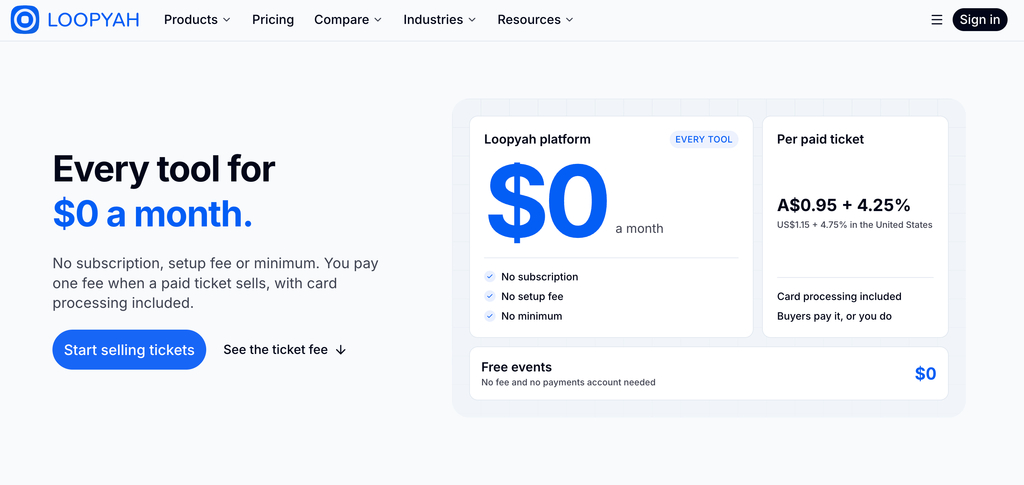
For U.S. events, Loopyah lists a charge of $1.15 plus 4.75% per paid ticket, including standard card processing. On a $25 ticket, that produces an estimated fee of $2.34. There is no monthly platform subscription or setup fee.
Organizers can choose whether to absorb the fee or pass it to ticket buyers. Free events carry no ticketing fee.
Payouts and cash flow
Loopyah says ticket revenue reaches its Stripe system shortly after an order, with standard bank payouts scheduled weekly. Organizers should confirm the specific payout terms, including any reserves or event-related holdbacks, before committing money needed for venue deposits or suppliers.
Features worth considering
- Promoter tracking: Individual referral links and commission management help organizers attribute ticket sales.
- Customer CRM: Buyer records across events can support repeat-event marketing.
- Event promotion: Integrated advertising and email tools reduce the number of separate systems organizers need.
- Ticket operations: QR check-in, seating charts, and event-management features support the work before and during an event.
Where Loopyah may not fit
Organizers looking primarily for an established public event-discovery marketplace should compare Loopyah with Eventbrite. Those who need only basic checkout may also want to evaluate simpler alternatives.
Editorial assessment
Loopyah offers a broad set of tools relevant to promoters and event businesses. However, independent testing of its organizer dashboard, support experience, payout behavior, and real-world reliability remains necessary before making stronger performance claims.
3. Eventbrite
Eventbrite is for one kind of organizer: someone with no audience yet.
Its marketplace puts your event in front of locals who are browsing for plans. If you have zero followers, that reach can be worth $3.52 a ticket. US organizers pay 3.7% + $1.79 per ticket, plus 2.9% processing.
The trade-offs are well known. Payouts arrive three business days after the event. If you sign up for early payouts, Eventbrite still holds back 20% of net sales as a reserve until the event ends. Bending Spoons, the Italian company that owns Evernote and Vimeo, took Eventbrite private in March 2026, so watch for plan changes.
You can skip the paid Pro email plans ($15 to $100 a month) if you already use a free email tool. Once your own list does the selling, it’s time to move to a cheaper platform.
4. Humanitix
Humanitix is a nonprofit itself, and it gives 100% of its booking fee profits to charity projects. You can put that on your event page as a selling point.
For US events, the standard fee is 5% + $1.29 per paid ticket, with card processing included. Registered nonprofits pay 3.9% + $1.29. By default, the buyer pays the fee, but you can absorb it, split it, or let buyers “tip” it at checkout.
It’s weakest on cheap tickets, because that fixed $1.29 takes a big bite out of a $10 workshop. At $25 and up, it’s an easy choice for independent organizers who care where fee money goes.
5. TicketSpice
On paper, TicketSpice looks close to Ticket Tailor. In practice, it usually costs more.
The base fee is $0.99 per paid ticket ($0.49 for tickets $5 or under), plus 2.9% + 30¢ processing. Then the extras start. A custom domain costs $150 a year, email marketing is a separate monthly charge, and using your own payment processor adds 1%. Some reviewers say their processing totals surprised them after large events.
So why pick it? Live human support and solid reserved seating. If you don’t need either one, Ticket Tailor does the same core job for less.
6. Luma
Luma looks polished, takes a couple of minutes to set up, and costs nothing for free events. Tech meetups and community dinner hosts love it.
Paid tickets carry a 5% platform fee plus Stripe. Luma Plus ($59 a month billed annually, or $69 monthly) cuts that platform fee to zero. Do the math before upgrading: Plus, it only pays for itself once you sell roughly $1,200 in tickets a month.
One quirk catches new users off guard. Luma shows buyers a single all-in price and won’t let you add a fee on top, so you raise the ticket price instead (about $52.50 to net $50 on the free plan). Money reaches your Stripe account on Stripe’s normal rolling schedule, which is about two days in the US.
7. Zeffy
If you’re a registered nonprofit, it’s hard to beat free. Zeffy charges organizers nothing and even covers card processing.
It funds itself through an optional contribution that buyers see at checkout, and they have to set that tip to zero by hand. Mention it on your event page so nobody feels tricked.
If you’re not a nonprofit, you can’t use it.
8. Tito
Tito is built for conferences and paid workshops, especially in tech. It charges 3% per ticket, capped at €25 per ticket. Charity and community events pay 2.5%, and you get 15% off fees if you prepay a year.
Developers like its embeddable checkout widget, and Tito doesn’t charge extra to remove its branding, which most rivals do. On a $299 workshop, a 3% fee beats almost any flat fee plus percentage combo. On a $10 club night, it’s the wrong tool.
9. Hi.Events
Read the warning first: if you host Hi.Events on your own server, you’re responsible when that server crashes the minute tickets go on sale. Don’t try it for your first sold-out show.
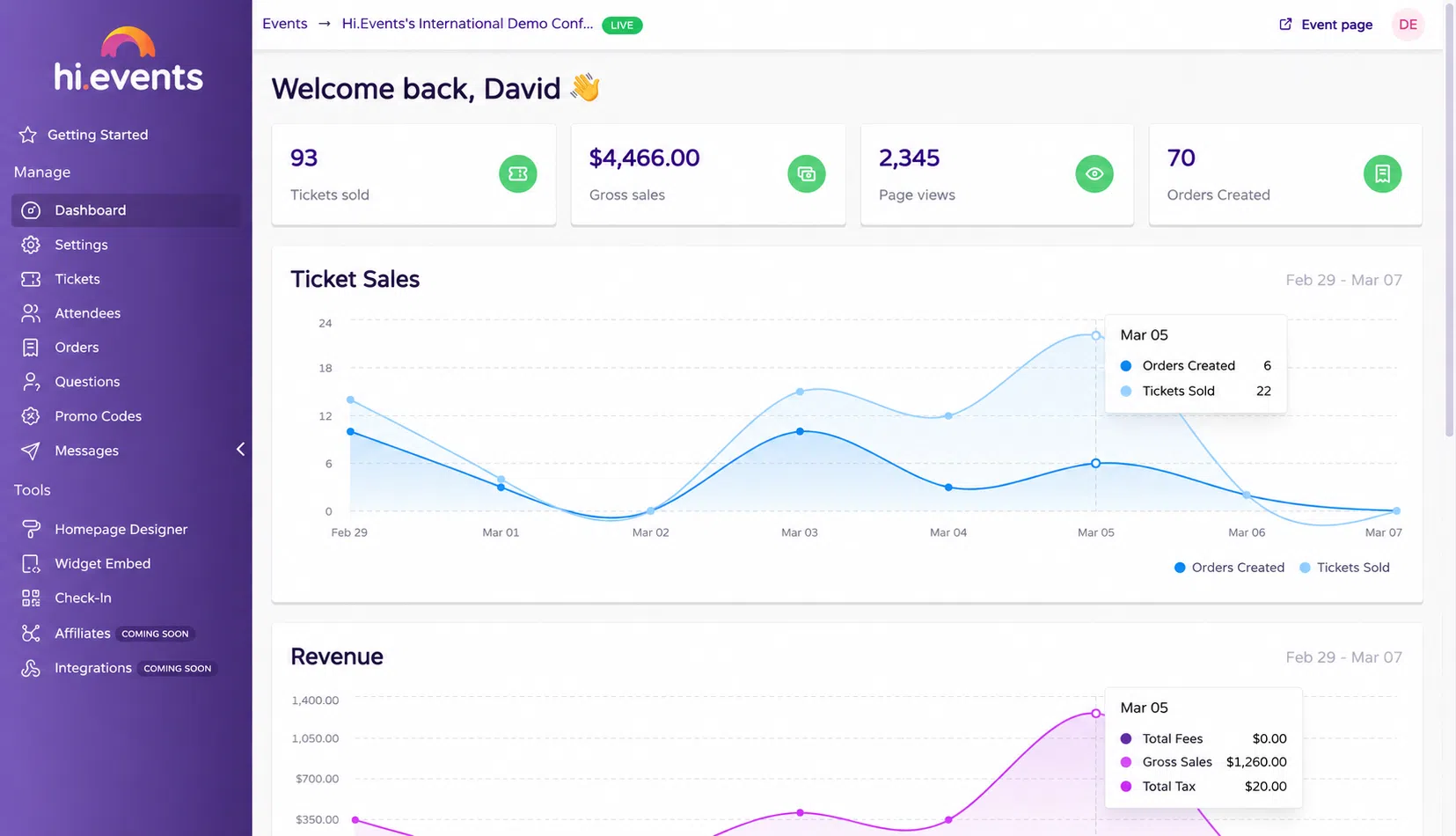
With that out of the way, it’s a smart pick for independent organizers with some tech skill. Hi.Events is open source. The hosted version charges 1.25% + $0.60 per paid ticket, paid by buyers by default, with no monthly fee. Hosting it yourself is free under its AGPL license, as long as you keep the “Powered by Hi.The “Events” link is visible. It only works with Stripe.
10. SimpleTix — For Box-Office Sales, Reserved Seating, and Season Tickets
Best for: Small venues, attractions, community organizations, and recurring events that need both online and in-person ticket sales.
SimpleTix is worth considering when selling tickets online is only part of the job. Organizers may also need to issue season passes, assign seats, take payments at the door, and check attendees in without managing several disconnected systems.
The platform charges $0.79 plus 2% per paid online ticket, with payment-processing fees charged separately. Using an illustrative processing rate of 2.9% plus $0.30, the estimated combined fee on one $25 ticket is approximately $2.32.
SimpleTix also lists a $0.25 service fee for in-person ticket sales, with applicable payment-processing costs separate. It has no standard monthly subscription fee.
Why it belongs in this comparison
SimpleTix offers a practical combination of online checkout, box-office tools, reserved seating, and season-ticket support. These capabilities make it particularly relevant to organizers who operate a physical venue or host recurring events.
Where to be careful
The total charge depends on the selected payment provider, how transaction fees are passed on, and the organizer’s specific setup. Check the current pricing calculator and account requirements before choosing it for a large event.
Marketing Gimmicks You Can Skip
Most beginners pay for features they’ll never use. These are the usual ones:
- Paid “boost” or discovery ads inside ticketing apps: Put that money into ads that point to your own event page instead.
- Premium email tiers bundled with ticketing: A free email tool and your own list do the same job.
- “Free” platforms that push every fee onto buyers: Under the FTC rule, buyers see the full total right away, so the fee still costs you sales.
Running online sessions too? Our roundup of the best webinar and event marketing platforms covers the tools built for that side of things.
Final Thoughts
For organizers who mainly want straightforward ticket sales and predictable platform charges, Ticket Tailor remains a useful starting point. Eventbrite is worth evaluating when marketplace discovery is important.
Loopyah may appeal to independent promoters who want ticketing, customer management, and promoter tools together. SimpleTix deserves consideration for venues that combine online sales with reserved seating, season passes, and box-office transactions.
Registered nonprofits should compare Zeffy and Humanitix, while community-event organizers may find Luma suitable. Developers who want more control can also investigate Hi.Events.
Before making a decision, calculate fees using your actual ticket prices, confirm when funds will reach your bank account, and check whether the product supports the operational requirements of your events.
Frequently Asked Questions (FAQs) on Event Ticketing Platforms for Independent Organizers
What is the cheapest ticketing platform for small events?
For nonprofits, it’s Zeffy, which costs nothing. For everyone else, Ticket Tailor and Tito tie at about $1.78 in fees on a single $25 ticket. Sell tickets in pairs or groups and the per-ticket cost drops, because card processing charges 30¢ once per order, not once per ticket.
Can I use two ticketing platforms at the same time?
Yes, and plenty of organizers do. A common setup is to list on Eventbrite for discovery and send your own email list to a cheaper checkout like Ticket Tailor. Just cap each platform’s ticket count so you don’t oversell.
Who pays the ticketing fees, me or the buyer?
On most platforms, you decide. Humanitix and Hi.Events pass fees to buyers by default, and Luma folds everything into one price. Either way, US buyers must see the full total up front.
Do I need a ticketing platform for a free event?
Not strictly, but one makes headcounts and door lists much easier. Luma, Tito, and Eventbrite handle free events at no cost. Ticket Tailor does too, up to 5,000 free tickets a year.
Is Eventbrite still worth it in 2026?
Only if you need its discovery traffic. If you’re selling to people who already follow you, you’re paying marketplace prices for demand you created yourself.