
When deciding between Virtual Private Server (VPS) hosting and dedicated hosting, it’s essential to understand the differences and how each hosting solution can impact your website’s performance, scalability, security, and cost.
While both options provide more resources and control compared to shared hosting, they are designed for different purposes and levels of demand.
In this detailed guide, we’ll explore the 6 key differences between VPS and dedicated hosting.
Whether you’re running a small business, an eCommerce site, or a high-traffic application, understanding these differences will help you make an informed decision.
1. Resource Allocation and Performance
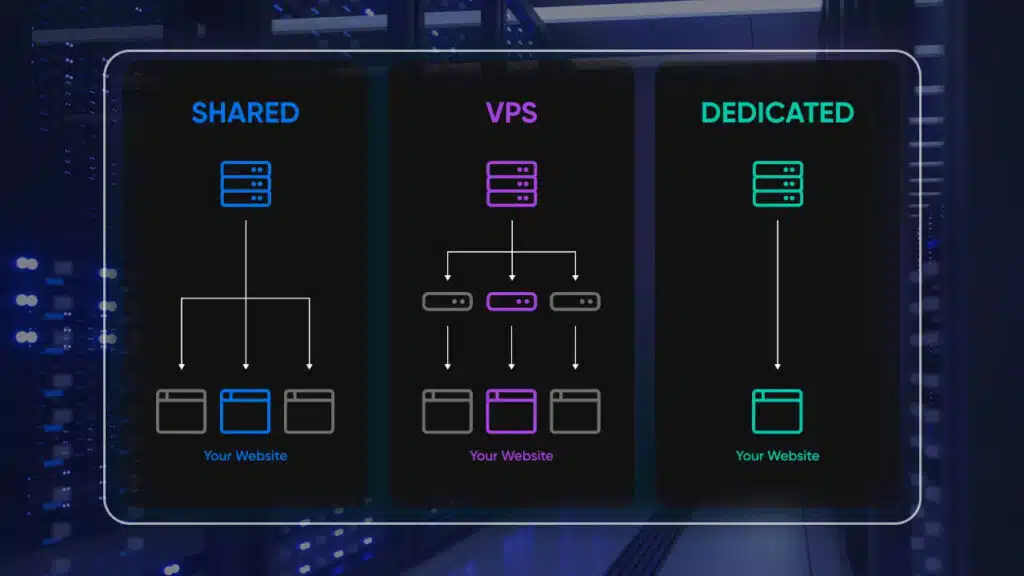
With VPS hosting, your server resources are divided among multiple users on the same physical server.
Each VPS operates in a virtualized environment, meaning you get a dedicated slice of the server’s resources (CPU, RAM, storage).
This isolation allows your website to perform better than shared hosting, as you don’t have to compete with other websites for resources.
However, since multiple VPSs share the same hardware, resource allocation is still limited.
VPS Hosting Resource Breakdown
- CPU and RAM: Allocated resources are shared but guaranteed to each VPS.
- Performance: VPS performance is better than shared hosting but may still fluctuate depending on other users’ server demands.
- Best For: Small to medium-sized websites that need more control and stability than shared hosting but don’t require the full power of a dedicated server.
Dedicated Hosting – Full Control Over Resources
With dedicated hosting, you rent an entire physical server exclusively for your website.
All the server’s resources are at your disposal, meaning there’s no resource competition with other users.
This gives you complete control over CPU, RAM, and storage, resulting in higher performance, reliability, and customization options.
Dedicated Hosting Resource Breakdown
- CPU and RAM: All server resources are dedicated to your website, offering superior performance.
- Performance: Dedicated servers deliver consistent, high-speed performance, especially for resource-intensive websites.
- Best For: Large websites or applications with high traffic volumes, resource-heavy databases, or specific server requirements.
Key Difference Summary: Resource Allocation and Performance
- VPS Hosting: Shared server resources but isolated, better than shared hosting.
- Dedicated Hosting: Exclusive access to server resources for maximum performance.
2. Cost and Pricing
One of the main benefits of VPS hosting is its affordability.
Since you share the physical server with other users, the overall cost is lower compared to dedicated hosting.
VPS hosting plans usually offer a range of pricing tiers based on the amount of resources you need, making it a cost-effective solution for growing websites that need more resources than shared hosting but can’t justify the cost of a dedicated server.
VPS Hosting Pricing Breakdown
- Affordable: VPS hosting typically starts at $20–$100 per month, depending on the resources and features you require.
- Scalable Plans: You can easily upgrade your plan as your website grows without the need for a full server migration.
- Best For: Small businesses, startups, or websites with moderate traffic that need better performance but want to keep costs low.
Dedicated Hosting – Higher Cost for Exclusive Resources
Dedicated hosting is significantly more expensive than VPS hosting because you’re renting an entire physical server.
With no resource sharing, dedicated hosting comes with a premium price.
However, the superior performance, control, and security that dedicated hosting offers justifies the higher cost.
Dedicated Hosting Pricing Breakdown
- Expensive: Dedicated hosting can range from $100–$500+ per month, depending on the server specifications and hosting provider.
- Full Control: You pay for the exclusive use of all server resources, offering better performance for resource-heavy websites.
- Best For: Enterprises, high-traffic websites, and resource-intensive applications that need top-tier performance and can afford the higher cost.
Key Difference Summary: Cost and Pricing
- VPS Hosting: More affordable, suitable for growing websites with moderate resource needs.
- Dedicated Hosting: Higher cost, but offers exclusive resources for high-traffic or resource-intensive sites.
3. Control and Customization
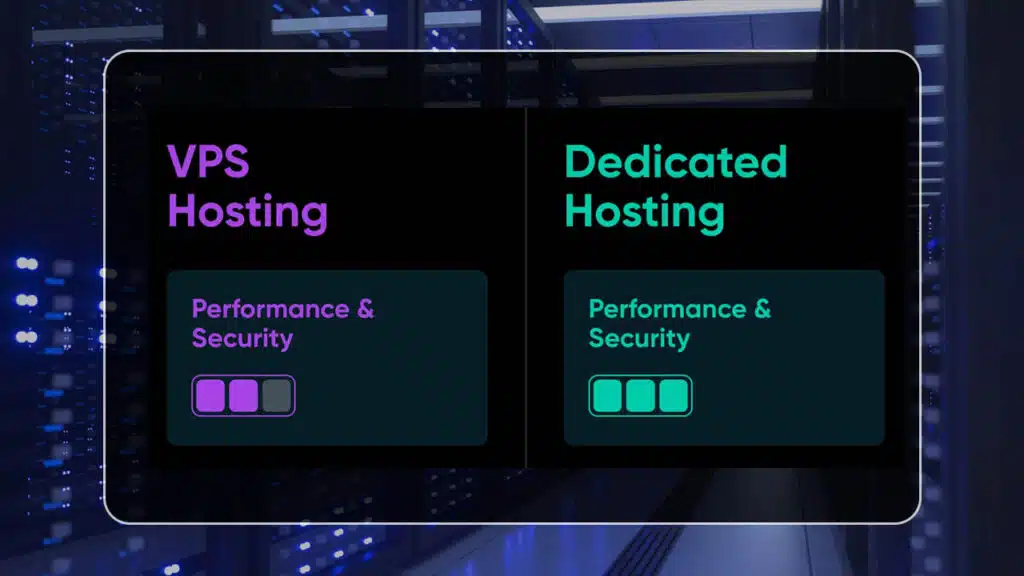
With VPS hosting, you get root access to your virtual server, giving you the freedom to install software, configure settings, and manage your hosting environment.
However, since you’re sharing the physical server with other VPS users, there may be some limitations on customization.
For example, certain configurations may not be allowed to ensure the stability of the entire server.
VPS Hosting Control and Customization
- Root Access: Full control over your VPS environment but within certain limits imposed by the hosting provider.
- Customization: Ability to install custom software, but restricted in some cases to maintain server stability.
- Best For: Users who need more control than shared hosting but don’t require the full customization freedom of a dedicated server.
Dedicated Hosting – Full Control and Flexibility
Dedicated hosting offers the highest level of control and customization.
Since you own the entire server, you can configure it exactly as you need, install any operating system or software, and manage your hosting environment without any restrictions.
Dedicated hosting is ideal for businesses that require specific server configurations for custom applications, high-security needs, or unique technical requirements.
Dedicated Hosting Control and Customization
- Root Access: Complete control over the server environment with no limitations.
- Customization: Full freedom to install and configure software, operating systems, security settings, and more.
- Best For: Businesses with advanced technical needs that require full control over their server environment.
Key Difference Summary: Control and Customization
- VPS Hosting: Offers root access and customization but with some limitations due to shared resources.
- Dedicated Hosting: Provides complete control with no restrictions, ideal for businesses with specific configuration needs.
4. Security and Privacy
While VPS hosting offers better security than shared hosting, it still involves sharing the physical server with other users.
Each VPS is isolated in its virtual environment, which reduces the risk of one user affecting another.
However, because multiple VPSs operate on the same server, there’s still a potential, albeit small, for security vulnerabilities if the server itself is compromised.
VPS Hosting Security Features
- Isolated Environment: Each VPS is contained within its own virtual environment, reducing security risks from other users.
- Security Add-Ons: Many VPS hosting providers offer additional security features like firewalls, DDoS protection, and SSL certificates.
- Best For: Small to medium-sized businesses looking for a balance between cost and security, but who don’t need the highest level of privacy.
Dedicated Hosting – Maximum Security and Isolation
Dedicated hosting offers the highest level of security because the server is entirely dedicated to your website.
This means there’s no risk of other users affecting your server’s performance or security.
Additionally, dedicated hosting allows for more advanced security measures, such as customized firewalls, intrusion detection systems, and higher levels of encryption.
It’s ideal for websites that handle sensitive data, such as financial institutions or eCommerce platforms.
Dedicated Hosting Security Features
- Complete Isolation: Since you have full control of the server, no other users can compromise your security.
- Custom Security Measures: Ability to implement tailored security protocols, such as VPNs, custom firewalls, and advanced encryption.
- Best For: High-security websites or applications that handle sensitive data, such as healthcare, banking, or eCommerce.
Key Difference Summary: Security and Privacy
- VPS Hosting: Offers good security with isolated virtual environments but shares the physical server with other users.
- Dedicated Hosting: Provides maximum security with full server isolation and customizable security options.
5. Scalability and Flexibility
VPS hosting is highly scalable, making it a popular choice for growing websites that need more resources over time.
Most hosting providers offer flexible plans that allow you to upgrade your VPS as your website’s traffic and resource needs increase.
This scalability makes VPS hosting a great option for businesses expecting growth but not yet ready to commit to dedicated hosting.
VPS Hosting Scalability Features
- Scalable Plans: Easily upgrade your VPS plan to access more CPU, RAM, or storage without migrating to a new server.
- On-Demand Resources: VPS hosting allows you to scale resources as needed without significant downtime or disruption.
- Best For: Growing websites or businesses that need a flexible hosting solution with the ability to scale quickly.
Dedicated Hosting – Scalable but Less Flexible
While dedicated hosting offers maximum control and resources, it is generally less flexible than VPS hosting in terms of scalability.
Scaling a dedicated server usually requires upgrading the entire server or migrating to a more powerful machine, which can involve downtime and higher costs.
Dedicated hosting is ideal for businesses that already know their resource needs and require a consistent, high-performance solution.
Dedicated Hosting Scalability Features
- Upgrading Hardware: Scaling a dedicated server typically involves upgrading hardware components or moving to a new server.
- Custom Solutions: For large enterprises, dedicated hosting can be scalable with custom solutions, such as adding more servers or load balancers.
- Best For: Large businesses or enterprises with predictable resource needs and the budget for dedicated server upgrades.
Key Difference Summary: Scalability and Flexibility
- VPS Hosting: Highly scalable with flexible plans that allow for easy upgrades as your website grows.
- Dedicated Hosting: Scalable but requires more effort and cost to upgrade, making it better suited for established businesses with stable resource needs.
6. Server Management and Maintenance
When it comes to VPS hosting, you can choose between managed and unmanaged plans.
With unmanaged VPS hosting, you’re responsible for managing and maintaining your virtual server, including software updates, security patches, and troubleshooting.
Managed VPS hosting, on the other hand, includes server management services from the hosting provider, allowing you to focus on your website without worrying about the technical aspects of running a server.
VPS Hosting Management Options
- Managed VPS: Hosting provider handles server maintenance, updates, and troubleshooting.
- Unmanaged VPS: You are responsible for managing the server, which requires technical expertise.
- Best For: Small to medium-sized businesses that want more control over their server but may not have the resources to manage it themselves.
Dedicated Hosting – Full Control, More Responsibility
Dedicated hosting typically involves more hands-on management since you have full control over the server.
Most dedicated hosting plans are unmanaged, meaning you’re responsible for maintaining the server, performing updates, and ensuring security.
However, managed dedicated hosting is also available for businesses that need the performance of a dedicated server without the technical burden.
Dedicated Hosting Management Options
- Managed Dedicated Hosting: Hosting provider takes care of server maintenance and management, allowing you to focus on your business.
- Unmanaged Dedicated Hosting: You have complete control but also bear full responsibility for server management.
- Best For: Large enterprises or websites with specific technical needs that require full control over the server.
Key Difference Summary: Server Management and Maintenance
- VPS Hosting: Offers both managed and unmanaged options, allowing for flexibility based on your technical expertise.
- Dedicated Hosting: Typically requires more hands-on management but can be fully managed for those who need it.
Conclusion: Choosing Between VPS and Dedicated Hosting
Choosing between VPS and dedicated hosting comes down to understanding your website’s specific needs, budget, and long-term goals.
If you’re a growing business with moderate traffic and want a cost-effective, scalable solution, VPS hosting is a great choice.
It provides better performance and control than shared hosting without the high cost of dedicated hosting.
On the other hand, if you require maximum performance, full control, and high security for a resource-intensive website or application, dedicated hosting is the way to go.
Though it comes with a higher price tag, the benefits of having an entire server at your disposal make it a worthwhile investment for large businesses or enterprises.
By considering the 6 key differences outlined in this article—resource allocation, cost, control, security, scalability, and server management—you can make an informed decision and choose the best hosting solution for your website.