
Hey there, are you a developer scratching your head over how to build an e-commerce site that really works? Maybe you’re worried about website security, or wondering how to make online shopping smooth for your users.
Here’s a quick fact to chew on, 48% of folks browse the internet on their phones. That means your online store has to shine on mobile screens, no excuses. Let’s talk about getting that mobile optimization right, along with other key tips.
My post will break down five big things you need to know, from SSL certificates for a secure website to nailing responsive design. Stick around, I’ve got simple fixes for you! Keep reading.
Key Takeaways
- Website security is vital; use an SSL certificate to protect data and meet PCI compliance for safe credit card handling.
- Speed matters in e-commerce; 90% of users leave if a site takes over 5 seconds to load, and 40% bounce after 3 seconds.
- Mobile optimization is key; 48% of internet use is from 5.112 billion mobile users, and 79% of smartphone users bought on their devices in the last 6 months.
- Flexible payment and shipping options boost sales; 6% of buyers abandon carts due to limited payment methods, and 55% leave over surprise shipping costs.
- Analytics help track success; tools like Google Analytics show visitor behavior to improve marketing and customer trust.
Prioritize Website Security
Let’s chat about keeping your e-commerce site safe, folks. Website security isn’t just a fancy add-on, it’s the backbone of customer trust. Think of it like locking your front door, you wouldn’t leave it wide open, right? Start with an SSL certificate, or Secure Sockets Layer, to encrypt sensitive info.
This tool shields customer data during online transactions, and trust me, it’s a must. Without it, Google might slap a penalty on your site, and nobody wants that headache. Plus, SSL helps meet PCI compliance rules for safe credit card handling.
Now, here’s a big tip, don’t store credit card numbers in your database. Imagine it as hiding cash under your mattress, it’s just asking for trouble. Using HTTPS, or Hyper Text Transfer Protocol Secure, alongside SSL keeps data under wraps.
It’s like a secret handshake between your web server and the user’s browser. So, lock down that e-commerce website development with these steps. Your shoppers will feel safer, and you’ll dodge major risks in the wild world of the web.
Optimize Performance and Speed

Hey there, folks, speed is everything in ecommerce website development. Imagine waiting for a page to load, just twiddling your thumbs. Frustrating, right? Well, stats show that 90% of visitors may bounce if a page takes 5 seconds to load.
Even worse, 40% of users ditch a site if it drags past 3 seconds. That’s a huge loss for any retail business. So, keep your site snappy, and don’t let slow loading chase customers away.
It’s like a race, and you’ve gotta cross the finish line fast.
Now, dig into some tricks to boost that site speed, my friends. Start by combining files to cut down on requests. Next, compress those images so they don’t weigh your pages down.
Also, use caching to store data for quicker access. These steps aren’t just hacks, they’re gold for mobile optimization too. Plus, site speed doesn’t just keep users happy, it lifts your SEO rankings with search engines like Google’s.
So, zoom ahead with these moves, and watch your ecommerce websites thrive.
Implement Effective Search and Filtering Functionality
Let’s talk about making your e-commerce site easy to explore. Did you know that 30% of visitors rely on search tools to find stuff? That’s a big chunk! If your site search isn’t up to snuff, folks might just bounce.
So, focus on building a solid search system with cool tricks like autocomplete. It guesses what users type, saving them time.
Also, add features like faceted search to narrow down options fast. Think of it as a treasure map, guiding shoppers with filters for price or brand. Toss in visual search features and keyword tagging too.
These help customers spot products without a hassle. Nail this, and your site becomes a breeze to shop on with top-notch usability.
Ensure Mobile Responsiveness and User-Friendly Design
Hey there, readers, let’s discuss how to make your e-commerce site stand out on every screen! Did you know that 48% of internet usage comes from an impressive 5.112 billion mobile users? That’s a massive audience shopping with their thumbs.
Plus, 79% of smartphone users made a purchase on their devices in the last six months. If your site isn’t user-friendly on a phone, you’re missing out on a huge number of sales.
Prioritize mobile optimization and responsive design to keep those customers engaged. Think of it as welcoming every visitor with open arms, regardless of their device.
Now, imagine this: over 50% of online transactions occur on mobile devices, as reported by Criteo in 2018. Pretty incredible, right? And here’s more, Walmart Canada experienced a 20% increase in conversions and a 98% boost in mobile orders simply by refining their site for better mobile web design.
So, create a layout that adapts to any screen size, from small phones to large tablets. Keep buttons large, menus straightforward, and navigation seamless. Use platforms like Shopify to check how your site appears on various devices.
A user-friendly setup is your key to satisfied customers and increased sales.
Offer Flexible Payment and Shipping Options
Folks, let’s talk about making life easy for your shoppers with flexible payment options. Did you know that 6% of buyers ditch their carts just because they can’t pay the way they want? Offer choices like PayPal, Apple Pay, Amazon Pay, Google Pay, major credit cards, and even cryptocurrencies.
This variety builds customer trust and keeps them clicking “buy” without a second thought.
Now, shipping options can make or break a deal, trust me on this. A whopping 55% of customers abandon carts over surprise shipping costs. So, lay it out clear and upfront with detailed shipping info.
Whether it’s free delivery, flat rates, or express, let them know before they hit checkout. Mix in smart tools like inventory management software to track stock and avoid delays.
With solid payment and shipping plans, your ecommerce website development will shine!
Design an Intuitive Shopping Cart and Checkout Process
Hey there, let’s talk about making your e-commerce site’s shopping cart and checkout a breeze for users. A smooth process can turn browsers into buyers, so let’s dive right into the key tips.
- First off, keep the shopping cart simple and clear for every internet user. Show items, prices, and totals right away. Let shoppers edit quantities or remove stuff without a hassle. This builds customer trust and keeps them moving forward.
- Next up, offer a guest checkout option to ease the buying journey. Did you know 23% of shoppers abandon carts when forced to create accounts? By allowing guest checkout, you cut down barriers to purchase and make it quick for them to finish.
- Also, think about adding social media login for faster sign-ups. Simplified registration via social media or minimal input boosts convenience. Shoppers love when they can log in with just a click, so use this trick to keep them happy.
- Make sure the checkout steps are short and sweet. Limit the number of pages or clicks to finalize a purchase. A long, messy process feels like running through mud, so streamline it with clear buttons and prompts.
- Don’t forget to show secure payment options at checkout. Display trusted logos and mention your SSL certificate to calm any fears. When users see safety signs, they’re more likely to complete their order without worry.
- Keep mobile optimization in mind for the checkout design. Many folks shop on phones, so test the cart and payment pages on small screens. A clunky mobile experience can scare buyers away faster than a bad sale.
- Lastly, give real-time updates during the checkout flow. Tell users if something goes wrong, like a wrong address or card issue. Clear messages act like a friendly guide, helping shoppers fix problems and seal the deal.
Showcase Products with High-Quality Visuals and Descriptions
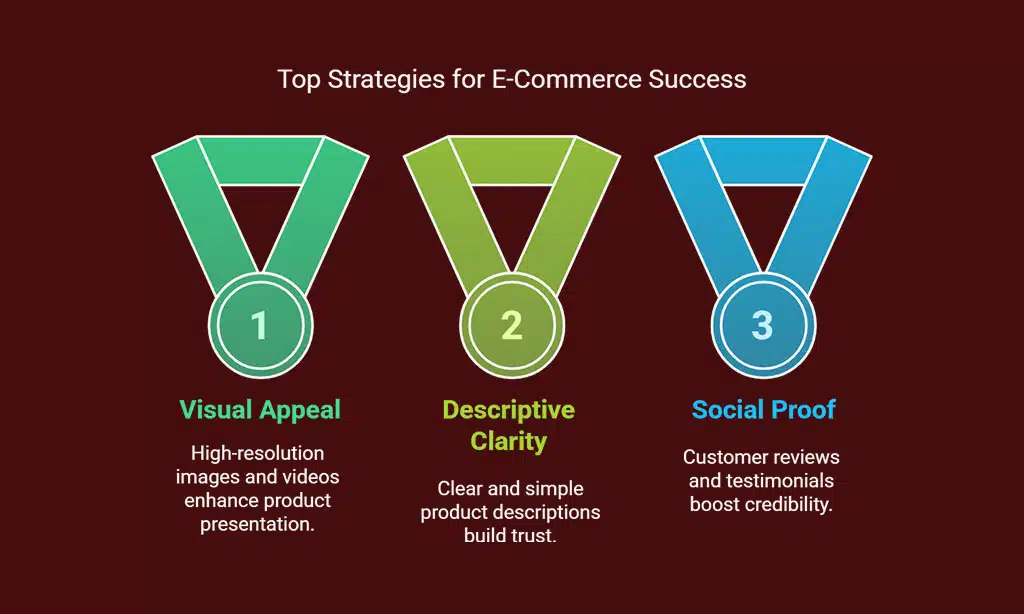
Show off your products with stunning visuals, folks! High-resolution images grab attention, but watch out, they can slow down your e-commerce website development. Use shots from multiple angles and toss in video reviews to help buyers decide faster.
This builds customer trust and keeps them clicking.
Good product descriptions matter just as much, trust me. Paint a clear picture with simple words about what you’re selling. Mix in some social proof, like customer reviews and testimonials, to boost credibility.
These little gems nudge shoppers to hit that buy button with confidence.
Integrate Analytics for Tracking and Insights
Hey there, let’s chat about why analytics matter for your e-commerce site. If you’re running an online store, you gotta know what’s working and what’s not. Tools like Google Analytics can track how many folks visit your site, what they click on, and where they drop off.
It’s like having a spy in the shop, without the creepy vibes. By using these insights, you can tweak your marketing strategy to pull in more buyers. Imagine figuring out that half your crowd leaves at checkout, ouch, but now you can fix it!
Now, think of analytics as your store’s personal coach. It helps you spot trends, like which products fly off the virtual shelf. Pair this with SEO tactics, and you’re golden for climbing up Google search ranks.
Plus, checking data on mobile app usage or site search habits shows how customers shop. Keep tabs on this with solid ecommerce plugins, and you’ll build customer trust by giving them what they want.
Stick with it, and watch how small changes make a big splash!
Plan for Scalability and Future Growth
Planning for growth is a must for any e-commerce site. Think of your website as a tiny shop that could turn into a huge mall. You gotta pick tools that can handle more customers and products as you expand.
Platforms like Magento are built for large-scale operations, so they’re a solid pick for big dreams. Meanwhile, WordPress works great for smaller setups with fewer items.
Also, chat with experts to make your site ready for the future. These pros in web development can guide you on using ecommerce plugins and picking the right systems like PrestaShop or OpenCart for smooth content control.
Keep scalability in mind, and your online store won’t buckle under pressure, no matter how fast you grow.
Takeaways
Hey there, developers, let’s wrap this up with a quick nod to your e-commerce journey! Building a stellar online store, like one powered by Shopify, takes some smart moves. Keep website security tight with an SSL certificate, and make mobile design a top priority.
Trust me, your customers will thank you for a smooth, speedy site. Got questions? Drop ‘em below, and let’s keep this convo rolling!
FAQs
1. What’s the big deal with responsive design for an ecommerce website development project?
Hey, let’s chat about this, okay? If your site isn’t built with responsive design, it’s like trying to fit a square peg in a round hole, it just won’t work on mobile devices. Get that mobile optimization right, and your Shopisy store will look slick on any screen, keeping customers clicking.
2. Why should I fuss over an SSL certificate when crafting my online shop?
Listen up, website security isn’t just a fancy add-on, it’s a must for customer trust. Without that SSL certificate, your ecommerce site is like a house with no locks, and nobody’s gonna feel safe shopping there.
3. How do payment options and shipping options tie into my site’s success?
Well, my friend, offering varied payment options and clear shipping options is like rolling out the red carpet for your buyers. Skimp on these, and you’re basically telling folks to shop elsewhere. Make it easy to pay and ship, and watch your ecommerce plugins work their magic.
Absolutely, don’t sleep on SEO, or search engine optimization, and those tiny but mighty meta tags with meta information. An SEO specialist can help you climb Google research rankings, making your site a magnet for shoppers. Ignore this, and your ecommerce website development is like a billboard in the middle of nowhere.
Hey there, social proof is your secret sauce, trust me on this one. Adding reviews or testimonials, alongside a strong social media marketing push, makes folks wanna subscribe and buy from your store. It’s like having your best buddy vouch for you, and who doesn’t love a good word from a pal?