

Research fellows need book scanners; it’s an undeniable relation. Better still, it has to be a portable book scanner. You should be able to tuck it conveniently in your backpack, carry it to the library or your professor’s office. Even in the era of the internet, books are essential for researchers. For example, consider this situation. As if in a waking dream, you enter the underground library at the Vatican’s! This treasure trove of spiritual and occult literature can be yours, only if you have a good scanner.
The best scanning hardware
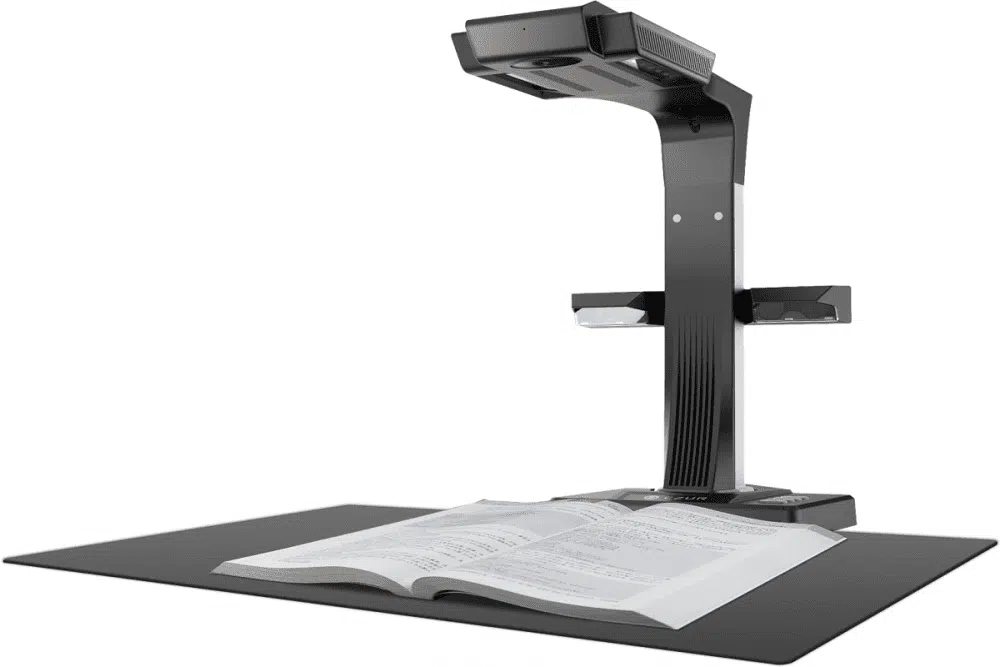
You get the idea. Check out the czur ET16 plus. Although it looks more like a trendy table lamp, it is still one of the most advanced technologies in book scanning. The portable black scanner is extremely versatile and can create the perfect page scans, even offsetting the central fold at the book rib. It’s easy to use, and you can even try the hands-free foot pedal.
Of course, it can scan everything that needs to be scanned. You name it! Flyers, certificates, passports, travel documents, IDs, blueprints, music sheets, business cards, contracts: it can create perfect copies of them all. Not only that, the open design of CZUR ET 16 allows scanning of small sculpture pieces, toys, and clothes among other things.
Awesome speed
The first thing that most people look at in a scanner is how fast it is. This 16 Megapixel scanner is incredibly fast! 300 pages would take only about 10 minutes. In other words, it is about 10 times faster than a typical flatbed scanner. The speed is about 1.5 seconds per page. You also save the time of flattening book curves by hand.
Advanced software supported
The patented book curve flattening technology effectively removes the curvature of books by software support. Not only that, software support is available for an auto-detecting page turn. The moment you turn into a new page, an auto-scan feature starts working. The booking curve flattening technology works with Mac OS (10/11 or later). It is also compatible with Windows XP/7/8/10. The virtual flattening of the 3D curved surface is achieved by the process of pixel transformation.
The scanned quality is impeccable. You can even scan conveniently in the dark. It has 10 LED lights and 2 supplemental lights along with a 16 MP Sony camera. The lights have been placed in such a way that no shadows are cast on the document. The end result: you get pages followed by pages of absolute perfection. Scanning glossy surfaces can be a bit challenging due to reflectivity. We recommend using the patented sidelights to reveal a whole scan of laminated documents and glossy magazine pages.
In addition, the czur book scanner offers a lifetime free OCR software membership, along with one year warranty. The program can read 186 languages, allowing you to edit the document right after scanning. Editing features include cropping, adjusting sharpness, and contrast, thickness, etc. Furthermore, you can easily convert any document to editable Word and PDF files. The scanning can be achieved in color, black & white, and grayscale.
The software is also useful to convert and edit imported document materials. One can also use the program to combine or separate the two open pages of a book right after the scan. You can also save files in JPG format. The only limitation here is that it allows scanning up to the A3 size.
Scanning process
The scan is achieved by three concurrent laser beams. These beams form horizontal laser lines on the curved pages. It automatically calculates the intersection angles between the laser beams and the scanning platform. This lets the formation of a 3D special curve of the laser lines. Finally, flattening is done by pixel transformation of the digital 3D curved surface. You can also integrate it with ZOOM, for a live scanning experience. One can also create videos of the scanning procedure using the czur et16 plus.
Practical test results
Daniel is a struggling artist. He specializes in oil paintings and watercolors. His work involves scanning the photographs of his artworks so that he may upload them to different online art merchant sites. He regularly uses the book scanner with great results. Daniel reports that although the colors are vivid, yet the true hue may not be mimicked always. He also suggests not using the CZUR ET 16 in a brightly lit area. Also, you should not place it below any kind of artificial lighting.
He also reports that while scanning books, one has to be extremely careful during a page turn. It takes about 1.5 seconds to scan a page, so you should always allow that duration. Actually, you may find that it would take about 7.5 to 8 seconds to scan a page in real life. So, fast page-turning may cause skipping of a few pages in between.
Don’t worry if the book shifts slightly from the position while you turn the pages. The corrective ability of the scanner will still produce perfect copies. The most appreciated fact is that it is not a flatbed scanner, where you must lift the inverted book after every page for the next scan.
Step-by-step process
The czur et16 plus is extremely easy to use. Once you have received your package, unpack it and follow the instructions. Set it up in a place softly illumined by natural light. Place the book or document to scan in the scanning area. Adjust the lighting according to your needs and start scanning. You can also use the foot pedal instead of the hand switch. Download the software support from the official website and use it with the scanner.
Conclusion
Overall, the CZUR ET 16 is an excellent product, especially when you need to scan books. Students, researchers, publishers, proofreaders, and rare book collectors would appreciate the functionality of this scanner. It sports a trendy modern design in black. The product has advanced features such as laser-assisted curve flattening technology, and an auto-scan feature after each page turn.
Printing glossy surfaces can be slightly challenging, but you can use the sidelights to overcome reflectivity. Overall the position of the lights overrides any scope of forming shadows. It is a highly affordable product in this category and very popular all over the world. Have you got yours yet?




























