
A resume alone often falls short in today’s competitive job market. For graphic designers and web developers, showcasing skills through real work is far more powerful than listing them on paper.
A strong portfolio can act as a direct pitch to recruiters—something that says “hire this talent” within seconds. Yet many job seekers still miss this opportunity, causing potential freelance and full-time roles to slip away.
An effective portfolio website highlights clarity, focus, and storytelling. It doesn’t just display projects—it explains the process and impact behind them. This guide explores how to build a portfolio website using platforms like Squarespace or Wix, along with essential SEO techniques to improve visibility.
It also covers how to present case studies, especially in UI/UX design, and how to connect your work with professional platforms like LinkedIn and Dribbble.
The result is a portfolio that stands out, attracts attention quickly, and helps turn opportunities into job offers.
Why a Portfolio Website Is Essential
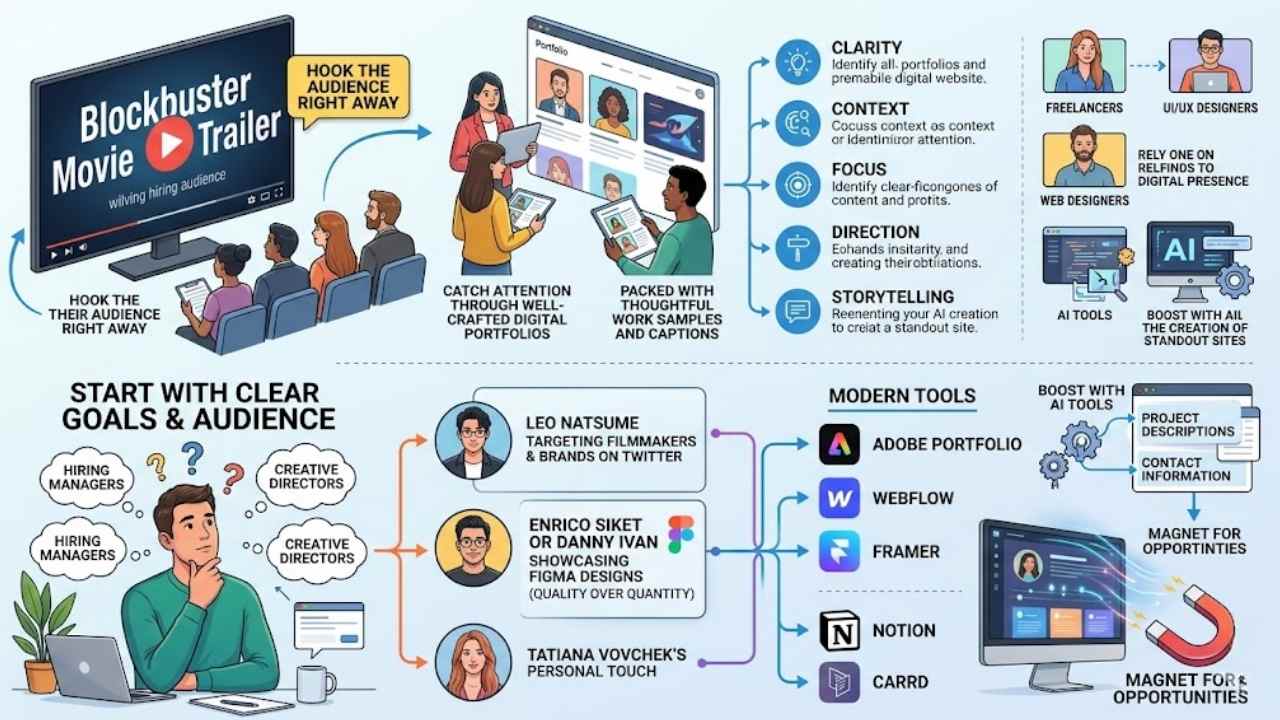
Picture your career as a blockbuster movie, and your online portfolio acts as the trailer that hooks the audience right away. Good portfolios shine with clarity, context, focus, direction, and storytelling, pulling in hiring managers who scan tons of resumes daily.
They catch attention through well-crafted digital portfolios packed with thoughtful work samples and captions. Freelancers, UI/UX designers, and web designers rely on this digital presence to showcase creative projects and build a professional vibe.
AI tools boost the process, helping you create standout sites that draw in potential employers. Defining your career goals and audience kicks off the whole thing, setting a strong foundation for what you build.
A portfolio is your chance to tell your story and show what makes you stand out, says Mitch Goldstein, a designer from Rochester Institute of Technology.
Digital portfolios let you highlight freelance work, like full stack app development or photography, in a clean design that screams professionalism. They establish your brand in fields from web development to filmmaking, think Disney or Cirque du Soleil levels of impact.
Tools like Adobe Portfolio, Webflow, or Framer make it easy to craft these sites, focusing on user experience and search engine optimization to get noticed.
Defining Your Goals and Audience
Start with clear goals for your portfolio website. Defining your audience and goals sets the first critical step in building a portfolio website. Think about who will view it, like hiring managers or creative directors.
You aim to catch their attention through well-crafted digital portfolios with thoughtful samples and captions. Good portfolios share common characteristics, including clarity, context, focus, direction, and storytelling.
Focus on career development, just like Leo Natsume does with his illustrator work. He targets filmmakers and brands on platforms like Twitter. Ask yourself what job you want, such as a role in Adobe Creative Cloud projects.
Your goals guide everything, from project descriptions to contact information.
Tailor your site to that audience. Picture a career guide helping you stand out, much like Enrico Siket or Danny Ivan showcase their Figma designs. They pick quality over quantity in their creative portfolios.
Tatiana Vovchek adds a personal touch for her brand. Use tools like Notion or Carrd to align with your aims. Digital portfolios display creative projects and establish professional presence.
Indeed Career Scout can spark ideas for your goals. Keep it simple, folks, like chatting with a friend over coffee. This step makes your site a magnet for opportunities.
Choosing the Right Platform
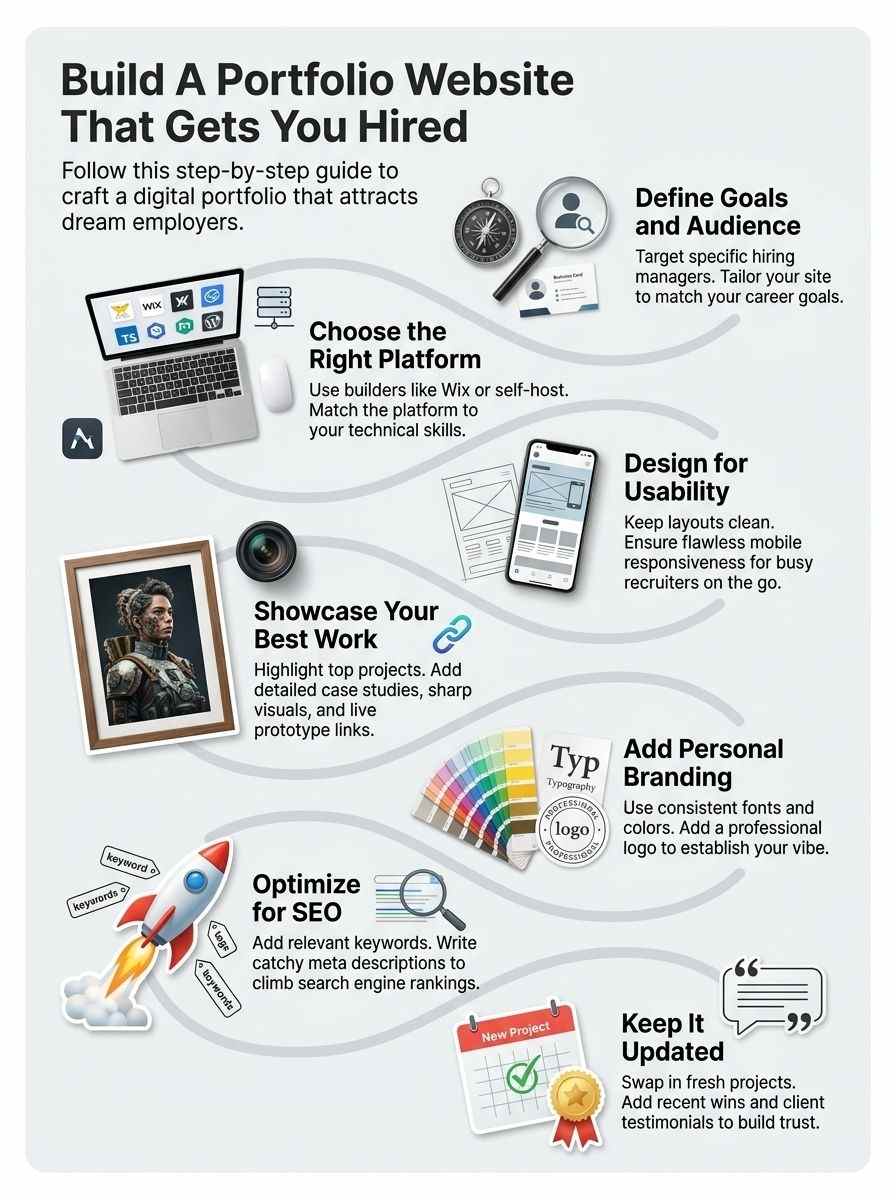
Pick a solid base for your portfolio site, like grabbing the perfect hammer for a nail, by checking out easy builders such as Carbonmade, WordPress, or GitHub Pages, and decide if you want full control with self-hosting or the quick setup of ready-made tools—stick around for tips on making it shine.
Popular portfolio website builders
Pick a platform that fits your skills and budget, folks, because the right one makes building your portfolio a breeze.
| Builder | Key Features | Pros | Cons |
|---|---|---|---|
| Wix | Drag-and-drop editor, templates for creatives, built-in SEO tools. | Easy for beginners, no coding needed, mobile-ready designs. | Limited free plan, ads on basic versions. |
| Squarespace | Stylish templates, blogging integration, e-commerce options. | Professional look, great for artists and designers, responsive sites. | Higher cost, steeper learning curve than some rivals. |
| WordPress | Custom themes, plugins for portfolios, self-hosting flexibility. | Free core software, endless customization, strong community support. | Needs hosting setup, potential security tweaks required. |
| Behance | Project showcases, networking with pros, Adobe integration. | Free to use, huge creative audience, easy uploads. | Less control over design, tied to Adobe ecosystem. |
| Cargo | Minimalist templates, image-focused layouts, simple navigation. | Affordable, artist-friendly, quick setup for visuals. | Fewer features, not ideal for complex sites. |
Self-hosting vs. pre-built platforms
You face a big choice in building your portfolio site, so let’s break down self-hosting against pre-built platforms in this handy table.
| Option | Pros | Cons | Best For |
|---|---|---|---|
| Self-Hosting | Gives you full control over design and features, like tweaking code for custom flair. Think of it as owning your own house, where you pick every paint color. | Demands tech skills, time for setup, and ongoing maintenance, plus costs for domains and hosting. A friend once spent weeks debugging, only to face server crashes during a job hunt. | Tech-savvy folks who want total freedom and have the bandwidth to manage it. Choosing the right platform is an essential decision when creating a portfolio website, and this fits if you crave customization. |
| Pre-Built Platforms | Offers easy drag-and-drop tools, quick setup, and built-in templates from popular portfolio website builders like Squarespace, Wix, or WordPress.com. It’s like renting a furnished apartment, ready to move in fast. | Limits deep customization and might lock you into fees or their ecosystem. I know someone who outgrew the limits and had to migrate everything later. | Beginners or busy pros needing speed and simplicity. AI tools can enhance these platforms to attract employers, tying into how good portfolios share clarity, context, focus, direction, and storytelling. |
Designing Your Portfolio Website
Think your portfolio site as a welcoming front door, so prioritize easy navigation and clean layouts with tools like Figma or Sketch, and always test for smooth views on phones and tablets to hook those recruiters—curious for step-by-step tricks, keep scrolling!
Focus on usability and simplicity
Keep your portfolio website simple and easy to use. Visitors want to find what they need fast, without confusion. Good portfolios shine with clarity, context, focus, direction, and storytelling.
These traits make your site stand out. Think of it like a clear path in a park, guiding folks straight to the best views. Design for usability matters a lot here. Skip the fancy bells and whistles that slow things down.
Instead, build pages that load quick and feel intuitive.
Make sure your site works well on phones and tablets too. People browse on the go these days. Add high-quality visuals for your projects, like wireframes, prototypes, and live site links.
Include case studies with user research, personas, and testing. This shows off your skills in a brand new way. Hiring managers notice thoughtful samples and captions. They catch attention fast.
AI tools can help improve your digital portfolio, drawing in potential employers with ease.
Ensure mobile responsiveness
People view websites on phones more than ever. Make your portfolio site work well on small screens. This boosts usability, a key part of good design. Think of it like fitting a story into a pocket; everything must flow smooth.
Use tools like Bootstrap to adjust layouts automatically. Test on real devices to catch issues early.
Good portfolios shine with clarity and focus, even on mobiles. Add high-quality visuals that load fast. Imagine a hiring manager scrolling on their commute; your site needs to impress right away.
Incorporate AI tools to check responsiveness and suggest fixes. This keeps your brand new and professional across all screens.
Showcasing Your Best Work
Pick your top projects, like that killer app you built or the sleek logo design that wowed clients, and slap on crisp images or videos to make them pop—trust me, this grabs attention fast, so keep scrolling for tips on branding that seals the deal.
Highlight key projects
You need to spotlight your top projects to catch hiring managers’ eyes. Good portfolios use clarity, context, focus, direction, and storytelling to showcase your best work, like including wireframes, prototypes, and live site links in a web design brand.
- Pick your strongest projects that match your goals, and display them front and center to establish your professional presence, because showcasing creative projects in digital portfolios draws in potential employers with thoughtful samples and captions.
- Add case studies for each key project, complete with user research, personas, and testing details, so readers see the full story behind your work and feel the impact you made.
- Use high-quality visuals like screenshots or videos to highlight what you did, and pair them with short captions that explain the problem you solved, turning dry facts into an engaging tale.
- Include live links to your projects whenever you can, especially for web design ones with prototypes, as this lets visitors interact and grasp your skills in action, boosting your brand appeal.
- Refresh your selections often to keep things current, and weave in AI tools to polish visuals or generate captions, which enhances your digital portfolio and attracts employers looking for fresh talent.
- Focus on variety in your highlights, say mixing big client wins with personal experiments, to show direction and storytelling that sets your portfolio apart in a crowded job market.
Use high-quality visuals
Pick sharp images that pop on your portfolio site. Show off your top projects with crisp screenshots, clear wireframes, and working prototypes. Link to live sites so visitors see your skills in action.
Add case studies packed with user research, personas, and testing details. These elements tell a strong story about your work.
Hiring managers scan fast, so use thoughtful captions under each visual. They grab attention and build your professional presence. Display creative projects that highlight your brand.
Try AI tools to polish these visuals; they make your site stand out to employers. Keep everything focused and clear for that wow factor.
Adding Personal Branding
Think your site as a handshake that says, “This is me,” so pick steady fonts and shades that match your vibe, and slap on a sharp emblem or snapshot of yourself to seal the deal.
Craving more ways to stand out? Stick around!
Consistent typography and colors
Pick a color scheme that screams you, like your favorite coffee mug that always starts your day right. Stick to two or three shades across your whole site, so visitors feel that cozy, familiar vibe right away.
This builds your brand, you know, that special stamp that sets you apart in a sea of portfolios. Good portfolios nail clarity and focus with these choices, drawing in hiring managers who spot your professional presence fast.
Mix in typography that flows like a good chat with a friend, easy to read on any screen. Go for clean fonts, maybe one for headlines and another for body text, but keep them consistent to avoid confusion.
Think of it as dressing your words in matching outfits; it establishes direction and storytelling in your digital showcase. Add a pro photo or logo that ties it all together, highlighting your creative edge without overwhelming folks.
Include a professional logo or photo
Add your pro logo or photo to strengthen your brand right away. This step builds a solid professional presence in your digital portfolio. Think of it as the friendly face that greets visitors, like a warm hello at the door.
Good portfolios shine with clarity, context, focus, direction, and storytelling, so make that image count. Digital portfolios show off creative projects and set up your pro vibe for all to see.
Hiring managers spot well-crafted digital portfolios with thoughtful samples and captions that grab attention. Pop in a sharp photo to humanize your work, hey, it makes you stand out in the crowd.
Grab AI tools to tweak and improve that logo or shot, drawing in potential employers fast. Case studies with user research, personas, and testing tie in nicely here too, boosting your total appeal.
Optimizing for Search Engines (SEO)
Imagine your portfolio site climbing Google rankings like a pro athlete scaling a wall, just by weaving in search terms that match what recruiters type, like “creative graphic designer,” and slapping on catchy meta blurbs that tease your skills in those search snippets.
Craving tips on freshening up your projects next? Keep going!
Use relevant keywords
Sprinkle keywords like “portfolio website” and “web design” throughout your site. You want search engines to find you easily, right? Think of it as leaving breadcrumbs for Google. Good portfolios grab hiring managers’ attention with clarity and thoughtful captions, so pick terms that match what employers search for.
AI tools help you spot the best ones, boosting your brand online.
Add those keywords to page titles, headings, and image alt text. This step builds on defining your goals and audience from earlier. Case studies in your portfolio, with user research and prototypes, shine brighter when optimized.
Your brand gets a real lift, drawing in more views and potential jobs.
Add meta descriptions
Meta descriptions act like quick summaries that search engines show under your site’s link. They help draw clicks from folks hunting for talent like yours. Craft them short, around 150 characters, and pack in keywords that match what hiring managers type in.
Think of it as your elevator pitch, tucked into code. This boosts visibility, and hey, it ties right into your personal brand, making you stand out in a crowded job market.
Good portfolios catch eyes with these snappy blurbs, pulling in viewers fast. Use tools like Yoast or SEMrush to check and tweak them. Add details from your key projects, like those wireframes or case studies you showcase.
AI tools can even suggest brand new descriptions to fit your style. Keep them fresh as you update work, drawing more traffic your way.
Keeping Your Portfolio Updated
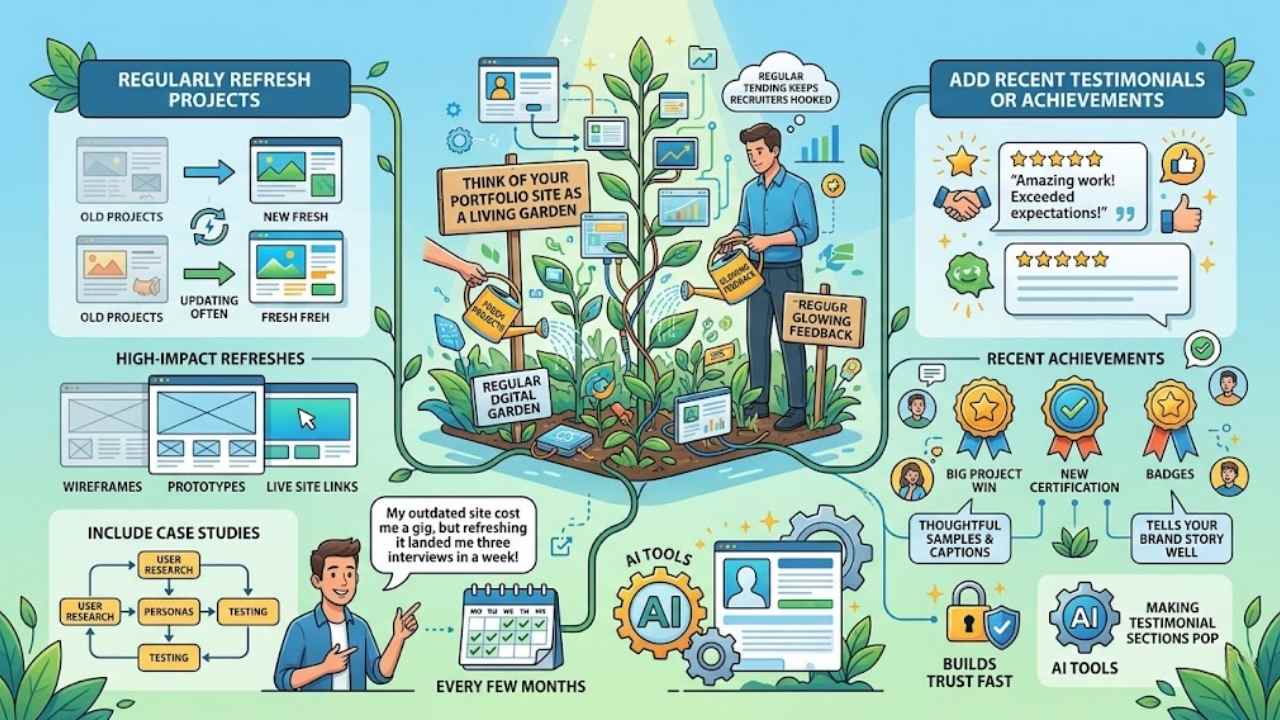
Think of your portfolio site as a living garden that needs regular tending, so swap in fresh projects, toss in glowing client feedback, and sprinkle on new wins to keep recruiters hooked and coming back for more—stick around to uncover how this simple habit lands you that dream gig.
Regularly refresh projects
Update your portfolio often, folks. Swap out old projects for fresh ones that show your latest skills. This keeps your site alive and kicking, like a garden you tend to regularly. Good portfolios shine with clarity, context, focus, direction, and storytelling, so pick projects that tell your brand story well.
Digital portfolios display creative projects and establish professional presence, drawing eyes from potential bosses. You know, I once heard a designer say, “My outdated site cost me a gig, but refreshing it landed me three interviews in a week.” That hits home, right?
Grab AI tools to polish those updates fast. They help enhance digital portfolios that attract employers, adding thoughtful samples and captions to catch hiring managers’ attention.
Focus on high-impact refreshes, like adding wireframes, prototypes, or live site links from recent work. Include case studies with user research, personas, and testing to boost your edge.
Keep it simple, swap in new stuff every few months, and watch opportunities roll in.
Add recent testimonials or achievements
Show off those fresh wins to keep your portfolio alive and kicking. Grab testimonials from happy clients, like glowing reviews that highlight your skills in action. Pair them with recent achievements, such as a big project win or a new certification you snagged last month.
This stuff catches hiring managers’ eyes, you know, through thoughtful samples and captions that tell your story. Good portfolios shine with clarity, context, focus, direction, and storytelling, after all.
Think of testimonials as your secret sauce for building trust fast. Add quotes from folks who’ve worked with you, maybe even ones that tie into your brand new creative projects. Use AI tools to polish these sections, making them pop and attract potential employers.
Digital portfolios establish your professional presence this way, displaying what you’ve done lately to show you’re on top of your game.
Final Thoughts
You’ve built a strong foundation by defining your goals, picking the right platform like Squarespace or WordPress, and showcasing top projects with clear visuals and stories. These steps keep things simple and effective, so you skip the hassle and focus on what lands jobs.
What project will you highlight first to wow recruiters? A killer portfolio grabs attention from hiring managers, boosts your brand, and opens doors to dream roles in design or tech.
Check out resources like Behance for inspiration or Canva for quick tweaks, and keep in mind, my first site turned a freelance gig into a full-time offer – yours could too. Go build that site; your future self will thank you.
Frequently Asked Questions (FAQs) About Building a Portfolio Website
1. What’s the first step in building a portfolio website that lands me a job?
Start with a clean design that screams “brand new” energy, like a fresh coat of paint on an old house. Pick a platform that’s easy to use, and focus on showcasing your top projects right up front. That way, employers see your skills without digging around.
2. How do I make my portfolio website stand out from the crowd?
Think of it as your personal billboard on the highway of job hunting. Add a brand new twist by including testimonials or quick stories about your work, keeping things real and relatable.
3. What kind of content should go on my portfolio site to impress hiring managers?
Load it up with your best samples, like case studies that tell a story. Don’t forget a brand new about page that shares your journey, making you feel like a friend they’d want on the team; oh, and keep it updated, folks love fresh vibes.
4. Can a basic portfolio website really help me get hired?
Absolutely, it’s like your silent wingman in interviews. A brand new site tailored to your field shows off your talents clearly, and with smart SEO, it draws in recruiters like bees to honey.