

Getting hacked is scary. Imagine losing control of your website because someone guessed your password. That’s why more people are using 2FA, or two-factor authentication. It adds an extra layer of safety to protect their websites.
WordPress offers many plugins to help with this. With the right plugin, you can secure your site and keep hackers out. This blog will share the 5 Best WordPress Plugins For 2FA (Two-Factor Authentication).
Stick around—your website deserves better security!
Key Takeaways
- 2FA adds an extra step to secure WordPress logins, protecting against hackers.
- WP 2FA offers email and app-based authentication but limits advanced tools in the free version.
- miniOrange supports apps like Google Authenticator and FreeOTP but saves premium features for paid plans.
- Wordfence Login Security is free and strong but may confuse beginners with its settings.
- Shield Security balances ease of use with protection, yet heavy use might slow websites down.
WP 2FA – Optimize Your WordPress Security
WP 2FA makes logins safer by adding an extra step. It’s a simple yet powerful way to boost website security.
Explore Key Features and Capabilities
This plugin helps secure website login with two-factor authentication. Users can choose email codes or app-based methods like Google Authenticator and FreeOTP. It works well for WordPress security, adding an extra layer of protection against cyber threats.
Setup is quick and user-friendly, appealing to beginners and experts alike.
You can enable 2FA for all users, ensuring no account stays unprotected. The plugin supports multifactor authentication, enhancing data safety on websites. Its flexibility makes it suitable for small blogs or large websites needing strong login security features.
Evaluate Pros & Cons
Let’s talk about the strengths and weaknesses of the WP 2FA plugin. Below is an easy-to-read table outlining its features.
| Pros | Cons |
|---|---|
| Free version offers core features for small websites. | Some advanced features are locked behind a paywall. |
| Supports email-based 2FA, making it accessible for everyone. | Limited customization options in the free version. |
| Highly user-friendly for beginners. | Does not offer app-based authentication tools like Authy. |
| Doesn’t require external devices to set up. | Support for multi-site WordPress setups can be tricky. |
| Compatible with most WordPress themes and plugins. | Sometimes laggy when handling larger sites. |
Weighing these factors can help you decide if WP 2FA is suitable for your needs.
miniOrange Google Authenticator – Enhance Login Safety
miniOrange Google Authenticator boosts your site’s defense with two-step verification. It adds a secure layer, making hacking attempts much harder.
Discover Key Features and Capabilities
This plugin uses Google Authenticator to add two-factor authentication. It supports QR codes for easy setup. Users can also use email-based 2FA options. The plugin works with apps like FreeOTP and Authy, giving users flexibility.
It provides backup methods to avoid lockouts. Admins can customize the login experience for extra control. This adds a strong layer of website security and user protection against threats.
Review Pros & Cons
Certainly, let’s break down the pros and cons of each plugin in an engaging way! Here’s the HTML table format with clear, concise points:
MiniOrange Google Authenticator – Pros & Cons
The miniOrange Google Authenticator plugin packs a punch for securing your WordPress logins. Here’s a quick breakdown:
| Pros | Cons |
|---|---|
|
|
WP 2FA – Pros & Cons
WP 2FA offers solid protection for WordPress admins and users alike. Take a look:
| Pros | Cons |
|---|---|
|
|
Wordfence Login Security – Pros & Cons
Wordfence Login Security is a powerhouse for those prioritizing website safety. Here’s why:
| Pros | Cons |
|---|---|
|
|
Two Factor Authentication by UpdraftPlus – Pros & Cons
UpdraftPlus offers a lightweight plugin for 2FA without complicating things. Here’s how it fares:
| Pros | Cons |
|---|---|
|
|
Shield Security – Pros & Cons
Shield Security strikes a balance between simplicity and power. Here’s how it stacks up:
| Pros | Cons |
|---|---|
|
|
By comparing these
Wordfence Login Security – Secure Your Website
Wordfence Login Security adds an extra shield to your website. It blocks attackers and keeps your login page safe.
Uncover Key Features and Capabilities
The plugin supports two-factor authentication with mobile apps like Google Authenticator and FreeOTP. It also works with email-based codes for added flexibility.
Admins can force 2FA for all users or specific roles, boosting WordPress security. Setup is simple, and the interface makes managing settings easy.
Analyze Pros & Cons
Sure! Here’s the content written according to your instructions:
Some plugins promise top-notch security, but every solution has its highs and lows. Here’s a quick breakdown of the pros and cons for the Wordfence Login Security plugin:
| Pros | Cons |
|---|---|
| Free to use with no hidden costs. | Limited customization for advanced users. |
| Supports app-based 2FA, like Google Authenticator. | No SMS-based authentication options. |
| Integrated with firewall and malware scanning. | Setup can feel technical for beginners. |
| Works well on multisite WordPress installations. | May slow down some sites due to added features. |
| Regular updates improve security over time. | Email-based support can feel slow on free plans. |
Would you need help with the next section?
Two Factor Authentication by UpdraftPlus – Strengthen User Verification
UpdraftPlus offers a simple way to add an extra layer of security for your site. It helps block unauthorized logins with strong two-step verification.
Examine Key Features and Capabilities
This plugin offers flexible 2FA methods like mobile apps, such as Google Authenticator and FreeOTP. Email-based authentication is also an option, making it simple for all users. It supports single-site and multi-site WordPress setups, offering website protection no matter the size.
It includes user role-specific settings to manage access control with ease. Bulk user configuration saves time by applying settings to many accounts at once. With clear setup steps and active support, this tool strengthens login security fast.
Assess Pros & Cons
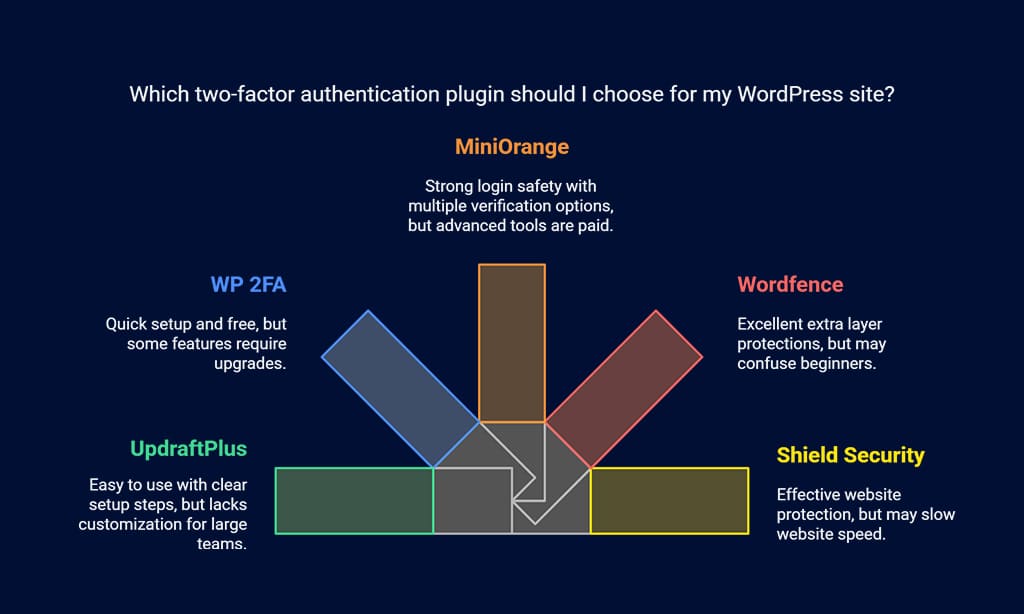
WP 2FA offers quick setup and works well with mobile apps like Google Authenticator. It is free, but some features need upgrades. MiniOrange Google Authenticator strengthens login safety with multiple options for user verification. Yet, it limits advanced tools to paid plans.
Wordfence Login Security includes excellent extra layer protections. Still, its focus on security features can confuse beginners. Shield Security protects websites effectively but may slow website speed under heavy use. The Two Factor Authentication plugin by UpdraftPlus is easy to use but lacks customization options for large teams or businesses.
Shield Security – Protect Against Threats
Shield Security adds a strong layer of safety to your site. It helps block threats and secures user logins with ease.
Investigate Key Features and Capabilities
This plugin supports Google Authenticator, Authy, and FreeOTP for two-factor authentication. Users can also enable email-based 2FA for added flexibility. It works fast and keeps login security simple.
The setup process is user-friendly with clear instructions provided. Mobile app compatibility enhances its convenience and makes it accessible to many users. This plugin boosts website protection while staying easy to manage.
Consider Pros & Cons
Some plugins may slow down your site if not optimized well. For example, adding Wordfence Login Security can offer strong protection but might use more server resources. On the other hand, miniOrange Google Authenticator is light and quick but needs users to have their phones close by for codes.
WP 2FA supports email-based authentication, which works great for everyone with email access. Yet, it could feel slower compared to app-based methods like those offered by Authy or Google Authenticator. Each plugin has strengths but choosing depends on your site’s speed needs and user preference.
Takeaways
Securing your WordPress site is easy with the right tools. These five plugins make adding 2FA simple and effective. They keep your data safe, protect users, and block threats. Each plugin offers unique features to fit different needs.
Start today, and give your website that extra layer of security!
FAQs
1. What is two-factor authentication (2FA) for WordPress?
Two-factor authentication adds an extra layer of security to your WordPress login. It requires you to provide a second form of verification, like a code sent to your phone, after entering your password.
2. Why should I use 2FA plugins on my WordPress site?
Using 2FA plugins helps protect your site from hackers and unauthorized access. Even if someone gets your password, they can’t log in without the second factor.
3. Are all 2FA plugins easy to set up on WordPress?
Most popular 2FA plugins are simple to install and configure. They often include step-by-step guides or setup wizards for beginners.
4. Can I choose different methods for the second factor with these plugins?
Yes, many 2FA plugins let you pick how you verify yourself—options like SMS codes, authenticator apps, or email-based codes are common choices.

























