Winter utility bills are the silent budget killer. You often don’t realize how much energy you are wasting until the statement arrives. In 2026, heating costs have not gotten any cheaper, but the technology to manage them has become significantly smarter. The best smart thermostats 2026 offers do more than just follow a schedule. They use radar to detect if you are actually home. They talk to your local utility grid to pre-heat your house when electricity is cheapest. They can even detect if a window is open and shut off the furnace to prevent heating the neighborhood.
We have tested the latest models to find the ones that offer true Return on Investment (ROI). Whether you have a complex multi-zone heat pump or simple electric baseboard heaters, there is a device on this list that will pay for itself. We focused on ease of installation, app reliability, and the “set it and forget it” factor that defines a truly smart home.
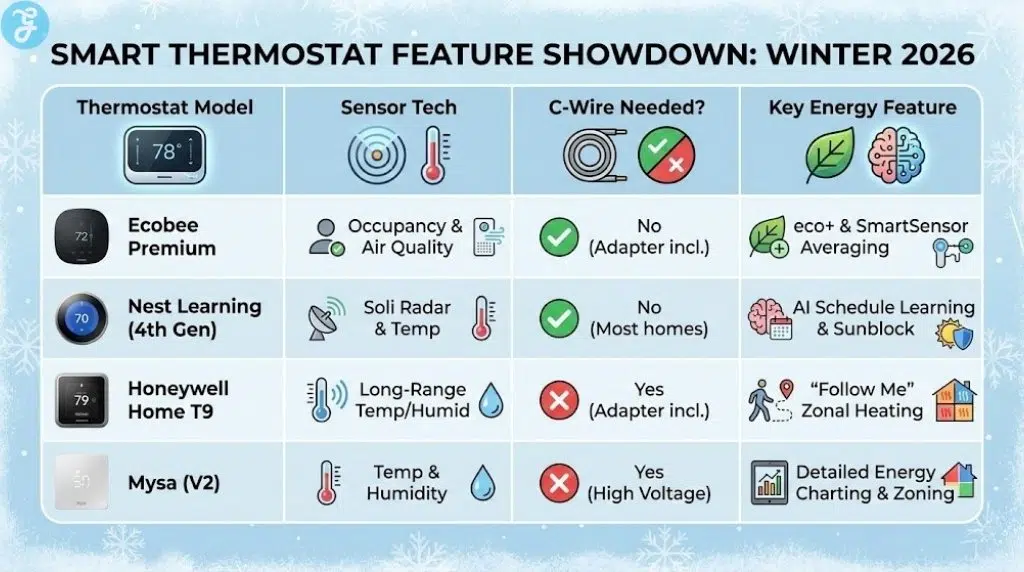
Here’s a quick overview:
| Thermostat Model | Best For | Sensor Type | C-Wire Required? | Price (Approx) |
| Ecobee Premium | Overall Best | Occupancy & Air Quality | No (Adapter in box) | $249 |
| Nest Learning (4th Gen) | Design & AI | Soli Radar & Temp | No (99% of homes) | $279 |
| Honeywell Home T9 | Large Homes | Temp & Humidity (200ft range) | Yes (Adapter in box) | $199 |
| Amazon Smart | Budget Hunters | Alexa Hunches | Yes (Adapter sold separately) | $79 |
| Sensi Touch 2 | Privacy | Temp Only | Yes | $179 |
| Mysa (V2) | Baseboard Heat | Temp & Humidity | Yes (High Voltage) | $139 |
| Wyze Thermostat | Value | Temp Only | Yes (Adapter in box) | $79 |
| Ecobee Enhanced | Mid-Range | Occupancy (Sold separately) | No (Adapter in box) | $189 |
The 8 Best Smart Thermostats to Save Energy This Winter
Here are our top 8 picks for the best smart thermostats to help you save energy this winter:
1. Ecobee Smart Thermostat Premium
The Ecobee Smart Thermostat Premium is the current king of the hill. It feels less like a thermostat and more like a smart home command center. The body is made of zinc and glass, giving it a premium weight and feel compared to the plastic models of the past. Its standout feature is the included SmartSensor. You place this small white device in your bedroom or office, and the thermostat averages the temperature. This ensures your bedroom is comfortable at night, even if the hallway thermostat thinks it’s already warm enough.
For energy savings, the “eco+” software is aggressive but intelligent. It monitors occupancy using a built-in radar sensor. If you leave for work, it knows instantly and turns down the heat. It does not wait for a scheduled time. It also integrates with local utility time-of-use rates, pre-cooling or pre-heating your home when power is cheap. The built-in air quality monitor is a nice bonus during winter when windows are closed, alerting you if CO2 or VOC levels get too high.
Best For: Homeowners who want granular control over hot and cold spots in their house.
Pros:
-
Comes with a separate SmartSensor in the box ($50 value)
-
Built-in air quality monitor helps with winter stuffiness
-
Premium metal and glass construction looks great
-
Works natively with Apple HomeKit, Alexa, and Google Assistant
Cons:
-
It is one of the most expensive options on the market
-
The interface can be overwhelming with data for simple users
-
Voice assistant features (Siri/Alexa) require a good Wi-Fi signal
2. Google Nest Learning Thermostat (4th Gen)
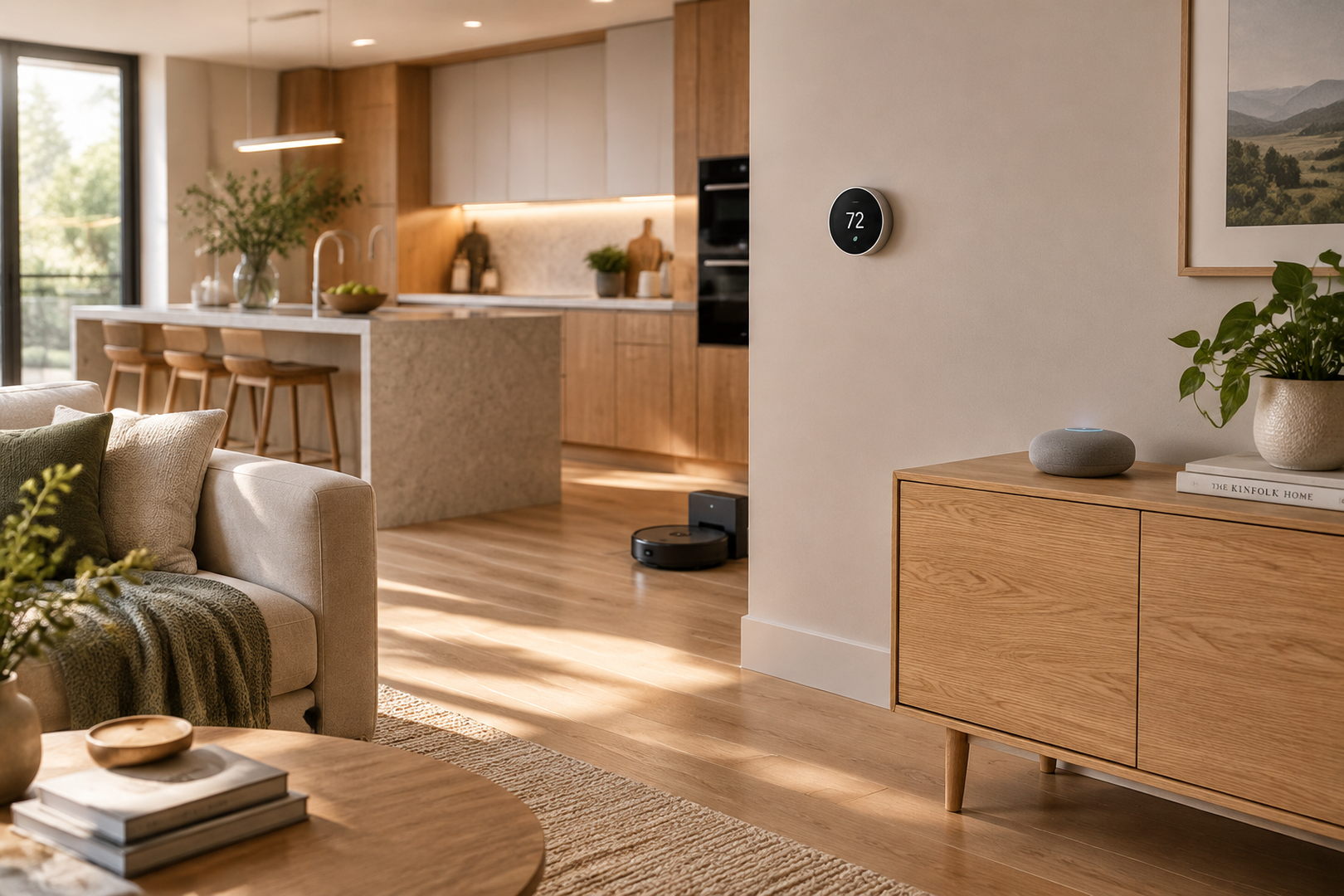
The 4th Generation Nest Learning Thermostat is the most beautiful piece of hardware on this list. It features a borderless domed crystal display that looks like a high-end watch face. But the real upgrade is the AI. This thermostat uses Google’s Soli radar technology to detect movement with extreme precision. It knows if you are walking past it or standing in front of it, adjusting the display information accordingly.
The “Learning” part is still its core strength. You don’t need to program it. You just use it. Turn it down when you go to bed. Turn it up when you have coffee. After a week, the Nest builds a schedule that mimics your life perfectly. For winter energy saving, the “Sunblock” feature prevents the thermostat from thinking it’s hot when direct sunlight hits it, preventing the AC from kicking on unnecessarily. It also supports Matter, ensuring it will work with your smart home setup for years to come.
Best For: People who want a thermostat that programs itself without any hassle.
Pros:
-
Stunning bezel-less design is a piece of wall art
-
Soli radar sensor provides responsive interface interaction
-
“Learning” algorithm is still the best in the industry
-
Installation is incredibly easy with the included trim plate
Cons:
-
No remote sensors included in the box (sold separately)
-
The high price tag is hard to justify for some
-
Google Home app interface changes can be frustrating
3. Honeywell Home T9
Honeywell (Resideo) has been making thermostats for over a century, and the T9 focuses on pure utility. Its superpower is range. The Smart Room Sensors for the T9 have a range of up to 200 feet. This is significantly better than most competitors. If you have a large sprawling ranch house or a thick-walled older home, the T9 is the best smart thermostat 2026 has to offer for connectivity.
The interface is simple and business-like. It doesn’t try to be a speaker or a camera. It just manages heat. You can set it to prioritize specific rooms at specific times. For example, you can tell it to only care about the living room during the day and only the bedrooms at night. This “Follow Me” mode ensures you aren’t paying to heat the kitchen at 3 AM. It handles multiple zones better than most consumer units, making it a favorite among HVAC installers.
Best For: Large homes or houses with thick walls where Wi-Fi struggles.
Pros:
-
Incredible sensor range covers large square footage
-
“Follow Me” mode is excellent for zoning comfort
-
Very reliable connection that rarely drops offline
-
Classic interface is easy for guests to understand
Cons:
-
The design is functional but looks a bit dated and boxy
-
The touchscreen is not as responsive as a smartphone
-
Requires a C-wire adapter (included) which adds installation steps
4. Amazon Smart Thermostat
If you want to save money upfront and over time, this is the pick. At roughly $79, the Amazon Smart Thermostat is a bargain. It was built in partnership with Resideo (Honeywell), so the hardware reliability is solid. It lacks a fancy touchscreen. Instead, it relies on a simple LED display and the Alexa app for control.
The “smart” aspect comes from Alexa Hunches. If Alexa guesses that everyone is asleep (because the lights are off and the house is quiet), it can automatically lower the temperature. If it detects you have left for work, it adjusts the setpoint. It is a no-frills device that effectively lowers your bill without any flashy features. It is often heavily rebated by utility companies, meaning you might be able to get it for free.
Best For: Budget-conscious buyers and deep users of the Alexa ecosystem.
Pros:
-
Extremely affordable price point
-
“Alexa Hunches” adds automated intelligence for free
-
Simple, clean design blends into the wall
-
often eligible for 100% utility rebates
Cons:
-
Requires a C-wire adapter (sold separately) for most older homes
-
No support for remote room sensors
-
You must use the Alexa app; there is no dedicated thermostat app
5. Sensi Touch 2
The Sensi Touch 2 is the privacy advocate’s choice. Emerson, the parent company, has made a commitment not to sell your data to third parties or use it for targeting ads. In an era where every device is tracking you, this is a refreshing stance. The thermostat itself acts and looks like a traditional unit but with a nice glass touchscreen.
Installation is a breeze because it keeps the standard footprint of older thermostats, meaning you often don’t have to paint the wall behind it. It works with Apple HomeKit, Google, and Alexa, but it doesn’t force you to use them. It is widely considered the most reliable “offline” smart thermostat. Even if your Wi-Fi goes down, it functions perfectly as a standard programmable unit with zero glitches.
Best For: Users who value data privacy and traditional reliability.
Pros:
-
Strong privacy policy regarding user data
-
Standard size covers old paint marks easily
-
Works reliably even without Wi-Fi
-
Interface is intuitive for non-tech-savvy family members
Cons:
-
Requires a C-wire for Apple HomeKit functionality
-
Lacks advanced occupancy tracking features
-
Design is plain compared to Nest or Ecobee
6. Mysa Smart Thermostat (V2)
Most smart thermostats only work with “low voltage” (24V) systems like central furnaces. They will fry if you hook them up to a high-voltage electric baseboard heater. Mysa is designed specifically for high voltage (120V-240V). If you have electric baseboards, fan-forced heaters, or in-floor radiant heating, Mysa is your only real option for modern smart control.
The V2 model is 40% smaller than the original. It features a minimalist LED display that shows the current room temperature. The app allows you to group multiple heaters into “Zones.” This means you can turn down every heater in the basement with one tap. The energy charting is fantastic, showing you exactly how much electricity (and money) each heater is using. This transparency often shocks users into changing their habits, leading to massive savings.
Best For: Homes with electric baseboard or fan-forced heating.
Pros:
-
The best solution for high-voltage heating systems
-
“Zone Control” lets you manage multiple heaters as one
-
Detailed energy usage reports in the app
-
Minimalist design looks great in modern apartments
Cons:
-
Installation involves working with high-voltage wires (dangerous)
-
Does not work with central HVAC systems
-
The faceplate is touch-sensitive but can be finicky
7. Wyze Thermostat
Wyze has built a reputation on offering 90% of the features for 30% of the price. The Wyze Thermostat continues this trend. It offers 7-day scheduling, geofencing, and filter replacement reminders for a price that competes with “dumb” programmable units. The industrial design is surprisingly nice, with a tactile dial that controls the menu.
The software is where it shines. The “Coast to Cool” feature turns off the compressor before the cycle ends, using the fan to blow the remaining cold air through the ducts. This saves a tiny amount of energy every cycle, which adds up over winter and summer. It comes with a C-wire adapter in the box, making it compatible with older systems right out of the gate.
Best For: Value seekers who still want advanced software features.
Pros:
-
Incredible value for the feature set
-
“Coast to Cool” feature squeezes extra efficiency out of HVAC
-
Physical dial is satisfying to use
-
C-wire adapter included in the box
Cons:
-
Remote sensors are often out of stock
-
The setup process can be a bit buggy on Android
-
Display is simple and purely functional
8. Ecobee Smart Thermostat Enhanced
Think of the Ecobee Enhanced as the “Premium” model on a diet. You lose the zinc body, the air quality sensor, and the included SmartSensor. However, you keep the core brain. You still get the radar occupancy sensor. You still get the eco+ software. You still get the reliable C-wire adapter kit.
For many users, this is the smart choice. If you don’t care about air quality monitoring because you have a separate purifier, why pay for it? If you don’t need voice control on your wall because you have an Echo Dot on the counter, save the money. It offers the exact same energy-saving logic as the more expensive model, just without the bells and whistles. It remains one of the best smart thermostats 2026 provides for the mid-range market.
Best For: Users who want Ecobee reliability without the premium price tag.
Pros:
-
Same powerful energy-saving software as the Premium model
-
Radar sensor for occupancy detection is built-in
-
More affordable price point
-
Future-proof with robust over-the-air updates
Cons:
-
Plastic body feels less durable than the Premium
-
No SmartSensor included (must buy separately)
-
No voice assistant support built-in
Quick Picks
-
Ecobee Smart Thermostat Premium: The most complete package. It includes a remote sensor in the box and doubles as a home security hub.
-
Google Nest Learning Thermostat (4th Gen): The smartest brain. It learns your habits faster than any other device and looks stunning on the wall.
-
Amazon Smart Thermostat: The cost-effective choice. Ideal for landlords or those who just want basic Alexa control for under $100.
-
Mysa Smart Thermostat: The specific solution. If you have high-voltage electric baseboard heaters, this is the only serious option.
How to Choose the Best Smart Thermostat
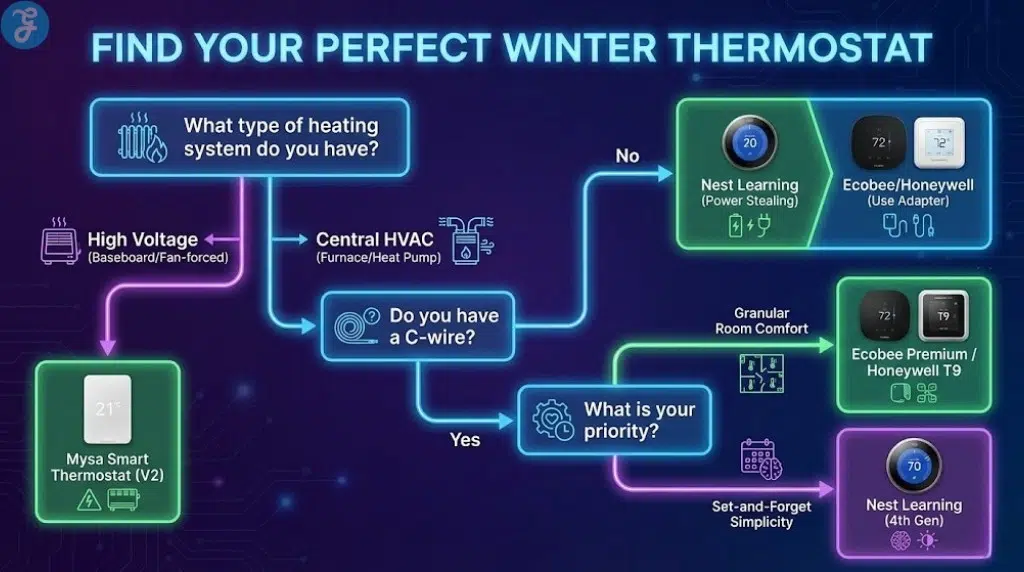
Buying a thermostat is not like buying a phone. You have to worry about wires, voltage, and HVAC compatibility. Here is your checklist to ensure you don’t end up returning a box of useless plastic.
The C-Wire Question
The “Common Wire” or C-wire provides constant power to the thermostat. Old thermostats didn’t need it because they used batteries. Smart thermostats with Wi-Fi need it.
-
Check your wall: Pop off your old thermostat faceplate. Do you see a blue wire connected to a “C” terminal?
-
If Yes: You can buy any thermostat on this list.
-
If No: You have three options:
-
Buy the Nest Learning (it can often run without a C-wire using “power stealing”).
-
Buy an Ecobee or Honeywell T9 (they come with an adapter kit you install at your furnace).
-
Hire an electrician to pull a new wire (expensive).
-
HVAC System Type
-
Central Air/Furnace: Standard 24V systems. Compatible with Nest, Ecobee, Honeywell, Amazon, Sensi, Wyze.
-
Baseboard Heaters: High Voltage (120V/240V). You MUST buy the Mysa. Do not try to install a Nest; you will destroy it and potentially start a fire.
-
Heat Pumps: All smart thermostats on this list support heat pumps, but Ecobee and Honeywell are generally considered better at managing the “Auxiliary Heat” (the expensive backup heat) to save you money.
Sensors vs. Algorithms
How do you want to save money?
-
Sensors (Ecobee/Honeywell): Best if you have a large house with hot/cold rooms. The thermostat runs until the room you are in is warm.
-
Algorithms (Nest/Amazon): Best if you have a predictable schedule. The thermostat learns you leave at 8 AM and cuts the heat automatically.
Smart Home Ecosystem
-
Apple HomeKit: Go with Ecobee or Sensi. Nest now supports Matter (so it works on Apple), but Ecobee is native and smoother.
-
Google Home: Nest is obviously the best integration, but Ecobee works well too.
-
Alexa: Amazon Smart Thermostat is native. Ecobee has Alexa built-in.
Wrap-Up
Upgrading your thermostat is one of the few home improvements that pays you back. A properly configured smart thermostat can save 10-15% on heating and cooling bills, meaning it pays for itself in roughly two years.
For 2026, the Ecobee Smart Thermostat Premium remains the definitive choice for control freaks and data lovers. Its ability to average temperatures across rooms is a game-changer for comfort. However, if you want beauty and simplicity, the Nest Learning Thermostat (4th Gen) is unbeatable. It requires zero effort to save money.
Don’t wait for the dead of winter to install one. Do it now, set your schedule, and let the algorithms handle the frost.