
When selecting a hosting solution for your WordPress website, one of the most important factors to consider is performance. A slow-loading website can damage your user experience, hurt your SEO ranking, and ultimately affect your bottom line.
Cloud hosting has become the go-to solution for websites looking for performance, scalability, and reliability—essential features for WordPress sites that require maximum uptime and speed.
Unlike traditional hosting that relies on a single server, cloud hosting distributes your website’s resources across multiple servers, ensuring that your site can handle more traffic and remains resilient against server failures. Whether you’re running a personal blog or a large-scale business website, cloud hosting provides a robust and scalable infrastructure.
In this article, we’ll dive into the 7 best cloud hosting providers for WordPress websites, detailing their features, pricing, and what makes them unique. By the end of this guide, you’ll be able to confidently choose the right cloud hosting solution for your WordPress site, ensuring smooth operation and better performance.
Why Cloud Hosting is Ideal for WordPress Websites?
WordPress websites often experience fluctuating traffic, and as they grow, performance and reliability become paramount. Cloud hosting offers distinct advantages over traditional hosting solutions, especially for WordPress sites.
1. Scalability
Cloud hosting allows you to easily scale your website’s resources—whether you’re dealing with a surge of traffic during an event or preparing for long-term growth. Instead of being limited to the fixed resources of a single server, cloud hosting providers can dynamically adjust your bandwidth, storage, and computing power. This flexibility ensures that your site remains operational under all conditions.
2. Enhanced Speed and Performance
WordPress websites are content-heavy, often relying on images, media files, and complex plugins. Cloud hosting uses powerful infrastructure and SSD storage, which improves loading times. Additionally, cloud hosting often comes with integrated content delivery networks (CDNs), further accelerating website loading by distributing content across multiple servers around the globe.
3. Redundancy and Reliability
Unlike traditional hosting, where a single server is a potential single point of failure, cloud hosting uses a distributed network of servers. If one server fails, others take over without affecting your site’s availability. This redundancy ensures that your WordPress website experiences less downtime, which is crucial for maintaining a professional and reliable presence.
4. Improved Security

Cloud hosting providers offer robust security features such as regular backups, firewalls, DDoS protection, and malware scanning. Since WordPress is a popular target for hackers, having secure infrastructure in place is essential for protecting your website from vulnerabilities.
5. Cost-Efficiency
Cloud hosting’s pay-as-you-go model allows you to pay only for the resources you use. This is especially advantageous for WordPress websites that have fluctuating traffic, as you don’t need to pay for more resources than you need at any given time. Additionally, many cloud hosting providers offer budget-friendly entry-level plans with the option to scale as your site grows.
7 Best Cloud Hosting Providers for WordPress Websites
Let’s take a look.
1. SiteGround
SiteGround is one of the most trusted names in WordPress hosting. Known for its exceptional customer support and fast performance, SiteGround’s cloud hosting solution offers WordPress users an optimized environment with excellent scalability and reliability. SiteGround is particularly popular for its “SuperCacher” technology, which enhances the speed of WordPress websites.
| Feature | SiteGround |
| Key Features | Optimized for WordPress, free daily backups, SSD storage, built-in caching, free CDN |
| Pricing | Start-up: $3.99/month, GrowBig: $6.69/month, GoGeek: $10.69/month |
| Best For | WordPress users who want strong performance and excellent customer support |
| Pros | 24/7 support, advanced caching, SSD storage, free CDN |
| Cons | Higher renewal pricing, no free domain |
Why SiteGround is Great for WordPress: SiteGround excels in performance and support, especially for users who are new to WordPress. The user-friendly dashboard, combined with fast customer support, makes it a great choice for beginners and experienced website owners alike. Plus, the advanced caching and daily backups ensure your WordPress website runs smoothly without worrying about losing your data.
2. WP Engine
WP Engine is one of the leading cloud hosting providers tailored specifically for WordPress. It provides a fully managed WordPress hosting environment, meaning that WP Engine handles all the technical aspects, including backups, updates, and security. WP Engine’s integration with Google Cloud ensures exceptional speed and reliability.
| Feature | WP Engine |
| Key Features | Managed WordPress hosting, automatic updates, premium support, staging environments |
| Pricing | Startup: $20/month, Professional: $39/month, Growth: $77/month |
| Best For | High-traffic WordPress websites that need premium support |
| Pros | Fully managed, high performance, staging environments, robust security |
| Cons | Higher cost, limited storage on basic plans |
Why WP Engine is Great for WordPress: WP Engine offers a fully managed WordPress hosting experience, which is perfect for businesses or serious bloggers who prefer to focus on content creation rather than technical maintenance. Their infrastructure, backed by Google Cloud, ensures that websites perform at optimal levels even under heavy traffic. WP Engine’s premium customer service ensures that any issues are quickly addressed, and the staging environment allows you to safely test website changes.
3. Kinsta
Kinsta is a premium cloud hosting provider that uses Google Cloud Platform to deliver cutting-edge performance. Kinsta’s infrastructure is designed to handle high-traffic WordPress websites, ensuring they stay fast and secure. Known for its intuitive dashboard and high-end support, Kinsta is ideal for developers and businesses who need top-tier hosting solutions.
| Feature | Kinsta |
| Key Features | Powered by Google Cloud, free daily backups, staging environments, premium security |
| Pricing | Starter: $35/month, Pro: $70/month, Business: $115/month |
| Best For | High-traffic websites, businesses needing fast, reliable WordPress hosting |
| Pros | Fast speeds, Google Cloud infrastructure, great support |
| Cons | Expensive, can be overkill for smaller websites |
Why Kinsta is Great for WordPress: Kinsta’s performance is outstanding, making it an ideal choice for WordPress sites that require high levels of traffic management and performance optimization. Their use of Google Cloud provides high reliability and speed, while their premium security and automatic backups keep your WordPress site safe from cyber threats. Kinsta’s 24/7 support team is always ready to assist with any WordPress-related issues.
4. Bluehost
Bluehost is a well-known hosting provider recommended by WordPress itself. Offering a variety of hosting solutions, including cloud hosting, Bluehost makes it easy for users to integrate WordPress with their platform. With a strong focus on customer support and ease of use, Bluehost is a great entry-level cloud hosting provider for WordPress websites.
| Feature | Bluehost |
| Key Features | Free domain for the first year, free SSL, free CDN, one-click WordPress installation |
| Pricing | Basic: $2.95/month, Plus: $5.45/month, Choice Plus: $5.45/month |
| Best For | Beginners looking for an affordable, reliable WordPress hosting solution |
| Pros | Affordable pricing, free CDN, 24/7 support |
| Cons | Higher renewal prices, limited features on basic plans |
Why Bluehost is Great for WordPress: Bluehost is an affordable, reliable option for beginners who want to get their WordPress site up and running without a steep learning curve. Their seamless integration with WordPress and easy setup process make it a great choice for newcomers. However, Bluehost’s pricing may increase after the first term, so be aware of future costs.
5. Cloudways
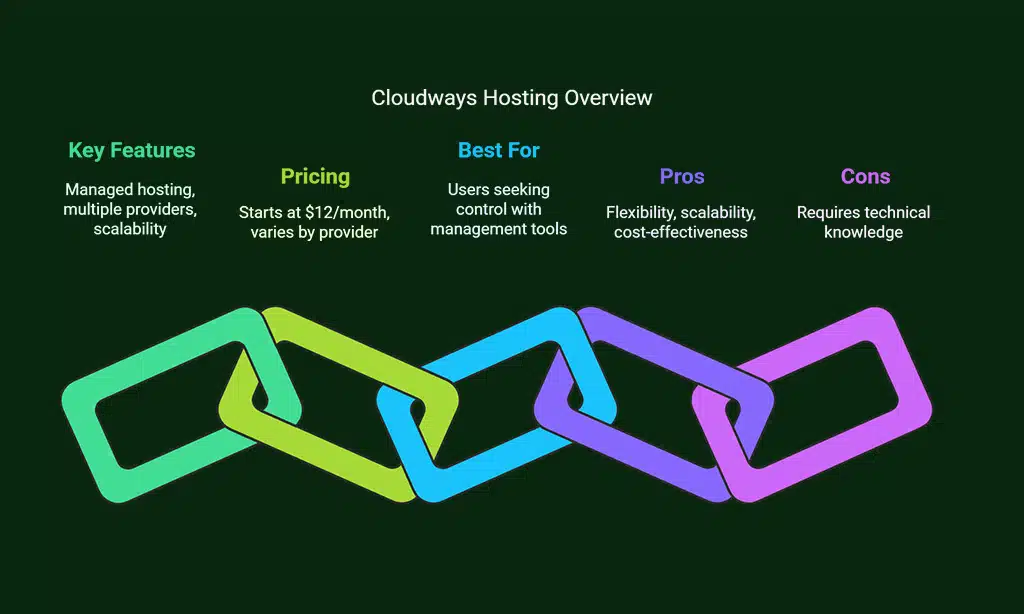
Cloudways is a unique cloud hosting provider that allows you to choose from a variety of cloud platforms, such as AWS, Google Cloud, and DigitalOcean. This flexibility gives you full control over your hosting infrastructure while still benefiting from managed services like automatic backups and updates.
| Feature | Cloudways |
| Key Features | Managed cloud hosting, multiple cloud provider options, easy scalability |
| Pricing | Starting at $12/month (varies by cloud provider) |
| Best For | Users who want full control over cloud infrastructure with easy management tools |
| Pros | Flexibility, scalability, cost-effective |
| Cons | Requires some technical knowledge |
Why Cloudways is Great for WordPress: Cloudways is perfect for developers or users who want a highly customizable cloud hosting solution for WordPress. It allows you to choose from several cloud platforms, giving you the flexibility to select the one that best fits your needs. With a user-friendly interface and managed services, Cloudways simplifies cloud hosting without compromising on performance.
6. A2 Hosting
A2 Hosting is known for its performance-focused cloud hosting services. With a range of WordPress-optimized hosting options, A2 Hosting promises incredibly fast speeds with its Turbo Servers, making it a great option for websites that prioritize performance.
| Feature | A2 Hosting |
| Key Features | Turbo Servers, free SSL, free daily backups, one-click WordPress installation |
| Pricing | Startup: $2.99/month, Drive: $5.99/month, Turbo: $9.99/month |
| Best For | Users looking for speed and performance in their WordPress hosting |
| Pros | Ultra-fast servers, great customer support |
| Cons | Higher renewal prices |
Why A2 Hosting is Great for WordPress: A2 Hosting’s Turbo Servers provide a speed boost that makes a real difference for WordPress websites. If you need your site to load faster than your competition, A2 Hosting offers an excellent solution. However, the Turbo plan comes at a higher price point, so it’s best suited for high-traffic sites that demand speed.
7. InMotion Hosting
InMotion Hosting is a well-established hosting provider offering cloud solutions with strong WordPress optimization. Known for excellent customer service, InMotion provides a reliable and secure cloud environment for WordPress websites, making it an appealing option for small businesses and personal sites.
| Feature | InMotion Hosting |
| Key Features | Free SSD storage, free SSL, free website migration, daily backups |
| Pricing | Launch: $6.99/month, Power: $8.99/month, Pro: $14.99/month |
| Best For | Small to medium-sized WordPress websites looking for reliable hosting |
| Pros | Affordable pricing, great support, free SSD storage |
| Cons | Limited data centers compared to larger competitors |
Why InMotion Hosting is Great for WordPress: InMotion Hosting offers a great balance of performance, affordability, and customer support. If you’re running a small to medium-sized WordPress website and need a reliable, secure hosting provider, InMotion is an excellent choice. Their free website migration service is especially useful if you’re moving from another host.
How to Choose the Right Cloud Hosting Provider for WordPress?
Selecting the best cloud hosting provider for WordPress can feel overwhelming, but by considering a few key factors, you can easily narrow down your choices:
- Performance and Speed: Opt for providers that offer SSD storage, content delivery networks (CDNs), and caching technologies to ensure your website loads quickly.
- Security: Ensure that the provider includes features such as SSL certificates, DDoS protection, and regular backups to protect your site from threats.
- Support: 24/7 customer support is crucial, particularly for WordPress websites. Look for providers that offer fast, responsive support channels.
- Scalability: As your website grows, you’ll need a hosting provider that can scale with your needs. Cloud hosting providers often offer flexible pricing and resources based on usage.
Wrap Up
Choosing the best cloud hosting provider for WordPress websites depends on your specific requirements, such as budget, performance needs, and level of support.
Whether you need a fully managed hosting solution like WP Engine or a more customizable option like Cloudways, there is a cloud provider out there that can cater to your needs.
By understanding the strengths and weaknesses of each provider, you can make an informed decision that ensures your WordPress website is fast, secure, and ready for future growth.