
AI skills now became a classroom topic, and the conversation always stops at writing a better prompt. That shortcut sounds practical, but it leaves students exposed. In my classes, I saw students write clever prompts and still miss weak evidence, shaky numbers, and privacy risks.
Prompt writing matters, but it is only one piece of a much bigger skill set. So I want to make this simple. I’ll walk you through the AI skills for students, why they matter now, and how to teach them with hands-on classroom work.
Why AI Skills Are Crucial for Students
Students are already using AI, whether schools are ready or not. Stanford’s 2026 AI Index reports that four out of five U.S. high school and college students now use AI for schoolwork, yet only half of middle and high schools have AI policies, and just 6% of teachers say those policies are clear.
That gap is why I treat AI skill building as core instruction. In February 2026, the U.S. Department of Labor published a national AI literacy framework, which tells me this is no longer a side topic for electives or tech clubs.
The evolving role of AI in education and careers
AI already helps students explain a hard lecture, organize notes, and generate practice questions. Google’s current student training materials frame Gemini and NotebookLM as study support tools, not just writing tools, which is a helpful distinction for schools that want deeper learning instead of shortcut culture.
NotebookLM is especially useful because it works from sources students upload themselves, such as PDFs, Google Docs, Slides, websites, audio files, and captioned videos. It can turn those materials into study guides, quizzes, mind maps, slide decks, and audio overviews, which makes it strong for review without pushing students away from the class material.
- NotebookLM: best for source-based study help, because students can trace answers back to their own materials.
- Gemini: helpful for drafting questions, refining ideas, and getting feedback on writing or structure.
- Career Dreamer: useful for older students who want to connect their interests and experiences to possible career paths.
- Google AI Professional Certificate: a stronger next step for college students, since Google says it includes 20+ hands-on activities tied to daily work tasks.
That mix matters because the future of AI in education is wider than homework help. Students need to know how to learn with AI, question it, and apply it in school tasks that look a lot like workplace tasks.
Limitations of prompt literacy alone
Prompt literacy is helpful, and I still teach it. Google’s Prompting Essentials course uses a five-step framework, and Google says the average successful prompt is 21 words, which tells students that good prompting is about clarity and structure, not stuffing a box with extra words.
Still, a clean prompt can produce weak reasoning, missing evidence, or confident nonsense. That is why I require students to practice critique, verification, data literacy, and ethics alongside prompt engineering.
- Prompt quality: Did the student define the goal, audience, constraints, and format?
- Reasoning quality: Did the student explain why the answer makes sense?
- Source quality: Did the student verify claims against credible material?
- Process transparency: Did the student show revisions instead of hiding the AI trail?
That shift matters in grading. In one course rubric revision pilot, I replaced an output-only rubric with three process criteria: prompt quality, reasoning steps, and source verification.
Across two 9-week terms with 54 students, the share of graded assignments showing explicit AI process documentation rose from 22% to 76%. The mean rubric subscore for reasoning also improved from 2.1 to 3.8 on a 5-point scale.
As an internal course summary noted, “Adding process criteria shifted work from product polishing to documented thinking.” For me, that is exactly why prompt literacy alone is not enough.
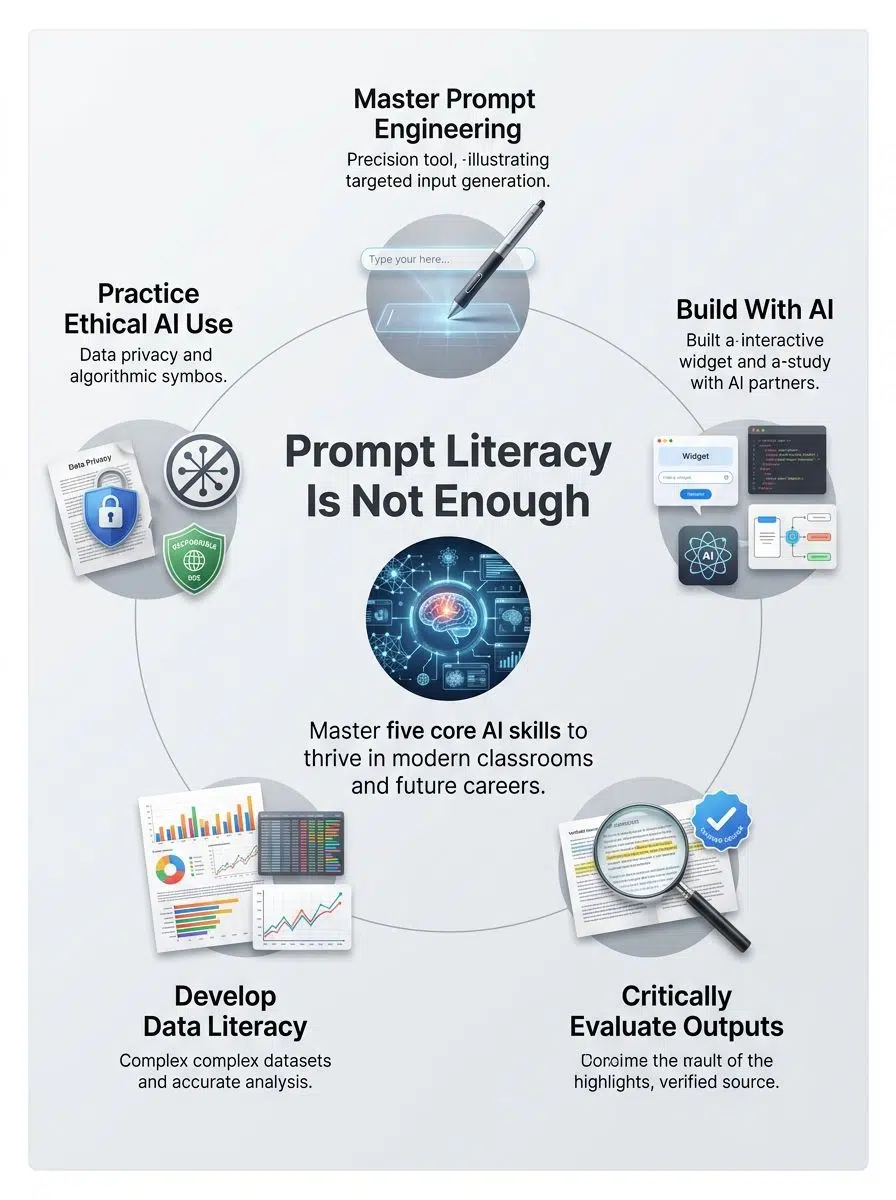
5 Essential AI Skills Students Need
I teach prompt literacy, but I find it too narrow for students who use generative AI every week. If I want students ready for school, work, and everyday decisions, I have to teach a fuller set of AI skills.
| AI skill | What students actually do | Why it matters |
| Prompt engineering | Give clear instructions, constraints, and examples | Better inputs save time and reduce vague output |
| Building with AI | Create a quiz, widget, explainer, or prototype | Students learn to make with AI, not just ask it for answers |
| Critical evaluation | Check claims, logic, and source quality | This is how students catch hallucinations and weak reasoning |
| Data literacy | Read charts, question numbers, and explain patterns | Students make better decisions with evidence |
| Ethical understanding | Consider privacy, bias, attribution, and fairness | Students learn responsible use before habits harden |
1. Prompt Engineering
Prompt engineering is still one of the essential AI skills, because students need to communicate clearly with AI systems. I teach it as structured instruction: define the role, the task, the context, the constraints, and the output format.
Google’s Prompting Essentials course is a good model here because it teaches a repeatable five-step method and says many learners can finish it in under 10 hours. That makes prompt training practical for a short classroom unit or a homework extension.
- Start with a role: “Act as a biology tutor” is better than “help me.”
- Name the task: Ask for one outcome, such as a summary, quiz, outline, or critique.
- Add constraints: Set reading level, length, tone, or allowed sources.
- Request a format: Bullets, a table, or flashcards usually beat a long paragraph.
I also make students save at least one weak prompt and one revised prompt. That comparison teaches more than a polished final draft ever will.
2. Building With AI (Vibe Coding)
Students should also build with AI, because creation teaches limits faster than passive use. Canva Code is a strong entry point here because Canva says students can create custom games, timelines, and interactive maps by describing what they want, with no coding required.
That lowers the barrier for students who have ideas but no formal computer programming background yet. For older learners, Google Career Launchpad pushes this further with hands-on labs and credentials built around generative AI, data analytics, and other job-linked skills.
- Build a study game: students learn logic, feedback loops, and revision.
- Create an interactive timeline: great for history, science, or literature units.
- Prototype a classroom tool: a vocabulary quiz, planner, or flashcard helper works well.
- Reflect on the build: students should explain what the AI made well and what still needed human judgment.
This is where AI becomes a creative partner instead of a copy machine. Students stop asking, “What can this tool do for me?” and start asking, “What can I make with it?”
3. Critical Evaluation of AI Output
I teach verification and critical interpretation as skills, not chores. Verification means checking whether a claim is accurate and supported, while critical interpretation means asking whether the response is logical, relevant, and complete.
NotebookLM models the right habit because Google describes it as grounded in the sources a user uploads, with clear in-line citations for accuracy and transparency. Google’s Gemini certification for university students also puts critical evaluation, data privacy, and ethical use at the center, which is exactly where I think classrooms should start.
I ran an AI training lab where I asked a chatbot to write a short finance report, then I had students check each claim against public data and recent reporting. That one task made the difference between polished-looking work and trustworthy work obvious.
One classroom verification lab made the pattern clear. Students received a short finance report generated by a chatbot and were told to verify it.
Out of 32 submissions, 9 students accepted the output without changes, 14 documented at least one verification step by citing a source or checking data, and 9 submitted a full three-step verification log with a source, cross-check, and revision. The average time spent on verification logs was 18 minutes.
An instructor note captured the difference well: “Students who logged verification steps were more likely to spot a factual mismatch in the chatbot report.” That is why I require visible verification, not just a cleaned-up final draft.
- Check the claim: Is the fact true?
- Check the source: Where did the information come from?
- Check the logic: Does the conclusion actually follow?
- Check the gap: What is missing, oversimplified, or too confident?
Rubrics now need visible evidence of critical evaluation, not just the final product. I grade the thinking trail.
4. Data Literacy and Analysis
Data literacy means students can read numbers, spot weak claims, and explain patterns in plain language. The National Academies’ 2026 framework on data and computing treats these competencies as foundational, which lines up with what I see in class every time a student accepts a chart without asking where it came from.
This skill also connects directly to career readiness. A July 2026 U.S. Bureau of Labor Statistics update projects employment of data scientists to grow 33.5% from 2024 to 2034, so students who can question data and communicate findings are building a skill set with real labor-market value.
- Ask where the number came from.
- Check whether the sample is missing key groups.
- Look for scale tricks in charts.
- Rewrite the claim in plain English.
I like tasks where students turn a spreadsheet into a short argument, then compare their conclusion with an AI-generated one. That side-by-side exercise shows them that analysis is more than producing a pretty graph.
5. Ethical Understanding of AI
Ethical understanding of AI is where student habits either mature or go sideways. Bias, privacy, authorship, and misuse all show up long before a student ever takes an AI ethics course.
The North Carolina Department of Public Instruction released public school guidance on generative AI on January 16, 2024, and its message still holds up: schools need practical guardrails, permission clarity, and age-appropriate use. Federal student privacy guidance also says a teacher should first check whether an app or service is approved for classroom use, which is a good baseline before any new AI tool enters a lesson.
- Privacy: Should this student data be pasted into a tool at all?
- Bias: Who might be misrepresented or left out?
- Attribution: What part came from the student, and what part came from AI?
- Purpose: Is the tool helping the student think, or hiding the thinking?
I also like pointing out design choices in real tools. Canva for Education has described advanced educator controls and blocked prompt terms as part of its safety setup, which helps students see that ethical AI use is not abstract, it shows up in product design and classroom policy.
How to Develop These AI Skills
I map hands-on projects that help students learn AI skills in short, repeatable cycles. Small assignments work better than one giant AI unit because students need practice, feedback, and reflection more than one inspirational talk.
That pacing matches the best training models I see online. Google AI Essentials, for example, is self-paced and designed so many learners can complete it within about a month, which is a good reminder that fluency grows through steady use.
Hands-on activities and projects
I use activities that make students touch every skill: prompt writing, verification, data work, tool choice, and ethics. The goal is simple, students should show me their process, not just hand me a glossy answer.
- Run a timed prompt lab: students write one prompt, revise it twice, and explain which change improved the result.
- Use source-based study materials: upload PDFs, slides, or lecture notes into NotebookLM so students can build quizzes and study guides from class content instead of random web summaries.
- Assign a data story: students turn a real dataset into one chart and a 150-word explanation that defends the conclusion.
- Build a simple interactive: use Canva Code to create a study game, map, or timeline that teaches one concept to a real audience.
- Add an ethics checkpoint: before submitting, students answer three questions about privacy, attribution, and possible bias.
- End with reflection: students state what the AI improved, what it got wrong, and what they had to fix themselves.
For the capstone, I use a workflow that makes students demonstrate the full process, not just the final result. They draft a prompt and version it twice, run the AI model and save the raw output, verify three facts with cited sources, write a one-page ethical reflection, and submit all artifacts in a single portfolio.
In one test group of 40, 35 portfolios met all five artifact requirements on the first submission. A pilot procedure note explained the value clearly: “Bundling artifacts made it easy to grade process and ensured students practiced every skill.”
That structure turns AI practice into something visible and teachable.
Leveraging AI tools like ChatGPT and Canva AI
I use tools very deliberately. Each one gets paired with a job it does well, so students learn tool selection instead of falling into the habit of using one chatbot for everything.
- Canva AI: useful for generating a first draft of a presentation, worksheet, permission slip, or newsletter from one prompt, then teaching students how to edit for audience and accuracy.
- Canva Code: helpful for building custom games, timelines, and interactive maps, especially for students who want to create without starting from formal coding syntax.
- Gemini: strong for writing feedback, brainstorming, outline checks, and practice questions tied to classroom notes.
- NotebookLM: ideal for source-grounded research help, since it can turn uploaded materials into study guides, quizzes, mind maps, and audio overviews.
- Google AI Professional Certificate: a smart extension for older students because Google says it includes 20+ hands-on activities tied to daily workplace uses of AI.
- Career Dreamer: useful for helping students connect their school experiences and interests to possible career paths and next steps.
I still train students to question every output. A flashy tool can save time, but it should never replace source checks, audience awareness, or common sense.
Incorporating AI in academic research and assignments
I use AI in class every week, and I make that use visible. Students log whether an assignment was AI Free, AI Assisted, or AI Enhanced so the teacher can see the role the tool actually played.
| Label | What it means | What students must submit |
| AI Free | No generative AI used | Final work only |
| AI Assisted | AI helped with brainstorming, outlining, or feedback | Prompt log and revision note |
| AI Enhanced | AI helped shape part of the product or analysis | Prompt log, raw output, verification notes, and reflection |
- Persona projects: students solve a problem from a real role, such as a budget planner or community organizer, then evaluate whether the AI advice would hold up in practice.
- Research checkpoints: students must submit source checks before the final draft, which keeps verification from becoming an afterthought.
- Assignment-specific AI rules: I tell students what is allowed, what is not, and what must be disclosed.
- Tool approval: before a new app enters the workflow, students learn to ask whether the school has approved it for classroom use.
This keeps academic integrity grounded in clarity rather than fear. Students know the rules, and teachers can grade the process with confidence.
The Bottom Line
Prompt literacy still matters, but prompt literacy alone is too small a goal. If I want students to use AI well, I have to teach the full set of AI skills: prompting, building, evaluating, analyzing data, and making ethical choices.
That shift changes instruction and assessment in practical ways. Students document their process, verify claims, explain decisions, and use tools like ChatGPT, Gemini, NotebookLM, and Canva AI with more care, which is exactly how the AI skills every student should learn become visible, teachable, and worth grading.
Frequently Asked Questions on AI Skills for Students
1. What skills do learners need beyond prompt literacy?
They must test, judge, and fix AI output. That means clear thinking, basic data sense, and simple coding.
2. How does teaching these skills change class work?
It allows students to use AI tools wisely, to check facts, and to shape ideas. Teachers can give real tasks, and students can do more hands-on work.
3. Why teach data sense and testing?
AI can make mistakes, so learners must spot them, like a proofreader finding typos.
4. Will these skills help in jobs?
Yes, they make people ready to work with tools and teams. They help solve real problems, and they make you less likely to be fooled by bad results.