

Designing a website can feel like climbing a mountain. You need the right tools to make it easier. AI-powered tools are changing how we build sites today.
These smart helpers cut down work time and boost creativity. In this post, you’ll see seven AI-powered tools that are reshaping web design. Find out which ones can save your day.
Key Takeaways
- Speed up website design tasks.
- Automate repetitive design processes.
- Boost creative output with AI-generated visuals.
- Enhance collaboration among teams.
- Convert design mockups to production-ready code.
- Simplify prototyping and improve workflow efficiency.
- Improve video editing and visual effects with smart tools.
MidJourney: Revolutionizing Visual Creativity
MidJourney turns text prompts into stunning visuals with AI. It’s reshaping how designers brainstorm and create graphics.
Key features and use cases
MidJourney makes web design easier for everyone. It helps designers turn text into stunning images in seconds.
- This tool uses artificial intelligence to generate high-quality graphics. Designers can tweak results by changing prompts.
- Teams often use MidJourney for landing pages and social media posts. It speeds up design work considerably.
- The latest version understands complex requests better. You can describe a specific style or mood in detail.
- Some agencies use this for rapid prototyping. Clients get visual concepts faster than traditional methods allow.
- Built-in filters help refine generated images. Users can adjust colors, lighting, and composition with simple commands.
- Designers find it perfect for creating placeholder images. It beats digging through stock photo libraries.
- The Discord-based interface feels familiar to digital natives. No complicated software to install or learn.
- Many combine MidJourney outputs with other AI tools. This creates complete designs without starting from scratch.
Figma: AI-Powered Design Collaboration
Figma uses AI to help teams work faster, making design collaboration feel like a breeze.
Streamlining workflows for teams
Figma uses artificial intelligence to make teamwork smoother than ever before (and yes—that includes remote work). Its real-time collaboration lets multiple designers edit projects at once without stepping on each other’s toes—no more endless email chains or version chaos!
AI-driven plugins automate repetitive tasks like resizing frames or generating color palettes so your team can focus on creativity instead of busywork (because nobody got into web design just to push pixels around all day).
*Good tools improve how we work—great tools change how we think.* – Daniel Hockman
Fronty: Automating Web Design Processes
Fronty turns design mockups into clean, ready-to-use code with just a few clicks, saving hours of manual work. It bridges the gap between designers and developers, making web creation faster and smoother.
Turning designs into code effortlessly
Fronty takes the hassle out of coding for designers. It converts visuals into clean HTML, CSS, and JavaScript in minutes. The platform analyzes your design files and automatically generates production-ready code, saving hours of manual work.
Built with AI smarts, Fronty adapts to design trends while keeping outputs cross-browser compatible. Designers can focus on creativity instead of debugging layouts pixel by pixel. It’s like having a developer on standby who never sleeps or asks for coffee breaks.
Codifying creativity shouldn’t feel like pulling teeth. With tools like Fronty handling the heavy lifting, web designers get their weekends back while clients still receive polished final products – that’s what we call a win-win scenario where both art and science shake hands happily. The platform even suggests optimizations you might miss during late-night design sprints – talk about a helpful robot sidekick!
These smart assistants bridge the talent gap when hiring full-time developers isn’t practical or affordable. Small studios particularly benefit from these digital collaborators that ask no questions but deliver solid answers. This tech isn’t replacing humans anytime soon — rather acting as creative prosthetics for overworked designers juggling multiple client demands. Monday mornings suddenly seem brighter when half your workload automates itself before breakfast. Who knew algorithms could become an artistic designer’s best ally?
Uizard: Simplifying Prototyping for Designers
Uizard turns complex design tasks into simple drag-and-drop actions. It helps designers create prototypes in minutes, not hours.
Rapid creation of prototypes and interfaces
Uizard makes prototyping a breeze with AI. It turns rough sketches into polished interfaces in minutes, saving hours of manual work.
The tool also suggests design improvements using machine learning. This helps fix user experience flaws before the final build, making websites more intuitive and clean. Perfect for fast-paced projects that need quick results without losing quality.
Adobe Sensei: Enhancing Creativity with AI
Adobe Sensei boosts creativity by adding smart AI features to Adobe’s tools, making design work faster and more intuitive.
Integration with Creative Cloud tools
Adobe Sensei works like magic across the Creative Cloud suite. It speeds up tasks in Photoshop, Illustrator, and Premiere Pro by learning your habits. The AI suggests edits, automates repetitive jobs, and helps pick perfect colors fast.
Sensei also boosts efficiency with smart features. In Photoshop, it can remove objects cleanly or match fonts in seconds. For videos, it auto-tags clips for quick searches. Designers save hours while keeping their creative flow intact.
Wix ADI: AI for Website Building
Wix ADI crafts custom websites in minutes, using AI to pick layouts and styles that fit your needs.
Customizing websites with AI assistance
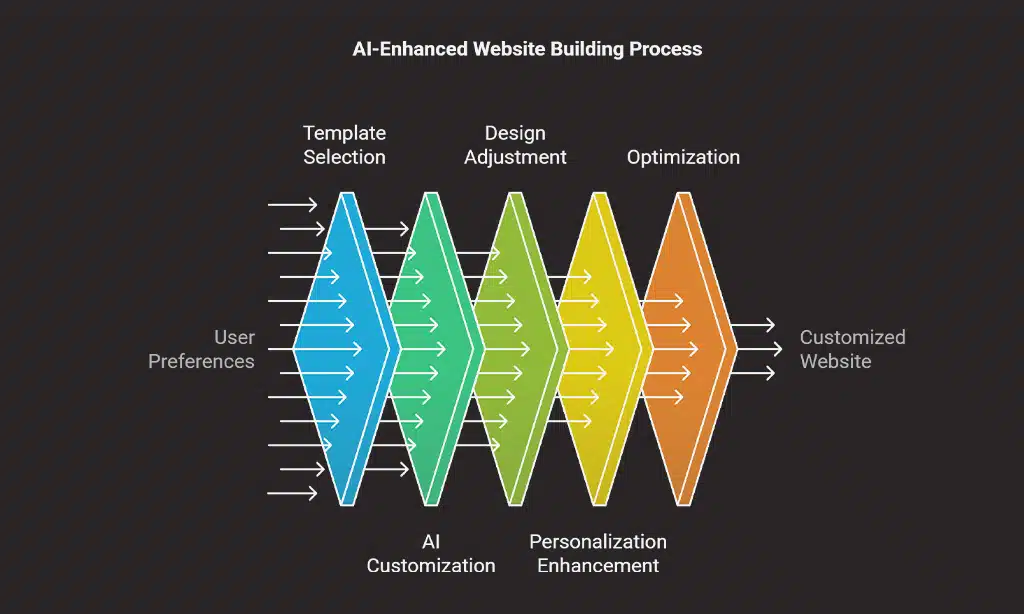
Building a website just got easier with AI. Tools like Wix ADI analyze your content and style preferences, then create a perfectly customized site in minutes. No coding skills needed.
Just pick a template, adjust the design, and publish. AI also enhances personalization. Smart algorithms recommend layouts, colors, and fonts based on user behavior. They even optimize images for faster loading. This means better responsive design without extra effort.
Web design becomes faster, smarter, and more user-friendly.
Runway ML: AI for Advanced Visual Projects
Runway ML gives designers AI tools for video editing and visual effects, making complex tasks simple. It’s like having a creative assistant that handles the heavy lifting while you focus on ideas.
Features for video editing and design
Video editing and design just got smarter with AI. These tools make challenging tasks simple and fast.
- Auto-Cropping and Resizing: AI adjusts videos for different platforms, like Instagram or YouTube, without manual tweaks.
- Smart Object Removal: Erase unwanted elements from videos with a click, saving hours of manual editing.
- Real-Time Effects: Apply filters, color corrections, and animations instantly using AI suggestions.
- Voice-to-Text Captions: Automatically generate accurate subtitles, boosting accessibility and engagement.
- Scene Detection: AI scans footage and splits it into logical segments for easy editing.
- Background Replacement: Change video backgrounds in seconds, no green screen needed.
- Motion Tracking: Follow moving objects smoothly to add text or effects without shaky results.
- AI-Generated Transitions: Create seamless scene changes customized to your video’s mood and pace.
- Facial Recognition: Enhance expressions, apply makeup, or blur faces automatically.
- Noise Reduction: Clean up audio by removing background hums or echoes effortlessly.
AI turns time-consuming edits into quick fixes, allowing designers to focus on creativity.
Benefits of AI-Powered Tools in Web Design
AI tools speed up web design, cut costs, and make sites smarter—ready to see how they can change your workflow?
Increased efficiency and productivity
AI-powered web design tools cut down hours of manual work like slicing butter on a hot knife—fast! They automate repetitive tasks such as coding layouts or resizing images so designers can focus on creativity instead of grunt work (bye-bye burnout).
These smart helpers analyze user behavior patterns quickly too—no guesswork needed—to suggest better layouts faster than human eyes alone could spot them (even after three cups o’ coffee!).
Less time wasted means projects launch sooner without sacrificing quality at all… now that’s what we call working smarter and harder simultaneously folks!
Enhanced user experience design
AI tools now help designers craft smoother, more intuitive websites. They analyze user behavior, tweak layouts in real time, and suggest improvements that keep visitors engaged.
These tools spot pain points faster than manual testing. Features like heatmaps, automated A/B testing, and smart recommendations take the guesswork out of optimizing UX. The result? Cleaner navigation, fewer clicks to goals, and happier users.
Takeaways
AI tools are changing web design fast. They make work easier and save time. From MidJourney’s visuals to Wix ADI’s quick sites, these tools help everyone. The future of design is here, and it’s smart.
FAQs
1. What are AI-powered tools for web design?
AI-powered tools help designers build websites faster. They automate tasks, like coding and layout suggestions, saving time. Some tools even create graphics or write content.
2. How do these tools make web design easier?
They handle repetitive work, like resizing images or checking colors. AI suggests improvements based on trends. This lets designers focus on creativity, not busywork.
3. Can AI tools replace human designers?
No. AI speeds up the process, but humans add the final touch. Designers still decide the look, feel, and user experience. Think of AI as a smart assistant, not a replacement.
4. Are these tools expensive?
Prices vary. Some offer free plans with basic features. Paid versions unlock more power, like advanced templates or faster performance. Many designers find the cost worth the time saved.
Disclosure: This content is informational and not a substitute for professional advice.























