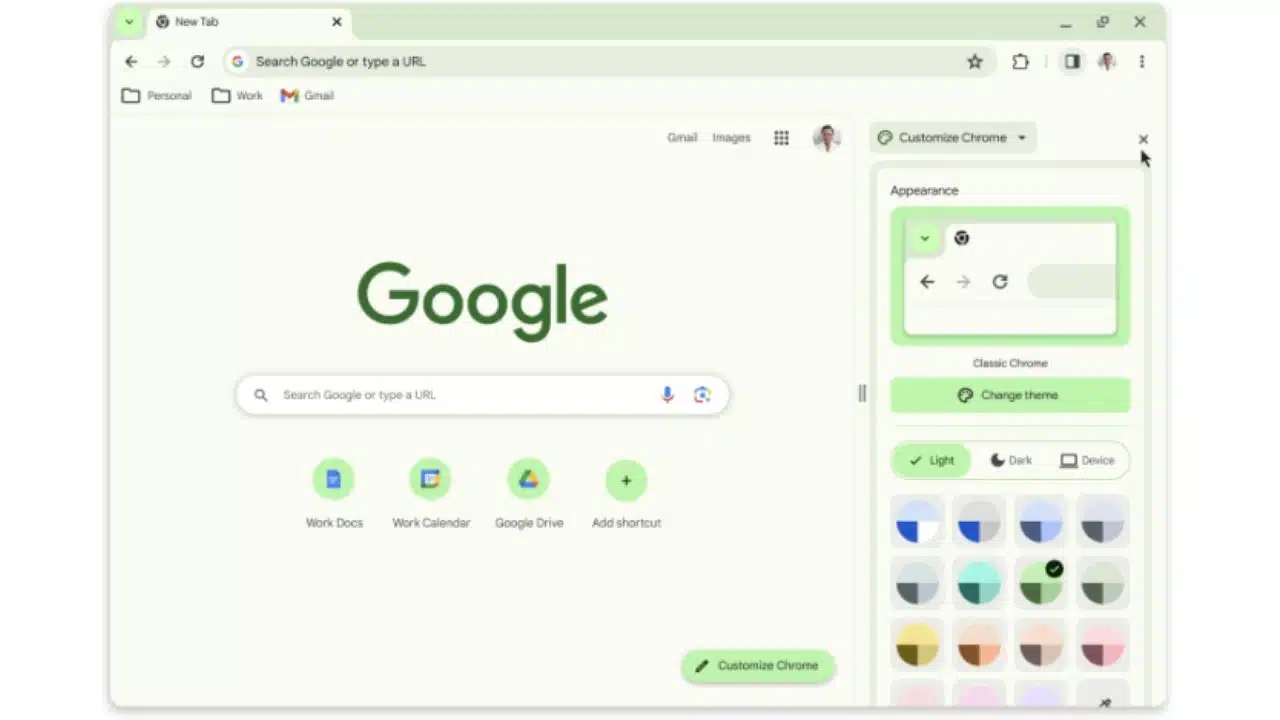
Google Chrome on desktop is getting a much-needed makeover, inspired by the aesthetic changes Google introduced with Android 12 on smartphones. To celebrate the 15th anniversary of its beloved web browser, Google has announced that it will be adopting the Material You design language for Chrome’s desktop version.
This means that Chrome’s desktop interface will no longer be a mishmash of colors, rounded corners, and plain black/white UI elements with dull fonts.
Currently, when you apply a theme from Chrome’s web store, it beautifully alters the color scheme of the top status, URL, and bookmark bars. However, the rest of the user interface, including the menu box, customization dashboard, and settings page, remains outdated and lacks color. Thankfully, this is about to change with the introduction of Material You styling to Chrome’s desktop version.
The customization dashboard is set to receive significant upgrades, including color palette wheels and dedicated buttons for swiftly toggling between light and dark modes. Of course, there’s also an automatic mode that adapts to your system-level color theme preferences. Google has gone the extra mile by refreshing Chrome’s icons for improved legibility and creating new color palettes that harmonize better with your tabs and toolbar.
In the ongoing battle against the growing threat of short-lived malicious websites, Google is stepping up its game. They will now conduct real-time checks on all new websites appearing on the internet, comparing them against their database of known malicious URLs. According to Google, this enhanced security measure will provide a 25% improvement in protection against malware and phishing threats.
With these exciting updates, Google Chrome on the desktop is set to become not only more visually appealing but also safer for users as it continues to evolve and adapt to the changing online landscape.
The Material You design makeover is bringing some exciting changes to Chrome’s menu dashboard. It’s not just about aesthetics; there are several new controls for convenient access. You’ll find options like profile switching, one-click deletion of browsing data, Google Translate, and Save & Share. Additionally, there’s a nifty new feature called “Search this page with Google.” When activated, it opens a dedicated side panel with various web search tools, Google Lens for image details, clickable keywords, and even webpage source information at the bottom. This particular feature bears some resemblance to the Bing Chat side panel in Microsoft’s Edge browser.
The Material You update for Chrome is expected to roll out in the coming weeks. If you’re eager to get a sneak peek of what it’ll look like, you can check out the preview version available on Chrome’s web store. Alongside the design facelift, the store is also getting some handy categorization controls. Furthermore, it’s introducing new sections, including extensions that harness generative AI tools and an Editor’s Spotlight segment, which highlights the cream of the crop among Chrome extensions.
Now, onto the security front, Google is taking a significant step forward. They’re extending their in-house safety check system to cover browser extensions. Over the past few years, experts from Avast, IBM Security, and McAfee have consistently raised concerns about malicious Chrome extensions. Despite Google’s efforts to remove them, these extensions continue to pose serious risks, including arbitrary code injection. While it remains to be seen how effective this safety check expansion will be, it’s undoubtedly a move in the right direction for bolstering Chrome’s security.