Traceable action items do more than remind someone to finish a task. They preserve the decision behind it, identify the person responsible, and give the next reviewer a way to check what was actually agreed. Without that connection, a polished meeting summary can leave your team with the same old question a week later: why are we doing this?
What We Checked
We reviewed official documentation for 8 tools that connect meeting notes or recordings to follow-up work. The checks focused on source links, assignment, due dates, task destinations, and important sync restrictions. Public browser inspections of Fellow, Otter, and Fathom produced the marked documentation captures below. We did not record a live meeting, connect a customer workspace, or measure extraction accuracy.
Some options are meeting-capture products; others help you maintain a written decision record. They are included for different workflows, not ranked by a common performance score. Feature availability and integration permissions should be checked in the account you intend to use.
What Makes Action Items Traceable?
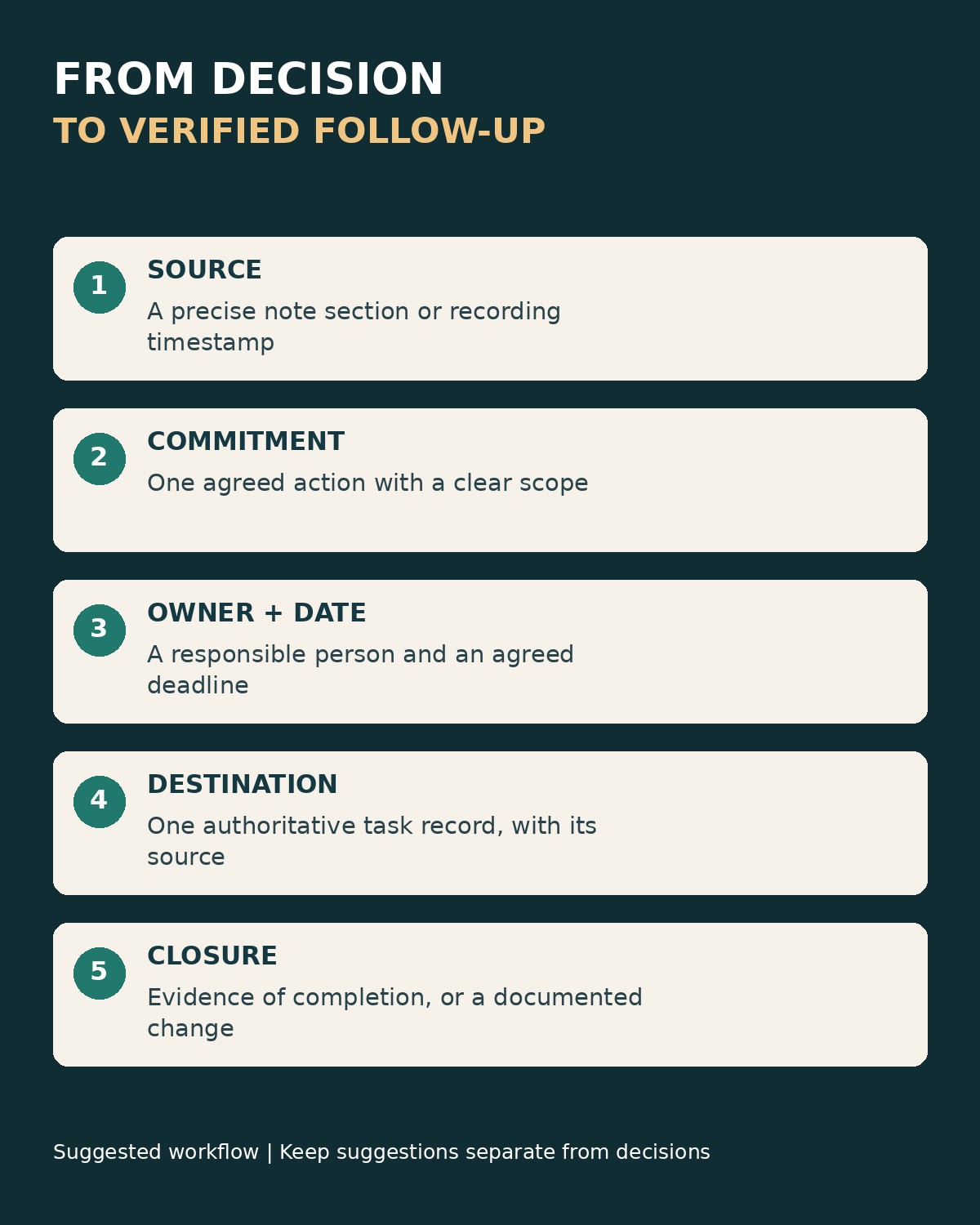
A useful action record answers five questions: what needs to happen, who owns it, when it is due, where the agreement came from, and what counts as finished. The source may be a timestamped recording or an approved meeting note. It does not have to be audio, but it should be specific enough to settle a disagreement about scope.
Keep decisions, actions, and unresolved questions distinct. “Use the smaller launch group” is a decision. “Prepare the revised invitation list” is an action. “Can support cover the new date?” remains a question until somebody answers it. Berkeley’s guidance for turning transcripts into decisions and actions uses that separation and advises keeping unconfirmed decisions among the open questions.
| Tool | Where the trace starts | Best-fitting workflow | Important limitation |
|---|---|---|---|
| Fellow | Meeting or note attached to the action | Recurring meetings with shared follow-up | Multi-assignee actions cannot sync to supported task integrations. |
| Otter | Action item’s location in the transcript | Checking the wording behind your own commitments | The global action list is personal, not a complete team dashboard. |
| Fathom | The meeting-moment link carried into Asana. | A recording owner managing personal follow-through | Documented sync is limited to the owner’s own assigned items. |
| Fireflies | Transcript link in the documented voice-command task workflow | Routing meeting follow-ups into Asana | Task routing and creation settings need deliberate configuration. |
| tl;dv | Timestamped AI note added to a HubSpot task | Customer-facing follow-up tied to a CRM record | The task’s due date is selected, not inferred from the conversation. |
| Avoma | Meeting notes and shareable transcript snippets | Reviewing customer-call actions before creating tasks | Verify that the final task retains the source context you need. |
| Notion | Meeting note linked to your task record | Teams keeping project context in Notion | A generated action list still needs a defined task workflow. |
| Confluence | Written meeting page and task location | Teams that prefer a maintained written record | The Task Report macro has page-versus-live-doc restrictions. |
1. Fellow: Keep Follow-Up Connected to Recurring Meetings
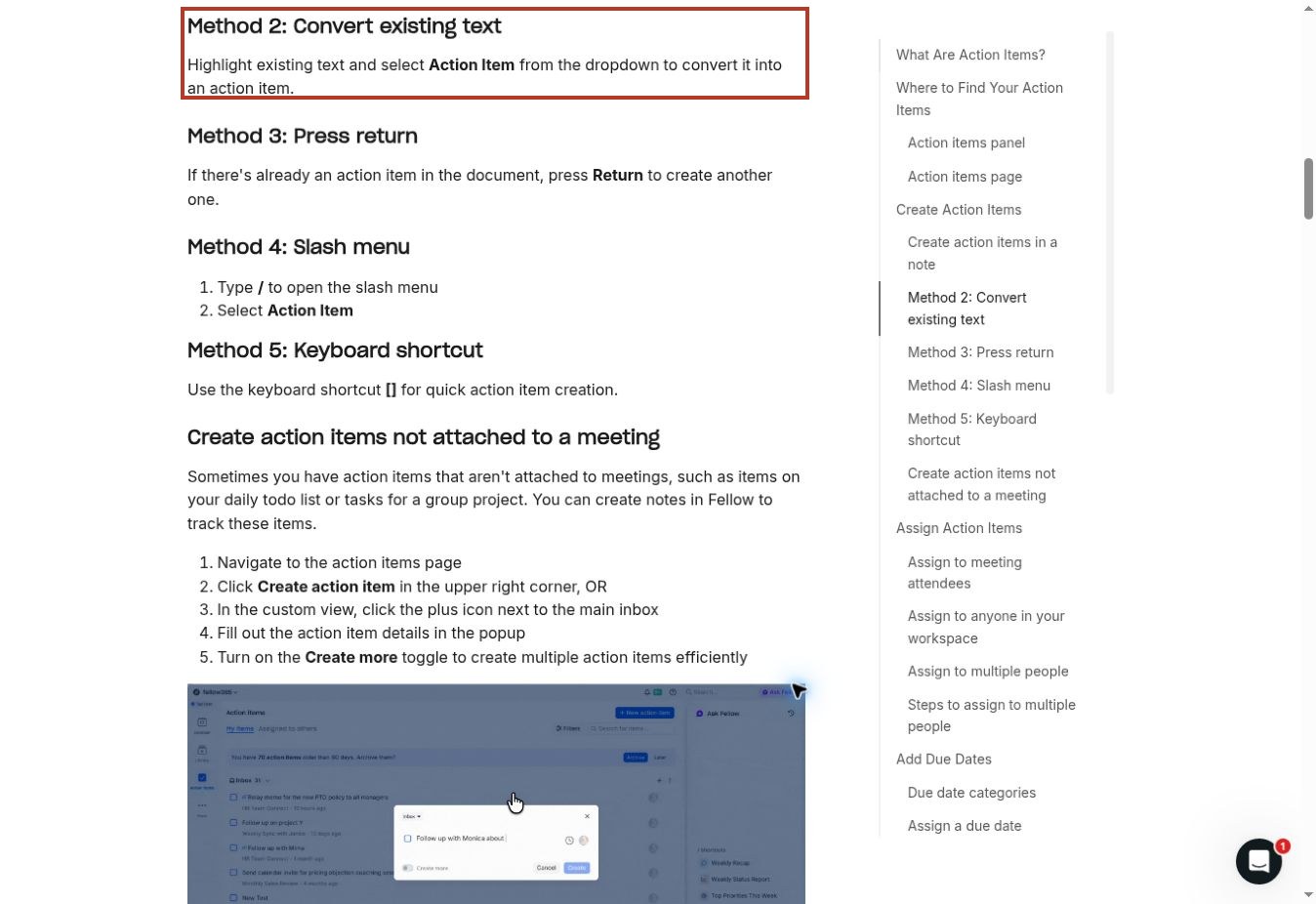
Fellow fits teams that already work from a shared agenda and return to unfinished items in the next meeting. Its action-item page shows the originating meeting or note, an assigned due date, and an indicator when an item is connected to an external task tool.
You can turn existing note text into an action item instead of rewriting the commitment elsewhere. That is valuable during a decision review: the team can agree on the wording while the context is still visible.
Watch the assignment model. Fellow documents that actions with multiple assignees cannot sync to integrations such as Asana or Linear. Its action guide identifies due dates as a team-plan feature. If your process depends on an external task board, establish one accountable owner and check your plan before adopting a workflow that the integration cannot carry through.
2. Otter: Return From the Task to the Transcript
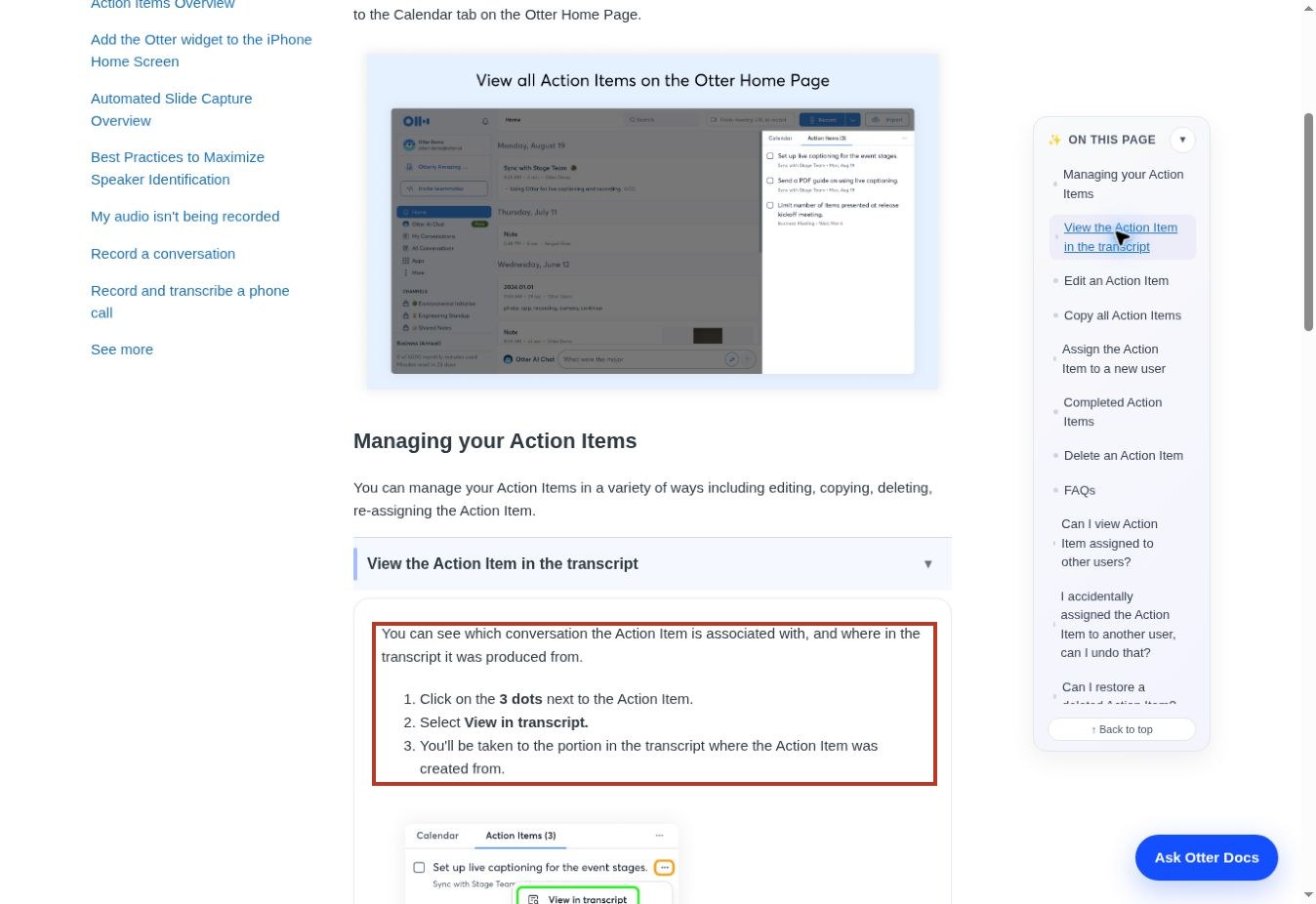
Otter’s action-item workflow is useful when the disputed detail is buried in the conversation. The documented “View in transcript” command takes you from an item to the passage where it originated. That is more useful than a source link that merely opens a long recording at the beginning.
Otter also consolidates items assigned to you across conversations. Editing an action updates it in the global list and the conversation; completing it moves it into the completed section. This supports personal follow-through without requiring you to review every meeting separately.
The global list is not a manager’s view of everyone’s work: Otter’s help page says it shows the items assigned to you. Use an appropriate shared project record if you need team-wide dependencies, approval, or delivery reporting. Before relying on a transcript passage, check the speaker attribution and the actual wording.
3. Fathom: Carry a Meeting-Moment Link Into Asana
Fathom’s documented Asana integration sends action items into a selected project and can include a link to the moment where the task was detected. Paid Asana users can see that link and the meeting title in custom columns; the guide says free users receive the link in the task description.
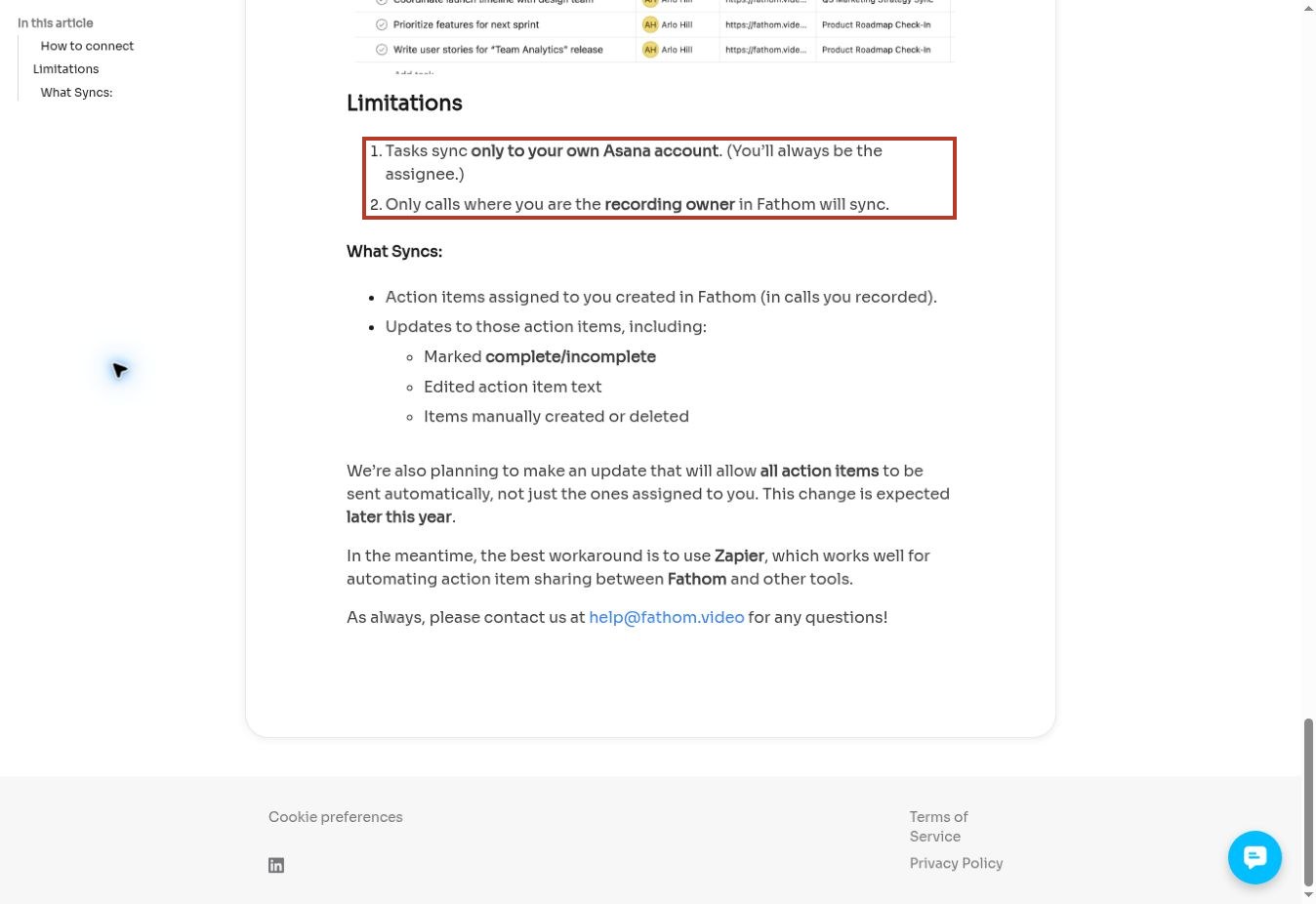
The restriction is consequential. The help page inspected for this review limits syncing to calls you own as the recorder and action items assigned to you. You remain the assignee in your connected Asana account. That suits personal follow-up, but it is not evidence that every colleague’s task will be distributed automatically.
The same page mentions planned expansion. Treat that as a roadmap statement until your account demonstrates otherwise. Confirm the owner, source link, and completion behavior with a small test before depending on it for a team-wide workflow.
4. Fireflies: Route Actions Into the Project Tool You Use
Fireflies documents an Asana connection that creates tasks from meeting action items in a chosen workspace, project, and list. Its separate voice-command workflow also describes including a link to the meeting transcript and recording in the task description.
That gives an operations team a concrete setup to evaluate: choose the destination, decide which task-creation behavior is enabled, and inspect the resulting task rather than stopping at a successful connection message. The source should be useful to the person receiving the work, not just accessible to the meeting organizer.
Automation can multiply ambiguity as easily as it can reduce copying. A suggestion such as “we could ask the vendor” is not necessarily an approved assignment. Start with a review step for extracted tasks, especially when the meeting contains brainstorming or several people discussing the same responsibility. Verify ownership and avoid sending duplicate tasks through two overlapping automations.
5. tl;dv: Create CRM Tasks From Specific Note Lines
tl;dv’s HubSpot workflow is particularly relevant to customer-facing teams. Its documentation describes creating a task from a line in the AI notes, selecting the CRM record, and carrying that line plus a timestamped recording link into the task notes.
This is a closer connection than pasting a generic call summary into a deal record. A colleague can see the commitment and revisit its source while working on the follow-up. The task dialog also allows a task name, type, due date, and optional assignee.
Do not mistake a default for an agreement. The guide explicitly says the due date is not read from the conversation. Review it against what was actually promised. Also check the selected contact, company, or deal: a precisely documented action attached to the wrong account is still a bad handoff.
6. Avoma: Review the Commitment Before Creating the Task
Avoma’s after-meeting guide provides a practical sequence: review the generated notes, add missing context, and turn a selected next step into a HubSpot or ClickUp task. The task creation step lets you supply the name, due date, and assignee.
Its transcript snippets offer another useful piece of the record. You can isolate a decision or commitment and share a link to that part of the discussion. For a sensitive customer follow-up, that can make the reason for the task easier to understand than an entire call transcript.
Check what reaches the destination. The documentation supports task creation and snippets, but those are not a promise that every created task automatically includes the exact source link your team needs. Add or verify that connection during the pilot. Keep the reviewed commitment distinct from the raw generated summary so later edits do not silently change the agreed scope.
7. Notion: Keep the Decision and the Project Record Together
Notion’s AI Meeting Notes can transcribe discussions and identify key points and actions in the workspace where a team keeps its other documents. Its help page also describes follow-up task skills. This is worth considering when moving meeting context into another system would create unnecessary duplication.
For traceability, design the record deliberately: retain the meeting note, create or review the actual task, and connect it back to the decision. A paragraph headed “Action items” is not automatically the same thing as a task with a maintained owner, deadline, and status.
Notion documents business or enterprise access for AI meeting notes, with additional eligible mobile subscription arrangements. Check the plan and capture permissions for your environment. The recommendation here is about keeping context close to work; it does not assume that a generated follow-up has been approved or that a suggested action was successfully executed.
8. Confluence: Use the Meeting Page as the Source Record
Confluence is the alternative for teams that want a written decision record without making a recording the center of the process. Put the decision and its tasks on the meeting page, then use the Task Report macro to gather follow-ups across relevant pages or spaces.
Atlassian documents filtering by location, assignee, labels, and task status. The report can display description, due date, assignee, location, and completion date. That makes it useful for a recurring review where people need to move from an outstanding item back to the page that explains it.
Check the content type. The current macro documentation warns that the macro is not available in live docs and directs users to add it to a page or convert a live doc. Keep the written decision specific, because a page location is only helpful when the page itself clearly records the agreement.
A Practical Record for Traceable Action Items
The following example is a proposed workflow, not a result from testing these products. Suppose a launch meeting agrees to invite existing customers before opening a wider pilot. An action titled “Do launch follow-up” loses almost everything that matters.
| Field | Example entry |
|---|---|
| Decision | Start the pilot with existing customers; wider invitations require a later review |
| Action | Prepare the existing-customer invitation list for approval |
| Owner | One named person who accepts responsibility |
| Due | The date explicitly agreed in the meeting |
| Source | The approved meeting note section or relevant recording timestamp |
| Done means | The list is reviewed and approved, not merely drafted |
| Change record | Any later scope change points to its own decision |
The task should be understandable without replaying the whole call. The source link is there to resolve uncertainty and preserve context, not to replace a clear task description. Keep it available to the people who need it while respecting the meeting’s access rules.
Run a Small Pilot Before Turning On Broad Automation
Use a short, consented test discussion with non-sensitive information. Include a clear commitment, a tentative suggestion, an unassigned request, and a decision that changes later in the conversation. These examples reveal more about your workflow than a perfectly scripted meeting where every sentence is an obvious task.
- Review the extracted items against the source. Check whether suggestions became false commitments.
- Confirm the owner and date. Leave missing information unresolved rather than silently inventing it.
- Create the destination task once. Open it in the project tool and inspect the source link.
- Check access using the intended recipient’s role. A working link for the organizer is not enough.
- Change the task title or mark it complete. Observe which direction, if any, the integration updates.
- Check the next meeting’s view. The same unfinished task should not become several independent copies.
Keep a short record of those observations. A connector labeled “integration” may mean one-time creation, one-way updates, or bidirectional sync. Do not infer one from another. When a sync fails, inspect the destination before retrying; otherwise, a recovery attempt can produce a duplicate.
For the review itself, watch for phrases in AI meeting notes that need human review. Wording such as “the team agreed” deserves a source check when the conversation actually ended without a decision. If you are still choosing how to capture the meeting, our broader comparison of AI meeting assistants covers the surrounding category.
Common Questions About Meeting Follow-Up
Is a recording link enough?
It is a starting point. A timestamp or specific note section reduces the effort needed to verify the agreement. Pair it with the task description, owner, due date, and completion criteria. Also decide what happens when the recording is removed under your retention policy.
Should every action go into the project-management system?
Not necessarily. Keep brief personal reminders where they will be used. Move shared deliverables into the system that manages their dependencies and status. The important part is choosing one authoritative record for each commitment instead of maintaining conflicting copies.
What if the decision changes?
Record the new decision and explain what it replaces. Update or cancel the affected task without pretending the original agreement never existed. The history helps colleagues distinguish a missed commitment from an authorized change of direction.
Choose the Tool That Preserves the Handoff
Fellow and Confluence suit teams that organize work around meeting notes. Otter offers a direct route back to transcript context. Fathom, Fireflies, tl;dv, and Avoma deserve a closer look when the handoff ends in a task manager or CRM, while Notion fits teams already keeping project context in its workspace.
Whichever you choose, traceable action items require a reviewed commitment and a maintained record. Begin with one meeting series, verify the source-to-task connection, and agree who checks completion. A smaller workflow that everyone follows is more useful than automatic task creation nobody trusts.