A startup does not need to buy a rack of expensive hardware to experiment with an AI model. It does need to understand what it is renting: a GPU virtual machine, a marketplace offer, a monthly server and a serverless endpoint solve different problems and create different bills.
This buyer guide compares 10 GPU cloud providers for AI startups and small teams, from independent marketplaces and specialist AI clouds to established hosting companies. Use it to build a shortlist, then run the same small workload on your preferred services before making a commitment.
Quick answer: Consider Runpod or Jarvislabs for flexible GPU development, Vast.ai or TensorDock for marketplace choice, and Contabo or HOSTKEY when a persistent server is a better fit. Modal is worth examining for code-driven serverless workloads. The right choice depends on availability, workload and total cost, not a single hourly rate.
How We Selected These GPU Cloud Providers
We reviewed publicly available provider product, pricing and documentation pages on November 10, 2026. To qualify, a provider had to describe a GPU-backed service relevant to AI development, training or inference. We prioritized products a smaller team could investigate, while including a few larger providers as useful reference points. The list is not a performance ranking and we did not run hands-on benchmarks. Availability, prices and contractual terms can change. Provider descriptions are vendor claims, not independent measurements.
For the underlying hardware choices, start with our guide to GPU requirements for AI applications. This article focuses on choosing where and how to rent compute.
GPU Cloud Providers at a Glance
| Provider | Service model | Useful starting point | Check before buying |
|---|---|---|---|
| Runpod | GPU pods and serverless | Development and inference | Cloud tier, idle storage and cold starts |
| Vast.ai | GPU marketplace | Comparing individual host offers | Host reliability, network and fees |
| TensorDock | GPU marketplace and VMs | Configurable GPU servers | Host availability and resource costs |
| Hyperstack | GPU virtual machines | AI experiments and training | Region, stock and storage terms |
| Jarvislabs | GPU instances and services | Notebook-led ML development | Spot interruptions and location |
| Contabo | GPU VPS | Persistent self-managed workloads | Monthly commitment and stock |
| HOSTKEY | GPU cloud and dedicated servers | Teams needing server control | Minimum rental, management and region |
| Modal | Serverless compute | Code-defined workloads and inference | Cold starts and all metered resources |
| Lambda | On-demand GPU instances | ML teams seeking GPU VMs | Capacity, filesystem and commitments |
| Vultr | Cloud GPU instances | GPU workloads within a wider cloud | Instance configuration and location |
These are different service categories, not interchangeable products. A marketplace listing may be cheaper per GPU-hour than a managed endpoint while requiring more engineering time. A fixed monthly GPU VPS may fit an always-on workload but cost more than hourly rental for occasional experiments.
1. Runpod: GPU Pods and Serverless Inference
Runpod offers GPU Pods for running workloads on GPU-backed instances and a separate serverless product for containerized inference. Its published pricing distinguishes Community Cloud and Secure Cloud for Pods; serverless workers scale in response to demand. The distinction matters when a team moves from experimentation to an application that must respond to customers.
Best for: Developers who want to compare GPU instances with a path to serverless inference.
Why teams may choose it: A team can begin with a Pod for fine-tuning or a notebook, then evaluate the platform’s serverless model for an API. GPU selection and billing differ between the two products.
What to check: Compare the actual cloud tier, GPU type, data-center location, storage charges and availability. For serverless, test cold-start delay and whether active workers are necessary for your latency target. Consult Runpod’s pricing page before budgeting.
2. Vast.ai: Marketplace for Comparing GPU Offers
Vast.ai provides a marketplace where customers can compare GPU offers from different hosts. Its pricing page distinguishes on-demand, interruptible and reserved options. That flexibility is useful when an experiment can tolerate a variable selection of machines.
Best for: Technically comfortable teams that want to compare individual machines and rental terms.
Why teams may choose it: A marketplace can expose different GPU models and host configurations rather than a single standardized instance catalog. It can make sense for development, rendering or batch jobs where a team is prepared to inspect listings carefully.
What to check: Verify the host, location, reliability information, network charges and storage terms for the specific offer. An interruptible offer is not equivalent to guaranteed uninterrupted capacity. Keep checkpoints outside the rented instance and test how quickly a job can resume.
3. TensorDock: Configurable GPU Virtual Machines
TensorDock describes itself as a marketplace of independent hosts and offers GPU virtual machines. Its deployment workflow lets buyers choose resources such as GPUs, CPU, memory and storage, making the full machine configuration important to a price comparison.
Best for: Small teams that want control over the balance between GPU power and supporting resources.
Why teams may choose it: A team with a modest model but a large preprocessing workload may value the ability to examine CPU, memory and GPU requirements together. TensorDock’s documentation describes deploying workloads on GPU virtual machines.
What to check: Confirm the total configured price, data-center location, host terms, network and storage charges. A GPU that appears inexpensive in isolation may not be the lowest-cost machine after CPU, RAM and persistent storage are included.
4. Hyperstack: GPU Virtual Machines for AI Workloads
Hyperstack offers GPU-backed virtual machines and publishes documentation on GPU configurations and resource billing. It is relevant when a team wants an infrastructure environment for training, inference or other compute jobs rather than only a prebuilt model API.
Best for: Teams that need a GPU VM and want to compare on-demand and other purchasing options.
Why teams may choose it: Documented machine configurations give buyers a basis for matching GPU type and memory to their software stack. Its documentation also describes persistent storage, which matters when a project keeps datasets between runs.
What to check: Validate region-specific GPU inventory, the exact machine flavor and storage behavior. Hyperstack’s billing documentation notes that persistent storage can continue to incur charges when a VM is hibernated. Ask how networking, quotas and support apply to your account.
5. Jarvislabs: Notebook-Friendly GPU Development
Jarvislabs offers GPU instances for AI work, with documentation describing JupyterLab, VS Code and SSH access. Its published catalog also distinguishes on-demand and spot options. This combination is worth examining if a small team spends much of its time in notebooks and iterative experiments.
Best for: ML developers seeking a relatively direct route from notebook to rented GPU.
Why teams may choose it: The documented workflow combines development access with GPU instance choices. For a prototype, the ability to start with a familiar environment can matter as much as the headline accelerator rate.
What to check: Spot capacity can be interrupted; establish a checkpoint interval and recovery process. Verify location, applicable currency, GPU stock and whether storage persists when an instance is stopped. A region-specific offer may differ from the price your account sees.
6. Contabo: GPU VPS for Persistent Workloads
Contabo positions its GPU VPS for AI training and inference. Its published materials describe a monthly GPU VPS model, which makes it a different purchasing decision from renting a GPU by the hour. A persistent environment can suit an application that is expected to run most of the month.
Best for: Teams comfortable administering a server for a sustained AI workload.
Why teams may choose it: A recurring server can make budgeting easier when demand is relatively steady and the chosen GPU configuration is sufficient. Teams can install and manage their own software stack.
What to check: Confirm the currently available GPU, VRAM, location, exact monthly price, setup charges and contract terms on the order page. A long-running VPS still needs application security, updates, monitoring and backups. It is not automatically the best deal for a GPU needed only a few hours a month.
7. HOSTKEY: GPU Cloud and Dedicated Servers
HOSTKEY offers GPU cloud hosting and dedicated GPU servers. Its published service descriptions discuss hourly rental and server management options. The dedicated-server route differs from a small shared cloud instance because the buyer needs to evaluate an entire machine and its operating responsibilities.
Best for: Technically capable teams considering GPU server control or a dedicated machine.
Why teams may choose it: Different server configurations allow a buyer to investigate hardware suitable for model development or sustained workloads. Dedicated infrastructure can also be relevant when a project has particular isolation or hardware requirements.
What to check: Compare the exact GPU and CPU configuration, minimum rental period, provisioning time, operating system, bandwidth and management support. Dedicated hardware does not automatically satisfy a particular compliance requirement; request the evidence your organization needs.
8. Modal: Code-Defined Serverless GPU Compute
Modal provides serverless compute with GPU options and usage-based resource pricing. Its approach is relevant for teams that want to run code or deploy inference without managing a persistent GPU server. The operating model is different from renting a VPS and leaving it running.
Best for: Developers building bursty jobs, inference endpoints or code-defined GPU workflows.
Why teams may choose it: Scaling compute around requests or jobs can reduce idle accelerator time when traffic varies. Teams need to measure their actual request pattern rather than assume serverless is always cheaper.
What to check: Add CPU, memory and other metered resources to GPU costs, and test initialization time against your service-level target. Check the applicable plan, concurrency limits and any charges for keeping resources warm.
9. Lambda: On-Demand GPU Instances
Lambda offers on-demand GPU virtual machines for AI work. Its published product information describes several GPU instance sizes, and its documentation discusses preinstalled ML tools. This can be useful for a small technical team that wants an ML-focused environment and has identified a suitable available configuration.
Best for: ML teams seeking GPU-backed virtual machines for model experiments or training.
Why teams may choose it: Preconfigured tooling can reduce initial setup work, and multiple instance sizes let teams evaluate how much GPU capacity their jobs need. Actual capacity remains dependent on what can be provisioned.
What to check: Verify GPU stock, location, instance size, persistent filesystem charges and any account or commitment requirements. Compare the cost of the entire workload, including waiting time and engineering effort, against other options.
10. Vultr: GPU Infrastructure in a Broader Cloud
Vultr is a broader cloud provider with GPU infrastructure alongside other cloud services. It provides a useful reference point for teams that may want their GPU workload near other compute, storage or networking resources in the same provider environment.
Best for: Startups that prefer to investigate GPU capacity alongside a broader cloud stack.
Why teams may choose it: Consolidating infrastructure can simplify procurement and operations for some teams, provided the required GPU and region are actually available.
What to check: Examine the specific instance’s GPU, CPU and memory allocation, region, billing terms, network and storage costs. A bundled cloud instance should be compared with another complete configuration, not with a standalone marketplace GPU rate.
How to Choose a GPU Cloud Provider
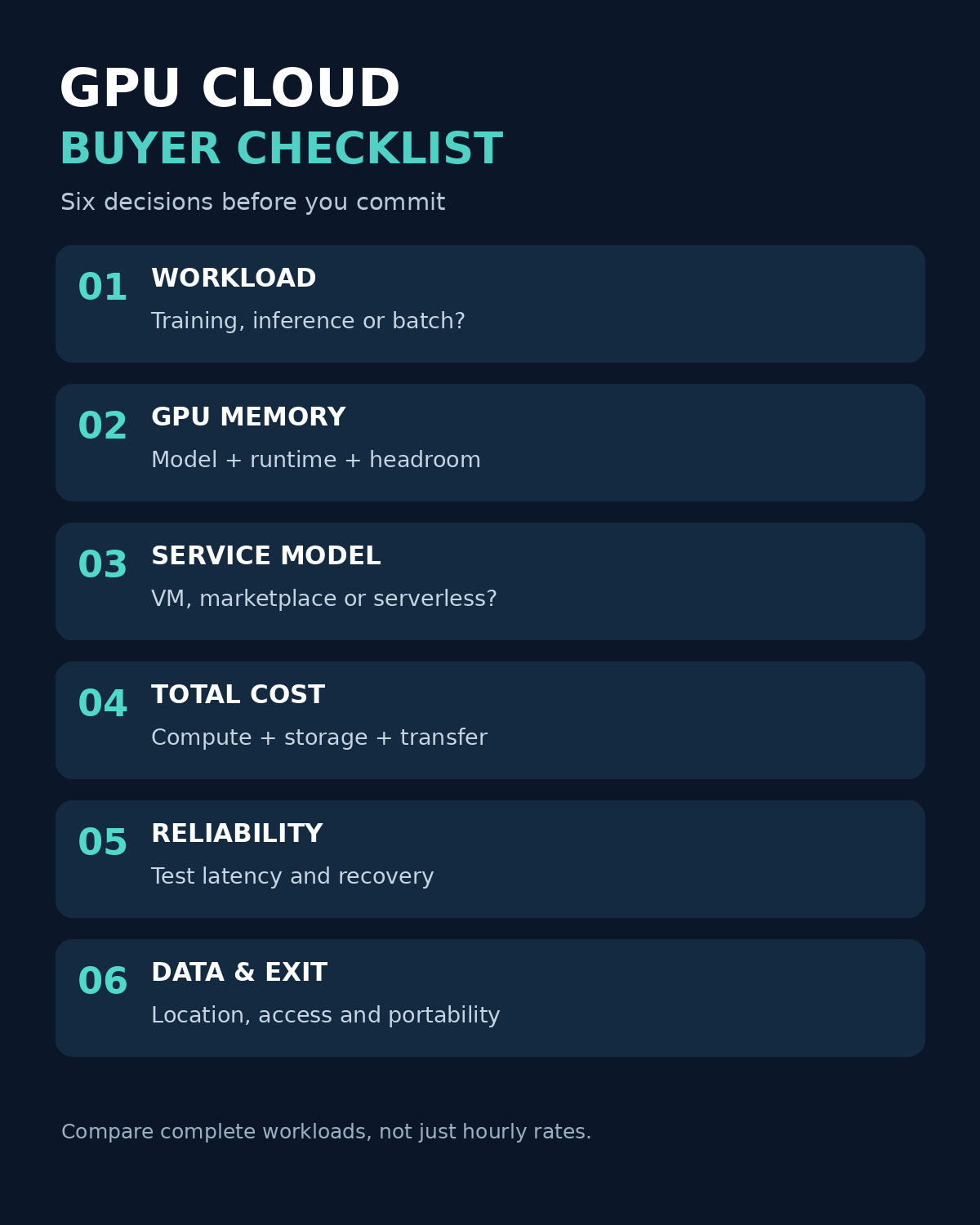
1. Define the workload and memory requirement
Separate training, fine-tuning, batch processing and live inference. Record the model, precision, context length, expected concurrency, framework and dataset size. GPU memory needs include more than model weights: runtime overhead, activations, caches and training state can be substantial. Test the actual workload before signing a commitment.
2. Select the operating model
Choose a VM or VPS when you need a persistent environment and are prepared to manage it. Consider marketplace machines when flexibility and the ability to evaluate individual offers matter. Consider serverless for event-driven workloads when your code fits the provider’s deployment model. For strict isolation or substantial sustained jobs, evaluate a dedicated server or reserved capacity.
3. Calculate total cost, not just the advertised GPU rate
Estimate monthly cost as GPU or instance compute + CPU and RAM where separately metered + persistent storage + network transfer + orchestration and support + taxes. Include idle time, failed runs, retries and any minimum commitment. Do not count an introductory credit as a permanent discount.
Illustrative example, not a vendor quote: A team runs one GPU for 120 billed hours at $1.20 per hour, pays $18 for storage and $12 for transfer and other charges. Its illustrative monthly total is $174. At 600 billed hours with the same assumptions, it is $750. A hypothetical $500 monthly server would cost more in the first scenario and less in the second, but this comparison is meaningful only if performance, GPU memory, availability, support and all other costs are comparable.
4. Test reliability and recovery
Run the same representative job at least once on each shortlisted configuration. Measure time to provision, completed jobs per dollar, restart time and—if serving an application—latency under the expected traffic. Record failures and distinguish cold starts from steady-state response times. For interruptible capacity, verify checkpointing and restoration rather than merely looking at the discount.
5. Review security, geography and support
Determine where data and backups will reside, who operates the underlying infrastructure, how access is controlled, whether disks are encrypted, and how to delete data at the end of the project. Ask for contractual documentation and independent reports where your customers require them. Confirm incident response, support hours, credits and the precise service-level agreement for the product you intend to buy.
6. Avoid lock-in before the first deployment
Keep a copy of datasets and model checkpoints in a location you control, document dependencies and use portable container images where practical. Measure the cost and time of transferring data out. For a small team, the ability to move a workload can be as valuable as a short-term promotional price.
A Practical Shortlist by Startup Scenario
- Occasional model experiments: Compare a GPU VM or marketplace offer with a small initial spend. Check minimum billing and persistent storage.
- Always-on internal assistant: Compare a monthly GPU VPS with an hourly instance at projected monthly utilization. Test security and backup responsibilities.
- Unpredictable customer traffic: Evaluate serverless options, including cold starts, maximum concurrency and any warm-worker charges.
- Training jobs with flexible deadlines: Consider interruptible or spot capacity only if checkpoints make the job recoverable.
- Sensitive customer data: Shortlist by documented location, contractual security terms and your own risk assessment before comparing prices.
Questions to Ask Before Signing Up
- Is the listed GPU a whole device or a shared fraction, and how much usable VRAM is available?
- What CPU, RAM, disk, public IP and network transfer are included in the quoted price?
- Is capacity available in the region and quantity we need today, and can it be reserved?
- What happens to data and charges when an instance stops, hibernates or is interrupted?
- Which frameworks and drivers are supported, and who maintains them?
- What response times, uptime terms and support channels apply to this exact product?
- Can we export our models and data, and what will transfer cost?
- What is the exit or cancellation process, including data deletion?
Frequently Asked Questions
What is a GPU cloud provider?
A GPU cloud is a service that provides remote access to GPU-backed computing. Depending on the provider, the customer may rent a virtual machine, a dedicated server, capacity from an independent host, or a managed serverless service.
Is a GPU VPS the same as serverless GPU inference?
No. A GPU VPS typically gives a customer a persistent virtual server to configure and operate. Serverless inference generally runs a deployed workload on managed workers that can scale with demand. Billing, responsibility and startup latency differ, so compare the specific products.
How much GPU memory does a small AI startup need?
There is no universal number. Memory depends on the model, numerical precision, context, concurrency and whether the task is inference or training. Use a representative test with headroom rather than selecting solely by parameter count.
Is the cheapest GPU per hour the cheapest choice overall?
Not necessarily. A slower or interrupted job can consume more billable time, and storage, networking, support and engineering work can change the result. Compare completed work and service requirements at the full monthly cost.
Takeaway
The best starting point is a shortlist matched to your operating model: marketplace, GPU VM, monthly VPS, dedicated server or serverless. Ask each provider for the same configuration and terms, run a small representative workload, and review the resulting cost, reliability and operational effort. Revisit the comparison as your traffic and GPU requirements change.