

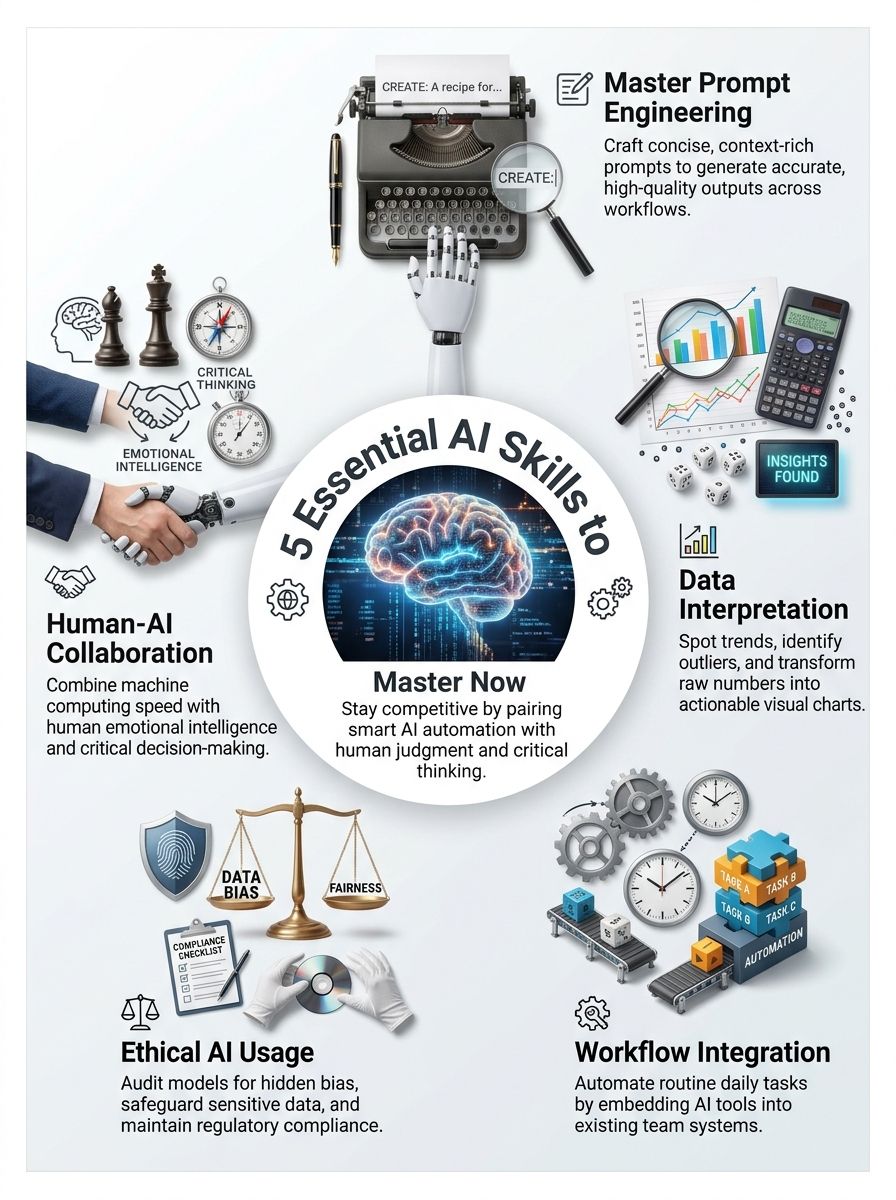
Have you felt your work changing faster than you can learn the new tools? The AI-Powered Skills are less about becoming a programmer and more about using Artificial Intelligence with good judgment.
The U.S. Department of Labor’s February 2026 AI Literacy Framework groups workplace readiness into five practical areas: understanding AI, exploring uses, directing AI, evaluating outputs, and using it responsibly. Start with the skill that matches a task you already do, then practice it on real work.
Skill 1: Mastering Prompt Engineering
Prompt Engineering means giving an AI tool a clear assignment, enough context, and a useful format for the answer. It is a communication skill, and it can save you from spending more time fixing a weak draft than doing the task yourself.
OpenAI’s current prompting guidance recommends being specific, adding relevant context, and refining your request after you review the first result. Treat a prompt like a work handoff to a new teammate who needs to know what success looks like.
Designing effective prompts for AI tools
A good prompt does not need fancy language. It needs a clear job, the right background details, and boundaries that stop the tool from guessing.
- Name the task: Say what you need, such as “Summarize these meeting notes into five action items.”
- Add the audience: Tell the tool whether the result is for a customer, manager, student, or teammate.
- Give context: Include the relevant facts, source text, definitions, and company rules. Do not paste confidential data into a tool that your employer has not approved.
- Set the format: Ask for bullets, a table, an email draft, plain language, or a fixed word count.
- Show one example: A short sample of a good answer can guide tone and structure better than a vague request.
- Ask for uncertainty: Tell the tool to label assumptions, missing information, and claims that need checking.
For a repeat task, save your best prompt as a template. Keep placeholders such as [audience], [deadline], and [source material], so you can reuse the structure without copying old details into a new assignment.
Improving AI-generated outputs
Your first answer is a starting point, not a finished product. Read it for accuracy, tone, missing details, and claims that sound confident but lack proof.
Break a large assignment into smaller prompts when the result matters. For example, ask the tool to extract facts first, then create an outline, then draft the final message from the facts you approved.
Quick prompt check: Could a coworker complete the same task from your instructions alone? If not, add the missing context before asking AI to do it.
For technical work, keep a simple prompt log with the task, version, output quality, and edits you made. That record helps you find patterns, improve your Prompt Engineering, and share proven templates with your team.
Skill 2: Data Analysis and Interpretation
Data Interpretation turns numbers into a decision. AI can sort, summarize, and spot possible patterns quickly, but you still need to ask whether the data is complete, current, and relevant to the question.
Data Literacy starts with simple habits: know where the numbers came from, check the date range, and compare results with a baseline. A chart can look convincing even when it leaves out the context that changes the answer.
Using AI for data insights
Tools such as Microsoft Excel, Power BI, and Google Sheets can help you summarize data and create visualizations without writing code. Use AI to generate questions, draft formulas, identify unusual values, or suggest chart types.
Microsoft’s guidance for Copilot in Power BI warns that AI outputs can vary and may be inaccurate. That makes verification part of the job, especially before you share results with customers, leaders, or coworkers.
- Ask AI to define the metric before it analyzes it.
- Check the date range, units, and missing values.
- Compare an AI finding with the raw table or source report.
- Use a chart to test whether the written summary matches the numbers.
Finding patterns and trends with AI tools
AI can help flag trends, outliers, seasonality, and changes between groups. An outlier is a value that sits far above or below the normal range, and it may point to a real issue, a one-time event, or a data-entry mistake.
Ask a focused question such as, “Which products had the largest month-over-month sales change, and what data quality issues could explain it?” This kind of request asks the tool to look for both a pattern and a reason to question that pattern.
| AI finding | What you should check |
|---|---|
| Sales increased 20% | Compare the same period last year and check for promotions or price changes. |
| A customer segment dropped | Check whether records are missing, duplicated, or grouped differently. |
| A forecast looks strong | Review the assumptions, past accuracy, and events the model may not know about. |
Skill 3: AI Workflow Integration
Workflow Integration means fitting AI into a real process, with clear inputs, review steps, and an owner for the result. The goal is not to automate everything. The goal is to remove repetitive work where automation gives you a better result or more time for work that needs people.
Start with a small, low-risk task that happens often, such as sorting feedback, drafting routine follow-up messages, or turning notes into a first report.
Adding AI to daily processes
Map the current process before you choose a tool. Write down who starts the task, what information they use, where the output goes, and where mistakes cause trouble.
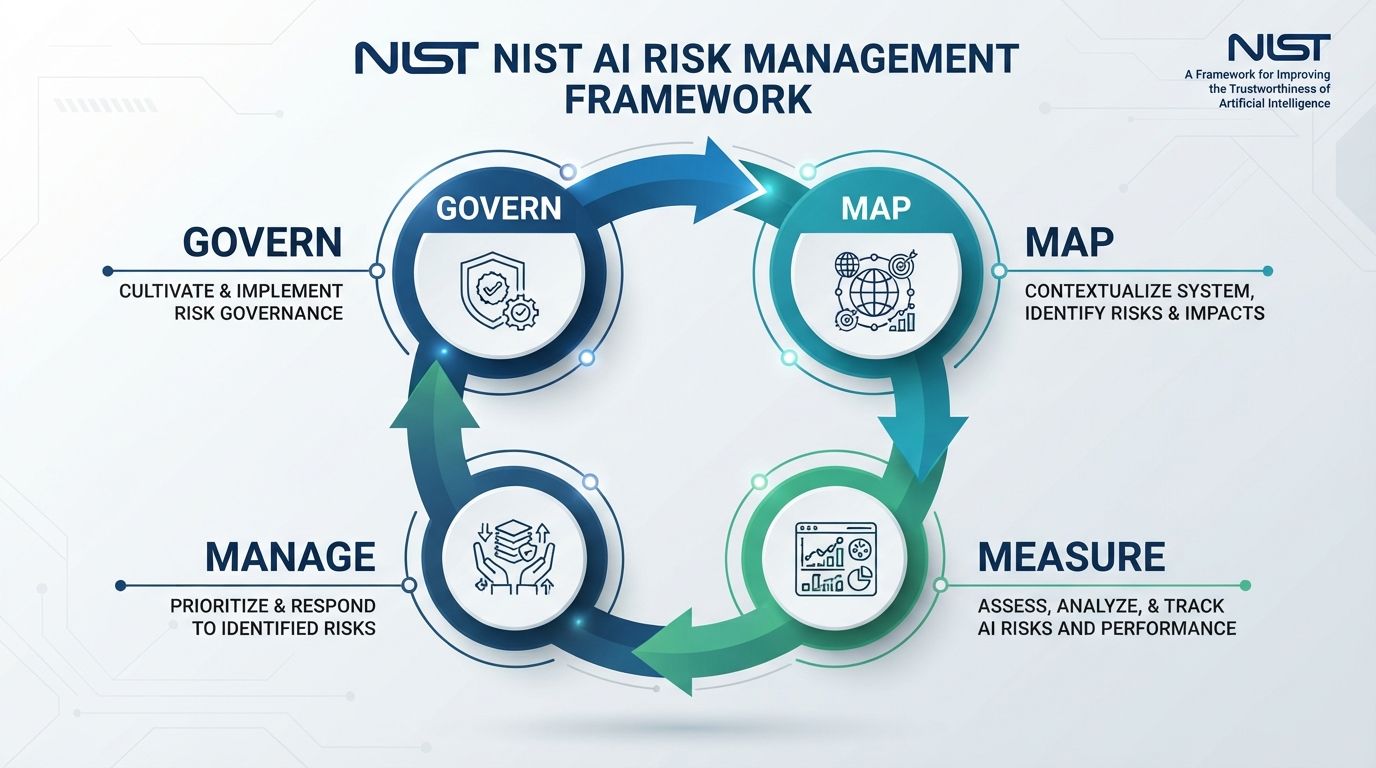
NIST’s AI Risk Management Framework uses four connected actions: govern, map, measure, and manage. For a small team, that can mean setting a rule, defining the task, testing results, and fixing problems before expanding the workflow.
- Choose one task: Pick work with clear inputs and a repeatable output.
- Set a success measure: Track time saved, correction rate, response time, or customer satisfaction.
- Use approved data: Follow your organization’s privacy and security rules before connecting tools.
- Keep a human review step: Require a person to approve messages, reports, or decisions that affect people.
- Run a short pilot: Test the workflow with a small group, collect mistakes, and revise the process.
Automating repetitive tasks
Automation works best for work that follows stable rules. A tool can route a form, label an email, create a draft, or move approved information from one system to another.
Tools such as Microsoft Power Automate and Zapier can connect apps through triggers and actions. Before turning on an automation, test edge cases such as blank fields, duplicate requests, late entries, and messages that need a human reply.
Keep an error log for the first few weeks. If the same mistake appears more than once, change the input rule, prompt, or review step rather than asking people to work around it every time.
Skill 4: Ethical and Responsible AI Usage
Ethical AI use protects people, your employer, and your reputation. It means thinking about privacy, bias, security, copyright, and the effect an AI-supported decision can have on someone.
You do not need to be a lawyer to build safer habits. You do need to know when a task carries enough risk that a manager, privacy team, legal team, or subject expert should review it.
Recognizing AI bias
Bias can appear when a model gives weaker, unfair, or different results for people in different groups. It can come from incomplete data, uneven training examples, the way a question is framed, or how people use the output.
For people-related tasks, test more than one realistic example. If you use AI to support hiring, performance, scheduling, benefits, or customer service, compare outputs across names, locations, writing styles, and accessibility needs.
The Equal Employment Opportunity Commission lists AI-supported recruiting, hiring, and employment decisions among areas it watches for possible discrimination. Do not let an AI score or recommendation make the final call on its own.
Following AI rules and privacy requirements
Start with a plain-language AI use policy. It should state which tools are approved, what data people may enter, who can access outputs, and which decisions require human review.
NIST’s generative AI profile calls for organizations to document applicable legal requirements, including privacy and intellectual property rules. That is a practical reason to label sensitive files and keep a record of the AI tools used in a project.
- Do not paste personal, financial, health, customer, or confidential business data into an unapproved AI tool.
- Check whether the output includes copied language, private information, or unsupported claims.
- Record the tool, version, data source, reviewer, and final decision for higher-risk work.
- Give people a clear way to report harmful or inaccurate AI output.
Skill 5: Collaboration with AI
Collaboration with AI means assigning the tool work it does well while keeping people responsible for judgment, empathy, and accountability. AI can produce options quickly. You decide which option fits the real situation.
This is where Critical Thinking and Emotional Intelligence matter. A technically correct answer can still miss the customer’s concern, the team’s history, or the consequences of a poor decision.
Knowing when to use AI and when to use people
Use AI for first drafts, summaries, idea lists, routine classification, data cleanup, and pattern checks. Use human judgment for sensitive conversations, unclear situations, high-stakes decisions, and choices that affect a person’s job, money, health, rights, or access.
| Good use for AI | Keep human control |
|---|---|
| Drafting a meeting recap | Approving commitments and resolving disputes |
| Sorting common support questions | Handling angry, vulnerable, or complex customer cases |
| Summarizing a spreadsheet | Making a budget, hiring, or performance decision |
| Creating a first-pass outline | Checking facts, legal risk, and final tone |
Making teamwork better with AI tools
Give AI a defined role in the team’s process. One person can prepare source material, another can review the prompt, and a subject expert can approve the final result.
Use shared prompt templates for repeat tasks. For example, your design team might use shared templates in ImagineLab Art to quickly draft campaign mockups, but let people improve them after they find a problem. A short team review can reveal missing context, unclear instructions, or a workflow that should stay human-led.
A useful meeting habit: Ask AI to summarize the discussion, then have the group confirm the decisions, owners, and deadlines before anyone sends the recap.
How to Develop These Skills
You can build AI Skills without trying to learn every tool at once. Pick one work problem, practice on it several times, and keep a short record of what improved.
The Department of Labor’s 2026 framework recommends hands-on learning in real workplace contexts. That approach works because you practice Prompt Engineering, Data Interpretation, responsible use, and Problem Solving in the same place you will use them.
Choose AI-focused courses and training
Look for training that teaches more than tool buttons. A useful course should cover AI basics, clear prompting, output evaluation, privacy, bias, and real examples from your type of work.
Start with beginner material if Digital Literacy or data skills feel rusty. Then move into role-based training, such as AI for marketing, operations, customer support, project management, Analytics, or data science.
- Choose a course with practice exercises, not lectures alone.
- Look for feedback on prompts, outputs, and decisions.
- Use a project from your job or volunteer work as a portfolio example.
- Revisit your training after a few months because tools and workplace rules change.
Practice AI tools in real-world scenarios
Practice works best when you measure something. Choose a safe, repeatable task and track quality as well as speed, because a faster answer has little value if you must rewrite it every time.
- Pick one task you do each week.
- Write a clear prompt with a goal, context, format, and limits.
- Review the output against a source you trust.
- Record what went wrong and revise the prompt or process.
- Share the improved method with a teammate and ask for feedback.
Build a small portfolio of approved examples, such as a cleaned-up report, a chart with a written interpretation, a documented workflow, or a prompt template that reduced rework. That gives you concrete proof of Skills Development and Professional Growth.
The Bottom Line: AI-Powered Skills You Need To Stay Competitive
The AI-Powered Skills are Prompt Engineering, Data Interpretation, Workflow Integration, responsible AI use, and Collaboration with AI.
Practice one skill on a real task, check the result, and improve the process. That mix of Technical Skills, Creative Thinking, Critical Thinking, and human judgment will help you use AI well without handing your work over to it.