You’re at the gate, and your phone charger is sitting on the hotel nightstand. PackPoint is the best of the packing list apps for travelers because it builds your list from weather, trip length and activities in under a minute.
Below: a comparison chart, honest flaws for all 10, and the airport rules no packing app warns you about.
Quick Comparison: Packing List Apps for Travelers
Here’s the short version. Prices are on the US App Store or official listings as of November 2026.
| App | Platforms | Price | Smart Suggestions | Best For |
|---|---|---|---|---|
| PackPoint | iOS, Android | Free; Premium $2.99 | Yes, weather-based | Most travelers |
| Packr | iOS, Android | Free; Premium tiers | Yes, weather-based | Multi-city trips, families |
| Packing Pro | iPhone, iPad, Mac | $2.99 one-time | No | Detailed planners |
| Apple Reminders | Apple devices | Free | No | Reusable templates |
| Google Keep | Android, iOS, web | Free | No | Cross-platform sharing |
| PackParty | iOS, Android | Free; upgrades from $0.99 | No | Group trips |
| PackKit | iPhone, iPad | Free; Pro $22.99/yr | No | Bag weight limits |
| PackLight | iPhone | Free core | No | Backpackers |
| LighterPack | Web | Free | No | Ultralight hikers |
| Packstack | iOS, Android, web | Free; Pro upgrade | No | Gear closets |
Key takeaway: smart apps save setup time. Template apps save you on trip number five.
How to Pick the Right Packing List App
Most packing list apps for travelers fall into two camps. Some generate a list for you. Others make you build one and reuse it.
- Pick a smart generator if you take different kinds of trips: beach, business, or ski.
- Pick a template app if you take the same trip over and over.
- Pick a weight tracker if you fly budget airlines or carry everything on your back.
The 10 Best Packing List Apps for Travelers
1. PackPoint — Best Overall
PackPoint asks where you’re going, when, how long and what you’ll do. Then it builds a list using the destination’s weather forecast. The Premium Package is a one-time $2.99 on the US App Store, and TripIt integration is a separate $0.99.
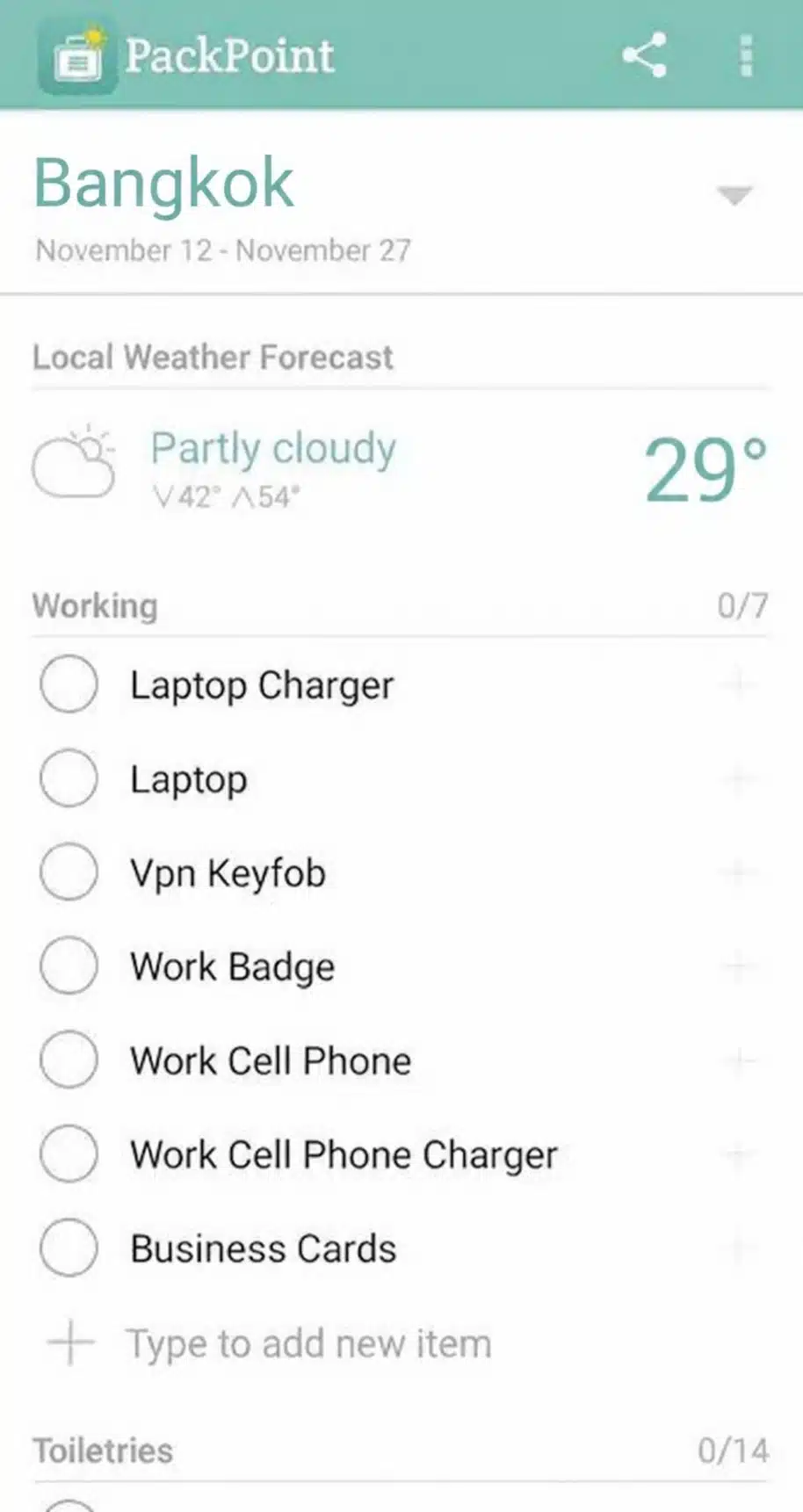
Picture this: you tick “business” and “gym” for a rainy four-day trip to Seattle. PackPoint adds a rain jacket, dress shoes and workout clothes before you’ve opened your closet.
Real flaws:
- Custom activities and editing default items need Premium.
- Reviewers call exporting a list clunky on the free version.
Who Should Skip This: people who pack the exact same bag every trip. A simple template is faster.
2. Packr — Best for Multi-City Trips and Families
Packr lets you add several destinations to one trip and builds a list from 24 activities and the weather. It also syncs with TripIt.
Real flaws:
- The App Store lists a confusing mix of premium prices, from $0.99 promos to $49.99.
- Some long-time users report syncing and lost-list problems after updates.
Who Should Skip This: anyone who hates paywalls and upsell screens.
3. Packing Pro — Best for Detailed Planners
Packing Pro costs $2.99 once, with no subscription. You get unlimited lists, multiple travelers and CSV import and export, so you can edit lists in Excel or Google Sheets.
Real flaws:
- It’s Apple-only. Android users are out of luck.
- The design feels old, and the long settings menus take time to learn.
Who Should Skip This: casual travelers who want a list in 30 seconds.
4. Apple Reminders — Best Free Option for iPhone Users
Since iOS 16, you can save any list as a template. Build your “Weekend Trip” list once, then reuse it forever. You can share a template with a link, too.
The best part? It’s already on your phone.
Real flaws:
- There are no weather or activity suggestions. You build every list yourself.
- People you share with need iOS 16, iPadOS 16, or macOS Ventura or later.
Who Should Skip This: Android households.
5. Google Keep — Best Free Cross-Platform Pick
Keep makes a quick checklist and shares it with anyone with a Google account. It works on Android, iPhone and the web.
Real flaws:
- It has no real template feature. You copy an old note and uncheck everything.
- Long lists turn messy fast without categories.
Who Should Skip This: travelers who want the app to suggest items.
6. PackParty — Best for Group Trips
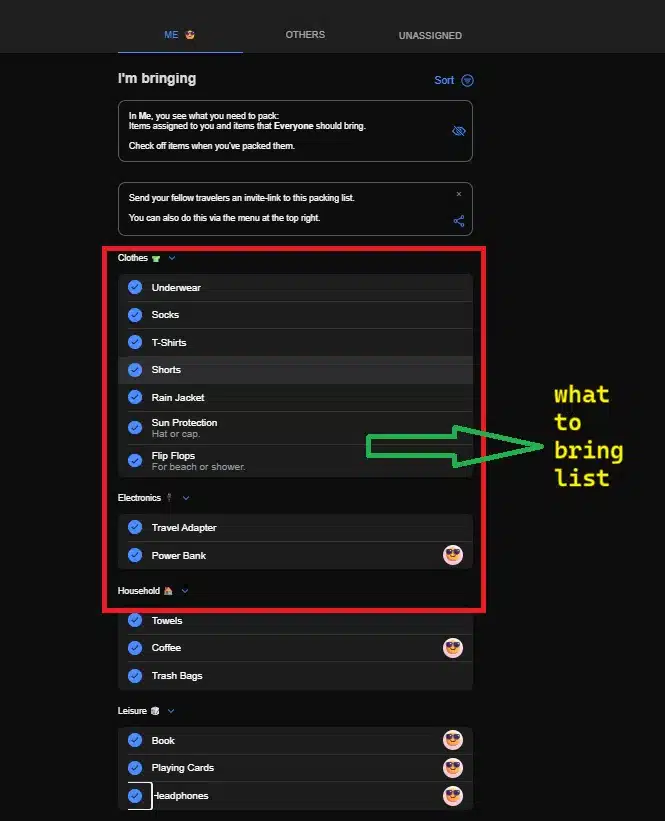
Group camping trip? PackParty lets you mark an item as “everyone brings one” or “one person brings it.” No more four tents and zero coolers.
Real flaws:
- It’s new, launched in January 2025, with only a handful of App Store ratings.
- It’s only a packing list. There’s no itinerary or expense tracking.
Who Should Skip This: solo travelers.
7. PackKit — Best for Staying Under Bag Weight Limits
PackKit Pro adds item weights, color-coded per-bag totals and your own carry-on and checked-bag limits. Pro costs $22.99 a year or $2.99 a month.
Here’s the catch: weight tracking sits behind the subscription.
Real flaws:
- The free version skips the feature that makes it special.
- It’s iPhone and iPad only.
Who Should Skip This: travelers who never get near the 50-pound checked-bag scale.
8. PackLight — Best for Backpackers on iPhone
PackLight lets you log your gear by weight and category, then build lists that show your total pack weight. The core features are free, with no sign-up and no ads.
Real flaws:
- It’s iPhone only.
- It’s built for trail gear, not suitcases and outfits.
Who Should Skip This: city travelers with roller bags.
9. LighterPack — Best Free Tool for Ultralight Hikers
LighterPack is a free website where you list gear, see weight totals and share your list with a link. It’s the standard tool in ultralight backpacking communities.
Real flaws:
- It’s browser-based, with no native phone app.
- It needs an internet connection, which is a problem at the trailhead.
Who Should Skip This: anyone who wants to tick items off on their phone offline.
10. Packstack — Best Modern LighterPack Alternative
Packstack works on iOS, Android and the web. The free plan gives you an unlimited gear closet, three packing lists and one gear kit.
Real flaws:
- Unlimited lists and kits require Packstack Pro.
- The Android app is new, with few reviews so far.
Who Should Skip This: people packing for hotels, not campsites.
The Airport Rules Your Packing App Won’t Check
That brings us to the biggest mistake people make: trusting the checklist and forgetting the rules. None of these packing list apps for travelers will stop you from putting a power bank in your checked bag.
Add these to every list:
- Liquids: TSA’s 3-1-1 rule still applies. Containers must be 3.4 ounces (100 ml) or less, all in one quart-size bag.
- Power banks: carry-on only, and 100 watt-hours or less without airline approval.
- Airline limits: since May 1, 2026, American and Delta allow two power banks per passenger. Southwest allows one.
Not sure about your power bank? Multiply mAh by volts and divide by 1,000. A 20,000 mAh bank at 3.7 volts is about 74 Wh, so it’s fine.
Short on space? A foldable travel bag handles souvenirs on the way home. Moving instead of vacationing? These tips for stress-free packing for your move apply the same checklist thinking to a whole house.
Frequently Asked Questions (FAQs)
What is the best free packing list app?
PackPoint’s free version is the best free smart option. Apple Reminders and Google Keep are the best free template options.
Is there an app that makes a packing list for you?
Yes. PackPoint and Packr build lists from your destination, dates, weather and activities.
Yes. Packr, Google Keep, Apple Reminders and PackParty all support sharing.
Do packing list apps work offline?
Most phone apps keep your list on the device. Web tools like LighterPack need a connection.
Which packing app tracks luggage weight?
PackKit Pro tracks weight per bag. PackLight, LighterPack and Packstack track gear weight for backpacking.
Final Thoughts
Start free. Try PackPoint for one trip, then save your edited list as a template so the next trip takes two minutes. The best packing list apps for travelers don’t just remind you what to bring. They help you skip what you’ll never use.