A digital legacy is the online life a person leaves behind: email, photos, social media profiles, subscriptions, financial accounts, and other digital assets. After someone dies, each provider follows its own rules. Some let users choose a trusted contact or decide in advance whether an account should be shared, memorialized, or deleted.
Others may require legal documents and still limit access to private data. Because laws and platform policies vary by country and service, families should not assume that a will—or a password—automatically grants access. Planning helps protect private information and gives loved ones clear instructions for handling important accounts.
What counts as a digital legacy?
A digital legacy can include much more than social media. It may involve:
- Email, cloud storage, and photo backups
- Social media, messaging, and personal websites
- Digital documents, books, music, and other purchased content
- Online banking, payment, and shopping accounts
- Cryptocurrency wallets and other digital financial assets
- Domain names, business accounts, and revenue-generating channels
- Subscriptions, memberships, and recurring bills
- Personal records stored in apps or on devices
Some of these hold money or business value. Others preserve family history, private correspondence, or creative work. Subscriptions and payment accounts may need timely attention to prevent unnecessary charges.
It helps to separate the account from its contents. A service may let a relative request account deletion or memorialization without giving them private messages, files, or passwords. Terms may also limit the transfer of a digital book or software license, even if the account can be closed.
What happens to online accounts when you die?
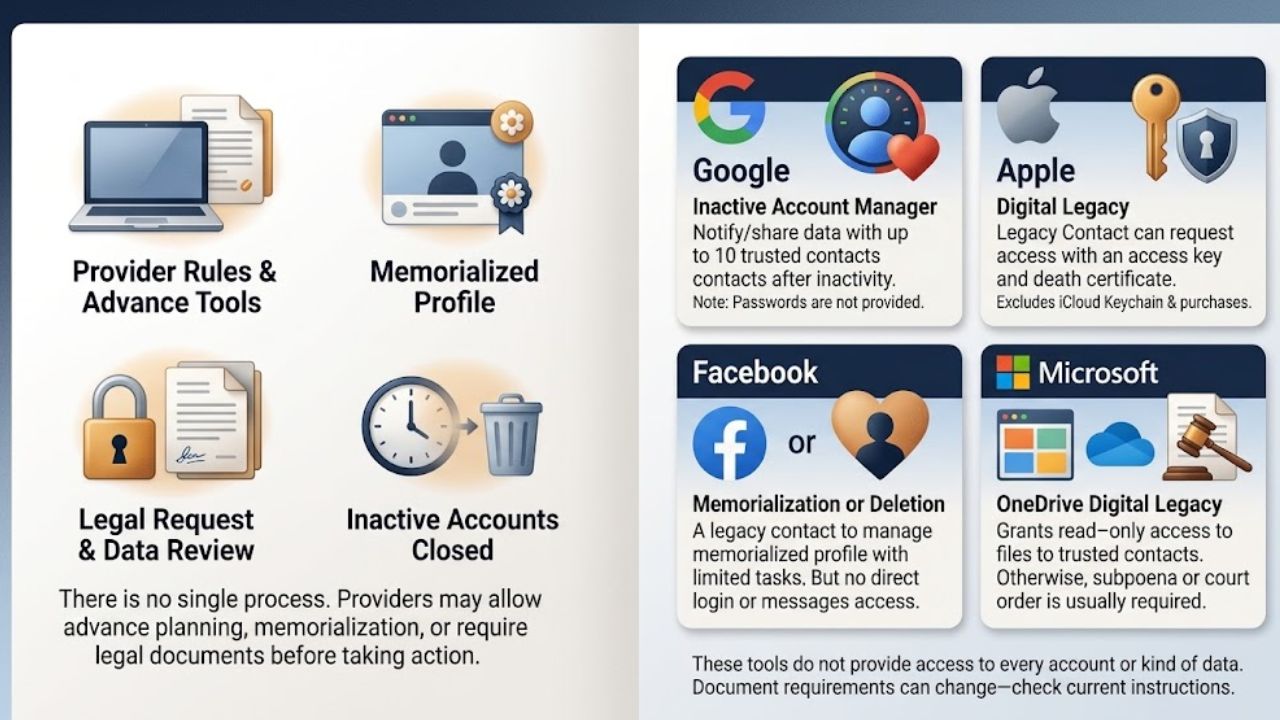
There is no single process for every account. A provider may offer an advance planning tool, allow a relative to request a memorialized profile, review a request for account data, or require legal documents before taking action.
An account may remain active for a time, then be closed or deleted under the provider’s rules. Some services have specific arrangements for a deceased user; others limit access to protect the account holder and people who communicated with them.
- Google: Inactive Account Manager lets users decide what happens after a period of inactivity. They can notify selected people or share certain data, choosing up to 10 recipients and which data types each person may receive. Google also reviews requests from family members or representatives in some circumstances, but does not provide passwords or other login details.
- Apple: A user can name one or more Legacy Contacts to request access to certain account data after death. The contact needs the access key and proof of death. The process excludes some information, including purchases and data in iCloud Keychain, such as passwords and passkeys.
- Facebook: Users can choose a legacy contact or request that the account be deleted after death. A legacy contact can perform limited tasks on a memorialized profile, but cannot log in as the deceased person or read their messages.
- Microsoft OneDrive: OneDrive Digital Legacy lets users grant read-only access to their files and photos to a trusted contact or next of kin. Microsoft says it is generally unable to provide account information to non-account holders if this feature was not set up. Its separate guidance for Outlook.com and other Microsoft services says a valid subpoena or court order is needed for Microsoft to consider releasing information.
These tools do not provide access to every account or every kind of data. Features and document requirements can change, so check each service’s current instructions and make sure your chosen contact knows how to use them.
Why family members may not be able to sign in
A loved one’s death does not automatically make it safe or permitted to use their password. Accounts can contain information about other people, including private messages and personal data. Providers may restrict access even when a relative has a death certificate or is helping settle the estate.
The law depends on location. Some jurisdictions have rules for fiduciaries managing digital assets; others rely on a combination of estate law, privacy rules, and provider terms. In the United States, the Revised Uniform Fiduciary Access to Digital Assets Act is a model law for jurisdictions to adopt. It is not a rule that applies everywhere.
A will can identify an executor or state the account holder’s wishes, but it may not override provider rules or grant access to all content. For important financial or business accounts, get advice from an estate lawyer in the relevant jurisdiction.
A practical digital estate plan
You do not need to put every password in a will. In some places, wills may become part of a public court file. Keep credentials in a secure system, and use appropriate estate documents to identify who should manage your accounts and what they should do.
1. Make an inventory of accounts and assets
Create a secure list of the accounts someone might struggle to find. Record the service, what it contains, whether it has financial value, and whether it needs attention after death.
Start with email, cloud storage, social accounts, financial services, password managers, cryptocurrency, business tools, domains, and subscriptions. A long list of every website you have visited is less useful than a focused inventory of accounts with practical or sentimental value.
2. Decide what should happen to each one
Write down a clear preference for each account:
- Preserve or download specific files
- Transfer a business asset where the service allows it
- Memorialize a profile
- Close the account
- Cancel a subscription or recurring payment
- Leave the account untouched if no action is needed
“Handle my accounts” leaves too much for a relative to guess. “Save the family photos, then close the cloud account” gives them a clear sequence.
3. Choose a trusted person and give them a route to act
Choose someone discreet, organized, and likely to be available. They could be your executor, a separate digital contact, or both. Explain what responsibilities you expect them to take on.
Set up available legacy tools while you can. Google Inactive Account Manager, Apple Legacy Contact, Facebook legacy contact settings, and Microsoft OneDrive Digital Legacy all require advance choices. Store access keys and recovery instructions securely, and tell your chosen contact where to find them.
4. Keep access information secure and current
A password manager can organize credentials, but it also needs a continuity plan. Check whether it offers an emergency access or trusted contact feature, and understand how that works before relying on it. Keep recovery codes and device access instructions in a protected place, not in an unencrypted file or a note attached to a computer.
Giving someone access to everything may expose more than you intend. Consider separate instructions for email, financial accounts, private messages, and family photos.
5. Plan for digital money and business assets separately
Cryptocurrency held in a self-custody wallet may be impossible to recover if the private keys or recovery phrase are lost. Do not put a recovery phrase in an ordinary will or share it casually. Ask a qualified estate professional how to document the asset and instructions securely.
For a business, list domain registrations, hosting, advertising accounts, payment services, customer records, and online channels that generate income. Name someone who can keep essential operations running. Before transferring customer or employee information, consider applicable privacy and data-protection duties.
6. Review the plan regularly
People change phones, email addresses, providers, and trusted contacts. An outdated email address or misplaced access key can make a careful plan useless. Review the inventory and provider settings after major life changes and at least once a year.
If you are handling someone else’s accounts
Look for a will, account inventory, password manager, or named legacy contact. Secure devices and records, but do not guess passwords or try to bypass account security. That could lock the account or violate provider terms.
First decide what you need: particular files, account closure, profile memorialization, or help with a bill. These are different requests, and providers may require different documents. Use the service’s official process and keep copies of forms and responses.
Do not rush to delete accounts that may hold records, photos, or financial information. At the same time, review subscriptions and recurring payments so charges do not continue unnecessarily. For investment, business, or cryptocurrency accounts, consult a qualified professional before moving funds or deciding who owns them.
Common digital legacy planning mistakes
Writing passwords into a will. Wills may be shared with other people or filed with a court. Store credentials securely and put instructions for finding them in appropriate estate documents.
Assuming a relative can simply log in. Knowing a password is not the same as having permission. Follow the provider’s process and seek legal guidance when needed.
Treating every account alike. A public profile, private inbox, business payment account, and cryptocurrency wallet involve different privacy, financial, and access concerns. Give each an appropriate instruction.
Naming a contact but not telling them. A selected person may not know they have been chosen or where an access key is stored. Explain the role while you can.
Final Thoughts
A digital legacy is easier to manage when your wishes are clear before anyone has to act on them. Start with accounts that hold important memories, money, business records, or private information. Choose a trusted person and keep the instructions secure and current. The useful next step is simple: make the inventory and tell your chosen contact where the instructions are.
Frequently Asked Questions (FAQs) About Digital Legacy
No. It can include email, cloud files, digital purchases, financial accounts, subscriptions, domains, business records, and cryptocurrency, as well as social profiles.
Can my family inherit my email account?
That depends on the provider, your settings, applicable law, and the documents available. Some providers may consider a request for account data; others may limit access or require a court order. A family relationship alone may not be enough.
Not necessarily. A password manager or other secure storage method may offer an emergency process. Your executor should know how to find the instructions, but unrestricted access to every private account may not be appropriate.
What should I do first to plan my digital legacy?
Make a secure inventory of your most important accounts, decide what should happen to each, and appoint a trusted person. Then set up the available legacy tools and tell that person how to find the instructions.