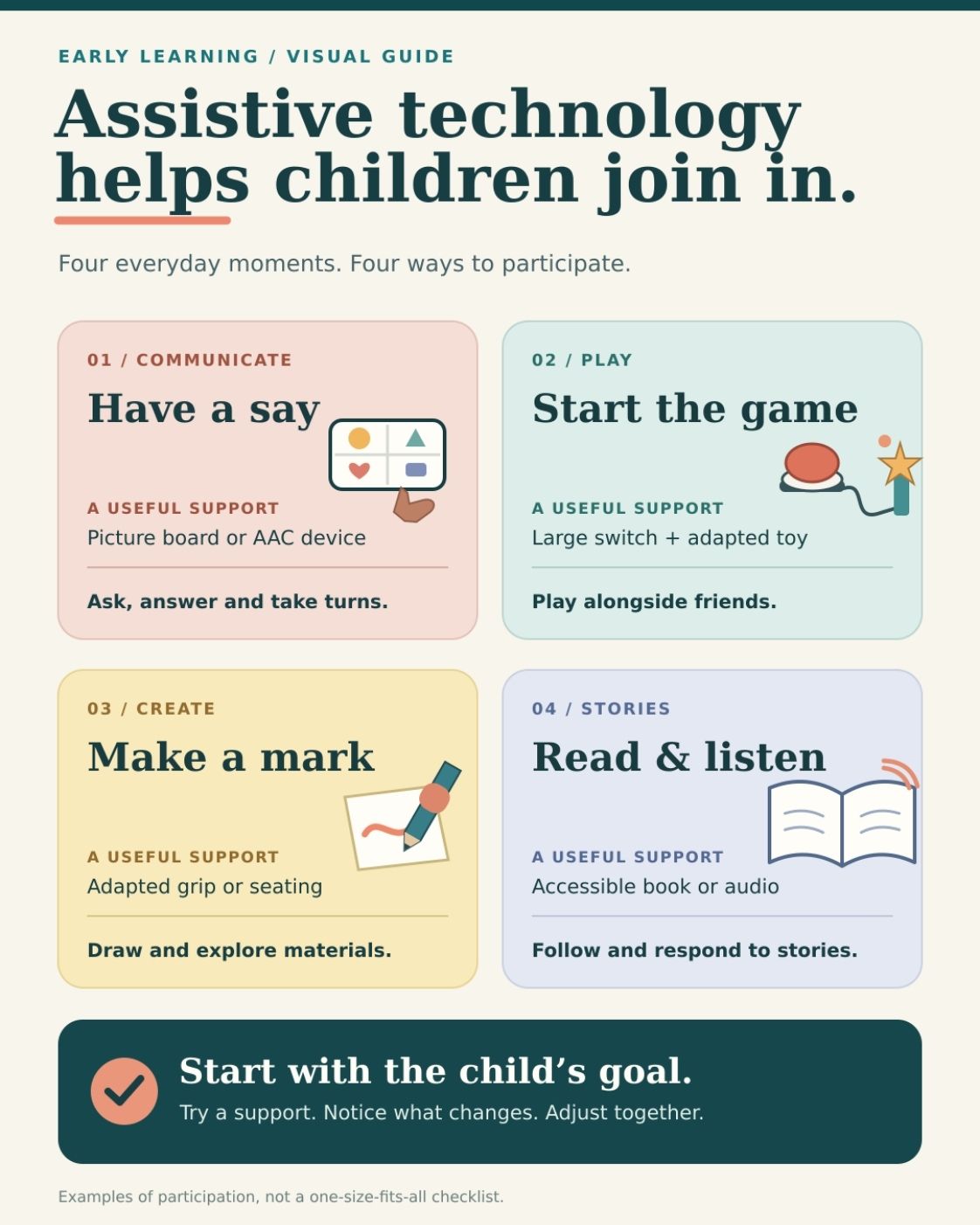
Assistive technology in early learning can be as simple as a picture board that helps a child join a conversation. It might be a large switch that lets them activate a toy, an adapted grip that makes drawing easier, or a device that speaks a message they have chosen.
Young children learn by playing, exploring, making choices, and interacting with people. When a disability makes one of those activities difficult to access, the right support can help a child participate. It may be used at home, in childcare, at preschool, or wherever the child spends their day.
The word technology often brings a screen to mind. In early learning, many useful tools do not need a battery.
What counts as assistive technology?
Assistive technology, or AT, is a tool or piece of equipment selected to help a child do something that would otherwise be difficult because of a disability. It can support communication, movement, vision, hearing, play, self-care, or participation in learning activities.
The term also includes assistive technology services. These are the steps that help a child use a tool successfully: assessing their needs when necessary, selecting or adapting equipment, teaching caregivers and educators how to use it, and checking whether it continues to meet the child’s needs.
A communication device left in a cupboard offers little help. Neither does an adapted pencil that is uncomfortable to hold. The support has to work for the child during an activity that matters to them.
Assistive technology is not the same as educational technology in general. A tablet used by a whole class for a counting game is an educational tool. If a particular child uses a selected communication system on that tablet to join the game, it may serve as assistive technology for that child. The purpose and the child’s use make the difference.
What does it look like during play and learning?
The clearest examples begin with an activity a child wants to join.
| Activity the child wants to join | Possible support | What it may help them do |
| Playing with a toy that has a small, hard-to-press button | An adapted toy with a large switch | Activate the toy and take turns |
| Sharing a choice or idea | A picture board or speech-generating device | Communicate with adults and other children |
| Drawing or handling a book | An adapted grip or page holder | Use the materials with less physical effort |
| Exploring a story | A tactile book or suitable vision or hearing support | Follow and respond to the story |
| Playing on the floor or moving between activities | Individually fitted seating or mobility equipment | Reach materials and interact with peers |
| Following a daily routine | A visual schedule selected for the child | Anticipate and participate in transitions |
These examples are possibilities, not prescriptions. Two children who seem to have the same difficulty may need different approaches. A child’s comfort, interests, movement, vision, hearing, and home language all affect what will work.
Some supports, particularly seating, mobility, hearing, and vision equipment, need professional assessment or fitting. Families should not have to choose them from a product description alone.
Low-tech and high-tech tools both have a place
Low-tech assistive technology usually refers to simple tools that do not need electricity. Picture boards, adapted grips, page holders, and some visual schedules fit this description. A switch-operated toy or a device that plays a recorded message may be described as mid-tech. A tablet running specialized communication software is a high-tech option.
These labels describe the tools. They are not stages a child must pass through. There is no rule that every child must master picture cards before trying a speech-generating device. An expensive tool is not automatically a better one, either.
Many children use more than one way to participate. A preschooler might use a speech-generating device during group time and a portable picture board outdoors. If the device needs charging, the child still needs a way to communicate. Adults should know where each support is and how to respond when the child uses it.
Can toddlers and preschoolers use AAC?
Yes. Augmentative and alternative communication, or AAC, includes ways to communicate alongside speech or when speech is not reliable. It may involve pictures, objects, signs, gestures, communication boards, or speech-generating devices.
AAC is sometimes treated as a last resort. That can leave a young child with too few ways to express what they want, notice, or feel. There is no minimum age or set of language skills a child must demonstrate before adults consider AAC. Research has not found that introducing AAC prevents speech development. For some young children with developmental delays, supported AAC interventions have also helped spoken vocabulary.
A communication app alone is not an intervention. A speech-language pathologist can help families and educators identify suitable options. Adults then need to make the system part of real conversations. They might point to a symbol while speaking, give the child time to respond, and use the support during play, meals, and stories.
Children need to communicate more than requests. They also need ways to say no, ask for help, comment on something funny, greet a friend, and share an idea.
How to choose assistive technology for a young child
Start with the child’s day, not a catalogue of devices. Follow the steps below and choose assistive technology in early learning.
Step 01: Identify one activity and the barrier
“We want her to join story time” is a more useful starting point than “She needs technology.” What happens when the story begins? Can she see or hear the book? Reach it? Show which page interests her? Tell someone what she thinks?
A clear goal helps the adults involved look for a support that serves a real purpose.
Step 02: Notice what the child already does
Young children communicate and solve problems in many ways. Watch where the child looks, what they reach for, how they respond to people, and when they seem most engaged. Ask family members what they see in familiar routines. A brief classroom or clinic visit may not show everything the child can do.
Step 03: Consider where the support will be used
A picture board that works well at a table might be difficult to use on a playground. A device that succeeds with one caregiver may need changes before other adults or children can communicate with its user.
Think about access throughout the day. Can the child reach the tool? Is it available when they need it? Does it work in the languages they use with family and friends?
Step 04: Try an option with the right support
Some simple adaptations can be tried without a separate formal assistive technology evaluation. More complex communication, mobility, or positioning needs may require specialist assessment. The child and the people around them also need time to learn how a support works during ordinary activities.
A trial should help answer a practical question: Does this make it easier for the child to take part?
Step 05: Review and adjust
Notice whether the child joins the activity more often, communicates more easily, or needs less help to reach and use materials. If a tool is rarely used, ask why before deciding the child cannot benefit from it. The fit may be wrong. The tool may be out of reach. Adults may need more training, or the support may not match the child’s interests.
Children grow, and their routines change. A communication system may need new vocabulary. Seating may need refitting. A tool that worked at home may need a different plan when the child starts preschool.
What benefits can families expect?
Appropriate assistive technology can give a child more opportunities to play, make choices, communicate, explore materials, and interact with others. In early learning, those everyday opportunities are valuable. A child who can join an activity has more chances to practise the skills involved in it.
A device alone cannot guarantee faster reading, speech, or developmental progress. In one preschool study, children used assistive technology more often after their educators received training, but the study did not find a clear additional gain in early literacy scores over its study period. Helping a child access a story and teaching a specific reading skill are related tasks, but they are not identical.
The goal is to make participation possible and support learning within it. Children still need responsive adults, appropriate teaching, hands-on play, and time with other children.
A child’s need to communicate or move freely does not end when they leave the classroom. They may need support at breakfast, in childcare, at a relative’s home, and during preschool activities.
Families can explain which words, people, and routines matter to the child. Educators can share what they notice during group play. A speech-language pathologist, occupational therapist, physical therapist, or vision or hearing specialist may help address particular needs.
Together, the adults should know who will keep the support available, how it will be maintained, and what to do when it does not work. They should also listen to the child’s response. A technically impressive tool is of little use if it is uncomfortable, inaccessible, or seldom available when the child wants to join in.
Where can parents seek help?
If a child regularly struggles to join activities they want to take part in, describe what you notice to their pediatrician, early educator, or a relevant specialist. A specific example helps: “He reaches for the toy but cannot press its button,” or “She has something to share during story time but cannot reliably tell us.”
In the United States, families of children younger than three can contact their state’s early-intervention program to request an evaluation. For children aged three or older, families can contact a local public elementary school or school district about a preschool special-education evaluation. Parents do not need to wait for a medical diagnosis or doctor’s referral to make that request.
For eligible children, assistive technology may be included in an Individualized Family Service Plan (IFSP) during early intervention or an Individualized Education Program (IEP) in preschool. The relevant team considers the child’s needs, including any services required to use a support. Funding and family payment rules differ between these programs, and early-intervention arrangements can vary by state. Families should ask how a recommended tool and its training will be provided.
Outside the United States, referral and funding systems differ. A healthcare provider, early-childhood service, school, or local disability support organization can help families find the appropriate assessment route.
When a Child Can Join In
A picture board, switch, adapted book, or communication device may look like a small change to an activity. For the child using it, that change can mean choosing a game, joining a story, or sharing a thought with someone nearby.
The best measure of assistive technology in early learning is what the child can now do and share. Keep watching, listening, and adjusting as they grow. The right support should make room for the child to participate in their own way.
Common questions parents ask about assistive technology in early learning
Does my child need a diagnosis before I ask about assistive technology?
You can raise a concern whenever you notice a barrier to your child’s participation. An evaluation can help determine what support is appropriate and whether your child qualifies for a particular program. Asking for help and qualifying for a funded device are separate steps.
Will AAC stop my child from trying to speak?
Research does not support that concern. AAC gives a child another way to communicate while their language develops. A speech-language pathologist can help select and use an approach suited to the child.
Is assistive technology the same as more screen time?
No. Many AT tools have no screen. When a child uses a digital tool to communicate or access an activity, adults should pay attention to its purpose and how it is used. The child still needs hands-on play and interaction, as well as reliable access to their means of communication.