


Two students can receive exactly the same online assignment and face very different chances of completing it.
One opens the lesson on a personal laptop with reliable home broadband. Another uses a parent’s phone after dinner because it is the household’s only connected device. A third has good internet but cannot navigate part of the platform with a screen reader. Another can open the lesson but struggles because the instructions and support materials are not available in a language used comfortably at home.
On a spreadsheet, all four students might be recorded as having access to technology.
In practice, their access is nowhere near equal.
That is the problem at the heart of the digital divide in EdTech. Internet availability still matters enormously, but it is only the first layer. Educational access also depends on connection quality, affordability, suitable hardware, digital skills, accessible design, language support, teacher preparation, and what schools expect students to do online.
The scale of the basic connectivity gap remains substantial. International Telecommunication Union estimates for 2025 put the number of internet users at about 6 billion, or roughly 74% of the world’s population, leaving 2.2 billion people offline. Internet use reached 94% in high-income countries but only 23% in low-income countries. There was also a large urban-rural gap: 85% of urban residents were online compared with 58% of rural residents.
Those figures matter, but school leaders need to go one step further. The more useful question is not, “Do our students have internet access?” It is, “Can they reliably do the work we are asking them to do?”
The Digital Divide in EdTech Starts With Connectivity, but It Does Not End There
A simple connected-or-not-connected measure hides too much.
International connectivity frameworks increasingly look at several conditions together: whether service is available, whether it is good enough, whether people can afford it, whether they have suitable devices, whether they have the skills to use those devices, and whether they can participate safely.
Education systems face the same combination of constraints.
Take two households that both answer “yes” when asked whether they have internet access.
The first has fixed broadband, several devices, and enough bandwidth for multiple people to work at the same time.
The second relies on one smartphone and a limited mobile-data plan.
Both are technically connected. Put a two-hour live video lesson in front of them and the difference becomes obvious.
For schools, meaningful access usually depends on six practical questions:
- Can the student connect from the place where homework is actually done?
- Is the connection stable enough for the required activity?
- Can the household afford the amount of data the course consumes?
- Is a suitable device available when the student needs it?
- Can the student and teacher complete the required digital tasks confidently?
- Can learners with disabilities use the content and interface?
A school that answers only the first question can easily overestimate how accessible its EdTech program really is.
School Connectivity Still Creates a Hard Ceiling
Global school infrastructure remains uneven.
UNESCO’s 2023 Global Education Monitoring Report reported internet connectivity in about 40% of primary schools, 50% of lower-secondary schools, and 65% of upper-secondary schools globally. These figures should be treated as international benchmarks rather than a live count of school connectivity in 2026; infrastructure changes faster than global education datasets can be updated.
The lesson for districts is straightforward: global averages are useful for understanding the scale of the problem, but local procurement decisions need local evidence.
A platform that performs well during a demonstration on fast office Wi-Fi may behave very differently in a rural school using an unstable connection. A large assignment upload can fail close to a deadline. A recorded lesson that automatically streams in high resolution can consume far more mobile data than a family expects. A live attendance requirement can become a penalty for students who share a device.
This is where some EdTech procurement goes wrong. Schools evaluate what a product can do under ideal conditions rather than what students can reliably do with it under ordinary ones.
For systems serving mixed connectivity levels, relatively unglamorous features can matter more than another dashboard or animation: downloadable lessons, compressed media, asynchronous participation, local saving, and recovery after a connection drops.
A school should be wary of making a bandwidth-heavy activity compulsory until it knows that most students can complete it without unreasonable cost or disruption.
A Smartphone Can Be Enough for One Assignment and Completely Wrong for the Next
Device access is often measured too loosely.
Smartphones can be excellent educational tools. Students can read articles, listen to audio, message teachers, join discussions, take short quizzes, and use many learning apps from a phone.
But “works on mobile” should not be confused with “works equally well on mobile.”
Writing a long research paper, comparing several sources, editing a spreadsheet, coding, preparing a presentation, or navigating a desktop-oriented learning-management system can be frustrating on a small screen. Some specialist software will not run on mobile devices at all.
Sharing also changes the picture.
If three siblings use the same laptop, the household technically owns a computer. That does not mean all three students have dependable computer access when assignments are due.
A useful device survey therefore needs more detail than “Do you own a laptop, tablet, or smartphone?”
Schools need to know whether a device is shared, when it is available, whether required software runs on it, whether the student has a keyboard when sustained typing is expected, and what happens when the device is damaged.
The repair question is easy to overlook. A one-device-per-student program can look excellent until a broken screen or failed charger leaves a learner without a usable device for weeks.
Affordability Is Often the Invisible Barrier
Network coverage does not tell a school whether a student can afford to use that network for education.
ITU reported in 2025 that mobile-data prices continued to fall in many markets, but affordability remained a serious problem in lower-income countries. Under its affordability benchmark, a data-only mobile broadband service remained unaffordable in around 60% of low- and middle-income countries.
That distinction matters because a household may live within network coverage and still ration internet use.
A move from downloadable documents to daily video lessons may therefore increase the cost of attending school without appearing anywhere in the school budget.
The hidden costs can be small individually and significant together: automatic video playback, oversized PDFs, high-resolution images, frequent application updates, background synchronization, and repeated file downloads.
This is one area where “more advanced” does not necessarily mean “better.” If a lighter version of a lesson teaches the same material while using less data and working on more devices, it may be the stronger educational design.
Digital Fluency Is More Than Being Comfortable With a Phone
Schools can also mistake familiarity with technology for useful digital skill.
A student who moves quickly between social apps may still struggle to name files consistently, upload the correct document, organize cloud storage, recover an account, check whether an online source is credible, understand privacy settings, or use a spreadsheet.
These are different abilities.
Current ITU work on digital skills distinguishes areas such as communication, information and data literacy, content creation, safety, and problem solving. Basic communication skills tend to be more widespread than more demanding skills such as digital content creation, online safety, and troubleshooting.
For teachers, the gap can be just as important.
Knowing how to create an assignment in a learning platform is useful. Knowing how to redesign that assignment when half the class has unreliable connectivity is a different kind of competence.
Teacher training that focuses only on menus and features is therefore too narrow. Educators also need practical strategies for mixed-device classrooms, students with limited connectivity, forgotten credentials, accessibility needs, and uneven digital confidence.
Software training teaches someone where to click. Good implementation training helps them decide when clicking is actually the right approach.
Accessibility Can Divide Students Who Have Exactly the Same Hardware
A learner can have a current laptop, a fast connection, and a fully licensed platform and still be excluded.
For students with disabilities, small interface decisions can have large consequences. Can the service be navigated by keyboard? Are videos captioned? Do important images have appropriate text alternatives? Are forms labeled clearly? Can a screen reader interpret the page in a sensible order? Does an assessment require precise mouse movement when another input method would work?
The Web Content Accessibility Guidelines provide a widely used international technical standard for web accessibility. WCAG 2.2 is the current WCAG 2 version, and W3C encourages organizations to use the latest version when developing or updating web content.
Schools should not, however, treat WCAG as a universal legal checklist. Accessibility laws and procurement obligations differ between countries and sectors. Technical conformance and legal compliance are related, but they are not automatically identical.
The procurement lesson is simpler: accessibility should be tested before a product becomes essential to coursework.
Waiting until a student cannot complete an assignment is too late to discover that a vendor’s definition of “accessible” was incomplete.
Language Support Needs to Go Beyond Translated Buttons
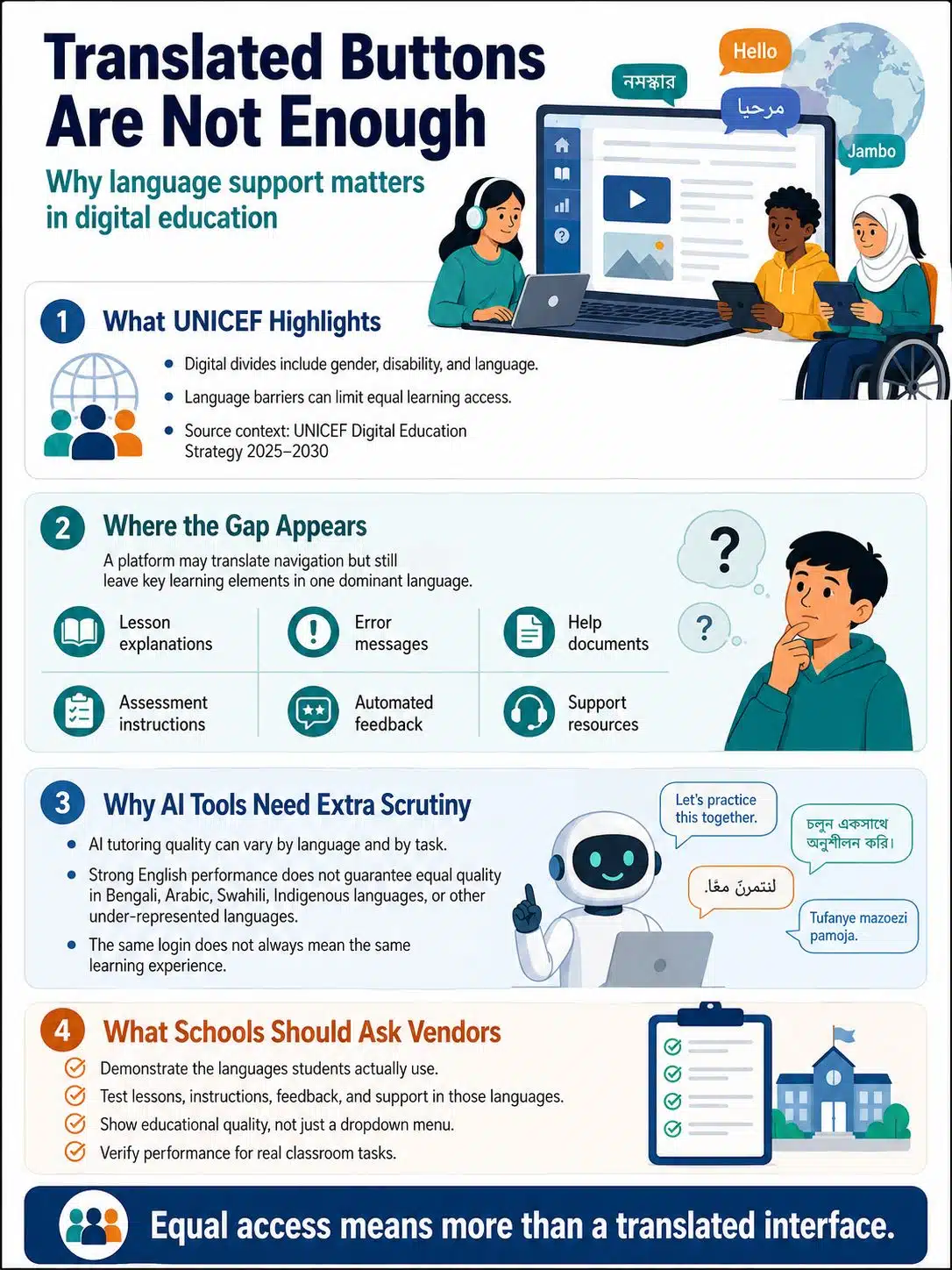
UNICEF’s Digital Education Strategy 2025–2030 identifies gender, disability, and linguistic digital divides among the barriers that education systems need to address.
The language issue is easy to underestimate.
A platform may offer translated navigation while leaving lesson explanations, error messages, help documents, assessment instructions, automated feedback, and support resources primarily in one dominant language.
That creates an uneven experience even when every student receives the same login.
This deserves particular attention as AI-based tutoring and automated educational tools spread. Performance can vary by language and by task. A system that handles English well should not automatically be assumed to perform at the same level in Bengali, Arabic, Swahili, indigenous languages, or other less-represented languages.
Schools purchasing these systems should ask vendors to demonstrate the languages students actually use. A language appearing in a dropdown menu is not enough evidence of educational quality.
Adoption Figures Can Make an Unequal Rollout Look Successful
EdTech programs produce neat numbers.
Ten thousand devices distributed. Every student account activated. Ninety percent of teachers trained. All schools licensed for the same platform.
Those figures are useful for managing a project. They do not prove that students are benefiting equally.
A district can issue an account to every learner while some students almost never log in from home. Schools can report enough devices while dozens are sitting in a repair queue. Teachers can complete required training and still avoid a platform because it does not fit the realities of their classrooms.
Equity monitoring has to move beyond deployment.
Schools should look for persistent differences in participation and performance. Are students in one area submitting fewer digital assignments? Do certain schools report more connection failures? Are mobile users abandoning a task that desktop users complete? Do accessibility-related support requests take much longer to resolve?
Those patterns deserve investigation before they are interpreted as motivation or effort problems.
Data collection also needs restraint. Schools should not gather sensitive student information simply because a platform makes it possible. Any monitoring should follow applicable privacy and data-protection rules and collect only what is genuinely useful.
Before Buying More Technology, Find the Actual Bottleneck
When an EdTech program underperforms, the instinctive response is often to buy more hardware or replace the platform.
Sometimes that is necessary. Often the bottleneck is somewhere else.
A district may discover that students have devices but no reliable home internet. Another may have good connectivity but poor repair turnaround. A third may be paying for sophisticated software that teachers rarely use because training focused on features rather than classroom application.
The first useful step is therefore a realistic baseline.
Giga, the school-connectivity initiative led by UNICEF and ITU, uses school-location, infrastructure, connectivity, and internet-performance data to help governments identify gaps and plan investment. The broader lesson applies well beyond national connectivity projects: decision-makers need to know where access is failing before choosing a remedy.
For a district, that can mean checking:
- what devices students actually use at home;
- how many are shared;
- which assignments require high bandwidth;
- where connection failures are common;
- how long repairs take;
- which accessibility problems recur;
- whether teachers have workable non-digital or low-bandwidth alternatives.
This kind of audit is less impressive than announcing a new platform. It is often more useful.
Procurement Should Test the Worst Common Conditions, Not the Best Ones
Vendor demonstrations tend to show products in favorable conditions: modern hardware, strong Wi-Fi, current browsers, prepared accounts, and someone who already knows the interface.
Schools should deliberately test outside that environment.
Try the student workflow on an inexpensive phone. Reduce the connection speed. Interrupt the network during an assignment. Check what happens when a large upload fails. Test keyboard navigation. Use a screen reader where relevant. Ask how much work is preserved if connectivity disappears. Confirm which functions stop working offline.
The point is not to make every product function perfectly under every possible condition.
It is to discover the limits before students do.
Schools should also ask what happens after purchase. Devices need chargers, repairs, updates, replacement batteries or hardware, account management, technical support, and eventually replacement.
A device program without a maintenance plan is not a complete access strategy. It is the first stage of one.
Uruguay’s Ceibal Offers a More Useful Lesson Than “Give Every Child a Device”
Uruguay’s Ceibal program is often associated with large-scale student device distribution, but the stronger lesson is what happened around the devices.
Ceibal was created in 2007. A 2025 World Bank review describes a system that has distributed millions of laptops and tablets while also supporting device maintenance and lifecycle management, school connectivity, and local Wi-Fi infrastructure.
That distinction matters.
The useful part of the model is not a particular device count, and it is not a blueprint that every country can copy. Uruguay’s geography, institutions, telecommunications market, funding, and education system are its own.
What transfers more easily is the principle: access has to be maintained.
A laptop distribution program eventually becomes a repair program, a replacement program, a connectivity program, a teacher-support program, and a budgeting problem. If those pieces are ignored, the original access gains can erode.
EdTech Companies Make Equity Decisions Before a School Buys Anything
Not every digital divide can be fixed by a school district.
Product teams make choices that determine how forgiving a platform will be when users have weaker devices, unstable connections, or accessibility needs.
For education products intended for broad use, several details deserve more attention than they often receive.
A student should not lose substantial work because the connection drops briefly. Mobile pages should be genuinely usable, not merely capable of shrinking onto a phone screen. Important video should have captions. Essential actions should not depend on precise mouse control. Error messages should explain what went wrong and what to do next.
Developers should also examine the cost their design choices impose on users.
High-resolution autoplay video may look polished in a demonstration and become a burden on limited data. Large mandatory application updates can leave institution-managed devices unusable until IT staff catch up. A visually elaborate interface can perform poorly on older hardware without improving the learning task.
These are product decisions, not unavoidable facts of digital education.
A More Useful Equity Test Before Launch
Before making a platform, device, or digital service central to teaching, decision-makers should be able to answer a few uncomfortable questions.
Who is most likely to struggle with this setup?
What device does normal use assume?
How much connectivity does an ordinary lesson require?
What happens when the connection drops halfway through the task?
Can essential work be completed on a phone when that is the only available device?
Has accessibility been tested rather than simply declared?
Which languages are supported through the full learning experience?
Who repairs failed hardware, and how long will students be without it?
What happens to a student who cannot use the standard digital route on a particular day?
If a district cannot answer those questions before rollout, teachers and families will end up answering them afterward.
A sensible test is to evaluate technology under the least favorable conditions that are common among the intended students. That does not mean designing every lesson around the weakest device in the system. It means understanding where the product stops working well and planning an acceptable alternative before reaching that point.
Final Thoughts
The digital divide in EdTech is not simply a line between people who are online and people who are offline.
Connectivity remains the foundation, and billions of people still lack it. But once a student is connected, other differences begin to matter: whether the connection is affordable, whether the device suits the assignment, whether a family has to share it, whether the platform is accessible, whether the learner understands its language, and whether teachers know how to work around technical limits.
For school leaders, the most useful next step is not necessarily another technology purchase. It is finding the barrier that is currently preventing participation.
For one district, that may be home connectivity. For another, it may be device repair, accessibility, teacher preparation, or poorly designed assignments that assume every student has a laptop and unlimited broadband.
That is a more demanding way to approach educational technology, but it is also a more accurate one. Equity is not demonstrated by the number of devices distributed or accounts created. It shows up when students can actually take part in the learning those tools are supposed to support.

























