The most practical way to ease subscription fatigue is not to cancel every recurring payment. It is to replace stable, self-contained software with dependable one-time purchase apps, then keep subscriptions only where they pay for a genuine ongoing service.
I do not think a zero-subscription setup is realistic for most people. Cloud storage, live collaboration, hosting, licensed content, continuously updated data, and generative AI all create ongoing costs. A local writing app or PDF editor is different. Its main job may not require a fresh payment every month.
The real challenge is telling useful ownership apart from a “lifetime” offer that still depends on someone else’s servers. Price matters, but the license, update policy, export options, and offline access often matter more.
Why Subscription Fatigue Builds So Quietly
A single $5 charge rarely feels urgent. The problem appears when small renewals spread across a bank card, PayPal, Apple, Google Play, and direct vendor accounts. Annual plans are even easier to forget because the charge disappears for months before returning all at once.
There is also a mental cost. Every subscription adds another renewal date, possible price increase, cancellation policy, and decision about stored data. Some apps restrict premium features as soon as payment ends. Others make exports possible but inconvenient. Over time, a convenient software stack can become a collection of tools you feel reluctant to leave.
Replacing everything at once is not the answer. A cheaper app creates no real saving if it cannot import your files, run on your devices, or handle the feature you rely on every day.
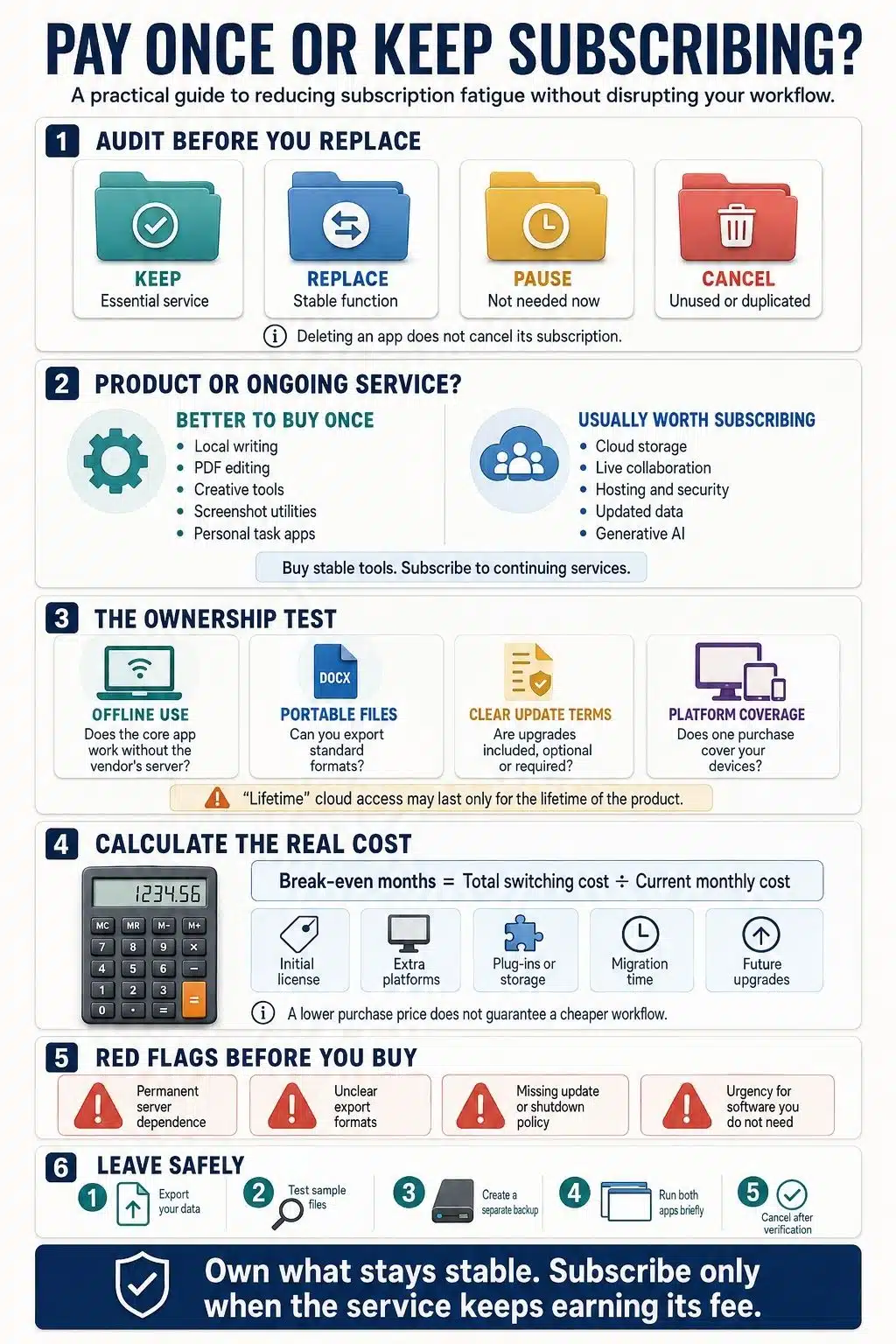
Begin With a Software Subscription Audit
Before buying an alternative, review the previous 12 months of bank and card statements. Check PayPal, app stores, and vendor accounts separately, since the billing name does not always match the product name.
For each subscription, note:
- The monthly or annual cost and next renewal date
- When you last used it for meaningful work
- What files, messages, or account data it holds
- Which functions disappear after cancellation
- Whether another tool already does the same job
Then place it in one of four groups: Keep, Replace, Pause, or Cancel.
I would change only one important workflow at a time. If you replace your notes app, task manager, email client, and cloud storage in the same week, it becomes difficult to tell which change is helping and which one is creating friction.
Protect your data before canceling, and cancel from the vendor or app-store subscription settings. Deleting an app from a device does not end its subscription.
Are You Buying a Product or Paying for a Service?
This distinction makes most decisions easier. A product performs a defined job. It edits a local PDF, organizes a manuscript, records a screen, or lets you draw on an iPad. A service keeps supplying something: storage, synchronization, collaboration, hosting, live data, security administration, licensed media, or AI processing.
Some apps sit between the two. You may buy a notes app once while its developer continues to provide free sync. A desktop email client can have a perpetual license, but it still needs an email provider. What matters is whether the core software remains useful if the connected service changes or disappears.
One-time payment is usually a good fit when the work happens mainly on your device, files can be exported in ordinary formats, and the update terms are clear. A subscription makes more sense when the continuing service is the main reason the product works.
Read the License Before You Trust “Buy Once”
One payment does not necessarily cover every future version, platform, or device.
- A perpetual current-version license lets you keep the version you purchased. A future major release may cost extra.
- An update-window license remains usable after the maintenance period ends, but later updates require another payment.
- A platform-specific license may require separate purchases for Windows, macOS, iPhone, or iPad.
- A lifetime feature unlock keeps certain premium features on your account, while sync, storage, or other services may still depend on the vendor.
- A lifetime SaaS deal normally lasts for the life of the product, not the life of the buyer. If the service closes, the deal ends with it.
Even a true perpetual license cannot guarantee compatibility with every operating system released in the future. The useful question is not simply, “Do I own it forever?” It is, “What exactly can I keep using, and under what conditions?”
One-Time-Purchase Apps Worth Considering
A useful recommendation needs a clear limitation beside it. These apps cover common personal and professional tasks, but none is the right choice for everyone. The public US prices and terms below were checked on August 5, 2026 and may vary by region, tax, platform, or promotion.
| App | Best for | Purchase model | Main limitation |
| Typora | Focused Markdown writing | $14.99 once for up to three devices | No native mobile app or team workspace |
| UpNote | Cross-platform personal notes | $39.99 lifetime | Sync still depends on UpNote’s service |
| Scrivener | Books and long-form projects | $59.99 for Mac or Windows; $23.99 for iOS | Each platform is licensed separately |
| Things | Personal task management | Separate one-time purchase for each Apple platform | Apple-only and not built for teams |
| Goodnotes | Handwritten notes and PDF markup | Region-dependent Special Edition purchase | Apple-only, with limited cloud and AI features |
| Office Home 2024 | Desktop documents, spreadsheets, and slides | $179.99 for one PC or Mac | No feature upgrades; Home is for noncommercial use |
| Procreate | Illustration and painting | $12.99 once | iPad-only |
| DaVinci Resolve Studio | Professional video production | $295 once | Demanding hardware and a substantial learning curve |
| CleanShot X | Screenshots and screen recording | $29 with one year of updates | Mac-only; cloud extras may cost more |
| PDF-XChange Editor | PDF editing | $62, or $79 for Editor Plus | Windows-only; one year of maintenance included |
| eM Client | Desktop email and calendar | $59.95 for one user on three devices | Lifetime upgrades cost extra |
For straightforward local writing, Typora is one of the cleanest subscription replacements. It uses ordinary Markdown files and does not force writing into a proprietary cloud library. Scrivener is the more capable option for books, research-heavy projects, and large manuscripts, although it costs more and takes longer to learn.
UpNote suits people who need their notes across desktop and mobile devices. Its lifetime plan includes sync, so it should not be mistaken for a completely local product. Things has a different trade-off: each Apple version is purchased separately, while its sync service does not require another subscription. Neither is a sensible choice for team collaboration.
Creative software requires an especially honest comparison. Procreate remains a straightforward purchase for iPad artists. DaVinci Resolve Studio is powerful, but many users should try the free edition before spending $295. Affinity is also worth considering, although it no longer belongs in a paid one-time-purchase list; its current unified design application is free for macOS and Windows, with separate premium integrations where applicable.
Utilities are often the easiest subscriptions to replace. CleanShot X and PDF-XChange Editor handle narrow, repeatable tasks, but their platform restrictions matter. Office Home 2024 can suit someone who wants the familiar desktop applications on one computer, yet it is a poor fit for commercial use, multi-device access, or regular feature upgrades.
Work Out the Real Break-Even Point
The basic calculation is:
Break-even months = total switching cost ÷ current monthly cost
If a $60 app replaces a $10 monthly plan, the simple break-even point is six months. That figure is useful only when $60 reflects the full cost of changing.
Add any second-platform license, paid plug-in, storage plan, maintenance renewal, and likely major upgrade. Migration time belongs in the calculation too, as does the loss of a feature that may require another tool. A replacement that takes two years to pay for itself is less convincing if you expect your devices or workflow to change next year.
I would also compare the price with what you actually pay now, not the subscription’s advertised monthly rate. Annual discounts, taxes, and bundled services can change the result in either direction.
Do Not Turn Subscription Fatigue Into Lifetime-Deal Clutter
Lifetime marketplaces create urgency around software you may never have considered at full price. Buying several discounted tools “for later” simply changes the shape of the waste. The apps may duplicate software you already own, stop receiving meaningful updates, or disappear before you have a reason to use them.
Server-dependent deals deserve the most scrutiny. A local app with exportable files can remain useful even if its developer closes. A cloud time tracker, AI generator, or collaboration platform cannot offer the same independence because its essential work happens on the provider’s infrastructure.
Before buying, find out whether the core function works offline, where your data is stored, which export formats are available, and what remains accessible if the company shuts down. A large discount does not answer any of those questions.
Move Your Work Before You Cancel
Do not end an important subscription and assume you can sort out the files afterward.
Export your work in standard formats where possible, then open a representative sample in the replacement app. Keep a separate backup. Test search, attachments, formatting, links, metadata, recurring tasks, and any automation that matters to your workflow.
Running both tools for a week or two is often worth the temporary overlap. Disconnect from the internet briefly if the replacement claims to work offline, and confirm that important files remain readable outside the app. Cancel the renewal only after the new workflow and backup have both been checked.
Some Subscriptions Still Earn Their Place
I would not try to replace a subscription that continues to provide clear, necessary value. Shared workspaces, cloud backup, web hosting, licensed media, live professional data, managed security, and heavy AI processing all carry real operating costs.
Team software is particularly difficult to replace with a standalone app because coordination is part of the product. The same is true when a service must store, process, secure, or deliver data every day. Forcing that kind of product into a permanent one-time price may lead to tight usage limits, weak support, or a business that cannot sustain the service.
The better target is software that charges repeatedly for a stable function you could reasonably license once.
Build a Smaller Software Stack You Can Trust
Subscription fatigue becomes easier to manage when every recurring payment has a clear reason to exist. Buy mature local tools for stable work. Keep subscriptions for services that continue to earn their fee.
The best one-time purchase apps are not merely cheap. They offer clear license terms, portable data, realistic update policies, and a core function that does not disappear when a payment stops. Selective ownership gives you more control without forcing your entire digital life into an unrealistic no-subscription rule.
Frequently Asked Questions on One-time Purchase Apps
1. What qualifies as a one-time-purchase app?
A one-time-purchase app is software you can continue using after a single payment. The license may cover one major version, one platform, or a fixed update period rather than every future release. The purchase terms determine what you actually keep.
2. Can a lifetime app stop working?
Yes. A local app may become incompatible with a future operating system, while a cloud-based lifetime app can fail if the provider closes its servers. “Lifetime” usually describes the product’s lifetime, so it should not be treated as a guarantee of permanent access.
3. Do one-time-purchase apps receive updates?
Many receive bug fixes and minor improvements, but policies differ. Some purchases include one year of updates; others cover the current major version. Later features or major releases may require a paid upgrade.
4. How can I tell whether switching will actually save money?
Compare the complete switching cost with your current payment. Include additional device licenses, upgrades, plug-ins, storage, migration time, and any missing feature that requires another app. The lower sticker price is not always the cheaper long-term choice.
5. Which subscriptions are usually worth keeping?
Subscriptions are easier to justify for cloud storage, real-time collaboration, hosting, managed security, licensed content, live data, and generative AI. These products provide ongoing infrastructure or resources rather than a fixed local function.