Are you trying to figure out How To Evaluate An EdTech Tool Before Your School Adopts It without adding one more problem to a teacher’s day?
You are right to slow down first. Instructure’s 2026 EdTech Top 40 report found that U.S. districts made an average of 3,001 digital tools available per district, while students and educators used about four LTI tools in Canvas on average, which tells you how easy it is to buy more software than your classrooms will truly use.
This page will walk you through the checks that matter most, from learning outcomes and student engagement to teacher usability, device fit, privacy, and cost. Keep reading, and we will sort it into a simple school-friendly process.
Why It Matters: How To Evaluate An EdTech Tool Before Your School Adopts It
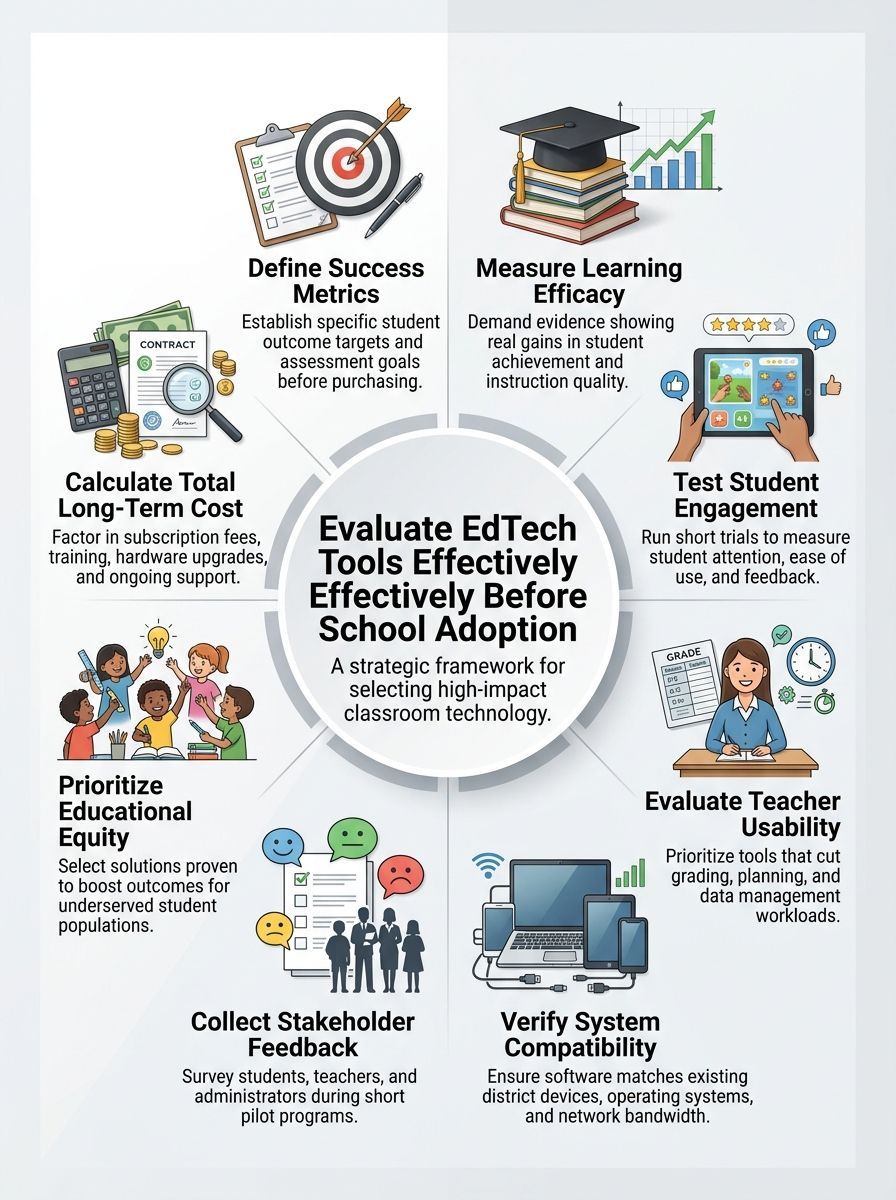
Schools should decide what success looks like before they listen to a sales pitch. If your team cannot name the student outcome, teacher time savings, or instructional problem the tool should improve, you are shopping too early.
The 2024 National Educational Technology Plan warned schools against relying on product claims that are not backed by independent, research-based evidence. That is a good reminder to treat vendor demos as a starting point, not a final answer.
A real evaluation also protects your budget. One app can trigger extra costs for training, rostering, accessibility fixes, privacy review, and network support long after the license invoice is paid.
- Set one target outcome: higher reading growth, better formative assessment data, stronger assignment completion, or less teacher admin time.
- Name one teaching problem: weak feedback loops, uneven curriculum support, or hard-to-read student data.
- Name one operational limit: older devices, weak Wi-Fi in some rooms, or a tight training calendar.
- Decide what would make you say no: low accessibility, slow logins, unclear privacy terms, or no evidence in your grade band.
If a tool cannot show how it helps learning, fits your classrooms, and saves work instead of adding it, it is not ready for schoolwide adoption.
A hands-on pilot still matters most. Minimum specs on a vendor sheet do not tell you how a tool behaves during a busy class period with shared bandwidth, student logins, screen casting, and a teacher who has twenty other things happening at once.
Key Criteria for Evaluating EdTech Tools
Once your school knows the problem it wants to solve, build a short scorecard and use it on every candidate. That keeps your evaluation steady, even when the demos look polished.
| Criteria | What to ask | What proof to request | Why it matters |
|---|---|---|---|
| Learning outcomes | Does the tool improve a skill we already measure? | Independent study, pilot data, ESSA evidence level | You need more than a claim that students “love it.” |
| Teacher usability | Can teachers use it well after a short training? | Onboarding plan, support hours, pilot feedback | Low-friction tools get used. Hard tools get ignored. |
| Student experience | Can students use it easily and stay focused? | Student survey results, accessibility documentation | Confusing tools drain lesson time fast. |
| Technology fit | Will it work with your devices and systems? | Browser list, SSO and rostering options, integration guide | Compatibility issues turn into support tickets and missed class time. |
| Cost | What will it cost in year one and year two? | License quote, training cost, support cost, renewal terms | The cheapest price line is rarely the real total cost. |
Efficacy and measurable outcomes
Start by asking for evidence that matches your setting, not just a glowing result from somewhere else. The What Works Clearinghouse notes that top ESSA evidence tiers depend on overlap between the study setting and the district that wants to use the tool, so a high school study does not automatically justify an elementary rollout.
That is why I like a plain question here: What changed for students, in which grade, in which subject, and over what time period? If the answer is fuzzy, the evidence is weak.
- Ask for the outcome measure, such as benchmark growth, pass rates, or assignment completion.
- Ask for the student group, especially grade band, subject, multilingual learners, and students with disabilities.
- Ask for the implementation conditions, like minutes per week, teacher training, and whether the study used the tool as a supplement or as core instruction.
- Ask whether the product has a Digital Promise ESSA certification or another independent review, then verify what that certification actually covers.
Good evidence should also help you make a decision. A tool that improves quiz scores but needs 45 extra teacher minutes each week may still be a poor fit for your schedule.
Student engagement and experience
Student engagement is more than screen time. You want to know whether students can start quickly, stay on task, and understand what to do next without constant rescue from the teacher.
One smart move is to measure the same lesson or unit with and without the tool. Compare on-task minutes, completion rates, re-do rates, and short student ratings on ease of use.
For student experience, ask the vendor for accessibility documentation. Section508.gov uses the term Accessibility Conformance Report, or ACR, and many vendors prepare one with a VPAT template, which gives your team something concrete to review instead of a vague promise that the product is accessible.
Students will tell you fast whether a tool is helpful, confusing, too slow, or easy to game. Build that feedback into the pilot on purpose.
Try these four student questions after a pilot lesson:
- Was it easy to log in and get started?
- Did the tool help you learn, or did it just keep you busy?
- What part was confusing or frustrating?
- Would you want to use it again for this class, and why?
Teacher usability and support
Teachers need a tool that works in real class conditions, not just during a training session. The best products reduce prep, grading, grouping, and data sorting, or they should not stay in the running.
Look closely at logins, class setup, and rostering. In school IT forums, district staff regularly point to missing single sign-on and manual rostering as the issue that turns a promising app into a help-desk burden.
Named integrations matter here. Products that support tools like Clever, ClassLink, or the 1EdTech OneRoster standard usually make account creation and class syncing much easier, which saves time for teachers and tech staff.
- Test the first 15 minutes: account setup, roster import, password resets, and first assignment creation.
- Track real teacher time: planning, grading, feedback, and finding student data.
- Review support terms: live help hours, admin training, response times, and whether onboarding costs extra.
- Check training format: one webinar is rarely enough for a schoolwide launch.
If ten teachers can use the tool well after a short pilot and need very little rescue, that tells you more than a glossy implementation deck ever will.
Compatibility with existing systems
Compatibility is where many school purchases go sideways. A tool can look great academically and still fail because it fights your browsers, filters, student information system, or classroom devices.
NCES reported that for the 2024-25 school year, 88 percent of public schools had a 1-to-1 computing program and 77 percent said high-speed internet was available across all school grounds and buildings. That sounds promising, but it also means a broken workflow can affect nearly every student in the building.
Ask for specifics, not general assurances. A vendor should be able to tell you which browsers they support, whether they work on district-managed Chromebooks and iPads, and how they handle SIS sync, grade passback, and single sign-on.
| Technical check | What a strong answer looks like |
|---|---|
| SSO | Supports district identity tools and avoids extra student passwords |
| Rostering | Uses OneRoster, Clever, ClassLink, or another documented sync method |
| LMS integration | Works with common standards such as LTI and clear grade passback rules |
| Accessibility | Provides an ACR and explains keyboard, caption, and screen-reader support |
| Device fit | Runs on your oldest still-supported student devices without major lag |
This is also the time to test real classroom stress. Open the tool on shared Wi-Fi, play media, switch tabs, sign in as a student, and try the teacher dashboard at the same time.
Gathering Feedback from Stakeholders
Your school will make a better decision when students, teachers, administrators, and technology staff all get a voice. Digital Promise’s pilot research found that collecting both student and teacher feedback leads to stronger decisions, which matches what many schools learn the hard way.
Keep the process simple. Use a short survey, two or three quick interviews, and usage data from the pilot instead of a giant form no one finishes.
Input from students
Students can spot friction that adults miss. They notice confusing directions, slow page loads, missing captions, distracting design, and assignment flows that feel harder than the learning task itself.
Do not just survey your highest-confidence users. Include students who use accommodations, multilingual learners, and students who often need extra login support, because those groups expose the real usability limits of a product.
- Watch one first-use session with no coaching unless a student gets stuck.
- Ask students to rate clarity, speed, and helpfulness on a 1 to 5 scale.
- Separate feedback on the lesson from feedback on the tool.
- Look for repeated friction points, not one-off complaints.
If several students need adult help before they can even begin, you have found a classroom problem, not a minor inconvenience.
Feedback from teachers and administrators
Teachers should judge whether the tool supports instruction, saves time, and fits the curriculum they already teach. Administrators should judge whether the purchase can scale, pass privacy review, and survive renewal season without surprise costs.
This is the right place to ask about contracts and privacy. The Student Data Privacy Consortium released National Data Privacy Agreement version 2 in April 2024 to reduce contract back-and-forth, so it is worth asking vendors whether they can work from that agreement or your state’s version of it.
Administrators should also ask for:
- Approval timeline: how long privacy, security, and legal review usually take
- Data map: what student and staff data the tool collects, stores, and shares
- Support plan: who trains staff, who handles launch week issues, and what happens at renewal
- Exit plan: how the district gets its data back if the contract ends
When teacher feedback, admin review, and tech review all point in the same direction, your adoption decision gets much easier.
Assessing Long-Term Impact
A good pilot helps you avoid a bad purchase. Long-term tracking helps you decide whether a good pilot deserves a bigger rollout.
Do not stop at launch data. Watch whether the tool still supports learning after the novelty wears off, whether teachers keep using it well, and whether support requests stay manageable.
Improvement in student achievement
Student achievement should be tracked against a baseline, not a feeling. If you can, compare benchmark scores, assignment quality, or standard-aligned assessments before and after the pilot for similar classrooms.
Rapid-cycle evaluation models used in K-12 often go beyond raw usage counts by connecting product use with a valid outcome measure and controlling for factors like grade level, demographics, and prior performance. That is helpful because a tool may work well for one student group and poorly for another.
- Set a baseline before the pilot begins.
- Use the same assessment measure across pilot and comparison groups.
- Check subgroup results, especially for students who started below benchmark.
- Track implementation fidelity, because weak training can hide a good tool and strong teachers can hide a weak one.
If the only positive evidence is that students clicked often, keep looking. Usage is useful, but learning outcomes should stay at the center.
Sustainability and cost-effectiveness
Schools should look at total cost of ownership, not just the license line. Year one often includes setup, privacy review, onboarding, device testing, and teacher training that never appears in the headline price.
Security costs belong in that math too. In a 2026 Department of Education cybersecurity update, the agency cited a CoSN 2025 finding that more than 78 percent of education technology leaders were investing in cybersecurity monitoring, detection, and response, which is a good reminder that every new tool adds some level of oversight burden.
| Cost area | What schools often miss |
|---|---|
| Licensing | Per-student minimums, renewal jumps, paid add-ons |
| Implementation | Data imports, SIS work, SSO setup, custom rostering rules |
| Training | Sub coverage, coaching time, after-school sessions |
| Support | Extra tech tickets, vendor premium support, troubleshooting time |
| Compliance | Privacy review, accessibility review, security review, contract language |
A practical way to judge value is to map cost against one or two outcomes your school cares about most, such as improved benchmark growth, fewer missing assignments, or reduced teacher admin time. If the tool cannot show a clear return after a defined period, it may still be a pilot, not a purchase.
Final Thoughts
How To Evaluate An EdTech Tool Before Your School Adopts It starts with clear goals, honest classroom testing, and a short list of proof you expect vendors to provide.
Check learning outcomes, student engagement, teacher usability, compatibility, privacy, and full cost. Then gather feedback, review the data, and choose the tool that helps instruction in real classrooms, not just in a demo.
FAQs about How To Evaluate An EdTech Tool Before Your School Adopts It
1. What should we check first when evaluating an EdTech tool for our school?
Start with learning goals and teaching fit. Check if the tool ties to your curriculum, supports learning outcomes, and allows smooth integration with classroom routines.
2. How do we check student data privacy and data security?
Ask for clear privacy policies, data storage rules, and access controls. Verify compliance with local laws, get IT to review security, and ask about encryption, backups, and breach plans.
3. What costs and support should we count before we adopt a tool?
Look at total cost, not just the license fee. Count training, devices, maintenance, and vendor support in your budget.
4. How should we run a trial or pilot before full adoption?
Do a short pilot, like a test drive, and let a few teachers and students try it. Collect feedback, check accessibility, track engagement and assessment data, then make the adoption decision with a clear implementation plan.