
Parental controls are easy to turn on. The real headache starts when you have to turn them off.
When children are young, setting up app lockouts, content filters, and strict bedtimes feels straightforward. You hand over an iPad, block explicit web content, set a thirty-minute timer, and consider the job done. But as kids grow into middle school and high school, those same restrictions stop feeling like a protective fence and start feeling like an invitation to break the rules.
If you keep every lock active until a child turns eighteen, they do not automatically learn self-regulation the day they leave home. They simply go from total oversight to zero oversight overnight. On the flip side, removing filters too early leaves kids vulnerable to adult content, predatory contacts, and endless algorithmic rabbit holes.
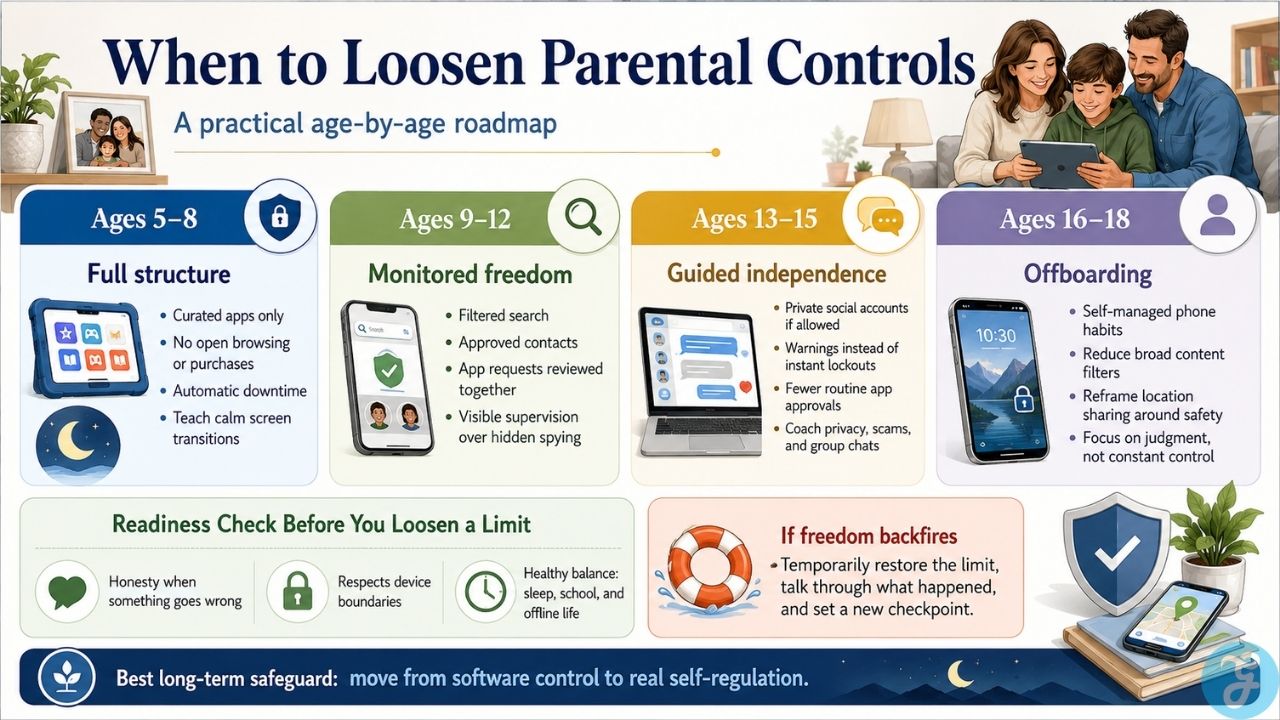
Pacing these changes by age helps you step back deliberately, replacing software locks with real accountability as your child proves they can handle more freedom. This parental controls age guide breaks down how to loosen restrictions step-by-step as kids mature.
Ages 5 to 8: Total Control and Controlled Sandbox Access
At this stage, children do not need privacy on digital devices. Their online experience should be entirely curated by adults, with software acting as hard boundaries. Children in early elementary school are still learning basic digital literacy and lack the impulse control to stop scrolling when a device demands their attention.
What to Keep Locked Down
-
Lock down browsing and spending: Block open search engines in favor of whitelisted sites or kid-friendly browsers, and turn off in-app purchases completely at the OS level so accidental clicks don’t hit your credit card.
-
Keep total app control: Require a password for every new download, even free educational games.
-
Set hard daily shutoffs: Use downtime settings to lock the screen automatically, especially during meals and an hour before bed.
Where to Start Loosening
The goal for early elementary kids is not digital independence; it is learning to transition away from screens without a meltdown. You can grant minor autonomy by giving them choices within set boundaries, like letting them pick which approved educational app to play during their thirty-minute window, rather than choosing for them.
Ages 9 to 12: Moving from Hard Blocks to Monitored Freedom
Middle school is usually when devices become social tools. It is also when kids figure out basic workarounds, like using web browsers to view restricted video content or resetting device clocks to bypass time limits.
Instead of trying to outsmart your child with tighter software locks, start shifting toward visible monitoring and shared expectations. Following a sensible parental controls age guide during middle school ensures you aren’t removing boundaries faster than your child can handle.
What to Adjust
-
Search and Browsing: Move from whitelisted sites to filtered web search. Turn on safe search features on browsers, but keep adult content filters active.
-
Communication: Allow messaging apps, but limit contacts to family members and real-world friends approved by you. Keep group chats restricted to known classmates.
-
App Store Access: Allow kids to request apps through built-in family sharing tools like Apple Screen Time or Google Family Link. Review the age ratings together before hitting approve.
Quick Rule of Thumb: Early childhood requires full restrictions; middle school requires guided monitoring; early high school requires negotiated boundaries; and late high school should focus entirely on final offboarding.
Ages 13 to 15: A Parental Controls Age Guide for Teen Independence
By age thirteen, most social platforms legally allow account creation. This is where technical controls often start to fail if they are not backed by clear family rules.
If you keep strict web filters and total app blocking in place through age fifteen, teens will find workarounds, borrowing friends’ unmonitored phones, creating secondary accounts, or using web-based proxy tools.
Key Transitions to Make
-
Social Media: If you permit social media accounts, start with private profiles only. Reserve the right to follow their accounts, but avoid policing every minor comment publicly.
-
Time Management: Shift from automated hard shutoffs during homework hours to scheduled warnings. Give them a chance to close their apps voluntarily before the device locks down.
-
App Approval: You can stop approving every single routine app, provided explicit content filters remain enabled at the account level.
By early high school, your role shifts from technical monitor to digital mentor. Talk openly about online privacy, scam links, data collection, and group chat dynamics.
Ages 16 to 18: Stepping Back and Offboarding Monitoring
The late teen years should be an offboarding phase. If a seventeen-year-old still needs a device lock to stop playing mobile games at 2:00 AM, the issue is a lack of self-regulation that software will not fix.
Steps to Complete Before High School Graduation
-
Remove Downtime Limits: Allow teens to manage their own night-time phone habits. Let them feel the real-world consequence of staying up too late on a school night while they still have a home support network.
-
Disable Category Filters: Turn off general category blocking. Keep basic anti-phishing and web safety protections active at the router or security software level, but stop filtering general web content.
-
Location Tracking Realignment: Convert location monitoring from a tool of surveillance into a mutual safety feature. Frame services like Find My or family safety apps around emergencies and roadside assistance rather than tracking everyday movements.
What to Check Before You Remove a Limitation
Birthdays give you a general starting point, but a teenager’s everyday behavior tells you if they’re actually ready for fewer restrictions. Before stepping down a specific limitation, check if your child meets these three practical signs:
-
Honesty When Things Go Wrong: Do they tell you when they stumble across weird content or receive an uncomfortable message, or do they hide it out of fear of losing their phone?
-
Respect for Physical Boundaries: Do they turn their phone over at night without an argument when required?
-
Real-World Balance: Are their schoolwork, physical activity, sleep, and face-to-face relationships remaining healthy?
If removing a restriction results in a sharp drop in sleep quality or household trust, it is fine to re-impose a restriction temporarily while discussing what needs to change.
Final Thoughts
Easing digital restrictions isn’t about giving up authority, it’s about training your kids to navigate the internet before they leave home.
Start with strict technical guards when kids are young, transition to active supervision as they enter middle school, and focus on practical advice and trust during their high school years. The best long-term safeguard isn’t an app installed on their phone; it’s the judgment you helped them build.
Frequently Asked Questions(FAQs) on Parental Controls
What should I do if my child finds a way around parental controls?
Acknowledge their technical cleverness without letting the rule violation slide. Address the behavior rather than just patching the tech loop: ask why they felt the need to bypass the limit, reinforce the safety reason behind the boundary, and set a clear, predictable consequence if the behavior continues.
Is location tracking appropriate for older teenagers?
Location tracking works best for older teens when it is mutual and framed strictly around safety—such as checking if someone made it to a distant practice safely or assisting during car trouble. It becomes problematic when used to monitor everyday personal interactions, which often leads to teens leaving phones behind or using location-spoofing apps.
Most platforms set a minimum age of 13. However, maturity matters more than age. Consider allowing private accounts when your teenager demonstrates an understanding that digital posts are permanent, understands how to block or report unknown users, and agrees to keep account privacy settings locked to friends only.