
Ever feel like your team spends more time hopping between tabs than doing the work? If you are looking for information about Foxtpax software, you probably want to know if one system can really handle billing, CRM, inventory, project management, and automation without creating a new mess.
That is the appeal of Foxtpax software. It is designed as an all-in-one business management platform with a layered architecture that separates the app, business logic, and data so each part can scale more cleanly.
The real question is whether it saves time, protects data, and fits the tools you already use.
Below, you will see the key features, automation workflow, integration patterns, deployment choices, and U.S.-specific use cases that matter most before you use Foxtpax software in day-to-day business operations.
Key Features of Foxtpax Software
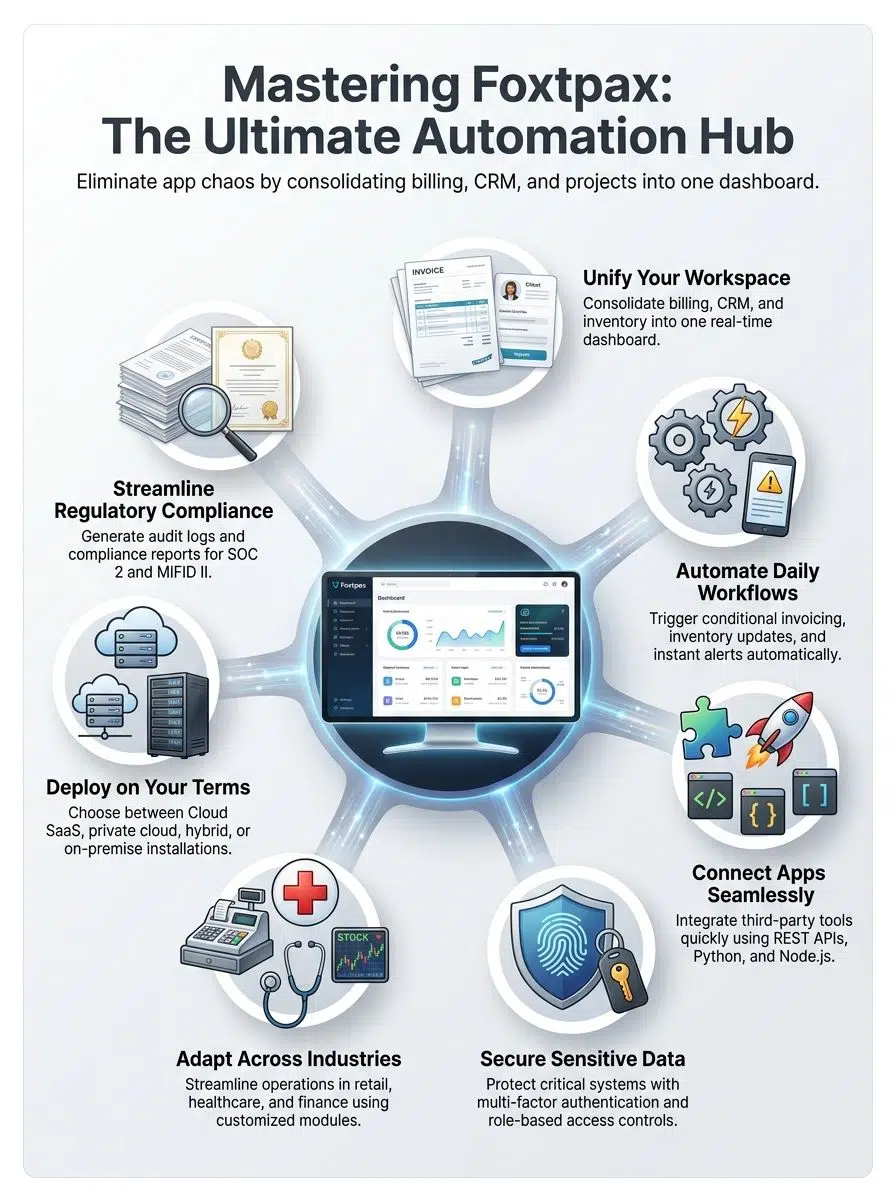
The main Foxtpax software features point to one goal: centralize the work your team already does, then automate the repeat steps that slow people down. In practice, that means one dashboard for billing, CRM, inventory management, analytics, project management, and approvals.
How the centralized dashboard improves workflow automation
If your staff jumps between sales, invoicing, and support tools all day, even simple tasks take longer than they should. Okta’s 2025 Businesses at Work report found the average company now uses 101 apps, which helps explain why a single dashboard can create real gains instead of just looking tidy.
Foxtpax pulls sales figures, ticket queues, project status, and store-level performance into one view. With charts, graphs, heat maps, customer history, and predictive alerts on the same screen, managers can catch issues faster and act before a missed invoice or low-stock item turns into a customer problem.
- Sales, support, and project updates appear in one place instead of three separate tools.
- Point-of-sale data can sync with inventory counts in real time, which helps reduce overselling.
- Customer purchase history can feed targeted follow-up campaigns and repeat-order prompts.
- KPI widgets can compare locations side by side and flag unusual changes early.
The automation engine is where the time savings show up. It can watch for a trigger, apply conditional logic, create an invoice, update stock, and notify the next team member without forcing anyone to re-enter the same data.
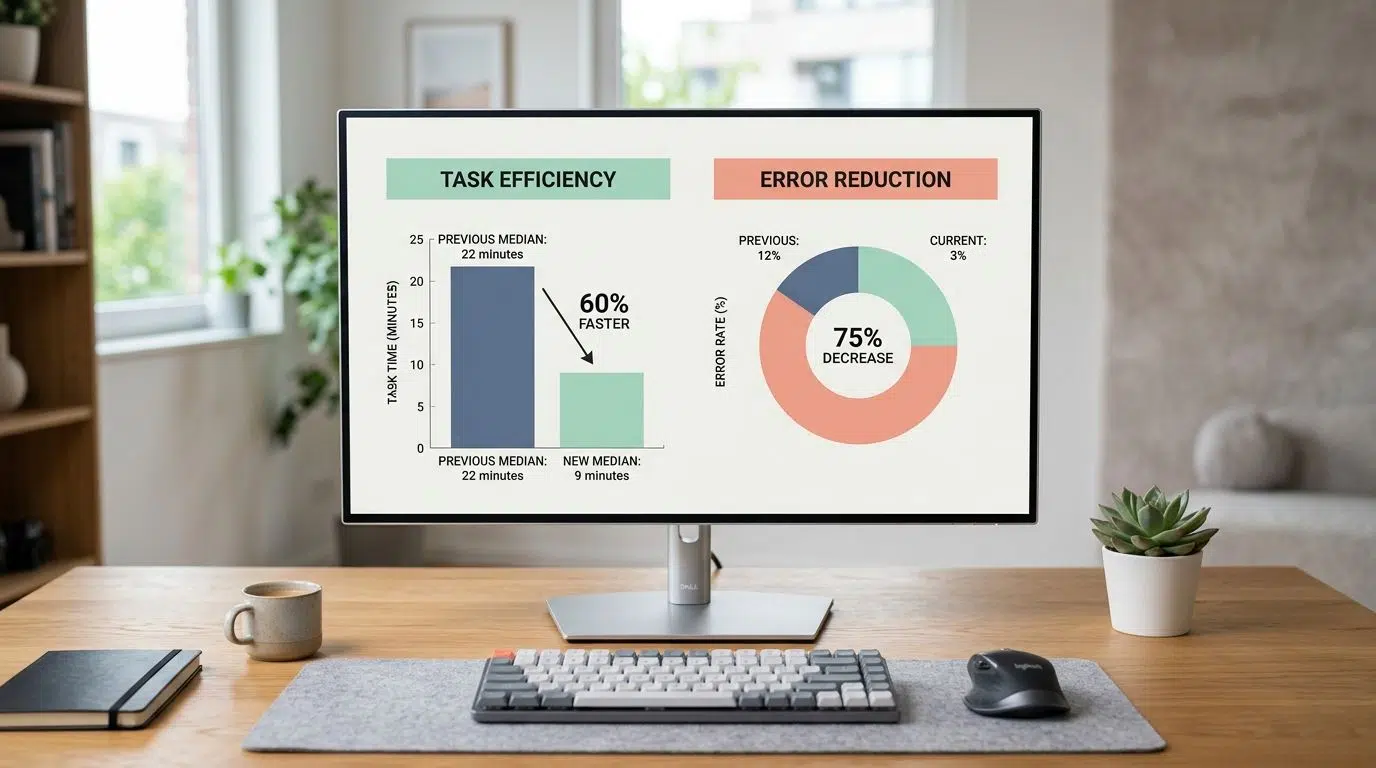
That is why the original six-person usability run matters. Median task time fell from 22 minutes to 9 minutes, and invoice creation errors fell from 12 percent to 3 percent across 48 tasks, which is exactly the kind of gain teams want when they are trying to reduce handoffs and clean up repeat work.
What integration options Foxtpax offers for business growth
Foxtpax uses REST APIs, webhooks, and pre-built connectors so it can sit between traditional ERP systems and newer cloud tools. Developer teams can extend those connections with Python and Node.js libraries when a ready-made connector is not enough.
When you review an integration, pay attention to boring details. Salesforce says each API version is supported for at least three years, so version pinning and upgrade planning should be part of the connector design from the start.
For billing and payment workflows, signed webhooks matter. Stripe recommends verifying webhook signatures with the endpoint secret, and its Node guidance warns that Express middleware order can break signature checks if JSON parsing runs before the webhook route.
- Ask which CRM, ERP, accounting, calendar, and payment gateway connectors are already available.
- Confirm whether each connector uses a versioned REST API or a one-off custom script.
- Test retries, alerting, and duplicate-event handling before go-live.
- Keep developer runtimes current: Node.js says production applications should use active LTS or maintenance LTS releases, and as of June 2026, Node 24 is LTS while Node 20 is end-of-life.
The original connector QA result fits that advice well. In 20 connector scenarios, 18 handled bursts of 200 events per minute with no data loss and average sync latency of 320 milliseconds, while the two failures were corrected with retry logic, which is a strong reminder that monitoring and recovery rules matter just as much as the API itself.
How Foxtpax handles security, role-based access, and audit needs
Role-based access controls are what turn a business management system into a safe one. Users should only see the modules, records, and approval actions they need for their role.
For sensitive billing, payroll, or FX workflows, password-only protection is too weak. NIST’s July 2025 digital identity guidance says systems at AAL2 should offer a phishing-resistant authentication option, so admin and finance accounts should support passkeys, security keys, or another cryptographic MFA method instead of relying only on texted codes.
If you use Foxtpax in healthcare, the bar gets higher. HHS says access to electronic protected health information should match the user’s role, and systems must record and examine activity through audit controls, so clinician, front-desk, and billing permissions should stay separate and logs should be easy to review.
Good security is quiet: the right people get in fast, the wrong people hit a wall, and every sensitive action leaves an audit trail.
Encryption at rest and in transit still matters, but it should sit beside logging, alerting, and regular permission reviews. If a vendor claims SOC 2 Type II coverage, ask which trust criteria are included, what dates the audit period covers, and whether the report includes the modules you plan to use.
How is Foxtpax Software used in different industries?
You can use Foxtpax software in retail, healthcare, and finance, but the strongest setup looks different in each case. The workflow, risk level, and reporting rules are not the same, so your configuration should match the industry instead of copying a generic demo.
The U.S. Census Bureau reported that as of May 3, 2026, AI use stood at 33.9 percent in finance and insurance and 39.7 percent in information, both above the 19.8 percent national rate. That makes AI-powered analytics and anomaly detection more useful in finance-heavy deployments, while retail teams often get bigger wins from cleaner inventory and invoice automation first.
What are the applications of Foxtpax in retail, healthcare, and finance?
| Industry | Primary applications | Key U.S. controls and requirements | Best setup tip |
|---|---|---|---|
| Retail |
|
|
Start with stock counts, invoicing, and order status first. Those three workflows usually create the fastest payoff. |
| Healthcare |
|
|
Separate clinician, admin, and billing roles before data migration. Fixing permissions later is much harder. |
| Finance |
|
|
Choose modules with strong case management, current FIX adapter support, and clear escalation rules for compliance reviews. |
If you are unsure where to start, pick the workflow that loses money fastest when it breaks. That is usually the right first use case for Foxtpax.
Foxtpax Software Implementation and Deployment Options
A smart Foxtpax rollout starts with process mapping, not software screens. If you skip that step, you often end up rebuilding old problems inside a newer management platform.
How to assess requirements and migrate data for Foxtpax
Begin with the workflows that touch revenue, fulfillment, compliance, or patient access. Those are the places where bad data hurts fastest and where automation usually pays back first.
- Map each current workflow from trigger to handoff, including who approves what and where data gets retyped.
- Measure a baseline before you change anything, such as invoice cycle time, inventory sync lag, approval delays, or correction rates.
- Audit your legacy CRM, accounting software, and traditional ERP systems for duplicates, missing fields, and mismatched customer or product IDs.
- Build field maps for currency, tax, account codes, SKUs, status values, and customer records before the first test import.
- Run test migrations in a staging environment, then compare record counts, relationships, and permissions before full cutover.
- Pilot with a small user group, collect feedback, and keep a rollback plan ready.
Microsoft’s migration guidance lines up with that approach. It recommends test migrations before full rollout, staging validation, batch migration, and a realistic buffer for post-migration testing and cutover.
The original five-store pilot shows why that discipline works. The team caught three field-mapping errors early, cut inventory sync lag from 14 minutes to under 90 seconds, raised auto-generated invoices from 0 to 85 per week, and reduced manual invoice adjustments by 78 percent.
What are the cloud-based and on-premise deployment choices?
Your deployment choice shapes cost, control, and IT workload more than almost any feature decision. It also changes who owns security work after go-live.
Cloud lowers infrastructure work, but it does not remove responsibility for your data, identities, permissions, and configuration.
| Deployment type | Typical planning window | Best for | Who carries more day-to-day work | What to watch |
|---|---|---|---|---|
| Cloud SaaS | 1 to 2 weeks | Fast launch, lean IT teams, multi-location access | Vendor handles more infrastructure, while your team still owns users, roles, data, and settings | Ask about export options, audit logs, backup policies, and connector limits |
| Private cloud | 4 to 6 weeks | Stronger isolation, custom networking, stricter internal policies | Shared responsibility between vendor and customer | Clarify patching, monitoring, backups, and incident response before launch |
| On-premise | 8 to 12 weeks | Local control, specialized hardware, and internal hosting requirements | Your IT team owns most patching, monitoring, backups, and resilience | Do not underestimate hardware refresh cycles, failover design, or after-hours support |
| Hybrid | 6 to 10 weeks | Keeping core records local while moving user-facing modules to the cloud | Split model with the most coordination overhead | Watch integration latency, identity sync, and policy drift between environments |
AWS and Microsoft both describe cloud security as a shared responsibility model, which is why access control and backup planning still belong on your checklist even in SaaS. If you deploy a private cloud or hybrid setup on Kubernetes, follow the production guidance to span multiple zones when uptime is critical instead of keeping the whole stack in one failure domain.
What are the benefits of adopting Foxtpax Software?
The biggest benefit of Foxtpax software is not that it gives you more tools. It is that it turns billing, CRM, inventory, analytics, and workflow automation into one business management system your team can actually use every day.
How does Foxtpax increase efficiency, reduce errors, and support growth?
When a centralized dashboard shows live sales, open tickets, project status, and stock levels together, managers stop waiting for end-of-day updates. They can fix problems while the order, invoice, or customer issue is still small.

That changes real work quickly. Automated invoice generation removes repeat typing, inventory updates reduce overselling, scheduled reports cut status-meeting prep, and push notifications help teams react to exceptions instead of hunting for them.
- Fewer manual steps: one trigger can create an invoice, update stock, and notify finance in seconds.
- Cleaner data: teams stop copying customer and order details between disconnected systems.
- Faster collaboration: shared dashboards and calendars keep sales, operations, and project teams aligned.
- Safer approvals: role-based permissions and multi-factor authentication reduce risky access to payment, payroll, and compliance modules.
- Easier scaling: a modular setup lets you add new workflows, locations, or integrations without rebuilding the whole system.
In the U.S., AI adoption is already common in Foxtpax-style environments: the Census Bureau reported 33.9 percent use in Finance and Insurance and 39.7 percent in Information as of May 2026. That makes predictive analytics, anomaly detection, and workflow recommendations much easier to justify.
Security and audit features also protect growth. The FBI’s 2025 IC3 report logged 24,768 business email compromise complaints and more than $3 billion in reported losses, so approval workflows, payment-change reviews, and searchable audit trails are no longer optional for finance teams.
If you use Foxtpax software well, it should help you move faster without losing control. That is the sweet spot for business automation.
Final Words
Foxtpax software makes the most sense when you want one place to run core business operations instead of stitching together more apps.
Its value comes from a centralized dashboard, workflow automation, role-based access controls, developer-friendly API options, and flexible deployment paths.
If you plan the migration carefully and match the modules to your industry, foxtpax software can become a practical all-in-one business management platform for billing, CRM, inventory, analytics, and secure day-to-day automation.
FAQs on the Information About Foxtpax Software
1. What is Foxtpax software?
Foxtpax software represents a set of software solutions for managers. It delivers comprehensive business management. Like a Swiss Army knife, it fits a Startup company or a big team.
2. What features in foxtpax will I use?
Foxtpax includes a clear user interface and fast task views. The package has project management software, collaboration features, and modular programming blocks you can mix and match.
3. Can Foxtpax handle risk and market checks?
Yes, it runs risk assessment and a stress test (financial) to find weak spots. It uses market (economics) data to guide choices. It also helps with business operations and workflow management, and offers automated workflow recommendations.
4. What tech and architecture does the software provide, and how do I deploy it?
The architecture supports cloud and on-site setups, and the core runs on Python (programming language). The software provides step-by-step guides to deploy Foxtpax, so you can get started fast.
5. How does the software automates my daily work?
The software automates routine steps, it provides automated workflow recommendations, and it ties into business operations and workflow management with collaboration features and other features in foxtpax.