

Music can completely shift a video’s vibe. It can make a sequence feel sharper, warmer, or significantly more premium than your actual production budget allowed. On the flip side, the wrong track will absolutely tank a good edit if it fights your pacing, buries the dialogue, or triggers a copyright strike five minutes after you hit publish.
That is why adding AI music to videos is becoming a standard workflow for modern creators. Instead of digging through generic stock music libraries for three hours just to find something that sounds like elevator music, you can use platforms like Suno, Udio, or Soundraw to generate custom background tracks, ambient beds, and transitions in seconds.
But speed is only half the battle. Efficiently adding AI music to videos still requires editing judgment, legal awareness, and human taste. A track can sound incredible on its own and still completely fail inside your timeline.
What Are We Actually Building Here?
When we talk about this process, we mean utilizing generators or assisted audio tools to build custom assets for a video timeline. This is not about letting an algorithm edit your project; it is about expanding your asset toolkit.
Depending on your project, you might generate:
-
Ambient textures for short documentaries or video essays
-
Clean lo-fi loops for tutorials and tech walk-throughs
-
High-energy beats for social media ads or product clips
-
Short audio stings for custom intros and transitions
The major advantage of adding AI music to videos is sheer flexibility. If you are editing a project in Premiere Pro or DaVinci Resolve, you no longer have to awkwardly chop up or stretch a pre-existing track to fit a weirdly timed 47-second segment. You can just tell the generator to give you exactly 47 seconds of music.
The trap, however, is assuming the first generation you get is ready for prime time. It rarely is.
Knowing When It Works Best
AI music tools solve a massive creative bottleneck: the search-and-settle routine. Traditional stock libraries can feel incredibly repetitive. If you have to listen to one more corporate marimba track while trying to find a background bed, you will likely lose your mind.
To help you decide when to use these tools, here is a quick breakdown of where AI-generated audio thrives and where it falls flat.
| Perfect For | Terrible For |
| Background tracks under heavy narration | High-end, emotionally complex commercials |
| Quick TikToks, Reels, and Shorts | Narrative films requiring thematic leitmotifs |
| Low-budget client drafts and placeholder tracks | Music videos or dance-focused content |
| Consistent background loops for software demos | Projects requiring deep cultural authenticity |
The rule of thumb is simple: AI music excels when it plays a supporting, almost invisible role. If your video relies on deep emotional precision or high-end artistic production, you still need a human composer or a premium licensed library.
Writing Prompts That Don’t Sound Like Robot Garbage
If you throw a lazy prompt at an audio generator, you are going to get generic, muddy audio back. The trick is to stop using vague adjectives and start describing the actual musical elements you need for your edit.
Weak Prompt: “Make background music for a tech video.”
Better Prompt: “Clean, modern electronic background music for a 90-second software tutorial. 110 BPM, light synths, minimal driving melody, low intensity so the voiceover stays completely clear. Instrumental only.”
When building your prompt, try to include:
-
Tempo and Energy: Specify the speed (e.g., mid-tempo, 120 BPM) and intensity.
-
Instrumentation: Name specific instruments like acoustic guitar, warm Rhodes piano, or sub-bass.
-
The Absolute Ban on Vocals: For 95% of video projects, explicitly state “no vocals” or “instrumental only.” Lyrics will almost always fight your speaker’s voiceover and distract your audience.
Mixing for Clarity: The Human Editor’s Job
An AI gives you the raw audio file, but a human editor makes it fit the narrative. Do not just drop a track onto your timeline, lower the volume slightly, and call it a day.
Protect Your Voiceover
Your viewer should never have to strain to hear the speaker. Drop your background track significantly lower than you think you need to (usually anywhere from -18dB to -24dB for speech). If the mid-tones of the music are still burying the vocals, throw a parametric equalizer on the music track and scoop out a bit of the 1kHz to 3kHz range to clear some space for the human voice.
Work With Stems
Whenever possible, use platforms like Loudly or Beatoven.ai that allow you to download stems (isolated tracks for drums, bass, and melody). If a scene suddenly gets quiet or serious, you can just mute the drum stem on your timeline while keeping the ambient melody running. It makes your audio transitions feel incredibly deliberate and professional.
Edit to the Cut
Match the rhythm of the music to the visual pacing. If you are executing quick, punchy cuts, make sure your visual transitions hit on the transient peaks (the beats) of the audio track. If the video moves into a slower explanatory section, fade the music down or transition to a simpler loop section.
The Legal Reality Check
This is the part most creators ignore until they get hit with a monetization penalty. Do not assume that because a piece of music was generated by an AI, it is automatically safe or copyright-free.
-
Check the Tier Rules: Many AI tools offer a free tier for personal use, but if you want to put that video on a monetized YouTube channel, use it for a paid social ad, or hand it off to a client, you almost always need to be on a paid commercial subscription.
-
Watch for Content ID Flags: If an AI model was trained on copyrighted material, its output might accidentally sound similar enough to an existing song to trigger automated platform flags. Keep screenshots of your generation logs and receipts as proof of your licensing rights.
-
Avoid Artist Imitation: Do not type “in the style of Hans Zimmer” or “Trent Reznor beat” into a prompt. Beyond the legal grey areas surrounding likeness and style, it yields unoriginal results. Describe the instruments and the cinematic scale instead.
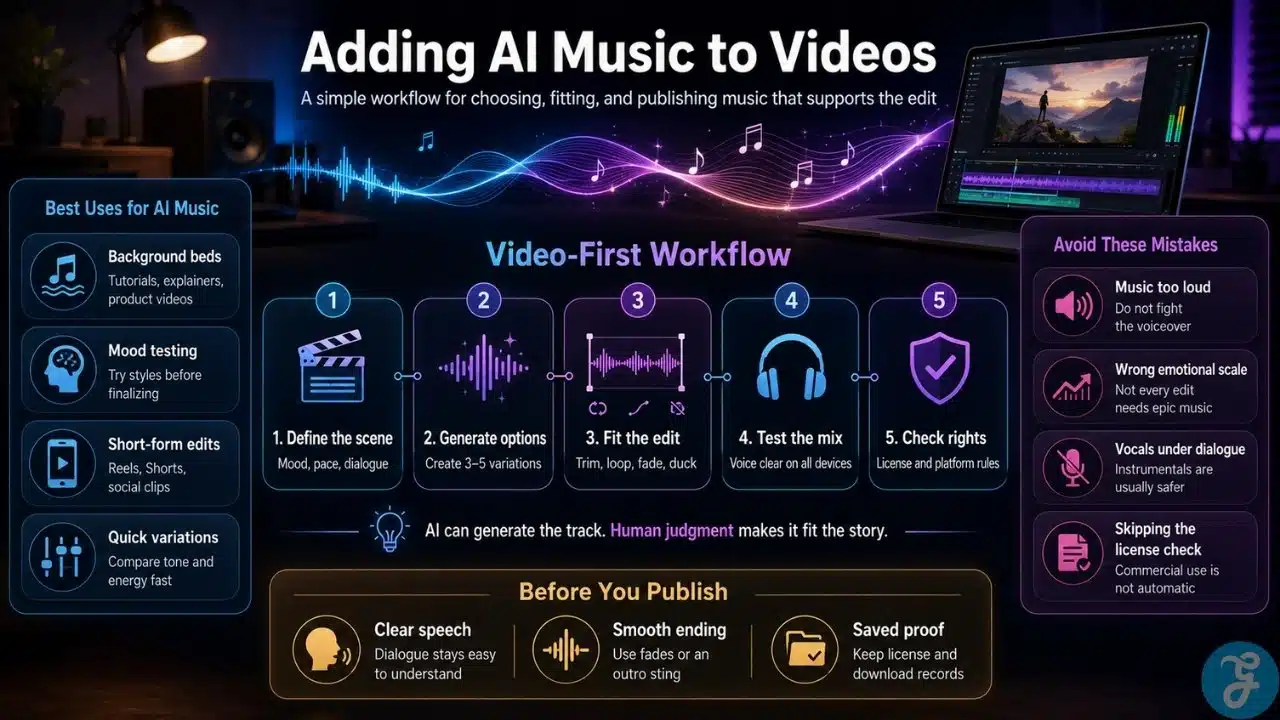
A Workflow for Adding AI Music to Videos
To keep your post-production moving efficiently, follow this step-by-step approach:
-
Analyze the Locked Cut: Watch your video edit completely without music. Mark where the natural pacing shifts, where the dialogue drops, and where you need the energy to lift.
-
Batch Generate: Head to your audio tool of choice and generate three or four variations based on specific BPM and instrument parameters. Don’t settle for the first option.
-
Test the Mix on Multiple Devices: Once you think your mix sounds great in your studio headphones, export a quick render and listen to it on your phone speakers. If the music drowns out the dialogue on a tiny phone speaker, go back to your software and turn the music down.
-
Archive the License: Create a dedicated folder for your project assets and save the license documentation alongside the audio file. If a platform challenges your video down the road, you can resolve it in thirty seconds.
The Final Cut
When done correctly, adding AI music to videos eliminates the friction of the endless stock search, gives you ultimate control over track length, and allows you to test creative directions on the fly.
Just remember that the algorithm does not understand storytelling. It does not know when a piece of dialogue needs a beat of silence to breathe, and it does not know how to build tension before a major visual reveal. Use the technology to create your raw materials, but rely on your own human editing eye and ear to make the piece truly resonate.
























