


A book rarely gets delayed because the author has no ideas at all. It gets delayed because the ideas are scattered, the outline keeps changing, the draft feels uneven, the edits take longer than expected, and the publishing tasks arrive when the writer is already tired.
That is where AI can help authors most. Not by replacing the author’s voice. Not by pretending to be a literary genius. The useful role is narrower and more practical: AI can organize raw thinking, create draftable structure, speed up revision passes, test marketing angles, and reduce the blank-page pressure that slows many writers down.
The best AI workflows authors can build are not one-click writing tricks. They are repeatable systems. A novelist may use AI to pressure-test character motives before drafting a scene. A nonfiction author may use it to turn research notes into a chapter outline. A self-published author may use it to draft five book description options, then revise the best one by hand.
This article focuses on real writing AI creative workflows examples across the author journey: idea development, outlining, drafting, editing, publishing, and marketing. The aim is simple: help authors write with more control, edit with less fatigue, and publish with fewer last-minute bottlenecks.
Where AI Actually Fits in an Author’s Workflow

AI is useful when a task has friction, repetition, or too many moving parts. It is less useful when the work needs taste, lived insight, emotional honesty, or final creative judgment.
For authors, that means AI belongs mostly in the support layer:
| Writing Need | Where AI Helps | Where the Author Must Lead |
| Finding book ideas | Generating angles, variations, reader questions | Choosing the idea with emotional or market strength |
| Outlining | Structuring chapters, scenes, arguments, or beats | Deciding the promise, pacing, and depth |
| Drafting | Expanding notes into rough text | Adding voice, judgment, rhythm, and originality |
| Editing | Spotting weak phrasing, repetition, unclear logic | Accepting, rejecting, or rewriting suggestions |
| Publishing | Drafting descriptions, metadata ideas, launch copy | Checking platform rules and final positioning |
| Marketing | Repurposing book ideas into posts, emails, and scripts | Protecting brand voice and reader trust |
The strongest author AI tools are not always the flashiest ones. ChatGPT can help with ideation, structure, research synthesis, and revision prompts. Grammarly and ProWritingAid are useful for grammar, clarity, style, and manuscript feedback. Notion AI can help organize notes and summarize research. Sudowrite is more fiction-oriented, especially for brainstorming, sensory detail, plot ideas, and scene development. Reedsy Studio can support planning, drafting, editing, and formatting. For self-publishing, Amazon KDP tools and official guidelines still matter because AI should not guess formatting or metadata rules.
The workflow matters more than the tool.
1. Book Idea Generation System
Writing stage: Ideation
Useful AI tools: ChatGPT, Claude, Gemini, Notion AI, Sudowrite for fiction brainstorming
Best for: Authors who have too many loose ideas or no clear book angle yet
Output/result: A shortlist of book ideas with audience, promise, angle, and possible structure
A weak book idea often sounds interesting for ten minutes and then collapses when the author tries to outline it. A stronger idea has tension, audience value, and enough depth to sustain a full manuscript.
AI can help authors move from “maybe I should write about this” to a more testable book concept.
Start by giving the AI raw material, not a polished request. Include notes such as:
- The broad subject you want to write about
- Who the book is for
- What problem or desire the reader has
- Your preferred genre or format
- Any ideas you do not want to pursue
- Comparable books, only if you know them well enough to use them honestly
A practical prompt could be:
“Act as a publishing development editor. I want to write a nonfiction book for first-time managers who struggle with difficult conversations. Generate 12 book concepts. For each one, include the reader promise, what makes the angle distinct, possible chapter structure, and why the idea may or may not be strong enough for a full book.”
For fiction, the prompt should give creative boundaries:
“Generate 10 thriller premises built around a missing-person case in a small coastal town. Avoid police-procedural clichés. For each premise, include the central secret, protagonist wound, antagonist pressure, and why the story can sustain 80,000 words.”
The first output will rarely be publishable. That is fine. Treat it like a development meeting. Ask follow-up questions:
- Which ideas feel too familiar?
- Which have the strongest emotional conflict?
- Which would attract a clear reader group?
- Which idea has the richest chapter or scene potential?
- Which idea sounds good but may become thin after 20,000 words?
The author should choose the final idea. AI can widen the table, but it cannot know which idea the author can carry for months.
A useful result from this workflow is a one-page book concept brief: title options, audience, promise, central argument or conflict, tone, structure, and reasons to continue or abandon the idea.
2. Reader and Market Positioning Workflow
Writing stage: Ideation and early planning
Useful AI tools: ChatGPT with web research features, Perplexity, Gemini, Notion AI for organizing notes
Best for: Nonfiction authors, self-published authors, business authors, and genre writers
Output/result: A reader profile, positioning note, competing-angle map, and promise statement
Many authors start writing before they know who the book is really for. That mistake creates problems later. The title becomes vague. The introduction tries to serve everyone. The marketing copy sounds soft. The chapters include material that may be interesting, but not necessary.
An AI-assisted positioning workflow can prevent some of that drift.
This workflow begins with reader clarity. Ask AI to identify possible reader groups for the book idea, but do not accept broad labels like “writers,” “entrepreneurs,” or “parents.” Push for sharper reader situations.
For example, instead of “authors,” a better reader profile might be:
- First-time self-published nonfiction authors with a finished draft but no launch plan
- Busy executives writing authority books with ghostwriter support
- Romance novelists trying to improve pacing across a series
- Academic writers adapting research into a trade nonfiction book
Once the reader group is clearer, use AI to map the reader’s pressure points:
- What does this reader already believe?
- What have they already tried?
- What frustrates them?
- What would make them trust the book?
- What promise would feel specific rather than inflated?
For nonfiction, this workflow can also help test the book’s central argument. Ask AI to create three versions of the promise:
- A practical promise
- A contrarian promise
- A narrow expert promise
Then compare them. The most marketable version is not always the loudest. It is usually the one that makes the right reader think, “This was written for my exact situation.”
For fiction, positioning is less about solving a reader’s problem and more about expectation. AI can help compare tone, subgenre, stakes, and reader appeal. A cozy mystery, literary thriller, romantasy, and domestic suspense novel may all involve secrets, but readers expect different pacing, emotional texture, and payoff.
This workflow should end with a short positioning note:
- Primary reader
- Reader expectation
- Core promise
- Tone
- Comparable shelf or category
- What the book should not become
That final line matters. Many manuscripts lose focus because the author never defines what the book is not.
3. AI Outlining Workflow
Writing stage: Planning
Useful AI tools: ChatGPT, Notion AI, Scrivener with AI-assisted notes outside the app, Reedsy Studio for organizing book structure
Best for: Authors who struggle with structure before drafting
Output/result: A chapter-by-chapter or scene-by-scene outline ready for drafting
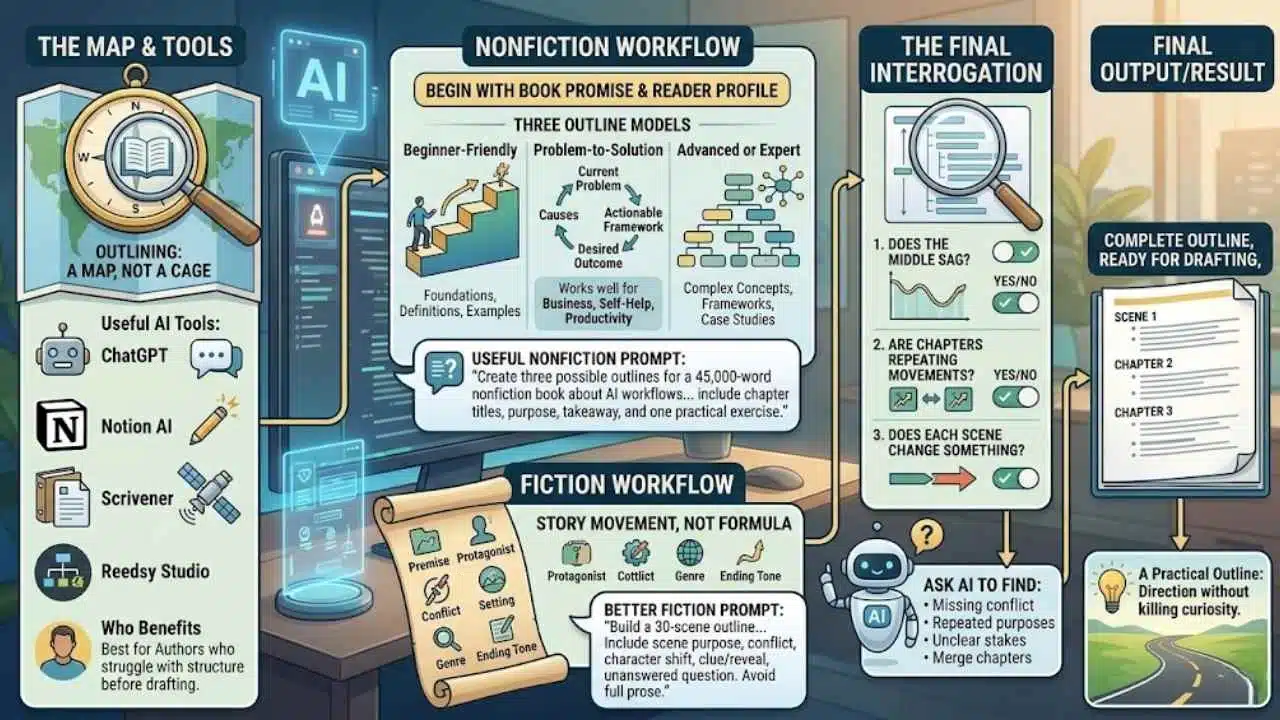
An outline is not a cage. For most authors, it is a map that reduces avoidable confusion. AI can build several possible maps quickly, which gives the author more room to choose.
For nonfiction, begin with the book promise and reader profile. Ask AI to create three outline models:
- Beginner-friendly structure
- Problem-to-solution structure
- Advanced or expert structure
Then inspect the difference. A beginner-friendly structure may need more definitions and examples. A problem-to-solution structure may work better for business, health, productivity, education, and self-help books. An expert structure may suit readers who already understand the basics and want sharper frameworks.
A useful nonfiction outlining prompt:
“Create three possible outlines for a 45,000-word nonfiction book about AI workflows for authors. The reader is a working author or content creator who wants practical writing systems, not generic AI tips. For each outline, include chapter titles, chapter purpose, reader takeaway, and one practical exercise.”
For fiction, the workflow should focus on story movement rather than generic plot formulas. Feed the AI the premise, protagonist, main conflict, setting, genre, and desired ending tone. Then ask for beats, not full prose.
A better fiction prompt:
“Build a 30-scene outline for a psychological thriller. Include scene purpose, conflict, character shift, clue or reveal, and unanswered question. Avoid writing the actual scenes.”
The author should check the outline for three problems:
- Does the middle sag?
- Are chapters repeating the same kind of movement?
- Does each chapter or scene change something?
AI outlines can look neat while hiding weak logic. That is why the author should interrogate the structure before drafting. Ask AI to find missing conflict, repeated chapter purposes, unclear stakes, or chapters that could be merged.
The final outline should not be too perfect. Leave room for discovery. A practical outline gives direction without killing the author’s curiosity.
4. Character, World, and Research Bible Workflow
Writing stage: Planning and drafting support
Useful AI tools: Notion AI, ChatGPT, Sudowrite, Milanote, Obsidian with AI-supported summaries
Best for: Novelists, series writers, fantasy authors, historical fiction writers, and nonfiction authors with heavy research
Output/result: A searchable story bible or research bible with consistent notes
Authors waste a surprising amount of time looking for their own decisions. What was the side character’s sister called? Did chapter three say the company was founded in 2011 or 2012? What rule did the magic system follow? Which source supported the claim in chapter six?
A book bible solves this problem. AI can help build and maintain it, especially when the manuscript grows large.
For fiction, create sections for:
- Main characters
- Secondary characters
- Locations
- Timeline
- Backstory
- Rules of the world
- Unresolved plot threads
- Voice and style notes
- Continuity warnings
After drafting a chapter, paste or upload the chapter into your AI tool and ask for a continuity extraction:
“Extract all character facts, location details, timeline clues, relationship changes, unresolved questions, and worldbuilding rules from this chapter. Format them as database-ready notes. Do not invent missing details.”
For nonfiction, the same idea becomes a research bible:
- Key claims
- Supporting sources
- Definitions
- Examples
- Case studies
- Expert names
- Terms to use consistently
- Terms to avoid
- Chapters where each idea appears
This is especially useful for authors working on business, science, health, technology, education, or history topics. AI can summarize notes, group related ideas, and flag where a claim needs verification. It should not be treated as the final fact-checker.
A simple workflow looks like this:
- Create a master notes database in Notion, Obsidian, Google Docs, or another system.
- Add chapter notes as you draft.
- Ask AI to extract names, facts, claims, open questions, and continuity details.
- Review the extraction manually.
- Add approved notes to the bible.
- Before each revision pass, ask AI to compare a chapter against the bible and flag possible inconsistencies.
This workflow is underrated because it does not feel glamorous. It simply prevents mess. For long manuscripts, that is valuable.
5. First Draft Acceleration System
Writing stage: Drafting
Useful AI tools: ChatGPT, Claude, Google Docs with AI support, Sudowrite, Notion AI
Best for: Authors who know what they want to say but get slowed down by blank-page resistance
Output/result: Rough chapter or scene drafts based on author-owned notes
AI can help produce a rough draft faster, but this is the stage where authors need the most discipline. If the prompt is lazy, the draft will usually sound generic. If the author gives strong notes, structure, voice direction, and boundaries, the output becomes more useful.
The safest way to use AI for drafting is not to ask it to “write chapter one.” That gives away too much control.
A better drafting workflow:
- Write rough notes in your own words.
- Add the chapter purpose or scene purpose.
- Add the emotional tone.
- Add what must happen.
- Add what must not happen.
- Ask AI to turn the notes into a rough draft.
- Rewrite the draft manually.
For nonfiction, the input might include:
- Main argument
- Reader problem
- Three supporting points
- Example or analogy
- Practical warning
- Desired ending
- Tone instructions
For fiction, include:
- Point of view
- Setting
- Character goal
- Conflict
- Subtext
- Scene turn
- Sensory details to include
- Details to avoid
A useful fiction prompt:
“Draft a rough version of this scene from the protagonist’s close third-person point of view. Keep the language restrained, avoid melodrama, and focus on tension through action and subtext. Use the scene notes below. Do not add new backstory or new characters.”
The author’s revision is not optional. AI-generated drafts often have smooth sentences without enough texture. They may over-explain emotion, soften conflict, or produce dialogue that sounds too direct. For nonfiction, they may create tidy paragraphs that lack judgment or fresh examples.
This workflow is best for speed, not final quality. It helps authors get material on the page, then the real writing begins.
6. Developmental Editing and Structure Review Workflow
Writing stage: Editing
Useful AI tools: ChatGPT, Claude, ProWritingAid manuscript tools, Sudowrite for fiction feedback, Notion AI for summarizing chapter notes
Best for: Authors with a complete or partial manuscript that feels uneven
Output/result: A revision map showing structural issues, weak chapters, pacing problems, and missing reader payoffs
Developmental editing looks at the manuscript as a whole. It asks bigger questions: Does the book work? Is the structure right? Does the argument build? Does the story move? Are the stakes clear? Does the reader get the payoff promised by the beginning?
AI can support this stage, but it should not replace a skilled human editor for serious publishing work. It can, however, help authors prepare a cleaner draft before hiring an editor or sending the manuscript to beta readers.
For nonfiction, upload or paste one chapter at a time and ask:
- What is the chapter’s main promise?
- Where does the logic feel thin?
- Which paragraphs repeat the same idea?
- Where does the reader need an example?
- What should be cut, moved, or expanded?
- Does the chapter serve the book’s main promise?
For fiction, ask different questions:
- What changes between the start and end of the scene?
- Is the protagonist active or passive?
- Where does the tension drop?
- What information is being repeated?
- Does the scene create a reason to read the next one?
- Are character choices emotionally believable?
A useful process is to build a revision table:
| Chapter/Scene | Main Purpose | Problem Found | Revision Needed | Priority |
| Chapter 1 | Introduce reader problem | Too much background before the practical promise | Cut opening explanation and move example earlier | High |
| Chapter 4 | Explain framework | Strong idea, weak example | Add real-world scenario | Medium |
| Scene 12 | Reveal betrayal clue | Tension drops after first page | Add active pressure from antagonist | High |
The table matters because editing fatigue comes from trying to fix everything at once. AI can help sort the mess into visible tasks.
Authors should be careful with AI feedback that sounds confident but vague. “Improve pacing” is not enough. Ask for exact places, reasons, and possible fixes. Then decide what is worth changing.
7. Line Editing and Rewriting Workflow
Writing stage: Editing and polishing
Useful AI tools: Grammarly, ProWritingAid, ChatGPT, Claude, Hemingway-style readability tools
Best for: Authors who need cleaner sentences without flattening their voice
Output/result: Cleaner prose, fewer repeated patterns, stronger rhythm, and a controlled style sheet
Line editing is where many authors accidentally let AI make the writing bland. Grammar tools can improve clarity, but they can also sand down style if the author accepts every suggestion.
A better workflow is selective.
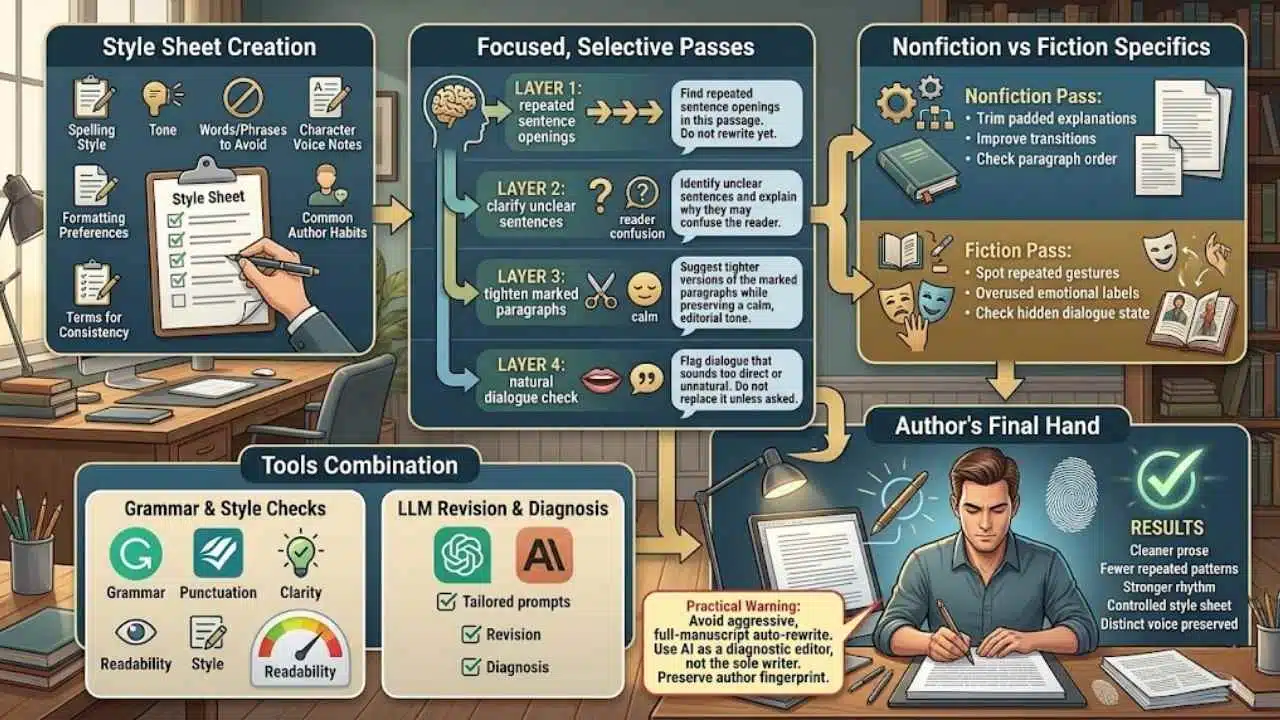
Start with a style sheet before editing. It should include:
- Preferred spelling style
- Tone
- Words or phrases to avoid
- Character voice notes
- Formatting preferences
- Common author habits to watch
- Terms that must stay consistent
Then run a focused pass. Do not ask AI to “make this better.” That instruction is too broad. Ask for one layer at a time.
Examples:
“Find repeated sentence openings in this passage. Do not rewrite yet.”
“Identify unclear sentences and explain why they may confuse the reader.”
“Suggest tighter versions of the marked paragraphs while preserving a calm, editorial tone.”
“Flag dialogue that sounds too direct or unnatural. Do not replace it unless asked.”
For nonfiction, AI is useful for trimming padded explanations, improving transitions, and checking whether the paragraph order makes sense. For fiction, it can help spot repeated gestures, overused emotional labels, and dialogue that states what the character should be hiding.
Use Grammarly or ProWritingAid for grammar, punctuation, clarity, readability, and style checks. Use ChatGPT or another large language model for more tailored revision prompts. The author should make the final edits manually.
One practical warning: do not run an entire manuscript through aggressive rewriting and accept the result. The prose may become smoother, but the author’s fingerprint can disappear. Better to use AI as a diagnostic editor first and a rewriting assistant second.
8. Kindle and SEO Book Description Generator
Writing stage: Publishing
Useful AI tools: ChatGPT, Claude, Grammarly, KDP description preview/checking tools, publisher metadata worksheets
Best for: Self-published authors and authors preparing sales copy
Output/result: A polished book description, subtitle ideas, keyword angles, and sales-page copy options
A book description is not a summary. Many authors get this wrong. The description should help the right reader decide whether the book is for them.
For nonfiction, the description needs to show:
- The reader problem
- The book promise
- The author’s angle
- What the reader will learn
- Who the book is for
- Why this book is different enough to consider
For fiction, it should create desire without explaining the whole plot. It needs character, conflict, stakes, tone, and a reason to turn the first page.
AI can generate useful description drafts if the author gives it the right material. Feed it:
- Final title and subtitle
- Genre or category
- Reader profile
- Comparable tone
- Main promise or premise
- Key benefits or stakes
- Spoilers to avoid
- Platform limits or formatting requirements to check manually
A practical nonfiction prompt:
“Write five Amazon KDP-style book description options for this nonfiction book. Do not make exaggerated claims. Open with the reader’s problem, explain the promise, include 5 benefit bullets, and end with a clear reason to read. Keep the tone practical and credible.”
For fiction:
“Write three book description options for a domestic suspense novel. Avoid spoilers. Emphasize the protagonist, central tension, and emotional stakes. Keep the tone tense but not melodramatic.”
After AI produces options, compare the openings. The first two lines matter most because readers often skim. Remove inflated language. Cut claims the book cannot support. Check the latest platform guidance before adding formatting, HTML, keywords, or category-related details.
This workflow can also produce supporting assets:
- Subtitle variations
- Short description
- Back cover copy
- Retailer description
- Author bio draft
- Series description
- Ad copy angles
The final description should sound like the book, not like a sales template.
9. Marketing Content Workflow for Authors
Writing stage: Marketing and reader engagement
Useful AI tools: ChatGPT, Claude, Canva AI features, Notion AI, Buffer or social scheduling tools, email marketing platforms with AI writing support
Best for: Authors who finish the book but struggle to promote it consistently
Output/result: A launch content calendar, email drafts, social posts, newsletter ideas, and repurposed book excerpts
Marketing feels painful for many authors because it uses a different muscle from writing the book. The author has spent months thinking in chapters. Now the work has to become posts, emails, hooks, interviews, landing pages, and short explanations.
AI can make this less chaotic.
Start with a book marketing source sheet. Include:
- Book title
- Reader promise
- Audience
- Key themes
- Strong quotes or passages
- Chapter list
- Author bio
- Common reader questions
- Launch date
- Preorder or sales page link
- Topics the author refuses to use for promotion
Then ask AI to turn the source sheet into content pillars. For example:
- Reader problem posts
- Behind-the-book posts
- Educational threads
- Short video ideas
- Newsletter topics
- Podcast pitch angles
- Book excerpt captions
- Launch-week reminders
For a nonfiction author, one chapter can become:
- A LinkedIn post
- A newsletter issue
- A short video script
- A carousel outline
- A podcast talking point
- A lead magnet section
- A webinar topic
For a novelist, one theme can become:
- A character quote graphic
- A mood-board caption
- A behind-the-scenes note
- A reader discussion question
- A book club prompt
- A short teaser
- A newsletter scene note
The best use of AI here is repurposing, not pretending. If the author hates social media, AI will not magically create a loyal audience. It can, however, help turn one strong idea into ten usable pieces without starting from zero each time.
A practical prompt:
“Using the book summary and chapter list below, create a 30-day content plan for an author launch. Include posts for email, LinkedIn, Instagram, and short video. Keep the tone useful, not pushy. Mark which posts should be written by the author personally because they need a human story or personal opinion.”
That last line is important. Some marketing content should come directly from the author. AI can draft the structure, but the author’s point of view is what readers remember.
Common Mistakes Authors Make With AI

AI can speed up an author’s process, but it can also create new problems if the workflow is careless. These mistakes show up often.
Asking AI to Write Too Much Too Early
The fastest way to get weak output is to ask for a full chapter before the idea, audience, tone, and structure are clear. AI needs direction. Without it, the result may sound polished and empty.
Start with notes, outlines, questions, and structure. Move to drafting only when the author knows what the scene or chapter must do.
Treating AI Feedback as Editorial Truth
AI feedback can be useful, but it is not the same as professional editorial judgment. It may miss genre expectations, misunderstand subtle voice choices, or recommend changes that make the manuscript more ordinary.
Use AI feedback as a second opinion. For serious publishing work, beta readers, editors, proofreaders, and subject experts still matter.
Accepting Every Rewrite
Grammar and rewriting tools often prefer clean, direct sentences. That can help. It can also remove rhythm, humor, tension, regional voice, character style, or deliberate roughness.
Authors should ask what each edit improves. If the answer is not clear, do not accept it automatically.
Forgetting About Rights, Privacy, and Platform Rules
Authors should be careful about uploading unpublished manuscripts, private client material, sensitive research, or contract-protected content into any tool without checking the tool’s privacy and data-use terms. This matters even more for ghostwriters, journalists, academics, and authors working with confidential interviews.
Publishing platforms may also have rules about metadata, formatting, AI-generated content disclosures, or description content. AI can draft, but authors must check current official requirements before publishing.
Using AI to Avoid the Hard Creative Decision
AI can generate twenty titles, ten plot twists, and five chapter structures. That abundance feels helpful until the author uses it to delay choosing. At some point, the author has to decide. The workflow should reduce confusion, not create an endless menu.
Publishing Text That Has Not Been Fact-Checked
This matters most for nonfiction. AI can produce false or outdated information with confident wording. Any claim involving law, health, finance, history, science, technology, statistics, or current events needs verification from reliable sources.
AI can help build a fact-checking list. It should not be the final authority.
A Practical Starter System for Authors
Authors do not need to adopt all nine workflows at once. That would create another productivity project instead of helping the book move forward.
Start with three workflows based on the current stage of the book.
If the book is still an idea, begin with:
- Book Idea Generation System
- Reader and Market Positioning Workflow
- AI Outlining Workflow
If the manuscript is partly drafted, begin with:
- Character, World, and Research Bible Workflow
- First Draft Acceleration System
- Developmental Editing and Structure Review Workflow
If the draft is complete, begin with:
- Line Editing and Rewriting Workflow
- Kindle and SEO Book Description Generator
- Marketing Content Workflow for Authors
Keep the system simple. Create one folder or workspace for the book. Keep prompts, outputs, notes, and decisions in one place. Save the prompts that actually produce useful results. Delete the ones that create noise.
A good writing AI workflow should leave the author with more control, not less. It should make the next decision clearer. It should reduce repeated labor. It should protect the author’s voice while removing some of the drag around planning, editing, publishing, and promotion.
For the broader pillar topic, this is where AI creative workflows become genuinely useful for authors. The value is not in asking a tool to “write a book.” The value is in building a repeatable system that helps the author think better, draft faster, revise with more distance, and publish with fewer loose ends.
Choose one workflow that matches the stage of your manuscript and use it for the next seven days. Do not rebuild your entire writing life. Fix the bottleneck directly in front of you.






















