Beta testing SaaS sounds simple until you actually try to run one. You invite a few users, ask them to “try the product,” wait for feedback, and hope they tell you what is broken. Then reality hits. Some testers disappear. Some give vague comments like “looks good.” Some report bugs without context. Others ask for features that do not fit your roadmap at all.
That is where many SaaS beta programs fail. A strong SaaS beta program is not just a soft launch. It is a controlled learning system. It helps you understand whether real users can sign up, reach the first value moment, use the core features, trust the workflow, and see enough value to keep going.
For SaaS companies, this matters even more because growth does not end at the signup. A user has to activate, adopt, renew, expand, and sometimes invite a team. If your beta program only finds surface-level bugs but misses onboarding friction, confusing positioning, weak activation, or poor retention signals, you may still launch with a product that looks ready but feels unfinished.
This is also why beta testing connects directly with SaaS growth marketing. It depends on the full customer journey, not just acquisition. A beta program gives you one of the earliest chances to test that journey before you spend heavily on traffic, ads, sales outreach, or launch campaigns.
What Is Beta Testing for SaaS?
Beta testing SaaS means giving a near-ready SaaS product, feature, or workflow to selected real users before a wider public release.
These users test the product in real-world conditions. They may use different devices, browsers, company setups, permission levels, workflows, integrations, and expectations. That is exactly the point.
Internal QA can catch technical bugs. Alpha testing can catch obvious product issues. But beta testing shows how real people behave when they are not sitting beside your product team.
In a SaaS context, beta testing usually helps answer questions like:
- Can users understand what the product does without a demo?
- Can they complete onboarding without support?
- Do they reach the main value moment quickly?
- Which features confuse them?
- Which bugs block real usage?
- Which integrations or workflows matter most?
- Are users willing to keep using the product after the first session?
- Does the product promise match the product experience?
A good beta test is not just about finding what is broken. It is about finding what stops users from trusting, adopting, and paying for the product.
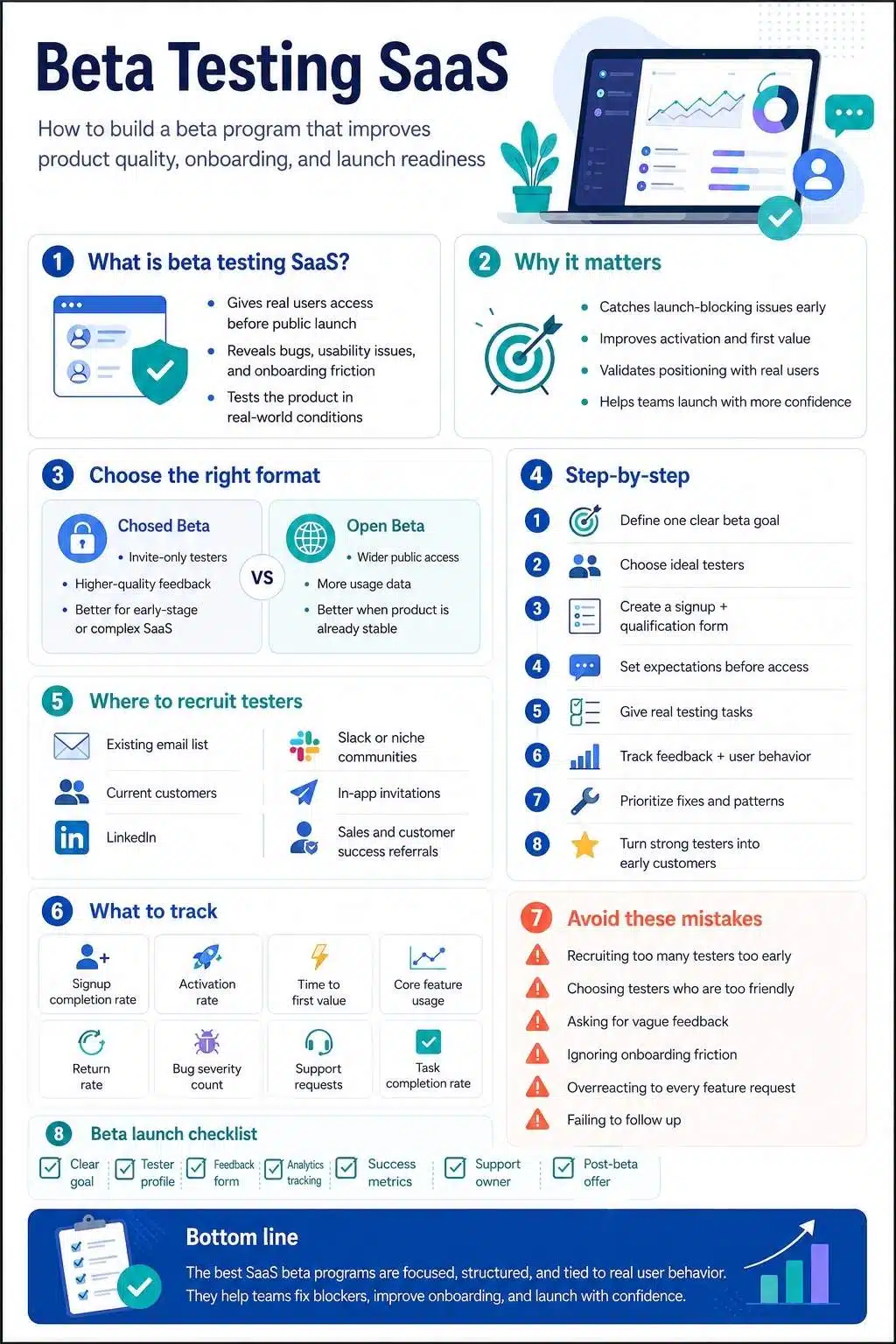
Why Beta Testing SaaS Matters More Than Many Founders Think
A SaaS product can look polished inside your team and still feel confusing to the market. That happens because your team already knows the logic behind every button, feature, and workflow. You know why the dashboard is arranged that way. You know what the setup step means. You know which feature creates the “aha” moment.
New users do not. They come in cold. They compare your product with tools they already use. They bring habits, doubts, shortcuts, and expectations you may not have planned for.
That is why a SaaS beta program is valuable. It gives you a safer space to see the product through the eyes of people who are not emotionally attached to it.
Done properly, beta testing helps you:
- Catch bugs before public launch
- Improve onboarding before paid acquisition begins
- Validate your positioning with actual users
- Discover missing help docs or product education gaps
- Understand which users are the best fit
- Find friction in activation and setup
- Reduce launch-day support pressure
- Build early advocates and testimonials
- Prioritize product fixes based on real usage
For SaaS, these insights can protect your launch budget. There is no point sending more traffic into a product experience that leaks users during setup.
Beta Testing vs Alpha Testing vs Pilot Programs vs Early Access
These terms often get mixed up. For SaaS teams, the difference matters because each stage has a different job.
Alpha Testing
Alpha testing usually happens before beta. It is mostly internal. Your team, QA testers, developers, or selected internal users test the product in a controlled environment.
The goal is to catch obvious bugs, broken flows, incomplete features, and major usability problems before external users touch the product.
Beta Testing
Beta testing happens when the product is close enough for real users to try in real conditions. The goal is to learn from real usage before a wider release.
This is where you test product stability, usability, onboarding, workflow fit, messaging, and early user satisfaction.
Pilot Program
A pilot program is usually more business-focused. It often involves a small number of target customers testing the product in a serious environment, sometimes with sales involvement.
For B2B SaaS, a pilot may be used to validate whether the product can work inside a company’s actual process before they become a paying customer.
Early Access
Early access is often a broader go-to-market approach. Users get access before the full public release, usually in exchange for feedback, patience, or community involvement. Early access can include beta testing, but it may also be used for demand generation and product-led growth.
The simple version:
- Alpha testing asks: Is this stable enough to show outside the team?
- Beta testing asks: Can real users use this successfully?
- Pilot testing asks: Can this work for a serious target customer?
- Early access asks: Can we build adoption and feedback before full launch?
Closed Beta SaaS vs Open Beta: Which One Should You Choose?
One of the first decisions is whether to run a closed beta SaaS program or an open beta. Both can work, but they solve different problems.
Closed Beta SaaS
A closed beta gives access to a selected group of testers. These may be current customers, waitlist users, industry experts, power users, or handpicked prospects.
A closed beta is usually better when:
- The product is still sensitive or unstable
- You need high-quality feedback
- You want testers from a specific customer profile
- You are testing a complex B2B workflow
- You need to protect positioning before launch
- You want fewer but deeper conversations
- You are testing pricing, onboarding, or activation
For most early-stage SaaS products, closed beta is the safer starting point. It gives you more control and less noise.
Open Beta
An open beta allows a wider audience to try the product. Anyone may sign up, or the beta may be publicly promoted.
An open beta is useful when:
- The product is stable enough for higher traffic
- You want wider usage data
- You are trying to build launch buzz
- You want to test performance at scale
- You already have clear feedback systems in place
- You can handle support requests from many users
The danger with open beta is feedback overload. You may get hundreds of comments, but not all of them will come from your ideal users.
A practical approach is to move in stages:
Internal beta → closed beta → wider beta → public launch
That way, the product gets stronger before the audience gets bigger.
When Should a SaaS Product Start Beta Testing?
Do not start beta testing too early just because you want feedback. If the product is too broken, testers will spend all their time reporting obvious bugs. You will not learn much about value, adoption, or workflow fit.
But do not wait until everything is perfect either. If the product is fully polished before real users see it, you may waste months building things the market does not care about.
A SaaS product is usually ready for beta when:
- The core workflow is usable from start to finish
- The main feature set is mostly complete
- Onboarding exists, even if it is basic
- The team can fix issues quickly
- Feedback channels are ready
- You know what you want to learn
- You can explain who the product is for
- You have basic analytics installed
- Users can safely test without major data risks
For example, if you are launching a project management SaaS, users should be able to sign up, create a workspace, invite a teammate, create a project, assign a task, and complete the main workflow. The experience does not need to be perfect, but the core promise must be testable.
How to Build a SaaS Beta Program Step by Step
A beta program should not feel like random people randomly clicking around your product. It should feel like a guided learning process. Here is a practical structure.
1. Define the Main Goal of Your Beta Program
Start with one clear question:
What do we need to learn before launch?
This sounds basic, but it changes everything. A SaaS beta program can have many possible goals:
- Find bugs in real-world usage
- Test onboarding and activation
- Validate a new feature
- Understand user expectations
- Improve product messaging
- Test integrations
- Check performance and reliability
- Collect testimonials
- Build a waitlist-to-customer path
- Test pricing or packaging signals
The mistake is trying to test everything at once. If your goal is activation, your beta tasks should focus on signup, setup, first value, and repeat usage. If your goal is feature validation, your questions should focus on whether users understand, need, and reuse that feature.
A focused beta creates cleaner feedback. A scattered beta creates noise.
2. Choose the Right Type of Beta Testers
Good beta tester recruitment is not about getting as many people as possible. It is about getting the right people. The right testers should match your target customer profile. They should have the problem your SaaS solves. They should be able to use the product in a realistic setting. They should also be willing to give honest feedback.
For B2B SaaS, this may include:
- Founders
- Operations managers
- Marketing teams
- Sales teams
- Customer success teams
- Finance teams
- HR teams
- Product managers
- Agency owners
- Developers
- Admin users
- End users inside target companies
You may need different tester segments if your product serves multiple roles. For example, a CRM beta may need sales reps, sales managers, and admins. Each one will notice different problems.
Sales reps may care about speed. Managers may care about reporting. Admins may care about setup, permissions, and integrations. If you only recruit one type of tester, you may miss issues that affect the buying committee or long-term adoption.
3. Create a Beta Tester Profile Before Recruiting
Before inviting people, define your ideal tester. Use a simple profile like this:
Ideal beta tester profile.
- Industry
- Company size
- Role
- Current tool or process
- Main pain point
- Experience level
- Required device/browser
- Required integrations
- Willingness to give feedback
- Time available for testing
For a closed beta SaaS program, you can also divide testers into groups:
- Power users
- New users
- Admin users
- Decision-makers
- Technical users
- Non-technical users
- High-intent prospects
- Existing customers
This helps you compare feedback more intelligently.
If only advanced users love the product but beginners get stuck, your onboarding needs work. If users like the idea but do not return after the first session, your activation loop may be weak.
4. Build a Simple Beta Signup Page
Your beta signup page does not need to be long. It needs to be clear.
Include:
- What the product does
- Who it is for
- What testers will get
- What testers are expected to do
- How long will the beta run
- Whether access is free
- Whether incentives are offered
- What kind of feedback do you need
- Any limitations or known risks
- A short qualification form
Avoid vague copy like:
“Join our exclusive beta and help shape the future.”
That sounds nice, but it does not tell serious testers what they are joining.
Use clearer copy:
“We’re inviting 50 B2B marketing teams to test our campaign planning software for 3 weeks. You’ll be asked to create one campaign plan, invite one teammate, and share feedback on setup, collaboration, and reporting.”
That kind of copy filters people before they apply.
5. Recruit Beta Testers From the Right Channels
Beta tester recruitment should start where your best-fit users already spend time. Here are practical channels for SaaS beta tester recruitment.
Existing Email List
If you already have newsletter subscribers, waitlist users, free users, or demo leads, start there. These people already know something about your product or category.
Keep your invite short. Explain who the beta is for, what they will test, and what they will get in return.
Current Customers
If you are testing a new SaaS feature, your current customers may be the best testers. They understand the product and can compare the new feature with their existing workflow.
But be careful. Do not overload your happiest customers with unfinished experiences unless the feature is relevant to them.
LinkedIn works well for B2B SaaS beta programs because you can search by job title, industry, company size, and pain point.
A good outreach message should be personal and specific. Do not send a generic “try our tool” message.
Communities and Groups
Depending on your niche, you may find testers in Slack groups, Discord communities, Reddit communities, Facebook groups, Indie Hackers, Product Hunt, niche forums, or founder communities.
Do not spam these communities. Join the conversation first. Explain the problem you are solving and ask for testers who match a clear profile.
In-App Invitations
If you already have users, in-app beta invites can work well. You can invite users based on behavior, plan type, usage level, or feature interest.
For example, if users frequently visit your reporting page, they may be good testers for a new analytics feature.
Sales and Customer Success Teams
Your sales and customer success teams often know which prospects or customers are most likely to give useful feedback.
Ask them:
- Which customers ask for this feature often?
- Which prospects would benefit from early access?
- Which users are honest and responsive?
- Which accounts match our ideal customer profile?
This can produce much better testers than a public signup form alone.
6. Use a Qualification Survey
A qualification survey helps you avoid the wrong testers. Ask only what you need. Too many questions reduce completion rates.
Useful questions include:
- What is your role?
- What type of company do you work for?
- How do you currently solve this problem?
- Which tools do you use now?
- How often do you face this problem?
- Are you willing to complete specific tasks during the beta?
- Are you open to a short feedback call?
- What device/browser will you use?
- What is your biggest frustration with your current process?
The strongest beta testers usually have a real pain point. They are not just curious. They want a better way to work.
7. Set Clear Expectations Before Giving Access
Many SaaS beta programs lose testers because expectations are unclear.
Before the beta begins, send a simple welcome email that explains:
- Start date and end date
- Login instructions
- What to test first
- How much time should it take
- How to report bugs
- Where to give product feedback
- How often will you contact them
- What happens after the beta
- Whether their data will be kept or deleted
- What incentive or reward will they receive, if any
Also, be honest about the product stage. If something is incomplete, say so. Beta testers are usually more patient when they know what to expect.

8. Give Testers Real Tasks, Not Vague Requests
“Tell us what you think” is one of the weakest beta instructions. Most users do not know what kind of feedback you want. Some will comment on colors. Some will ask for unrelated features. Some will say everything is fine even when they struggled. Give testers realistic tasks instead.
For example:
- Create your account and complete setup.
- Import your first project or dataset.
- Invite one teammate.
- Complete one full workflow.
- Try to connect your current tool.
- Find the report you would use in a weekly meeting.
- Export or share the result.
- Come back two days later and continue where you left off.
Then ask specific follow-up questions:
- Where did you hesitate?
- What felt unclear?
- What did you expect to happen?
- Did anything feel slower than expected?
- What would stop you from using this again?
- What would make this worth paying for?
- Which part felt most useful?
- Which part felt unnecessary?
This gives you feedback you can actually use.
9. Track Both Feedback and Behavior
User comments are important, but behavior often tells the deeper truth. A tester may say the onboarding was easy, but analytics may show they skipped setup, failed to invite a teammate, or never returned. Track both qualitative and quantitative signals.
Qualitative Feedback
This includes:
- User interviews
- Surveys
- Open-text feedback
- Support messages
- Bug reports
- Screen recordings
- Feedback calls
- Community discussions
Behavioral Data
This includes:
- Signup completion rate
- Activation rate
- Time to first value
- Feature usage
- Drop-off points
- Session frequency
- Invite rate
- Integration completion
- Support requests
- Retention during the beta period
When feedback and behavior disagree, investigate.
For example, if users say they like the dashboard but rarely return to it, the dashboard may look good but not be useful enough.
10. Separate Bugs, Usability Issues, and Feature Requests
Do not dump every beta comment into one messy spreadsheet. Separate feedback into categories.
Bugs
Something is broken or not working as intended.
Example: “The CSV import fails when the file has more than 1,000 rows.”
Usability Issues
The feature works, but users struggle to understand or complete the task.
Example: “I didn’t realize I had to connect my calendar before creating a schedule.”
Feature Requests
Users want something that does not currently exist.
Example: “Can you add Slack notifications?”
Positioning Feedback
Users misunderstand what the product does or who it is for.
Example: “I thought this was for freelancers, but it seems built for agencies.”
Onboarding Gaps
Users need more guidance, examples, templates, or help.
Example: “I didn’t know what to do after creating my workspace.”
This structure helps your product, marketing, and customer success teams act on the right feedback.
11. Prioritize Feedback With a Simple Scoring System
Not all feedback deserves the same attention. A request from one wrong-fit tester should not rewrite your roadmap. A repeated blocker from your ideal customer profile should get serious attention.
Use a scoring system like this:
| Feedback Factor | Question to Ask |
| Severity | Does this block users from completing a key task? |
| Frequency | How many testers reported or experienced it? |
| Customer Fit | Did it come from ideal users? |
| Business Impact | Does it affect activation, conversion, retention, or expansion? |
| Effort | How hard is it to fix? |
| Strategic Fit | Does it support the product direction? |
High-severity, high-frequency issues from ideal users should be addressed first. Low-fit feature requests should be saved, not rushed into development.
12. Keep Testers Engaged During the Beta
Recruiting testers is only half the job. Keeping them active is the harder part. Most beta testers are busy. If you do not guide them, they may forget about the product after the first login.
To keep engagement strong:
- Send a clear kickoff email
- Give weekly testing prompts
- Share what has been fixed
- Thank testers by name when possible
- Offer short feedback calls
- Create a private community or feedback channel
- Remind users of the beta timeline
- Show that their feedback is being used
One of the best ways to keep testers engaged is to close the loop. Instead of only saying “Thanks for your feedback,” say:
“You mentioned that the invite flow was confusing. We simplified the invite screen and added a confirmation message. Could you try it again this week?”
That makes testers feel heard. It also improves the quality of future feedback.
13. Know What Success Looks Like
A beta program should end with a decision. Do not run beta forever because the product is never perfect. SaaS products are never truly finished. Before the beta begins, define success criteria.
Examples:
- 70% of selected testers complete onboarding
- 50% reach the first value moment within 24 hours
- Fewer than 5 critical bugs remain
- 60% of testers say they would use the product again
- At least 10 testers agree to a follow-up interview
- At least 5 testers give permission for a testimonial
- Target users complete the core workflow without support
- Activation improves after onboarding changes
Your numbers will depend on your product stage, market, and tester group. The point is to define what “ready” means before emotions take over.
14. Turn Beta Testers Into Early Customers
A SaaS beta program should not end with a thank-you email and silence. If testers are a good fit and they found value, create a path to the next step.
That path could be:
- Early adopter pricing
- Extended free trial
- Founder plan
- Discounted annual plan
- Private onboarding call
- Customer advisory group
- Case study invitation
- Referral program
- Product community membership
Be careful with pressure. Beta testers helped you. They should not feel trapped in a sales funnel.
A good closing message sounds like:
“Thanks for helping us improve the product. Based on your usage, it looks like the team workspace and reporting features were useful for you. We’re opening early customer access next week. Would you like to continue with a founder plan?”
That feels natural because it connects the offer to the value they experienced.
Common SaaS Beta Program Mistakes
Even good teams make these mistakes.
1. Recruiting Too Many Testers Too Early
More testers do not automatically mean better feedback. If the product is still unstable, too many testers can overwhelm your team.
Start small. Learn fast. Expand when your feedback system is ready.
2. Choosing Testers Who Are Too Friendly
Friends, supporters, and existing fans may be kind, but they may not be honest enough.
You need people who will tell you where the product is confusing, slow, weak, or not worth paying for.
3. Asking for General Feedback
General feedback usually produces general answers.
Give testers tasks. Ask specific questions. Watch behavior.
4. Ignoring Onboarding
Many SaaS teams focus on feature bugs and forget onboarding.
But if users cannot reach value quickly, the product may lose them before they ever see the best feature.
5. Treating Every Feature Request as a Roadmap Priority
Beta testers will ask for many things. Some will be smart. Some will be distractions.
Look for patterns from ideal users before changing direction.
6. Not Following Up
The first answer is rarely the full answer.
If a tester says, “This was confusing,” ask what they expected, where they got stuck, and what would have helped.
That is where the useful insight usually appears.
Best Metrics to Track During Beta Testing SaaS
A SaaS beta program should measure product readiness, not vanity activity.
Track these metrics:
| Metric | Why It Matters |
| Signup completion rate | Shows whether account creation is smooth |
| Activation rate | Shows whether users reach the first value moment |
| Time to first value | Shows how quickly users experience usefulness |
| Core feature usage | Shows whether the main feature is actually used |
| Return rate | Shows whether users come back after first use |
| Bug severity count | Shows product stability |
| Support requests | Shows confusion and friction |
| Task completion rate | Shows usability |
| Feedback quality | Shows whether testers are engaged |
| Conversion interest | Shows whether testers see enough value to continue |
For early SaaS, activation and task completion are often more useful than total signups.
A beta with 40 serious testers can teach more than a beta with 1,000 random users who never return.
Simple SaaS Beta Program Timeline
Here is a practical timeline for a 6-week SaaS beta.
| Week | Focus |
| Week 1 | Define beta goals, tester profile, success metrics, and feedback system |
| Week 2 | Build a signup page, a qualification survey, onboarding emails, and test tasks |
| Week 3 | Recruit and qualify testers |
| Week 4 | Launch closed beta, monitor onboarding, and collect first feedback |
| Week 5 | Fix major issues, run feedback calls, and test updated workflows |
| Week 6 | Analyze results, decide launch readiness, invite best-fit testers to continue |
For complex B2B SaaS, you may need 8–12 weeks. For a smaller feature beta, 2–4 weeks may be enough.
The right timeline depends on product complexity, tester availability, and how quickly your team can act on feedback.
A Practical Beta Testing Checklist for SaaS Teams
Before launching your beta, check these items:
- Clear beta goal
- Defined tester profile
- Closed or open beta decision
- Signup page
- Qualification survey
- Beta invite email
- Onboarding instructions
- Feedback form
- Bug reporting process
- Analytics tracking
- User interview plan
- Test tasks
- Support owner
- Internal response process
- Success metrics
- Post-beta offer or next step
- Data/privacy explanation
- Thank-you or incentive plan
If any of these are missing, your beta may still work, but it will be harder to manage.
Final Thoughts
Beta testing SaaS is not just a product development step. It is a growth step. It helps you find bugs, yes. But more importantly, it shows whether the product makes sense to real users. It shows whether onboarding is clear, whether the value is obvious, whether your ideal customers care enough to return, and whether your launch message matches the product experience.
The best SaaS beta programs are not the biggest. They are the clearest. They recruit the right testers, ask better questions, watch real behavior, fix the biggest blockers, and turn early users into confident advocates.
Before you scale acquisition, launch campaigns, or push harder on growth, make sure the product experience is ready to receive that attention. A thoughtful beta program can save you from launching too early, spending too soon, and learning painful lessons in public.
Frequently Asked Questions about Beta Testing SaaS
1. What is beta testing SaaS?
Beta testing SaaS means giving a near-ready SaaS product or feature to real users before a wider release. The goal is to find bugs, usability issues, onboarding problems, workflow gaps, and early adoption signals before launching to a bigger audience.
2. How do I start a SaaS beta program?
Start by defining one clear beta goal. Then choose your ideal tester profile, decide whether to run a closed beta or open beta, create a signup and qualification process, prepare test tasks, set up feedback channels, and track both user comments and behavior.
3. What is a closed beta SaaS program?
A closed beta SaaS program gives access to a selected group of testers instead of the public. It is useful when you want higher-quality feedback, more control, and testers who closely match your ideal customer profile.
4. How many beta testers does a SaaS product need?
It depends on your product stage and goal. For early qualitative feedback, a small group can reveal major usability issues. For broader SaaS beta testing, many teams start with a focused group of 25–100 testers, then expand as the product becomes more stable.
5. How do you recruit beta testers for SaaS?
Good beta tester recruitment starts with your target users. You can recruit from your email list, waitlist, current customers, LinkedIn, niche communities, Product Hunt, Slack groups, Discord groups, in-app prompts, and referrals from sales or customer success teams.
6. What should you ask beta testers?
Ask task-based and experience-based questions. For example: Where did you get stuck? What felt unclear? Did you reach the main value? What would stop you from using this again? What would make this worth paying for? Which feature felt most useful?