
An XML sitemaps guide sounds technical until your best articles stop getting discovered fast enough. That is when the sitemap becomes less of a background file and more of a quiet SEO safety net.
For publishers, this matters a lot. You may publish evergreen guides, update old articles, build topic clusters, add new categories, or remove outdated pages. Search engines can often find many of those URLs through internal links. But a clean XML sitemap makes the job easier. It tells crawlers which URLs matter, when important pages changed, and how your site’s key content is organized.
A sitemap will not magically rank a weak page. It will not force Google to index everything. But it can support better crawl discovery, especially when your site is large, growing, media-heavy, or not perfectly linked internally.
This guide explains XML sitemap setup in a practical way. You will learn what to include, what to remove, how to submit it, and how to avoid the sitemap mistakes that quietly weaken technical SEO.
What Is an XML Sitemap?
An XML sitemap is a file that lists important URLs on your website for search engines. It is written in XML format, which is made for machines, not regular readers. A human visitor usually does not need to open your XML sitemap. Search engine crawlers use it to understand which pages, posts, videos, images, or news URLs you want them to discover.
A basic sitemap entry usually includes the page URL and may include the last modified date. Larger websites may use a sitemap index, which is like a folder that points to multiple smaller sitemap files.
For example, a publisher might have separate sitemaps for:
- Posts
- Pages
- Categories
- Authors
- News articles
- Videos
- Images
- Topic hubs
- Static evergreen guides
This keeps the sitemap cleaner and easier to monitor.
Why XML Sitemaps Matter for SEO
Sitemap SEO is mostly about crawl discovery and crawl clarity. Search engines discover URLs in many ways. They follow links, process submitted sitemaps, revisit known URLs, and use other discovery signals. A sitemap does not replace internal linking. It supports it.
For a small site with 100 well-linked pages, the sitemap may not feel urgent. But for a publisher with thousands of posts, old archives, multiple categories, frequent updates, and new evergreen clusters, a sitemap becomes more useful.
It helps search engines find:
- Newly published content
- Recently updated evergreen articles
- Important pages buried deep in archives
- Rich media pages
- News content
- Large sets of URLs
- Pages are not linked strongly enough yet
Think of your XML sitemap as a clean list of URLs you are proud to show search engines. If the sitemap is full of redirects, noindex pages, thin tags, broken URLs, or duplicate versions, it sends a messy signal. If it contains only strong, indexable, canonical URLs, it supports a healthier crawl path.
XML Sitemap vs HTML Sitemap
| Feature | XML Sitemap | HTML Sitemap |
| Purpose | For search engines | For users |
| Location/URL | Typically /sitemap.xml or /sitemap_index.xml | Regular page on the website |
| Format | Structured XML markup readable by crawlers | Standard HTML page readable by humans |
| Design | Not designed to be visually appealing | Designed to help users navigate and find content |
| Use | Supports crawl discovery and indexing | Supports user navigation, accessibility, and internal linking |
| SEO Consideration | Essential for search engines; should not be replaced | Useful for users, but does not replace XML sitemap for SEO |
Do All Websites Need an XML Sitemap?
Not every website desperately needs one, but most websites benefit from having one. For publishers, the answer is usually yes.
You should use an XML sitemap if:
- Your site has many articles.
- You publish new content often.
- You update evergreen guides regularly.
- Your site has large archives.
- Some content is several clicks away from the homepage.
- You use rich media like images or videos.
- You have news content.
- You manage multiple content types.
- Your internal linking is still being improved.
A sitemap is especially helpful when a website is growing. New pages may not have strong internal links yet. Topic clusters may still be forming. Category pages may change. Old content may be updated.
In those cases, a sitemap gives search engines another reliable discovery path.
What Should Be Included in an XML Sitemap?
A good XML sitemap should include URLs that are important, indexable, canonical, and useful.
For a publisher, this usually means:
- Evergreen articles
- Fresh articles
- Important pages
- Topic hubs
- Category pages with real value
- Author pages, if they are useful and indexable
- News URLs, if the site qualifies and uses news content
- Video pages, if video is a meaningful part of the page
- Image entries, when image discovery matters
The key is quality control. Only include URLs that you want search engines to consider for search results. If a URL is not useful enough to be indexed, it usually does not belong in the sitemap.
For example, an evergreen guide on technical SEO belongs in the sitemap. A thin tag page with two posts probably does not. A canonical article URL belongs in the sitemap. A tracking URL or duplicate parameter URL does not. A clean sitemap should feel like a curated index of your best crawl-worthy content.
What Should Not Be Included in an XML Sitemap?
This is where many sites make mistakes. Do not include URLs that send mixed signals.
Avoid adding:
- Noindex pages
- 404 pages
- Redirected URLs
- Canonicalized duplicate URLs
- Blocked URLs
- Internal search result pages
- Login pages
- Cart or account pages
- Thin tag archives
- Low-value date archives
- URL parameter variations
- Draft or private content
- Staging URLs
- Paginated URLs without a clear reason
- HTTP versions if HTTPS is canonical
- Non-www versions if www is canonical, or the reverse
The sitemap should not fight your other SEO signals.
If a URL is in your sitemap but has a noindex tag, you are telling search engines two different things. If a URL is in the sitemap but redirects somewhere else, you are wasting crawl attention. If the sitemap includes old HTTP URLs while the site uses HTTPS, cleanup is needed.
For sitemap best practices, consistency matters more than size.
The Role of Canonical URLs in Sitemaps
Your XML sitemap should list canonical URLs. A canonical URL is the preferred version of a page. If the same content can be reached through multiple URLs, the canonical tells search engines which one should be treated as the main version.
For example, these may all point to similar content:
- https://example.com/article/
- https://www.example.com/article/
- http://www.example.com/article/
- https://www.example.com/article/?utm_source=facebook
Only the preferred canonical version should appear in the sitemap.
For publishers, canonical consistency is important because articles can collect tracking parameters, category paths, syndication URLs, AMP versions, or pagination variations. Your sitemap should stay clean and point to the final preferred URLs.
Understanding the lastmod Tag
The <lastmod> tag tells search engines when a URL was last meaningfully updated. This tag can be useful, but only if it is honest.
A meaningful update can include:
- A rewritten section
- Updated facts
- New examples
- Fresh internal links
- Improved structured data
- A changed headline
- Updated main content
- A major image or media update
A small footer change, copyright year change, ad script change, or layout tweak should not trigger a new lastmod date for every URL.
This matters for evergreen publishing. If you update an article properly, the lastmod tag can help search engines understand that the page changed. But if every page shows today’s date every day, the signal becomes unreliable.
Use lastmod carefully. It should reflect real editorial or technical changes that matter to the page.
Do priority and changefreq Still Matter?
Many sitemap generators still include <priority> and <changefreq>. These fields come from the sitemap protocol, but Google ignores them. That means you should not depend on them for ranking or crawl control.
Do not spend time trying to set every article to priority 1.0. Do not mark every page as changing hourly unless that is truly useful for another system. It will not make weak pages rank higher.
For modern sitemap SEO, the most important fields are the URL itself and accurate lastmod data when used properly. A clean list of indexable canonical URLs is more valuable than a bloated sitemap full of fake priority scores.
XML Sitemap Setup for WordPress Publishers
Most WordPress websites can generate XML sitemaps automatically. WordPress core includes basic sitemap functionality. SEO plugins can also generate more advanced sitemaps and give you better control over which content types are included.
Common sitemap setup steps:
- Find your sitemap URL.
It is often /sitemap.xml, /wp-sitemap.xml, or /sitemap_index.xml. - Review included content types.
Check posts, pages, categories, tags, authors, media, and custom post types. - Remove low-value archives.
Thin tags, empty categories, and weak date archives often do not need to be indexed. - Confirm only canonical URLs appear.
Avoid duplicate URL versions, staging URLs, and parameter URLs. - Check lastmod behavior.
Make sure dates change only when content changes meaningfully. - Submit the sitemap in Google Search Console.
Submit the sitemap index, not every small sitemap file unless needed. - Add the sitemap URL to robots.txt.
This gives crawlers another way to discover it.
For publishers, the biggest WordPress sitemap issue is not generation. It is control. Many plugins add too much by default. Review what is included.
Recommended Sitemap Structure for Publishers
A publisher site should usually use a sitemap index. Instead of one giant sitemap, create separate sitemap files by content type. This makes troubleshooting easier.
A practical structure may look like this:
- Post sitemap
- Page sitemap
- Category sitemap
- Author sitemap
- News sitemap
- Video sitemap
- Image sitemap
- Custom post type sitemap
This helps you diagnose problems quickly. For example, if Search Console shows issues in the post sitemap, you know the problem is likely related to articles. If only the author sitemap has errors, you can inspect author pages separately.
For large publishers, split big post sitemaps into smaller files. This keeps files within sitemap limits and makes crawl monitoring cleaner.
How to Submit an XML Sitemap
The most common way to submit a sitemap is through Google Search Console.
The process is simple:
- Open your verified property.
- Go to the Sitemaps report.
- Enter your sitemap URL.
- Submit it.
- Check whether the status is successful.
- Review discovered URLs and errors over time.
You can also list your sitemap in the robots.txt file.
For example:
Sitemap: https://www.example.com/sitemap.xml
If you use a sitemap index, point to the index file. After submission, do not expect instant indexing. Submitting a sitemap tells Google where the file is. It does not force Google to crawl or index every URL immediately.
Check the report periodically, especially after major site changes, migrations, plugin changes, or content cleanup.
XML Sitemap Best Practices
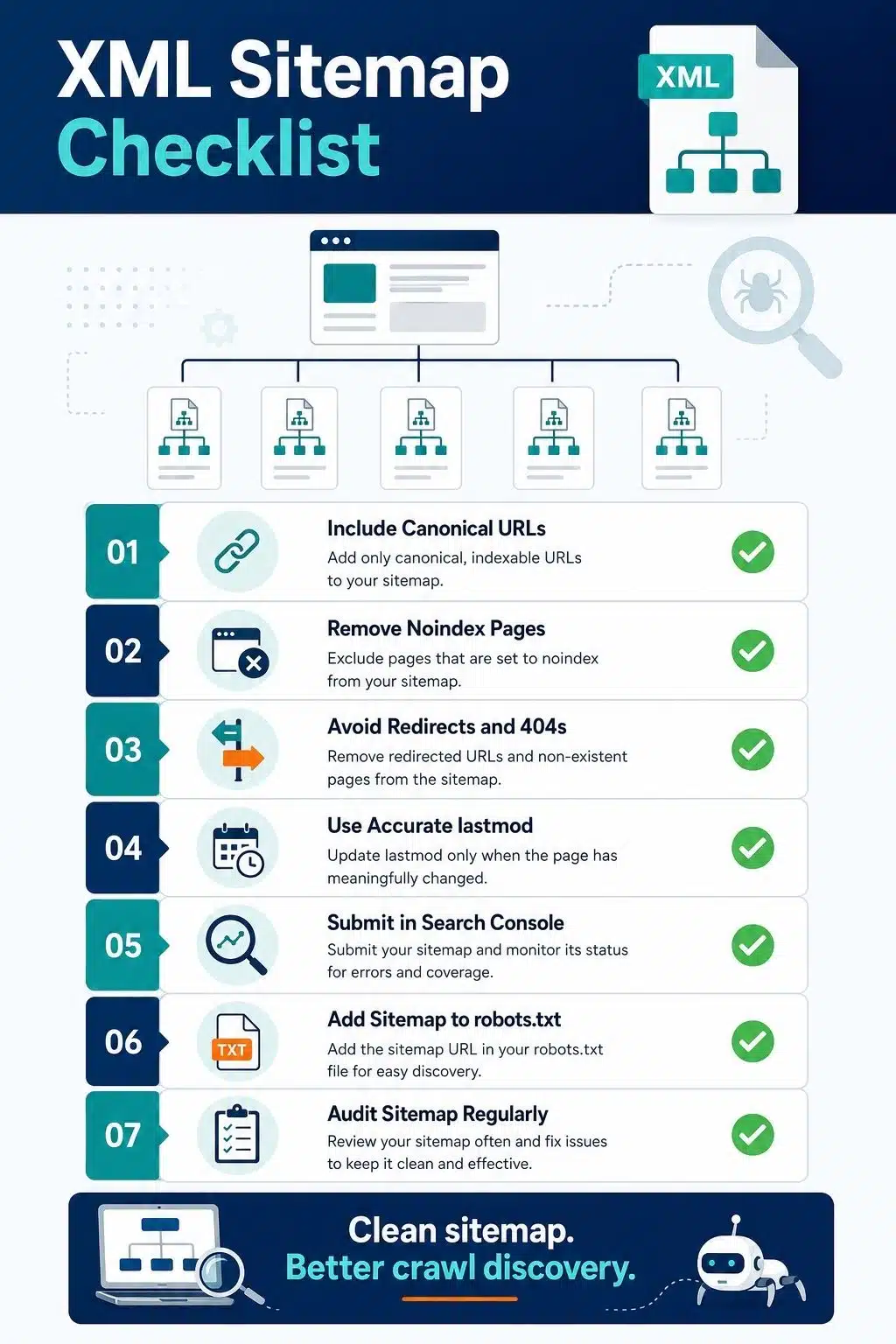
Use these sitemap best practices as a practical checklist.
- Use absolute URLs.
List full URLs, including the protocol and domain. - Include only indexable pages.
No noindex, blocked, broken, redirected, or duplicate URLs. - Use canonical URLs only.
The sitemap should match your canonical strategy. - Keep the sitemap updated.
New and updated content should appear automatically. - Use accurate lastmod dates.
Only change lastmod when the page meaningfully changes. - Keep files within limits.
Split large sitemaps when needed. - Submit the sitemap index.
For large sites, one sitemap index is easier to manage. - Place the sitemap at the site root when possible.
This keeps discovery simple. - Add the sitemap to robots.txt.
It helps search engines find it. - Audit your sitemap regularly.
Look for errors, old URLs, redirects, and noindex pages.
A sitemap should be boring in the best way. Clean, stable, predictable, and easy to understand.

Common XML Sitemap Mistakes
Mistake 01: Including Too Many Low-Value URLs
Publishers often let every tag, author page, media attachment, archive, and parameter URL enter the sitemap. This creates noise. A sitemap should highlight important, indexable URLs, not every possible page your website can generate.
Mistake 02: Adding Redirected URLs
If an old article URL redirects to a new version, the sitemap should list the final URL, not the old one. Redirected URLs waste crawl attention and make the sitemap less clean.
Mistake 03: Including Noindex Pages
Noindex URLs should not appear in an XML sitemap.
If a page is marked noindex, you are telling search engines not to index it. Putting that same page in the sitemap sends a mixed signal. The sitemap should include URLs you actually want search engines to consider for indexing.
Mistake 04: Using Bad lastmod Data
Some websites update the lastmod date across the entire site whenever a template, footer, plugin, or small layout element changes. That makes the date harder to trust.
The lastmod tag should reflect meaningful page updates, such as new content, updated facts, rewritten sections, improved examples, or major structural changes.
Mistake 05: Blocking Sitemap URLs With robots.txt
A sitemap should be easy for search engines to access.
If your sitemap URL, sitemap index, or listed URLs are blocked by robots.txt, crawlers may struggle to process them properly. Always check that your sitemap and important URLs are crawlable.
Mistake 06: Mixing Wrong Domain Versions
Incorrect domain versions can also create sitemap problems.
For example, if your canonical site uses HTTPS, the sitemap should not list HTTP URLs. If your preferred domain is www, the sitemap should not list the non-www version unless that is your actual canonical setup.
Your sitemap should match your canonical domain version exactly.
Mistake 07: Leaving Empty or Broken Sitemap Files
Empty sitemap files, broken sitemap URLs, and 404 sitemap pages can create unnecessary crawl confusion.
This often happens after plugin changes, migrations, content pruning, or deleted post types. Check your sitemap after major site updates to make sure every sitemap file still works.
These mistakes are easy to miss because sitemaps run quietly in the background. But at scale, they can create crawl confusion and weaken your technical SEO foundation.
XML Sitemaps and Internal Linking Work Together
A sitemap helps discovery, but internal links help search engines understand importance and context. Do not use a sitemap to hide weak internal linking.
If a page matters, it should usually be linked from relevant places on your site. For example, a cluster article about XML sitemaps should connect naturally to your broader guide on technical SEO for publishers. That gives readers and crawlers a clearer path from the specific topic to the main pillar.
A sitemap says, “This URL exists and matters.” Internal links say, “This URL belongs in this topic and connects to these related ideas.”
You need both. For strong SEO, treat the sitemap as infrastructure and internal linking as editorial architecture.
How Often Should You Audit Your XML Sitemap?
For a small website, a quarterly sitemap check may be enough. For a publisher, monthly checks are smarter, especially if you publish often.
Audit your sitemap after:
- A site migration
- A permalink change
- A major redesign
- A plugin change
- A category cleanup
- A noindex cleanup
- A large content pruning project
- A shift from HTTP to HTTPS
- A change in canonical rules
- A new content type launch
During the audit, check whether the sitemap contains only live, indexable, canonical URLs. Review Search Console errors. Compare submitted URLs with indexed URLs. Look for sudden drops or strange increases. A sitemap audit does not need to be complicated. It needs to be regular.
Final Thoughts on XML Sitemaps
A good XML sitemap will not fix weak content, poor site structure, or messy internal linking. But it can make a strong technical SEO foundation cleaner. For publishers, the best sitemap is not the biggest one. It is the cleanest one.
Include the URLs that deserve discovery. Remove the URLs that send mixed signals. Keep lastmod honest. Submit the sitemap properly. Review errors before they become patterns.
That is the real value of this XML sitemaps guide. It helps you treat the sitemap as part of your publishing system, not just a file your SEO plugin generated years ago.
When your sitemap is clean, search engines get a clearer path through your important content. Readers may never see that file, but your crawl health can benefit from it every day.
Frequently Asked Questions About XML Sitemaps
1. What is an XML sitemap in SEO?
An XML sitemap is a file that lists important URLs on your website for search engines. It helps crawlers discover pages, understand updates, and process large or complex sites more efficiently.
It does not guarantee indexing, but it supports better crawl discovery.
2. Does an XML sitemap improve rankings?
An XML sitemap does not directly improve rankings. It helps search engines find and crawl important URLs. Better discovery can support SEO, but rankings still depend on content quality, relevance, authority, user experience, internal linking, and technical health.
3. What should I include in an XML sitemap?
Include indexable, canonical, important URLs. For publishers, this usually means articles, evergreen guides, valuable pages, strong category pages, and relevant media or news URLs.
Do not include noindex pages, redirects, 404s, duplicate URLs, or thin archives.
4. How do I submit an XML sitemap to Google?
Submit it through Google Search Console. Open your verified property, go to the Sitemaps report, enter your sitemap URL, and submit it. You can also list the sitemap in your robots.txt file.
Submitting a sitemap tells Google where the file is, but it does not force instant indexing.
5. Should I use a sitemap index?
Yes, if your site has many URLs or multiple content types. A sitemap index points to smaller sitemap files, such as post sitemaps, page sitemaps, category sitemaps, and news sitemaps.
This makes large publisher sites easier to manage and troubleshoot.
6. Should noindex pages be in the sitemap?
No. A noindex page should not be included in your XML sitemap. The sitemap should list pages you want search engines to consider for indexing.
Including noindex URLs sends mixed signals.
7. How often should I update my XML sitemap?
Your XML sitemap should update automatically when important URLs are added, removed, or meaningfully changed. For evergreen content, update the lastmod date only when the article receives a real content or structural update.
Do not refresh dates across the whole site without meaningful changes.