
Finding the right AI Watermark and Background Removal Tool sounds easy until you actually upload an image and the result looks like someone attacked it with a blurry sponge. One tool removes the watermark but leaves a suspicious scar. Another removes the background but slices into hair, product edges, shadows, or fabric. Then there are tools that look fantastic on their landing pages but panic the moment your image has texture, reflections, or a busy background. Very futuristic. Very AI. Very “please check the pixels before publishing.”
For this comparison, I looked at AI tools that handle two common editing jobs: removing unwanted watermarks, logos, text, timestamps, or visual distractions, and cleaning or removing backgrounds without making the final image look fake. The goal here is not to crown the loudest tool on Google. The goal is to find which tools make sense for bloggers, e-commerce sellers, marketers, content teams, and small businesses that need clean images without opening Photoshop every five minutes.
One important note before we begin: watermark removal should only be used on images you own, created yourself, licensed, or have clear permission to edit. Removing watermarks from copyrighted images to avoid payment, licensing, or attribution is not smart image editing. It is copyright trouble wearing an AI costume.
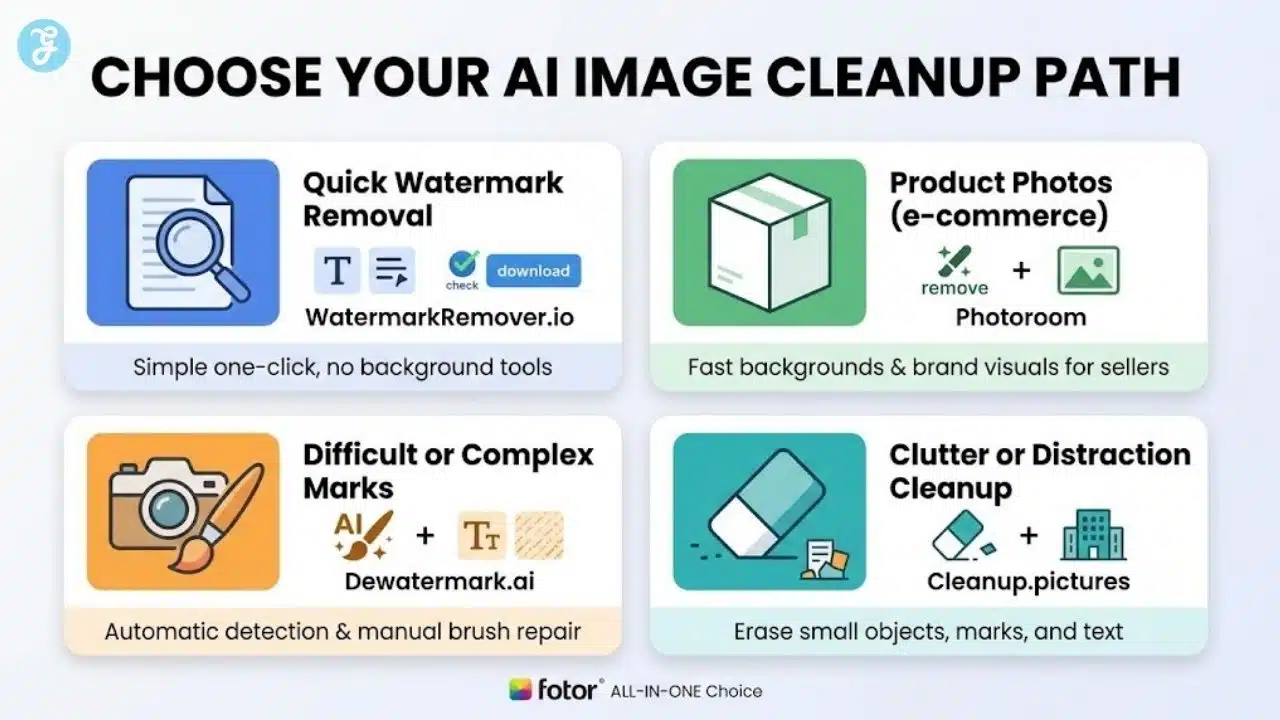
After reviewing official features, workflow fit, and user-facing tool capabilities, Fotor is the best overall choice. Photoroom is stronger for product photos and e-commerce. WatermarkRemover.io is best for quick watermark-only jobs. Dewatermark.ai is useful for tougher watermarks because it includes manual brush correction. Cleanup.pictures is the easiest option for removing small objects, text, and background distractions.
Our Selection Criteria
Before ranking the tools, I judged them by practical usefulness. A tool can say it is “AI-powered,” “one-click,” “instant,” and “professional,” but if the final image looks like melted pixels, that is not a feature. That is a warning sign.
I used these criteria to compare the tools:
- Watermark removal quality: Can it remove logos, text overlays, stamps, or watermarks without obvious blur or smearing?
- Background cleanup ability: Can it remove full backgrounds, erase distractions, or clean messy areas naturally?
- Ease of use: Is the workflow simple enough for non-designers?
- Manual control: Does it offer brush, masking, or refinement when AI makes a mess?
- Output quality: Does the final image still look sharp and natural?
- Best use case fit: Is it better for bloggers, e-commerce, creators, agencies, or casual users?
- Pricing and free access: Are free exports, HD downloads, batch tools, or paid limits reasonable?
- Review and feature consistency: Does the tool’s actual feature set match what users need, or is it mostly landing-page theatre?
This matters because watermark removal and background cleanup are not the same job. Removing a small date stamp from a plain wall is one thing. Removing a semi-transparent watermark across hair, skin, fabric, or product texture is a completely different little nightmare.
Top 10 AI Tools For Watermark Removal And Background Cleanup
Before narrowing the list to the top five, I shortlisted ten tools that are relevant for this category. Some are stronger for watermark removal, some are better for background removal, and some are better as full creative workflows.
| Rank Pool | Tool | Strongest Use Case | Quick Verdict |
|---|---|---|---|
| 1 | Fotor | Watermark removal, object cleanup, background removal | Best overall all-in-one choice |
| 2 | Photoroom | Product photos and e-commerce visuals | Best for sellers and product teams |
| 3 | WatermarkRemover.io | Dedicated watermark removal | Best pure watermark remover |
| 4 | Dewatermark.ai | Complex watermark cleanup | Best for manual correction after AI removal |
| 5 | Cleanup.pictures | Object, text, and defect removal | Best simple cleanup tool |
| 6 | remove.bg | Fast background removal | Best background-only specialist |
| 7 | Canva | Marketing designs with Magic Eraser and BG Remover | Best for Canva users |
| 8 | Adobe Express / Photoshop | Brand-safe editing and edge refinement | Best for professional creative workflows |
| 9 | PicWish | Budget-friendly background and image cleanup | Good for creators and small teams |
| 10 | Pixelcut | Product and creator visuals | Good for quick social/product images |
Fotor offers an AI watermark remover for logos and stamps, plus a separate AI background remover that creates transparent backgrounds, which makes it one of the broadest tools in this comparison. Photoroom offers AI retouching for objects, people, text, or watermarks, and its background remover is built around e-commerce and brand visuals. WatermarkRemover.io focuses on watermark removal and supports common formats such as JPG, JPEG, PNG, WebP, and HEIC, with batch processing available for premium users. Dewatermark.ai stands out because it offers automatic removal plus a manual in-app AI brush for leftover artifacts. Cleanup.pictures is more of an object and distraction remover, designed to remove people, text, objects, and defects while reconstructing what was behind them.
Best AI Watermark and Background Removal Tool Options Ranked
The five tools below are ranked based on overall usefulness for both watermark removal and background cleanup. I am not repeating “how to choose” under every tool later, because that just turns the article into a loop wearing different shoes.
1. Fotor — Best Overall AI Watermark and Background Removal Tool
Fotor ranks first because it handles the widest range of cleanup tasks in one place. It has a dedicated AI watermark remover for logos, stamps, and watermarks, and it also offers a background remover for creating transparent backgrounds. That combination makes it the most practical all-rounder for content teams, bloggers, small businesses, and marketers who need fast cleanup without switching between five different tools.
Best for: Bloggers, publishers, small brands, content teams, and marketers who need watermark removal, object cleanup, and background removal in one workflow.
Things to Consider: Fotor can still struggle when a watermark crosses detailed textures, faces, hair, or product surfaces. Some advanced features may also require credits or a paid plan, so regular users should check export limits before making it part of a daily workflow.
Why It Ranks #1: Fotor is not the most specialized tool in every category, but it is the strongest overall choice because it covers watermark removal, background cleanup, and general image editing without becoming too complicated.
2. Photoroom — Best For Product Photos And E-Commerce Cleanup
Photoroom ranks second because it is built for product visuals, not just casual image cleanup. Its AI retouch tool can remove objects, people, text, and watermarks, while its background remover creates transparent backdrops that can be replaced with studio or lifestyle settings. That makes it especially useful for e-commerce sellers, marketplace listings, product ads, and branded product images.
Best for: E-commerce sellers, Shopify stores, Etsy sellers, marketplace images, product ads, and product-background consistency.
Things to Consider: Photoroom is better for product workflows than pure watermark removal. If your only job is removing an occasional watermark, a dedicated remover may be simpler and cheaper.
Why It Ranks #2: Photoroom turns messy product images into cleaner sales-ready visuals. If the goal is product presentation, it is stronger than many generic AI erasers.
3. WatermarkRemover.io — Best Dedicated Watermark Remover
WatermarkRemover.io is the cleanest dedicated option for watermark removal. It is built around one main job: upload an image, remove the watermark, and download the result. It supports common image formats including JPG, JPEG, PNG, WebP, and HEIC, and premium users can access batch watermark removal through Pixelbin integration.
Best for: Fast watermark removal from images you own, created, licensed, or have permission to edit.
Things to Consider: It is limited as a broader image editor. If you also need background replacement, product cleanup, design templates, or manual creative control, you may outgrow it quickly.
Why It Ranks #3: If this ranking were only about watermark removal, WatermarkRemover.io could compete for the top spot. Since this comparison also includes background cleanup, it sits behind broader tools like Fotor and Photoroom.
4. Dewatermark.ai — Best For Complex Watermarks With Manual Brush Control
Dewatermark.ai earns its place because watermark removal is not always clean after one AI pass. Its official feature set includes automatic watermark removal plus a manual in-app AI brush to clean remaining artifacts. That matters when a watermark sits across busy textures, product surfaces, fabric, faces, or detailed backgrounds.
Best for: Logos, timestamps, signatures, text overlays, semi-transparent marks, and difficult watermarks that need manual cleanup.
Things to Consider: Dewatermark.ai is mostly focused on watermark removal. It is not the best choice if your main need is full background replacement, product-photo design, or broader visual editing.
Why It Ranks #4: The manual brush gives it a practical advantage over one-click tools. AI makes mistakes. A brush tool is the part where humans quietly save the day.
5. Cleanup.pictures — Best For Object, Text, And Background Distraction Cleanup
Cleanup.pictures is not a full background remover in the same way remove.bg or Photoroom is. Its strength is removing unwanted objects, people, text, and defects from an image, then reconstructing what was behind them. That makes it useful when the issue is not the full background, but one ugly object, mark, sign, or distraction ruining the image.
Best for: Removing background distractions, text, small defects, unwanted objects, people in the background, and visual clutter.
Things to Consider: Large removals can still create artifacts, especially on complex backgrounds. If you need full background removal or product image workflows, other tools on this list are stronger.
Why It Ranks #5: Cleanup.pictures is simple and fast. It is not the broadest tool, but for quick visual cleanup, it does the job without making users wrestle with a heavy editor.
Other Strong Tools That Almost Made The Top 5
These tools are still useful, but they did not make the top five because they are either more specialized, less complete for this exact topic, or better suited to a different workflow.
remove.bg
remove.bg is excellent if your only job is background removal. It removes image backgrounds automatically in about five seconds, and it remains one of the simplest tools for transparent backgrounds.
Best for: Fast transparent backgrounds and subject cutouts.
Things to Consider: It is not built for watermark removal or detailed object retouching.
Canva
Canva is useful if you already create social posts, thumbnails, ads, carousels, or website graphics inside Canva. Its Magic Eraser lets users brush over unwanted objects, while its Background Remover removes backgrounds inside the design editor.
Best for: Marketers, creators, and teams already working inside Canva.
Things to Consider: It is convenient, but not as precise as dedicated retouching tools for complex cleanup.
Adobe Express / Photoshop
Adobe Express offers quick background removal and downloads transparent PNG files, while Photoshop is better for more detailed manual refinement. Adobe Express is useful for fast social and brand visuals, while Photoshop is better when image quality needs closer control.
Best for: Designers, agencies, and brand teams needing more polish.
Things to Consider: It can feel heavier than necessary for simple watermark or background cleanup.
PicWish
PicWish is a useful budget-friendly AI photo editor for background removal, cleanup, and basic image improvement. It is a good option for creators and small teams, but it does not feel as strong as Fotor or Photoroom for this exact combined workflow.
Best for: Affordable AI image editing.
Things to Consider: Not as complete as the top all-rounders.
Pixelcut
Pixelcut is fast and creator-friendly. Its background remover claims to remove backgrounds in less than three seconds, and its cleanup tool can remove objects and watermarks by swiping over the unwanted area.
Best for: Creators, social images, and quick product visuals.
Things to Consider: Better for fast edits than detailed restoration.
Comparison Chart
Here is the full comparison in one place. This keeps the rankings easy to scan without repeating the same points again like an SEO article that got paid by the heading.
| Rank | Tool | Best For | Strongest Feature | Things To Consider |
|---|---|---|---|---|
| 1 | Fotor | Best overall AI cleanup | Watermark removal, object cleanup, and background removal in one place | Complex edits may still need manual correction |
| 2 | Photoroom | Product photos and e-commerce | Clean product backgrounds and branded product visuals | Better for product workflows than general watermark removal |
| 3 | WatermarkRemover.io | Dedicated watermark removal | Simple one-click watermark removal | Limited background cleanup features |
| 4 | Dewatermark.ai | Tougher watermark jobs | Manual brush support after AI detection | Not the best full background editor |
| 5 | Cleanup.pictures | Object and distraction cleanup | Fast removal of text, marks, objects, and visual clutter | Large edits may create visible artifacts |
How To Choose The Right Tool By Yourself
Choosing the right tool depends on the image problem you face most often. A watermark remover, a background remover, and an object cleanup tool may sound similar, but they are not always built for the same job. That is where people pick the wrong tool and then blame AI for doing AI things.
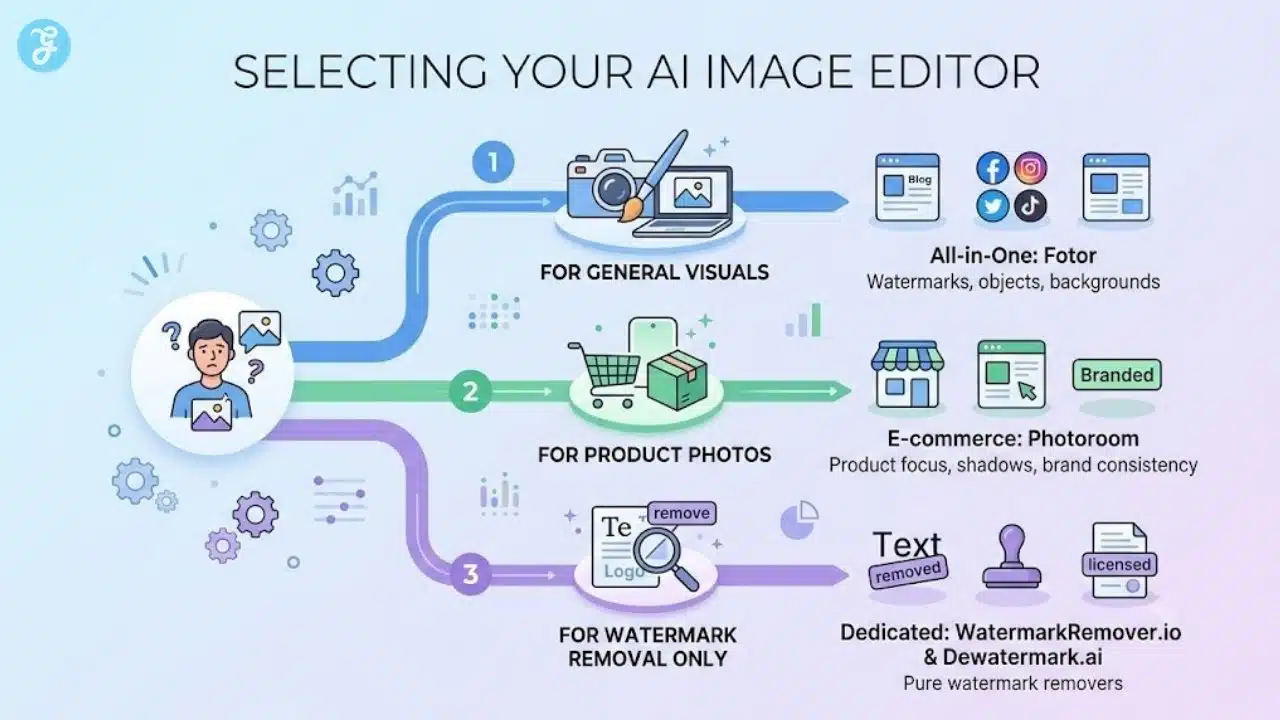
Start with your main use case. If you mostly need to remove watermarks from images you own or have permission to edit, choose a dedicated watermark remover with strong detection and manual brush support. If you work with product photos, look for tools that handle backgrounds, shadows, product edges, batch editing, and branded visuals. If you create blog or social media images, an all-in-one editor with object removal, background cleanup, and simple exports will usually save more time.
Also, check how much control the tool gives you after the first AI pass. One-click editing is nice, but real images are messy. Hair, fabric, glass, product edges, transparent objects, and textured backgrounds can confuse AI tools. A brush tool, manual masking, or edge refinement option can make the difference between a clean result and an image that looks like it survived a digital accident.
Pricing matters too. Free tools are useful for occasional edits, but regular content teams, e-commerce sellers, and marketers may need HD downloads, batch editing, commercial-use clarity, faster processing, and fewer export limits. Before paying, test the tool on your own image type, not just the sample images on the website. Sample images are always suspiciously well-behaved.
Here is a simple decision framework:
| Your Main Need | What To Look For |
|---|---|
| Watermark removal | AI detection, manual brush, clean reconstruction |
| Product photo cleanup | Background remover, batch editing, shadow control, brand templates |
| Blog and website visuals | Object remover, background cleanup, simple exports |
| Social media graphics | Built-in design tools, quick resizing, text, and layout options |
| Professional editing | Manual refinement, layer control, edge correction |
| Occasional quick edits | Free access, easy upload, fast download |
The safest rule is simple: choose the tool that matches your workflow, not the one with the loudest landing page. If you clean product images every day, you need a product photo workflow. If you only remove occasional watermarks, a dedicated remover is enough. If you manage mixed content for blogs, ads, or social media, an all-in-one tool will usually make more sense.
Final Ranking
Here is the simplified final ranking if you just want the answer without the long tool courtroom drama.
| Rank | Tool | Best Use |
|---|---|---|
| 1 | Fotor | Best overall all-in-one AI cleanup tool |
| 2 | Photoroom | Best for product and e-commerce images |
| 3 | WatermarkRemover.io | Best dedicated watermark remover |
| 4 | Dewatermark.ai | Best for complex watermarks with manual brush support |
| 5 | Cleanup.pictures | Best for quick object, text, and background cleanup |
The Final Pixel Check Before You Publish
The best AI Watermark and Background Removal Tool depends on the mess you are trying to fix. For most people, Fotor is the strongest all-around option because it combines watermark removal, background cleanup, object removal, and general photo editing into a single workflow. Photoroom is better for e-commerce sellers who need polished product photos. WatermarkRemover.io is the cleanest option for quick watermark-only work. Dewatermark.ai is useful when the watermark is stubborn and needs manual brush correction. Cleanup.pictures is the easiest choice when you need to remove objects, text, or background distractions.
The smart move is not choosing the most hyped AI tool. It is choosing the tool that matches your actual workflow. If you edit product images daily, use a product-focused platform. If you need general cleanup for blogs, social media, and websites, choose an all-rounder. If you only need watermark removal, choose a dedicated remover and move on with your life.
AI can clean images quickly, but it can also blur textures, distort edges, invent weird patches, and leave tiny visual scars where the watermark used to be. Trust the tool enough to save time, but not enough to skip your own eyes. Always check the final image before publishing.