
Publishing content only to watch larger sites steal the clicks is a common SEO frustration. This usually occurs when targeted search terms are too broad. Competing for massive seed keywords leads to unnecessary battles, whereas focusing on long-tail phrases attracts visitors with clear intent. Mastering niche keyword research is the key to bypassing industry giants and capturing highly qualified traffic.
Follow a proven seven-step process to transform a content strategy into a powerful asset. This method covers essential stages: pinpointing audience needs, conducting competitor analysis, evaluating ranking difficulty, and executing content optimization. Culminating in an actionable keyword map, this approach eliminates SEO guesswork. Implement these targeted tactics to sustainably grow organic visibility, drive engaged visitors, and boost conversion rates.
What is Keyword Research?

Keyword research is the process of finding the exact words your audience types into search engines before they buy, compare, or learn. Good keyword research tells you what to publish, what page to improve, and which topics are too competitive right now.
For B2B, SaaS, and service businesses, the goal is not to collect the biggest list. It is to find seed keywords, long-tail phrases, and related user queries that match real pain points, real demand, and real commercial intent.
Google Ads notes that Keyword Planner forecasts refresh daily and use the last 7 to 10 days of data with seasonality adjustments. That makes it useful for checking whether a term has stable interest before you spend time building a page around it.
- Find demand: Check search volume, trend, and keyword difficulty before you commit resources.
- Read intent: Separate informational keywords from commercial intent and transactional keywords.
- Match the SERP: Study what Google already rewards, such as guides, category pages, demos, pricing pages, or comparison content.
- Plan content: Turn your list into a keyword map for website optimization and content marketing.
Understanding Niche Keywords
Niche keywords target a smaller, more specific group of buyers. In plain English, they trade raw volume for clarity, which is exactly what you want if you serve a narrow audience or sell a specialized offer.
A strong niche keyword often includes the buyer’s use case, industry, role, problem, or buying stage. Think “SaaS onboarding checklist for HR teams” instead of “onboarding software.”
Definition of niche keywords
Good niche keywords bring the right buyer to the page, not just a bigger traffic graph.
That is why niche keyword research works so well in competitive niches. It helps you use the same language your readers use in demos, support tickets, customer reviews, and sales calls.
You can mine those phrases from autocomplete, People Also Ask, google search console, customer reviews, and competitor pages. Then you validate them with demand validation, keyword difficulty, and the kind of content already ranking on the SERP.
Niche keywords vs. trending keywords
| Aspect | Niche Keywords | Trending Keywords |
|---|---|---|
| Definition | Specific terms tied to a narrow audience, product use case, or buying need. | Terms that surge because of news, seasonality, social attention, or short-term buzz. |
| Best use | Steady content strategy, qualified lead generation, and long-term SEO growth. | Quick visibility, campaign tie-ins, and timely content bursts. |
| Search intent | Usually clearer. Many terms reveal informational intent, commercial intent, or transactional keywords right away. | Often unstable. Intent can shift fast as the story or trend changes. |
| Competition | Usually easier to enter because fewer brands build pages for the exact query. | Often crowded fast, especially when publishers and advertisers rush in. |
| Content types | Guides, landing pages, comparison pages, templates, case studies, and solution pages. | News posts, updates, reaction pieces, launch pages, and seasonal content. |
| Research methods | Seed keywords, competitor analysis, PAA, reviews, search console data, and long-tail phrase expansion. | Google Trends, social listening, trending searches, and real-time market signals. |
| Business value | Higher fit for audience targeting and better content performance over time. | Useful for spikes in awareness, but weaker as a stand-alone growth plan. |
The Importance of Keyword Research in Competitive Niches
In a competitive niche, keyword research keeps you out of unwinnable fights. Instead of chasing one broad term with giant brands on page one, you can build around clusters that match a narrower need and a clearer stage of the funnel.
That shift helps your SEO strategy in three ways: it cuts wasted content production, it improves audience targeting, and it gives your pages a better chance of reaching people who are ready to act.
One overlooked edge is coverage. Search Console shows up to 1,000 top queries in the Performance report table, so it should not be your only source of ideas. Pair it with competitor analysis, autocomplete, and customer language so you do not miss profitable long-tail keywords.
- Lower-contention targets: Long-tail keywords often have lower keyword difficulty than head terms.
- Better-fit traffic: Specific searches usually reveal stronger keyword intent, which can lift conversion rates.
- Smarter content optimization: A keyword map keeps overlapping pages from competing with each other.
- Clearer ROI: You can tie rankings and organic traffic back to pages built for one audience and one problem.
That is why strong keyword research starts with the buyer first, then uses tools to confirm what the buyer is already telling you.
The Step-by-Step Process for Keyword Research
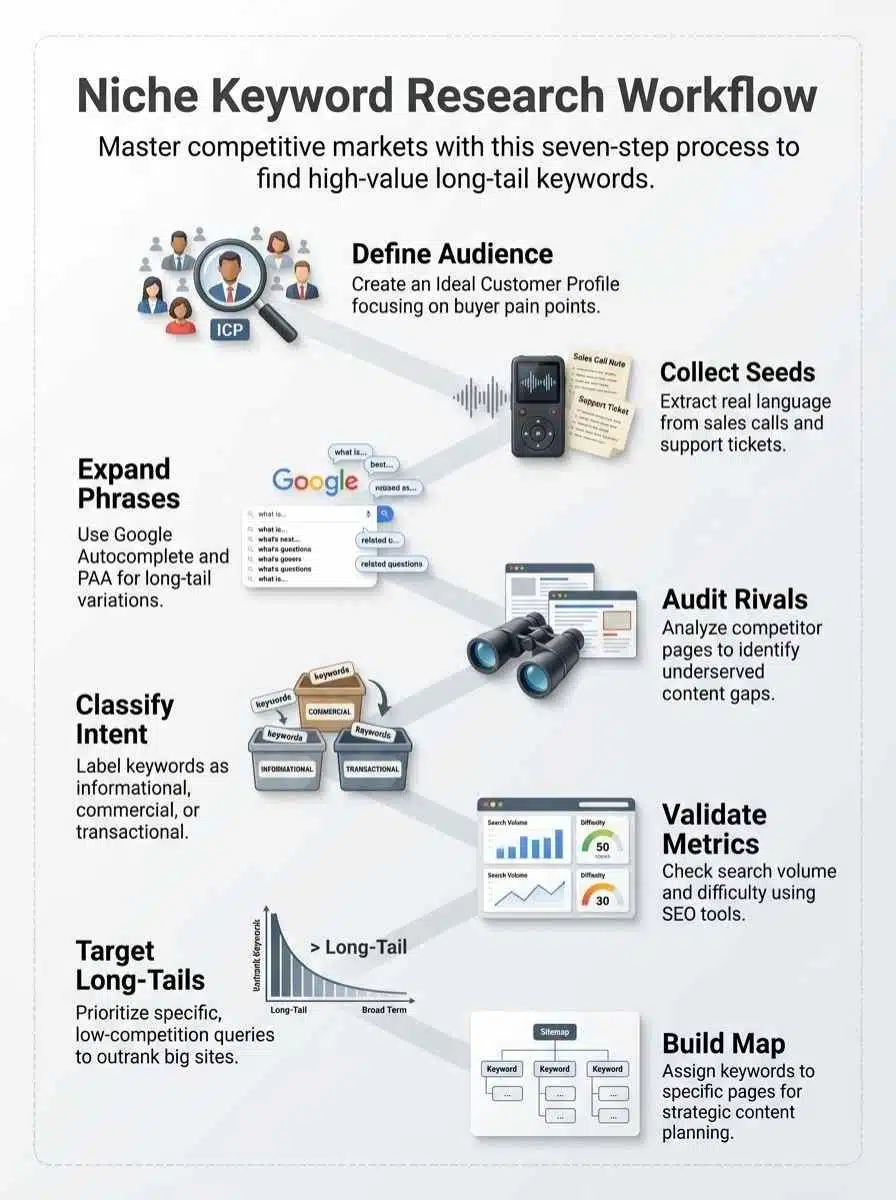
If you want keyword research to stay useful, make it repeatable. This seven-step workflow is simple enough to run every month and strong enough to support a full content strategy.
Step 1: Define your target audience and list seed keywords
Start with people, not software. If you cannot describe the buyer, your seed keywords will stay vague and your content strategy will drift.
- Write a basic Ideal Customer Profile with job title, company size, industry, pain points, and buying triggers.
- Pull seed keywords from sales calls, onboarding notes, support tickets, LinkedIn comments, and customer reviews.
- Use the exact wording buyers use. “Reduce churn in Shopify subscriptions” is better than “customer retention solutions.”
- Open google search console and look for queries already earning impressions. Those are often your fastest content optimization wins.
If your list feels too broad, cut it down to 10 to 30 seed keywords. That is usually enough to start without turning the project into a spreadsheet mess.
Step 2: Expand seed keywords using tools and autocomplete suggestions
Now widen the field. Your job here is quantity first, then filtering.
Semrush says its Keyword Magic Tool now works from a database of more than 27 billion keywords, which is why it is so good at surfacing subtopics after autocomplete runs dry.
- Run each seed through Google Autocomplete and save every useful variation.
- Open people also ask (paa) questions and collect the follow-up questions that appear.
- Use google keyword planner to start from keywords or from a competitor page, then set the location to the United States before judging search volume or competition.
- Use answerthepublic for question angles, comparisons, and modifiers you may not think of on your own.
- Keep one master sheet with source, search intent, search volume, keyword difficulty, and notes.
Step 3: Analyze competitors’ keyword strategies
Your competitors have already paid the learning tax. You can study what ranks for them, where they leave gaps, and which content types Google favors in your niche.
Semrush’s help docs say Keyword Gap lets you compare your domain with up to four competitors at once. That is enough to spot shared terms, missing terms, and soft spots you can target without copying every page they publish.
- Start with search competitors, not just business competitors.
- Check which pages bring them traffic and what intent those pages satisfy.
- Look for thin answers in PAA, related searches, and FAQ sections. Those question gaps often turn into strong long-tail pages.
- Save only the keywords that match your audience targeting, offer, and funnel stage.
Step 4: Classify keywords by search intent
Search intent tells you what job the searcher wants done. If you miss intent, the page can struggle even when the keyword looks perfect in a tool.
- Informational keywords: definitions, guides, templates, and how-to content.
- Commercial intent: comparison pages, alternatives, pricing, reviews, and shortlist content.
- Transactional keywords: demo, quote, buy, service, software, or sign-up terms.
- Navigational intent: branded searches and product-specific lookups.
A simple shortcut helps here: if the top results for two keywords look nearly identical, treat them as one cluster. You usually need one strong page, not three weak pages that cannibalize each other.
Step 5: Validate keyword demand and difficulty
This is where you stop bad ideas before they absorb a month of writing time.
Use both a metric view and a manual view. Metrics tell you whether a keyword is worth testing. The live SERP tells you what it will take to win.
- Check search volume and trend data in google keyword planner.
- Review keyword difficulty in semrush, ahrefs, or another trusted tool, then compare that score with the pages ranking now.
- Look for SERP features such as videos, PAA, product grids, AI summaries, and comparison widgets because they change click behavior.
- Skip terms that attract the wrong visitor, even if the numbers look tempting.
One practical warning: Google Ads may not surface very low-volume or sensitive keywords in Keyword Planner. If a phrase never appears, treat it as a topic clue, not confirmed proof of demand.
Step 6: Identify long-tail opportunities for less competition
Long-tail keywords are where smaller sites usually gain ground first. They capture narrower user queries, clearer context, and stronger buyer signals.
- Add qualifiers such as industry, role, platform, company size, timeline, and pain point.
- Sort google search console by average position and scan the queries sitting just off page one. Those are quick-win targets for content optimization.
- Turn PAA questions into subsection ideas so one page can rank for multiple informational keywords.
- Favor phrases that signal action, such as software, solution, service, pricing, compare, implementation, and template.
In practice, a page built around a narrow problem often beats a generic guide because it answers a sharper question and matches commercial intent more closely.
Step 7: Build a keyword map for content planning
A keyword map turns research into execution. It tells your team what page each cluster belongs to, what intent it serves, and what success should look like.
| Column | What to include | Why it matters |
|---|---|---|
| Primary keyword | The main term the page targets | Keeps the page focused |
| Secondary keywords | Close variants, long-tail phrases, and related questions | Improves topical coverage without forcing keyword stuffing |
| Search intent | Informational, commercial, transactional, or navigational | Helps you choose the right format and call to action |
| Page type | Blog post, landing page, comparison page, template, or service page | Matches content types to user queries |
| Priority | High, medium, or low based on demand and difficulty | Stops your team from chasing everything at once |
| KPI | Rankings, organic traffic, demos, leads, or sales | Ties keyword research to business results |
Keep one primary keyword per page, then group closely related long-tail keywords beneath it. This keeps website optimization clean and prevents accidental cannibalization.
Tools for Keyword Research
The best tool stack depends on where you are in the workflow. Free tools are great for idea gathering and demand checks. Paid tools earn their keep when you need faster competitor analysis, deeper databases, and cleaner reporting.
Free tools for beginners
Google’s help docs and the tool vendors’ own pages highlight a few limits that matter early on: Keyword Planner needs full Google Ads account setup for basic idea generation, Search Console shows up to 1,000 top queries in the table, and registered AnswerThePublic users get three free searches per day.
| Tool | What it does | How to use for niche keyword research | Best practical note |
|---|---|---|---|
| Google Keyword Planner | Shows keyword ideas, search volume ranges, trend signals, and bid data. | Start with seed keywords or a competitor URL, then narrow results to the U.S. and filter by relevance. | Best for demand validation and location-specific search checks. |
| Google Search Console | Shows real queries, clicks, impressions, CTR, and average position from your site. | Find pages already getting impressions, then improve them for related long-tail keywords and intent gaps. | Best for quick wins and post-publish content optimization. |
| Google Trends | Shows relative interest over time and helps spot seasonality. | Compare close topics before you commit to a pillar page or campaign theme. | Best for timing, not for exact search volume. |
| Google Autocomplete | Surfaces real search phrasing as people type. | Use it to expand seed keywords with modifiers, questions, and use-case language. | Best for discovering natural audience language fast. |
| People Also Ask | Reveals common follow-up questions tied to a query. | Turn strong questions into H2s, FAQ blocks, and cluster support terms. | Best for search intent and subtopic discovery. |
| AnswerThePublic | Groups question, comparison, and preposition queries around a topic. | Use it when you need fresh angles for long-tail phrases and content gaps. | Helpful for turning one seed keyword into multiple article ideas. |
| AlsoAsked | Maps question relationships pulled from search behavior. | Use it to build logical content outlines around PAA branches. | Useful when you want cleaner question clustering than a manual SERP pass. |
| Browser extensions and quick-check tools | Speed up surface-level checks for related terms and page data. | Use tools like Keyword Surfer or similar extensions for rough direction, then confirm important decisions in Google Ads or a full SEO platform. | Best for speed, not final validation. |
Paid tools for advanced strategies
As of May 2026, vendor pricing pages show a wide spread, so the right pick depends on whether you need better keyword data, faster audits, or deeper competitor analysis.
| Tool | Standout feature | Price snapshot | Best for |
|---|---|---|---|
| Ahrefs | Strong competitor research, Parent Topic clustering, Site Explorer, and solid keyword difficulty views. | Starter is $29 per month, Lite is $129 per month, with higher tiers available. | Teams that want keyword research, competitor analysis, and content gap work in one place. |
| Semrush | Keyword Magic Tool, Keyword Gap, intent data, topic grouping, and broad reporting. | SEO Toolkit Pro is $139.95 per month, Guru is $249.95, and Business is $499.95. | B2B campaigns, agencies, and teams that need both organic and competitive data. |
| Screaming Frog SEO Spider | Technical crawling, on-page audits, and direct integrations with Search Console and PageSpeed data. | Free for up to 500 URLs, or $279 per year for the paid version in U.S. pricing. | Teams mapping keywords to existing pages and fixing technical blockers. |
| Keywords Everywhere | Lightweight search overlays for volume, CPC, competition, and related terms. | Credits start at $80 for 200,000 credits, and 1 credit equals 1 keyword. Credits expire after one year. | Fast list building and quick SERP checks without a full platform subscription. |
| AnswerThePublic | Question-first research, comparison angles, and visual topic discovery. | Individual is $11 per month, Pro is $99, and Expert is $199, plus lifetime options. | Content teams that need fast idea generation and question-rich briefs. |
| SpyFu | Competitor-focused SEO and PPC history with generous exports. | Basic is $39 per month, Pro + AI is $119 after an introductory first month offer, and Team or Agency is $249. | Marketers who care most about competitor analysis and paid plus organic overlap. |
| BrightEdge or Conductor | Enterprise reporting, workflow support, and large-scale search visibility management. | Custom enterprise pricing. | Large in-house teams managing many stakeholders and large content inventories. |
If you want a simple starting stack, use google search console, google keyword planner, and one paid suite such as semrush or ahrefs. Add Screaming Frog once your site grows large enough that page-level audits become a bottleneck.
Common Mistakes to Avoid in Keyword Research

Most weak keyword research fails in the same few places. The upside is that these mistakes are easy to fix once you know what to watch.
- Starting too broad: If your seed keywords look like category labels instead of real questions or real problems, you are setting yourself up for vague content and tough SERPs.
- Ignoring audience language: Internal jargon rarely beats the words buyers use in calls, reviews, and support tickets.
- Trusting metrics without opening the SERP: A keyword can look attractive in a tool and still be a bad fit if the top results are all product pages, video results, or giant publishers.
- Using one tool as the whole truth: Cross-check google search console, google keyword planner, and at least one third-party database before you lock in priorities.
- Splitting close variants into separate pages: If the top results overlap heavily, cluster the terms and build one stronger page.
- Forgetting location settings: A U.S. campaign should be filtered to the United States before you compare search volume, CPC, or keyword difficulty.
- Reading fresh Search Console data as final: Google’s Search Console help says the newest data can be preliminary, and full reporting usually appears within two to three days. Do not rewrite your plan because of yesterday’s dip.
- Building a list without a map: If every keyword stays in one big sheet with no page target, your content strategy stalls and your website optimization gets messy.
A good keyword list is useful. A mapped keyword list is publishable.
Final Thoughts
Strong keyword research is less about finding more phrases and more about choosing better ones.
You now have a seven-step process: start with customer language, expand seed keywords, run competitor analysis, sort by search intent, validate search volume and keyword difficulty, target long-tail keywords, and map each cluster to the right page.
Start small. Pick one cluster, publish or refresh one page, track impressions, clicks, and conversion rates, then build from what the data proves.
That is how niche keyword research turns into steady organic traffic, better content optimization, and pages that bring in qualified leads instead of empty visits.
Frequently Asked Questions (FAQs) About Niche Keyword Research
1. What is keyword research in a competitive niche?
It is finding the words and phrases people use to search for what you sell, so you can rank higher. It helps with seo (search engine optimization).
2. How do I find the right search words when competition is fierce?
Start with simple topic ideas, then test specific phrases that match buyer intent. Look at what ranks on the serp (search engine results page), spot gaps, copy what works. It is like hunting for a good parking spot, you keep circling, you grab the one others miss.
3. How do I use keyword research for seo (search engine optimization)?
Place the chosen words in titles, headings, meta text, and clear content so both search engines and people find you.
4. How do I track if my keywords work in a competitive niche?
Watch rank, clicks, visits, and conversions, check the serp (search engine results page) often. Swap to new phrases when rivals push you down.