


Have you ever tried to connect to your database only to get stopped dead in your tracks? You type in your username and password, hit enter, and the connection fails. Suddenly, finding a MySQL Error 1045 Access Denied solution becomes your top priority. You cannot access your data, and your project completely stalls. This error stops you cold.
A 2025 Stack Overflow developer survey of US programmers showed that nearly 45 percent of database admins face this exact authentication issue. You are absolutely in good company. The best news is that we can solve this problem quickly.
Most of the time, a small mistake with your login details, permissions, or server settings is to blame. I am going to walk you through the exact steps I use to get things running smoothly again.
Grab a cup of coffee, and we will fix this together.
What is MySQL Error 1045?
MySQL Error 1045 is an access denied message that stops database connections dead in their tracks. This error code pops up when MySQL rejects your login attempt because something does not match up with your credentials or permissions.
The database server acts like a strict security guard at a building. It checks your username, password, and access rights before letting you through the door. If any of those pieces are wrong or missing, MySQL blocks your connection instantly.
Access denied errors are the most common authentication problems developers face when configuring a local or remote server.
The error message typically reads “Access denied for user ‘username’@’hostname'”. It tells you that MySQL does not recognize your credentials or that your user account lacks the necessary permissions. This could mean your password is incorrect, your username does not exist, or your user account simply does not have the right privileges.
Host configuration issues also trigger this error. This happens when the database connection attempts to reach MySQL from an unauthorized IP address.
Understanding your server version is also critical. Since the release of the MySQL 8.4 LTS track in 2024 and 2025, the old native password plugin is disabled by default. If your older PHP application tries to connect, it fails instantly.
| MySQL Version | Default Authentication Plugin | Error 1045 Risk Factor |
|---|---|---|
| MySQL 5.7 and older | mysql_native_password | Low (Standard legacy support) |
| MySQL 8.0 to 8.3 | caching_sha2_password | Medium (Deprecation warnings appear) |
| MySQL 8.4 LTS and 9.x | caching_sha2_password (native disabled) | High (Legacy apps will fail immediately) |
Let’s explore the specific causes that lead to this frustrating message so you can begin troubleshooting.
Common Causes of MySQL Error 1045
MySQL Error 1045 pops up when something blocks your access to the database. Your credentials, permissions, or server settings usually cause this headache.
Incorrect username or password
Your credentials are the keys to the kingdom. Getting them wrong locks you out fast. An incorrect username or password ranks as the most common culprit behind this error.
Your database server checks what you send against what it has stored. If they do not match, access gets denied every single time. Here are the most common credential mistakes:
- Case sensitivity failures: MySQL treats “admin” and “Admin” as two completely different accounts.
- Trailing spaces: Developers on the r/mysql subreddit note that copying passwords often grabs invisible spaces.
- Outdated configuration files: Your WordPress wp-config.php file might contain an old password after a recent database migration.
You need to verify your exact credentials. Test your connection with those precise details to rule out a simple typo.
Missing user privileges
MySQL users often hit a wall when they lack the right access control rights. A user account might exist in your system, but without proper permissions, that account cannot read or modify data.
This triggers the error because MySQL blocks actions outside the user’s assigned scope.
Think of database privileges like a keycard system. You might have access to the lobby, but the server room remains locked until an administrator upgrades your badge.
Fixing this problem requires you to grant the necessary user privileges to your account. You will need to log in as an administrator or root user.
Many US web hosts use cPanel, which includes the visual tool phpMyAdmin. Inside phpMyAdmin version 5.2 and higher, you can click the “User Accounts” tab to assign these privileges without writing manual SQL queries.
Misconfigured MySQL settings
Your MySQL configuration file might be the hidden culprit behind this error. This file controls exactly how your database server operates.
On Linux systems like Ubuntu, this file is typically located at /etc/mysql/my.cnf. On Windows machines, it is usually named my.ini. Port numbers, socket paths, and host configurations all live in this specific file.
A small typo can lock you out instantly. Your server might be listening on a custom port instead of the standard port. It could also be binding to the wrong hostname.
Configuration is destiny. A misconfigured MySQL server acts like a locked door with no key.
A massive trap is the bind-address setting. If your configuration file sets bind-address = 127.0.0.1, your database only accepts local connections. Any remote tool like MySQL Workbench will get an access denied error.
Incorrect port or host configurations
MySQL runs on specific ports and hosts that must match your connection settings exactly. If you try to connect using the wrong details, MySQL will reject your access attempt.
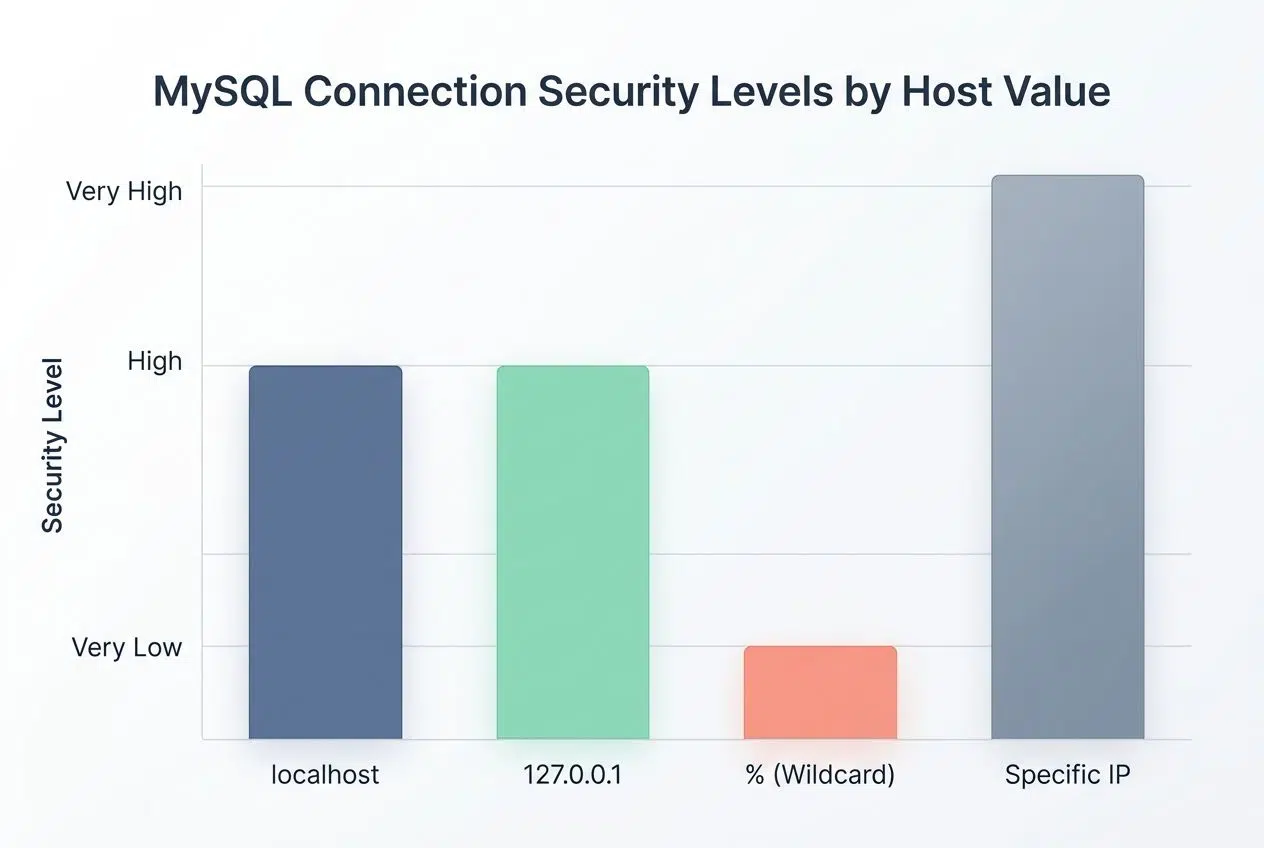
Most MySQL servers use port 3306 by default. Some systems run on different ports, like 3307, to avoid network conflicts. Your database connection string needs to point to the correct host address.
A mismatch here causes authentication failures instantly. This happens even if your username and password are perfectly correct.
| Host Value | Connection Type | Security Level |
|---|---|---|
| localhost | Connects via Unix socket (same machine only). | Very High |
| 127.0.0.1 | Connects via TCP/IP loopback (same machine only). | Very High |
| % (Wildcard) | Allows connection from any IP address. | Very Low |
| Specific IP (e.g., 192.168.1.5) | Restricts access to one exact remote machine. | High |
Update your database connection settings to match your actual server configuration. This simple step eliminates a massive source of permission troubles.
MySQL Error 1045 Access Denied: How To Fix It
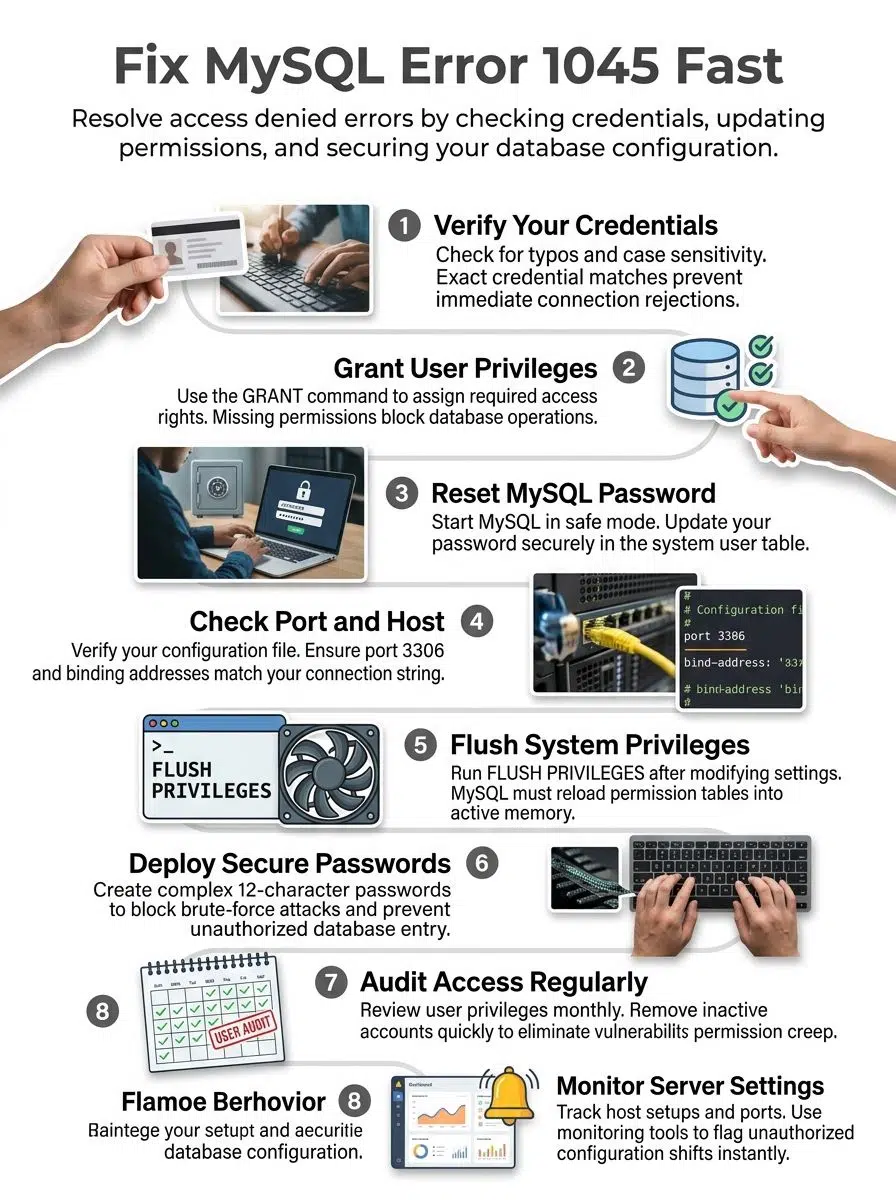
You can fix this error by tackling the root cause directly. This usually involves correcting a wrong password, adding missing permissions, or fixing a misconfigured connection. We will walk you through each solution step by step.
Verify username and password
Your credentials are the first thing to check when MySQL blocks your access. Getting this part right stops most connection problems immediately.
- Review the exact error message in your terminal to see which username and hostname failed.
- Check your application configuration files to ensure the username has zero typos and no accidental spaces.
- Test your credentials directly using the command line with mysql -u username -p to isolate the issue.
- Verify the hostname portion of your credentials, since MySQL treats user@localhost differently from user@127.0.0.1.
Grant necessary user privileges
Granting user privileges fixes many access denied errors fast. You need to give your MySQL users the exact permissions they need to interact with your data.
- Log in to your database using a root or administrative account via the command line or a client tool.
- Identify which user account lacks permissions by checking the MySQL.user system table.
- Use the command GRANT ALL PRIVILEGES ON database_name.* TO ‘username’@’localhost’; to provide full access to a specific database.
- Add read-only permissions using GRANT SELECT if a user only needs to view data without making changes.
- Test the new permissions immediately to confirm the user can now read or write data successfully.
Reset the MySQL password
Resetting your password solves many authentication problems quickly. This process works perfectly if you forgot your password or need a security refresh.
- Stop your MySQL server completely using a command like sudo systemctl stop mysql on Linux.
- Start the server in safe mode without grant tables using sudo mysqld_safe –skip-grant-tables &.
- Log in directly through the terminal without providing a password.
- Update the password using the modern syntax: ALTER USER ‘root’@’localhost’ IDENTIFIED BY ‘new_password’;.
- Restart your server normally so it exits safe mode and applies your fresh credentials.
Check MySQL server port and host settings
After you verify your password, check your server host configuration. These settings control exactly where your database listens for network traffic.
- Open your my.cnf or my.ini configuration file to inspect the current port and binding parameters.
- Verify your server uses the default port 3306 or note your custom port number.
- Check the bind-address setting to ensure MySQL accepts connections from your specific network interface.
- Test your connection using explicit flags in the command line, such as mysql -u username -p -h hostname -P 3306.
- Review your US hosting provider’s firewall rules to ensure the database port is fully open to your IP address.
Flush privileges after changes
You must refresh your server so it recognizes all the permission changes you just made. MySQL keeps user permissions cached in memory.
- Connect to your server with administrative access rights.
- Type FLUSH PRIVILEGES, and press Enter to reload all permissions into memory instantly.
- Verify the command executed successfully without any terminal error codes.
- Test your connection using the modified credentials to confirm the error is gone.
Preventing MySQL Error 1045 in the Future
You can stop these database problems before they even start. Smart habits and regular checkups keep your systems secure and running smoothly.
Use secure passwords
Strong passwords act as your primary defense against unauthorized access. Weak credentials make it incredibly easy for automated bots to compromise your system.
Create passwords that combine uppercase letters, lowercase letters, numbers, and special characters. You can use modern tools to handle this for you:
- 1Password: Generates and syncs complex database passwords across your team securely.
- Bitwarden: Provides an open-source vault to store your MySQL credentials safely.
- Dashlane: Automatically flags weak or reused passwords in your environment.
Store these passwords securely and never leave them in shared documents. This completely removes the risk of typing errors that cause access denied messages.
Regularly review user permissions
Your user permissions need routine audits to maintain peak security. You should review who has access to your database every single quarter.
Permissions creep happens frequently when staff members change roles but keep their old database rights. A quick audit stops this risk entirely. Run a query like SELECT user, host FROM mysql.user; to see every active account.
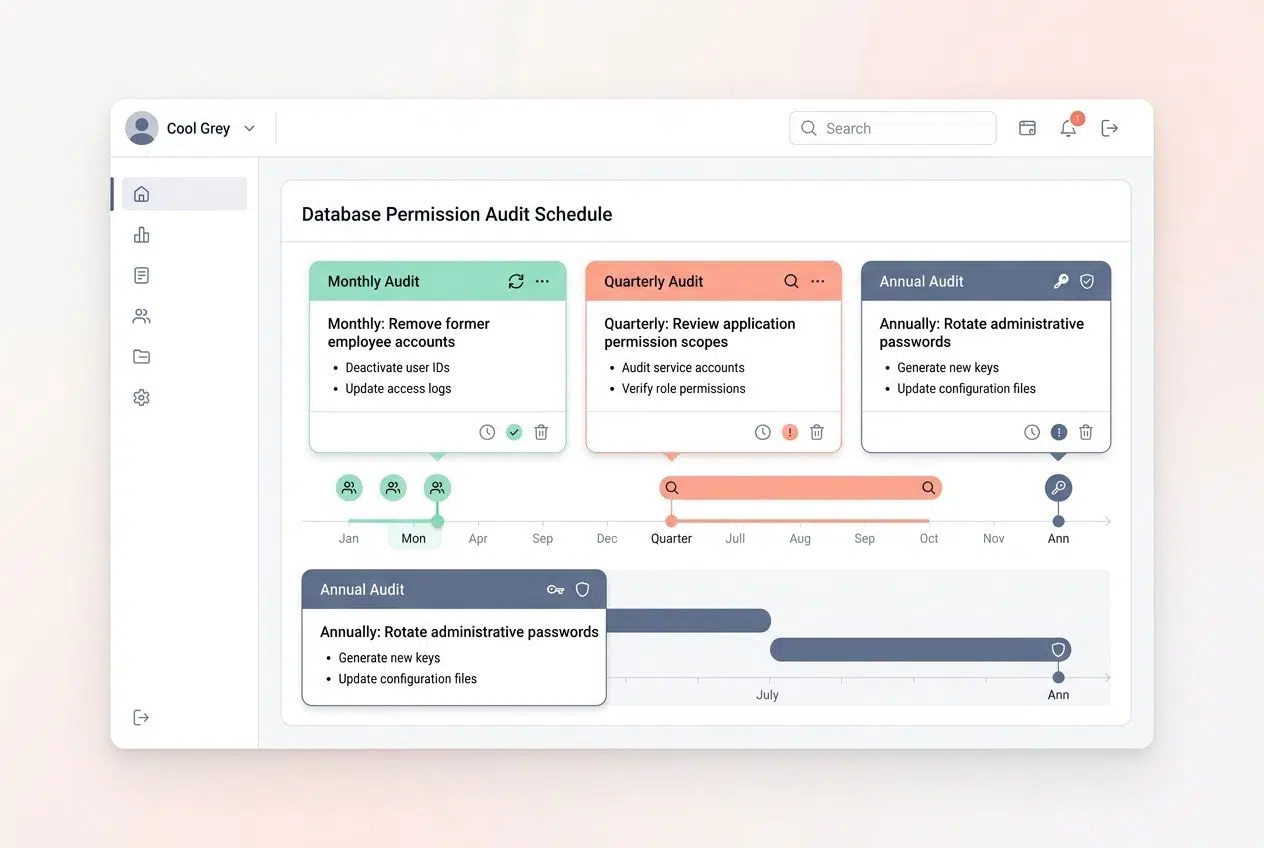
| Audit Frequency | Task to Perform | Goal |
|---|---|---|
| Monthly | Remove former employee accounts | Prevent unauthorized legacy access |
| Quarterly | Review application permission scopes | Ensure apps only use necessary privileges |
| Annually | Rotate administrative passwords | Comply with modern security standards |
Trimming back access rights protects your data from accidents. Run the flush command immediately after cutting unnecessary permissions.
Monitor MySQL server configurations
Keeping tabs on your configuration files prevents unexpected connection failures. Track your port numbers and authentication methods continuously.
Scan your configuration files for outdated entries that might block legitimate traffic. Mismatched settings between your server and your application create friction instantly.
Set up modern infrastructure monitoring to watch your server. These tools track failed login attempts in real time:
- Datadog: Monitors MySQL logs and alerts you when access denied errors spike.
- New Relic: Provides deep database connection tracing for fast troubleshooting.
- Prometheus: Tracks authentication metrics across your entire server cluster.
If you manage a Linux server, routinely check the /var/log/mysql/error.log file. Catching permission issues early keeps your database healthy and your team productive.
Wrapping Up
Finding a MySQL Error 1045 is critical when your database connection stops cold. You now have the exact tools needed to tackle this problem directly.
The fixes we covered work fast and work well. Most of the time, you will solve this error by verifying your username, password, and host configuration. Taking a few minutes to apply these solutions saves you hours of frustration later.
Going forward, strong security practices protect your database from future trouble. Set up solid passwords and review your permissions regularly.
These steps keep your authentication system running smoothly. Your database connection stays reliable when you stay proactive about your server health.
Frequently Asked Questions (FAQs) on MySQL Error 1045
1. What does MySQL Error 1045 Access Denied mean?
This error means MySQL blocked your login because your username or password doesn’t match what the server expects. It can also happen if your user account exists but doesn’t have permission to access the specific database you’re trying to reach.
2. How do I fix MySQL Error 1045 Access Denied?
Start by double-checking your username and password, since even one wrong character will lock you out. If those are correct, you’ll need to verify your user privileges with the SHOW GRANTS command or have an admin reset your access.
3. Can my computer settings cause this error?
Yes, your firewall can block MySQL’s default port 3306 without any warning. Check your Windows Firewall or security software to make sure connections to MySQL are allowed.
4. Why does this happen after changing my password?
When you change your MySQL password, any apps or scripts still using the old one will get blocked immediately. You need to update the credentials in all your config files and tools like phpMyAdmin or MySQL Workbench.






















